Contract Lifecycle Automation: A Practical Guide for B2B
Poor contract management can cost organizations an average of 9.2% of annual revenue, while AI-assisted contract lifecycle management can reduce end-to-end cycle times by 50% to 80%, depending on complexity and the amount of human review required. The available contract automation benchmarks put the operational consequence plainly: a process that once took about 3.4 weeks can reach under one week in high-adoption environments.
That shift explains why contract lifecycle automation has moved beyond a legal back-office project. In a growth-stage SaaS company, contracts affect pipeline conversion, pricing discipline, customer onboarding, invoicing, renewals, compliance, and revenue forecasting. The software matters, but the repository, ownership model, approval rules, and contract data matter first.
What Contract Lifecycle Automation Really Does
Contract lifecycle automation coordinates the work that happens from contract intake through renewal, using structured workflows, business rules, integrations, and searchable contract data. It can support authoring, negotiation, approval, execution, storage, obligation tracking, amendments, and renewal management without forcing every request through email and spreadsheets.
The important distinction is between automating a document and automating the transitions around it. An e-signature platform can send a file for signature. A repository can store the signed agreement. A CLM workflow connects the request to the correct template, routes the agreement to the right reviewers, records deviations, sends the final contract to the systems that need it, and creates follow-up actions from the terms.
Poor management creates more than administrative inconvenience. It can leave renewal dates in inboxes, approved discounts disconnected from the final agreement, and service commitments invisible to delivery teams. The contract lifecycle automation benchmark data also reports a three-year ROI of 261% and payback periods of roughly 13.8 months for enterprise buyers. Those figures shouldn't become a business case by themselves, but they show why leaders now evaluate CLM as an operating system rather than a document archive.
Start with the workflow, not the vendor demo
Before comparing platforms, map the actual path of a contract:
- Who requests it?
- What information must the requester provide?
- Which template or clause set applies?
- Which terms require legal, finance, security, or executive review?
- Where does the executed agreement become the system of record?
- Who owns each obligation and renewal action?
A platform that can't answer those questions clearly won't fix the process. It will give an unclear process a cleaner interface.
The rest of the implementation should follow that logic. Define the contract data you need, establish ownership for each stage, then configure only the automation that removes a known handoff or control failure. The technology is mature enough to support complex workflows. The operating model is where teams usually stall.
The Six Core Modules of the Contract Lifecycle
A contract lifecycle isn't a straight line. Redlines send agreements back to negotiation, commercial changes can reopen approvals, and amendments can create new obligations after execution. Treat the six modules as a connected map rather than a sequence that every contract follows once.
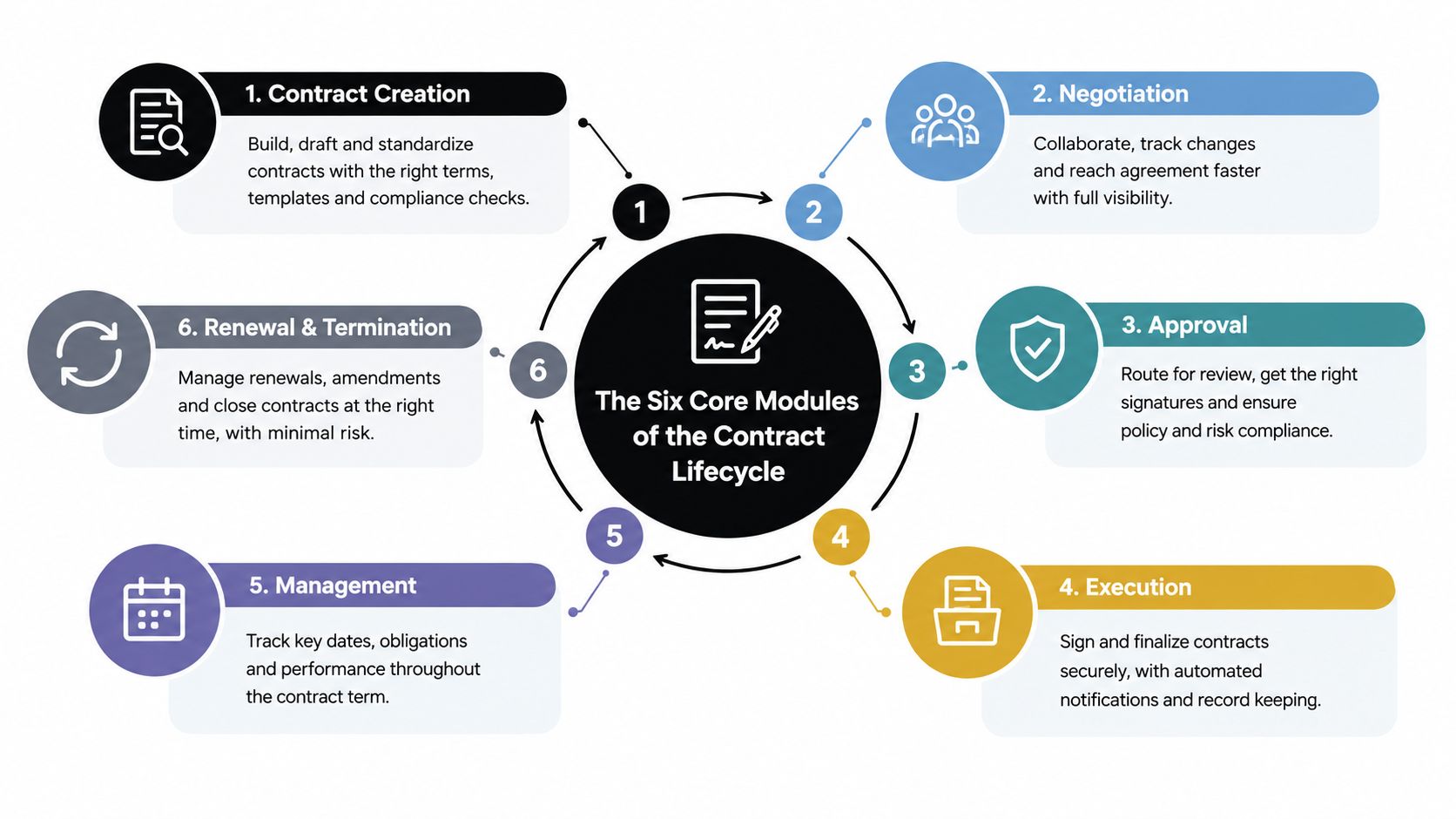
Authoring
Authoring combines approved templates, clause libraries, and structured fields. A SaaS account executive should be able to pull customer name, billing entity, product package, term, and approved commercial terms from Salesforce or a CPQ system instead of asking legal to retype them. The control isn't the template alone. It's preventing critical deal data from changing between quote and contract.
Negotiation
Negotiation tools should preserve versions, identify redlines, compare language, and expose fallback positions. For a non-standard indemnity clause, the reviewer needs to see the proposed language, the approved alternative, and the person authorized to accept further risk. A simple shared document often records changes, but it rarely provides a dependable decision history.
Approvals
Approval routing should use rules such as contract type, deal value, region, data-processing requirements, or risk tier. Parallel review is often better than a sequential chain. Security, finance, and legal can review their own areas at the same time, while the workflow prevents execution until every required decision is complete.
The same principle applies in any effective workflow that moves cases from intake. The quality of intake determines the quality of routing. If the requester provides incomplete or inconsistent information, even advanced approval logic will route the wrong work to the wrong people.
Execution
Execution includes signature collection, signer verification, audit history, and final-document control. DocuSign or Adobe Acrobat Sign may handle the signature event, but the CLM platform should own the master contract record and its metadata. Otherwise, the signed file exists, but the business still can't reliably answer what was agreed, when it renews, or which system should act next.
Obligation management
This module turns language into accountable work. An agreement's service levels, payment milestones, reporting duties, security reviews, and termination conditions should become structured records with owners and due dates. Extraction can accelerate setup, but a responsible person still needs to validate material obligations before the workflow treats them as authoritative.
Renewals and amendments
Renewal automation should trigger account-team action from the contract record, not from memory. A mid-market MSA with an automatic renewal clause might create a review task, pricing check, customer-health review, and notice deadline for the responsible account owner. The document automation software capabilities used alongside CLM should support consistent generation, but renewal decisions still require commercial judgment.
Integrations and Tech Stack Considerations
CLM creates value when it moves reliable contract data between systems. A platform that becomes another silo may improve legal visibility while leaving sales, finance, and customer teams dependent on manual updates.
CRM supplies the commercial context
Salesforce and HubSpot should provide the deal record, account details, product information, owner, region, and stage. After execution, the CLM workflow should write status, effective date, term, and renewal information back to the CRM. Reps shouldn't have to message legal to learn whether a contract is awaiting approval or signature.
CPQ protects the quoted deal
Salesforce CPQ, DealHub, and Salesforce Revenue Cloud can provide approved pricing, discounts, bundles, and commercial guardrails. The contract should inherit those values rather than recreate them manually. If the quote and agreement diverge, finance and sales need a clear exception path, not a quiet spreadsheet correction.
E-signature completes the event
DocuSign and Adobe Acrobat Sign are useful execution components. They provide signature workflows and audit trails, but they shouldn't become the only place where final agreements live. The CLM record should connect the signed file to the customer, contract type, obligations, amendment history, and renewal workflow.
ERP and finance turn terms into action
NetSuite, SAP, and Sage Intacct need contract metadata that affects billing milestones, payment schedules, revenue operations, and financial planning. A one-directional integration creates manual reconciliation. A well-designed event flow can notify finance when a contract is executed, amended, suspended, or approaching a commercial milestone.
Practical rule: Treat every integration as a business decision, not a technical checkbox. Define which system owns each field before anyone builds the connector.
Evaluate vendors against concrete integration requirements:
- Pre-built connectors: Confirm which objects and fields the connector supports.
- REST APIs: Check whether your team can create, update, and query contract records programmatically.
- Webhooks: Prefer event-driven notifications for execution, approval, amendment, and renewal events instead of relying only on batch synchronization.
- Error handling: Require visibility into failed syncs, duplicate records, and rejected field values.
- Ownership controls: Document the source of truth for pricing, customer identity, contract status, and renewal dates.
Teams that need temporary administrative capacity may also compare virtual legal assistants companies while internal legal operations are being established. Automation still needs someone to validate fields, resolve exceptions, and maintain templates. For complex cross-system routing, workflow orchestration software can coordinate events when the CLM platform's native automation isn't enough.
Benefits and ROI You Can Actually Measure
A credible CLM business case starts with payback, not a feature checklist. The question is whether the program reduces avoidable labor, protects commercial value, improves control, or accelerates revenue. Early gains can be measured through request-to-signature time and legal effort. Obligation and renewal value usually becomes clearer after the underlying records are complete and trusted.
Sirion's contract management ROI benchmarks cite 30% to 50% reductions in contract administration costs, 50% to 70% reductions in legal review time, compliance moving from roughly 75% to 85% in manual processes to 95% or more with automation, and contract error reductions as high as 67% in some benchmarks.
Four value buckets
Cycle time measures the time from intake to signature, and separately from redline receipt to approval. This helps distinguish a slow intake form from a difficult negotiation.
Revenue leakage includes missed renewal actions, unapproved discounts, payment exceptions, and obligations that teams fail to enforce. The financial model should connect each prevented exception to a documented commercial value.
Risk and compliance can be tracked through audit completeness, clause deviation rates, approval evidence, and obligation completion. Automation doesn't remove judgment. It makes the judgment and escalation trail easier to inspect.
Operational cost includes lawyer hours, sales-administration time, finance reconciliation, and contract operations effort. Count the work people no longer perform, not just the number of clicks in a workflow.
| Metric | Before automation | After automation | Typical lift |
|---|---|---|---|
| Contract administration cost | Manual routing, filing, and follow-up | Standardized workflows and centralized records | 30% to 50% reduction |
| Legal review time | Manual review and repeated status requests | Rules, clause controls, and structured intake | 50% to 70% reduction |
| Compliance | Roughly 75% to 85% in manual processes | 95% or more with automation | Higher control coverage |
| Contract errors | Manual handling and version confusion | Digital administration and controlled records | Up to 67% reduction in some benchmarks |
Use the cost-benefit analysis framework to separate measurable savings from assumptions. A simple formula is:
(Annualized labor savings + revenue retained) ÷ (CLM license cost + implementation cost)
Don't count every theoretical benefit in the first forecast. Cycle-time improvement and reclaimed administrative effort are usually easier to verify. Renewal and obligation gains require dependable data, assigned owners, and enough operating history to prove that the workflow changed an outcome.
A 90-Day Implementation Roadmap
A growth-stage B2B or SaaS company doesn't need to automate every contract type at launch. A focused rollout can establish the repository, prove the approval path, and create enough trust for broader adoption. Deep obligation management belongs in a later release unless a specific compliance or revenue problem makes it urgent.
Days 1 to 15, discover and baseline
Legal operations leads the discovery with RevOps and IT. Audit contract volume, repositories, templates, approval paths, duplicate records, and renewal ownership. Select three to five KPIs for the program, such as request-to-signature time, redline-to-signature time, legal touch rate, record completeness, or renewal-task completion.
The decision gate is a signed process map and an agreed baseline. If leadership skips it, the team will argue about whether the new platform improved performance because nobody defined the starting point.
Days 16 to 45, build the foundation
IT and legal operations configure the repository, metadata model, permissions, CRM connection, and e-signature integration. Migrate the highest-volume templates first, rather than attempting a historical cleanup of every agreement. The source data needs naming rules, contract-type classifications, effective dates, counterparties, and ownership fields.
The gate is a successful test from CRM request through executed record. If that test fails, don't add more templates. A larger library will only multiply the same data and routing defects.
Days 46 to 75, pilot one motion
Choose one sales motion, region, or deal-size band. Give the pilot a named executive sponsor, a legal operations owner, and a weekly review with sales, finance, and IT. Run real deals through the workflow, including exceptions and redlines. Synthetic test cases hide the ambiguity that breaks approval routing.
The gate is evidence that users complete the intended path and that exceptions reach a named owner. If adoption depends on legal manually repairing every request, the process isn't ready to expand.
Days 76 to 90, expand carefully
Document playbooks, train second-tier users, publish escalation rules, and transfer day-to-day ownership to contract operations or a defined legal operations role. Review failed integrations, abandoned requests, inconsistent metadata, and user workarounds.
The final gate is operational ownership, not a launch announcement. If nobody owns templates, permissions, reporting, and workflow changes, the system will deteriorate after the implementation team leaves.
Common Pitfalls and How to Avoid Them
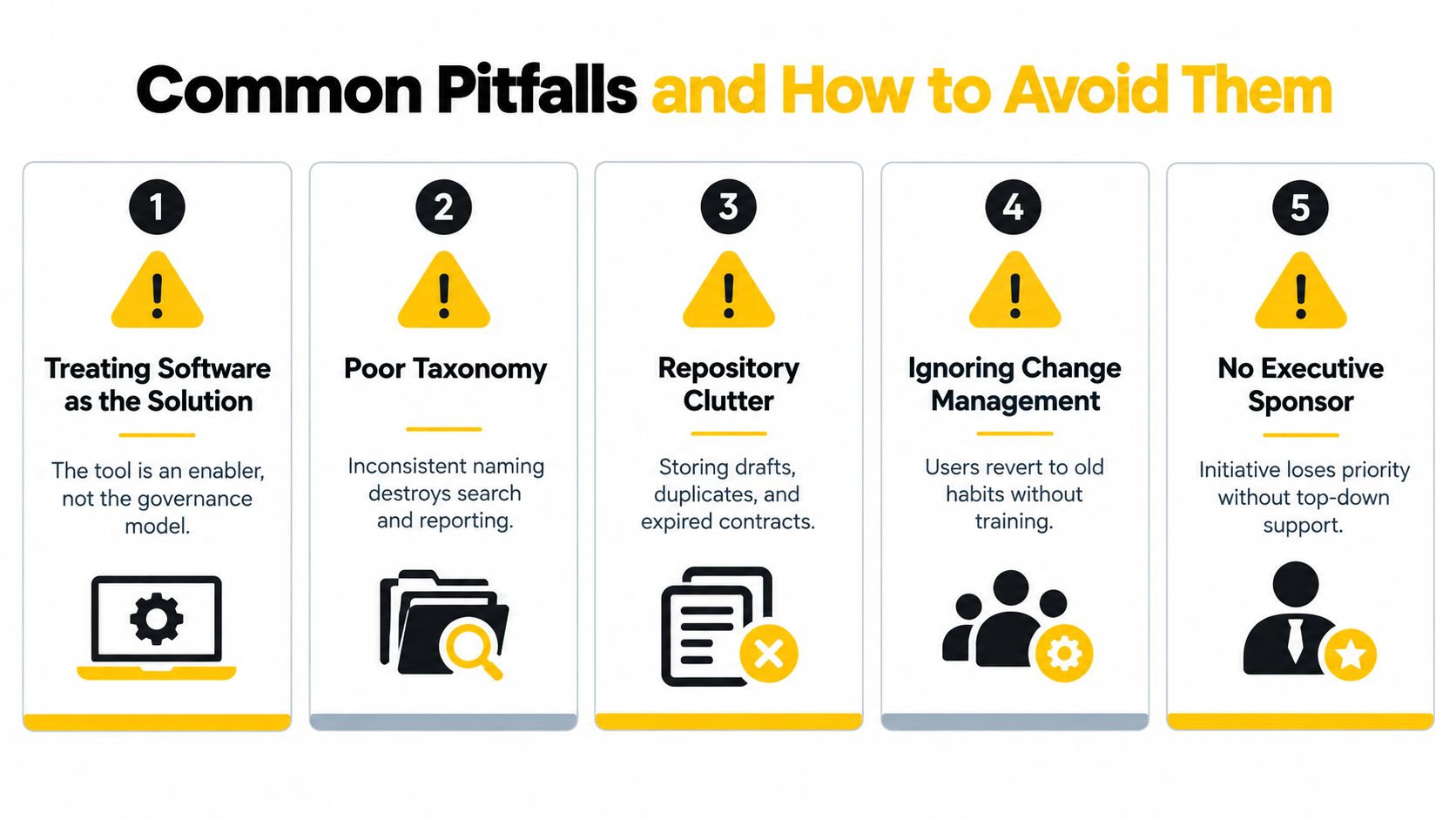
Buying CLM software isn't the hardest part. The difficult work is deciding what a valid contract record looks like, who can change a workflow, which clauses require escalation, and how users will behave when the old email process remains available.
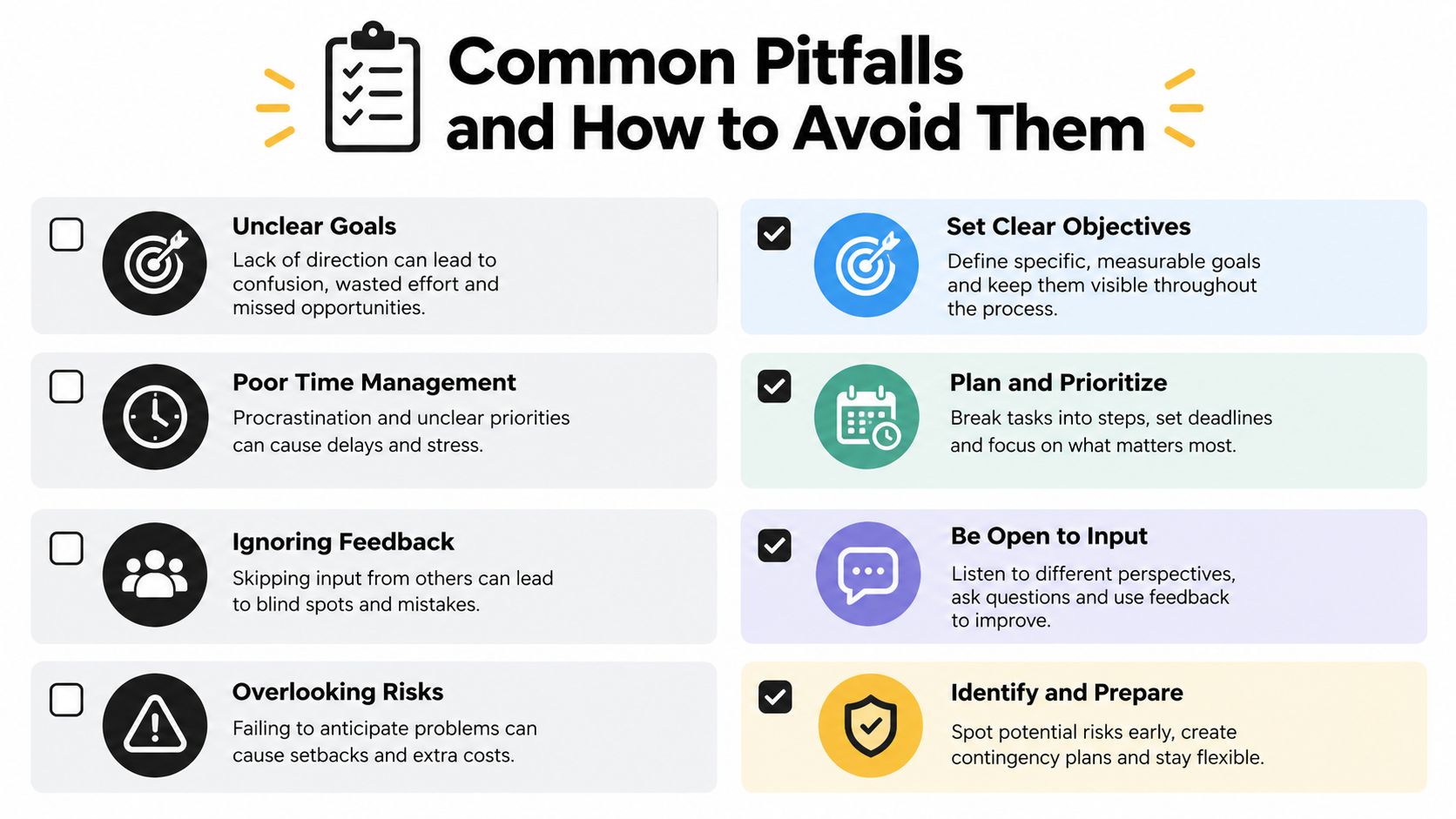
Treating software as the solution
A platform can't decide which fallback language your business accepts. Before configuration, create a contract-type inventory, approve templates, define clause positions, and assign owners for exceptions. The tool should enforce those decisions, not substitute for them.
Migrating clutter into a new repository
Copying every draft, duplicate, expired agreement, and unsigned attachment creates a searchable version of the old mess. Set migration rules first. For each contract type, establish the authoritative record, archive policy, metadata requirements, and ownership standard.
Using inconsistent taxonomy
Search and reporting fail when one team calls an agreement an MSA, another calls it a master services agreement, and a third uses a customer-specific label. Create controlled values for contract type, region, business unit, status, and risk tier. Don't allow free-text fields where a controlled choice will do.
Delaying CRM and CPQ integration
A disconnected CLM platform forces sales to re-enter deal data and finance to reconcile contract terms manually. Test the full path during the pilot. A parallel approval test on real deals is more valuable than a polished demonstration using clean sample data.
Underfunding adoption and governance
The 2026 reporting on CLM governance and AI adoption says 67% of companies lacked a formal AI policy for contract use, only 38% described CLM maturity as integrated, and early-adoption barriers included staff training, troubleshooting support, and unclear use cases. The same source reports that 61% of organizations still rely on manual processes to surface critical contract insights.
Those findings point to a governance problem, not a model-quality problem. Establish human review thresholds, escalation paths, audit requirements, acceptable AI use, and training before enabling automated recommendations.
Leadership should ask:
- Can we locate the authoritative version of every active contract?
- Does each obligation have an owner?
- Can sales and finance see contract status without asking legal?
- Have we standardized the high-volume templates?
- Who approves workflow and clause changes?
- What happens when an integration fails?
- Will an executive sponsor defend the new process when adoption becomes inconvenient?
If the answers are unclear, delay the purchase or narrow the scope. Digitizing disorder only makes disorder easier to repeat.
Use Cases and KPIs That Prove It Works
Consider a manufacturing supplier managing MSAs, NDAs, and renewal pricing escalators. Before automation, a salesperson or procurement manager submits a request by email, legal searches for a prior agreement, reviewers negotiate in separate files, and renewal terms remain difficult for account teams to monitor. After automation, the requester selects the contract type, approved language populates the draft, exceptions route to the right reviewers, and renewal pricing obligations become assigned records.
The value isn't limited to faster drafting. Procurement can prepare for a renewal from the actual agreement, finance can inspect the commercial terms that affect billing, and delivery leaders can see service commitments that require operational action. The workflow reduces dependence on individual memory.
A SaaS enterprise-sales motion has a different bottleneck. The CRM contains the opportunity, the CPQ tool contains pricing, legal reviews the agreement, and finance needs an executed record before billing can proceed. A connected workflow carries approved deal data into the contract, routes deviations by risk, sends the final agreement through e-signature, and writes status and dates back to the systems used by sales and finance.
Don't promise a fixed time saving before measuring the baseline. Instead, compare the same motion before and after implementation, then connect each KPI to a business consequence.
| KPI | Definition | Target benchmark |
|---|---|---|
| Redline-to-signature time | Elapsed time from first substantive redline to execution | Establish a baseline, then reduce avoidable waiting |
| Auto-approved contract share | Contracts completed without unnecessary legal intervention | Increase only where policy permits |
| Obligation compliance rate | Assigned obligations completed by their due dates | Improve through ownership and escalation |
| Renewal capture rate | Renewals identified and actioned before notice deadlines | Increase through structured dates and tasks |
| Revenue leakage recovered | Commercial value protected or reclaimed through contract controls | Tie every recovery to a documented exception |
| Average days to execute | Time from approved request to signed agreement | Track by contract type and complexity |
Quarterly reviews should examine trends by region, contract type, deal size, and exception reason. A falling average can hide a growing backlog of complex agreements. A rising auto-approval rate can indicate better standardization, or it can signal that controls were weakened. The board-level story becomes defensible when operational metrics connect to labor cost, retained revenue, billing timing, or documented risk reduction.
MakeAutomation helps B2B and SaaS teams connect deal data to contract generation, route reviews by contract type, value, or risk, flag non-standard clauses, and track executed agreements through renewal workflows. Visit MakeAutomation to assess the workflow and automation foundations your CLM rollout needs before you select or expand a platform.