Software Documentation Best Practices Playbook
Writing more documentation won't fix operational friction. A larger knowledge base can make matters worse when nobody owns freshness, release changes bypass the docs, and users can't find the answer they need. The durable approach is to treat documentation as operational infrastructure, with version control, review gates, ownership, and feedback loops built into everyday delivery.
For B2B and SaaS teams, the hidden cost isn't the first draft. It's the repeated cost of correcting stale screenshots, reconciling conflicting SOPs, repairing broken API examples, and answering questions that should have been self-service. The following software documentation best practices focus on preventing that decay.
Why Most Documentation Initiatives Fail After Launch
Most documentation projects fail because leaders measure output instead of reliability. A team publishes a large collection of articles, celebrates completion, and moves on to the next initiative. Months later, the product has changed, the article hierarchy no longer matches the interface, and support teams create their own explanations in chat.
That pattern reflects a flawed assumption: more pages equal less friction. In practice, customers and employees need a trustworthy answer at the moment of work. A short, current procedure often outperforms a thorough but neglected manual.
Decay creates operational drag
Documentation decays whenever product, process, or ownership changes without a corresponding update. A renamed setting can invalidate a screenshot. A changed authentication requirement can make an API example fail. A revised approval path can turn an SOP into a source of risk.
A 2026 State of Docs summary identifies keeping documentation up to date as the single biggest challenge, alongside recurring problems with navigation, outdated screenshots, jargon, and support requests. The implication is practical: the maintenance system deserves at least as much design attention as the authoring workflow.
Operational rule: Every important document needs an owner, a review trigger, and a defined response when the content becomes uncertain.
That rule applies equally to customer help content, engineering references, onboarding material, and internal process documentation. Teams that already use a structured business process documentation approach have a useful foundation, because clear start points, end points, and responsible roles make updates easier to route.
Replace the writing project with a service
A documentation service has inputs, controls, and measurable outcomes. Product releases, incident reviews, support trends, and process changes become update signals. The documentation owner doesn't need to rewrite everything. They need to ensure that the right artifact enters review when its source of truth changes.
Start with a content inventory that records:
- Purpose: What task does this document support?
- Audience: Who uses it, and what context do they have?
- Owner: Who can approve a substantive change?
- Source: Which product, process, or system does it describe?
- Risk: What happens if the content is wrong?
- Trigger: Which event should initiate review?
This model changes the conversation. Instead of asking whether the company has documented a process, ask whether users can trust and retrieve the process today. That is the standard that scales.
The Core Dimensions of High Quality Technical Writing
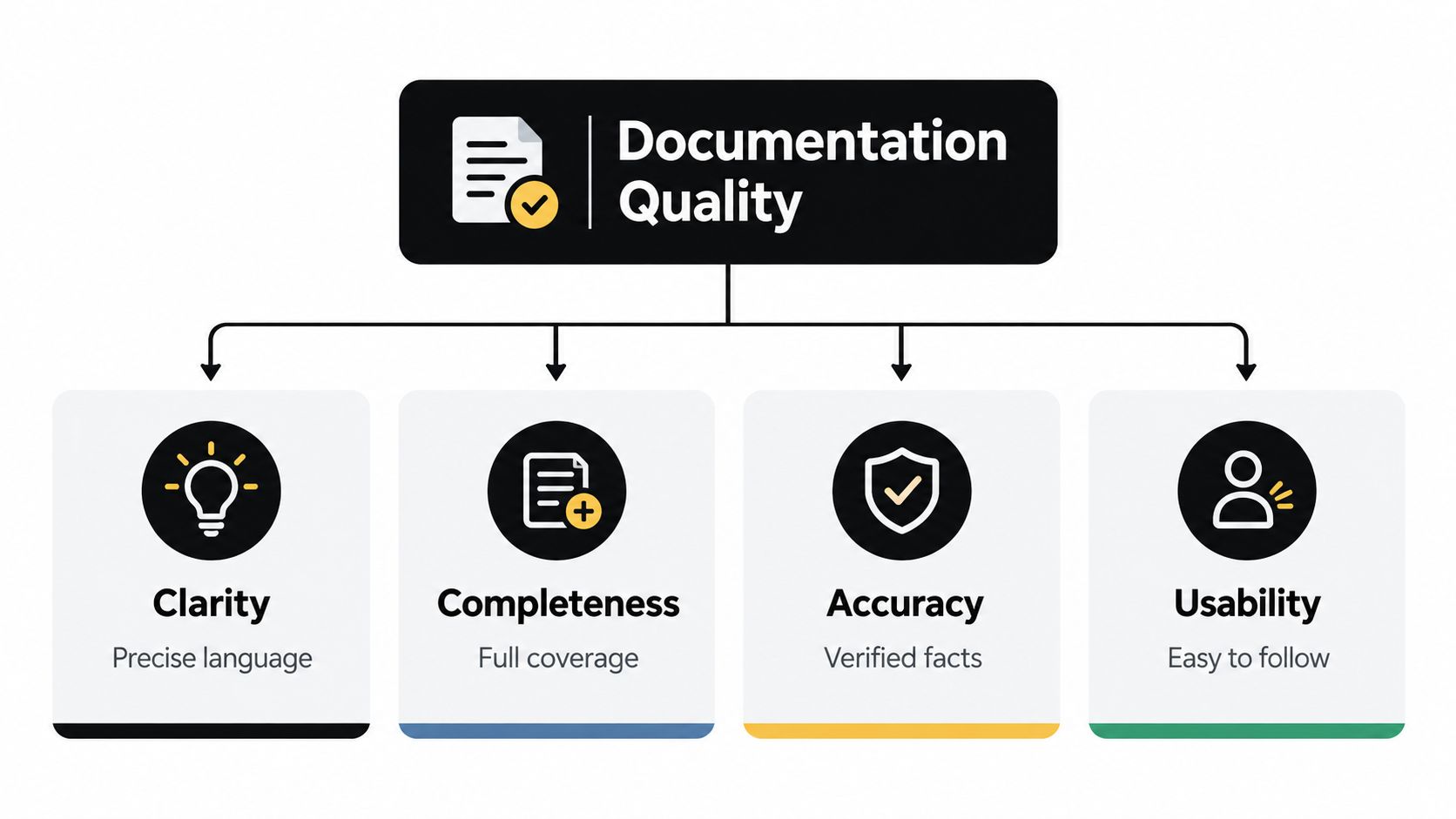
Technical writing quality is measured by successful use, not by grammatical polish. A document earns trust when readers can find the relevant information, understand the instructions, and complete the intended task without asking the author to interpret it for them.
A 2020 software-engineering study proposes a 10-dimension documentation-quality framework spanning structure, content, and style. Practitioners ranked readability, relevance of content, and organization among the strongest drivers of perceived quality. The practical implication is clear: a precise document with a direct path to action serves users better than a longer document with broad coverage and weak organization.
Evaluate content, presentation, and use
A reliable review answers three separate questions:
- Is it correct and complete? Verify facts, prerequisites, examples, edge cases, permissions, and expected outcomes.
- Is it readable and organized? Review headings, sequence, terminology, visual hierarchy, sentence length, and scanability.
- Can the intended reader use it? Give the document to someone performing the task. Observe where they hesitate, search, backtrack, or request clarification.
The third check catches defects that technical and editorial reviews miss. Engineers can confirm system behavior, and editors can improve language, yet neither review proves that a new customer can complete the workflow. Play testing reveals the gap between what the author already knows and what the reader needs to discover.
Automated checks should support this process. CI/CD rules can flag broken links, missing metadata, invalid examples, outdated generated references, and terminology that conflicts with the approved vocabulary. Automation cannot judge every instruction, but it can prevent predictable defects from reaching human reviewers.
Build a review rubric
Use a compact rubric instead of relying on personal preference. Rate each item qualitatively or with an internal scoring system:
- Audience fit: The document identifies its reader and assumes only the required background.
- Task clarity: The opening states what the reader will accomplish.
- Sequence: Steps follow the order in which the work occurs.
- Terminology: Product labels and internal terms remain consistent.
- Evidence: Commands, screenshots, examples, and expected outputs match the current system.
- Recovery: The document explains what to check when the expected result does not occur.
- Findability: The title, metadata, navigation, and search terms reflect user language.
A document may be accurate yet unusable if it hides the procedure beneath background information. It may also be easy to follow but unsafe if it omits permissions, dependencies, or rollback instructions. The rubric makes these trade-offs visible and gives reviewers a shared basis for deciding what must change before publication.
Make reviews serve different purposes
Assign distinct review responsibilities rather than asking one person to catch every defect:
- The author checks intent, completeness, and obvious gaps.
- A technical reviewer verifies behavior, configuration, and examples.
- An editor improves clarity, structure, and terminology.
- A representative user performs the task without author assistance.
- The owner decides whether the content is ready and sets the next review trigger.
A systematic review of software systems documentation describes a comparable multi-stage pipeline covering self-review, technical review, editorial review, play testing, and post-publication feedback. The coordination cost is real. It is lower than the cost of repeatedly repairing documentation that passed proofreading but failed in production use.
Audience Driven Templates for API UX and SOPs
Documentation effort should follow usage and consequence, not the preferences of the person holding the pen. A developer integrating an API needs authentication details, request structure, response examples, and failure handling. A product manager reviewing a UX specification needs decisions, states, dependencies, and acceptance criteria. An operations specialist following an SOP needs a safe sequence with clear ownership.
A documented survey found that specification documents were the most popular documents, while quality and low-level documents were the least consulted. The reported mean consultation score for the least-consulted category was 2.96, with a standard deviation of 1.31, as described in the survey source. Prioritization doesn't mean ignoring low-level references. It means keeping high-use artifacts especially current and discoverable.
API reference template
An API page should answer the developer's questions in execution order:
- What does this endpoint do?
- What permissions and authentication does it require?
- What request method, path, headers, parameters, and body does it accept?
- What successful response should the caller expect?
- What errors can occur, and how should the caller recover?
- Which versions, limits, idempotency rules, and compatibility constraints matter?
Generate the reference from the contract where possible, but don't stop at generated fields. Add task-oriented guides, complete example requests, realistic responses, and troubleshooting notes. A generated endpoint list describes the interface. It doesn't necessarily explain how to use the interface safely in a production integration.
UX specification template
A UX specification should preserve decisions, not merely screenshots. Include the user problem, target scenario, constraints, assumptions, user flow, states, empty and error conditions, accessibility considerations, content requirements, analytics events, and acceptance criteria.
Link each major design decision to the product requirement or issue that motivated it. Keep exploratory alternatives separate from the approved direction, otherwise future readers won't know which behavior the team committed to. Screenshots help, but annotated flows and state definitions usually provide more durable value because visual layouts change faster than the underlying interaction rules.
SOP template
An SOP needs enough detail for a capable person outside the author's immediate team to complete the work. A practical structure is:
- Purpose and outcome: Define why the process exists and what completion looks like.
- Scope and owner: State when the procedure applies and who is accountable.
- Prerequisites: List access, inputs, approvals, and dependencies.
- Procedure: Use numbered steps with one action per step.
- Exceptions: Explain common branches and escalation points.
- Verification: Show how the operator confirms success.
- Change record: Record the version, date, owner, and reason for the latest update.
| Artifact Type | Primary Audience | Update Cadence | Business Impact |
|---|---|---|---|
| API reference and integration guides | Developers, solution engineers | On every contract or behavior change | Protects integrations and accelerates adoption |
| UX specifications | Product, design, engineering, QA | At decision points and scope changes | Reduces interpretation gaps and rework |
| Internal SOPs | Operations, support, customer success | When the workflow, owner, or system changes | Improves consistency and handoffs |
| Low-level technical notes | Specialists and maintainers | When implementation details change | Preserves context without competing with high-use content |
The matrix should guide investment, not create bureaucracy. If a page has high operational impact, connect its update to the system or workflow that can detect change. If it is rarely consulted and low risk, keep it concise and avoid turning maintenance into a full editorial project.
Integrating Version Control and Review Workflows
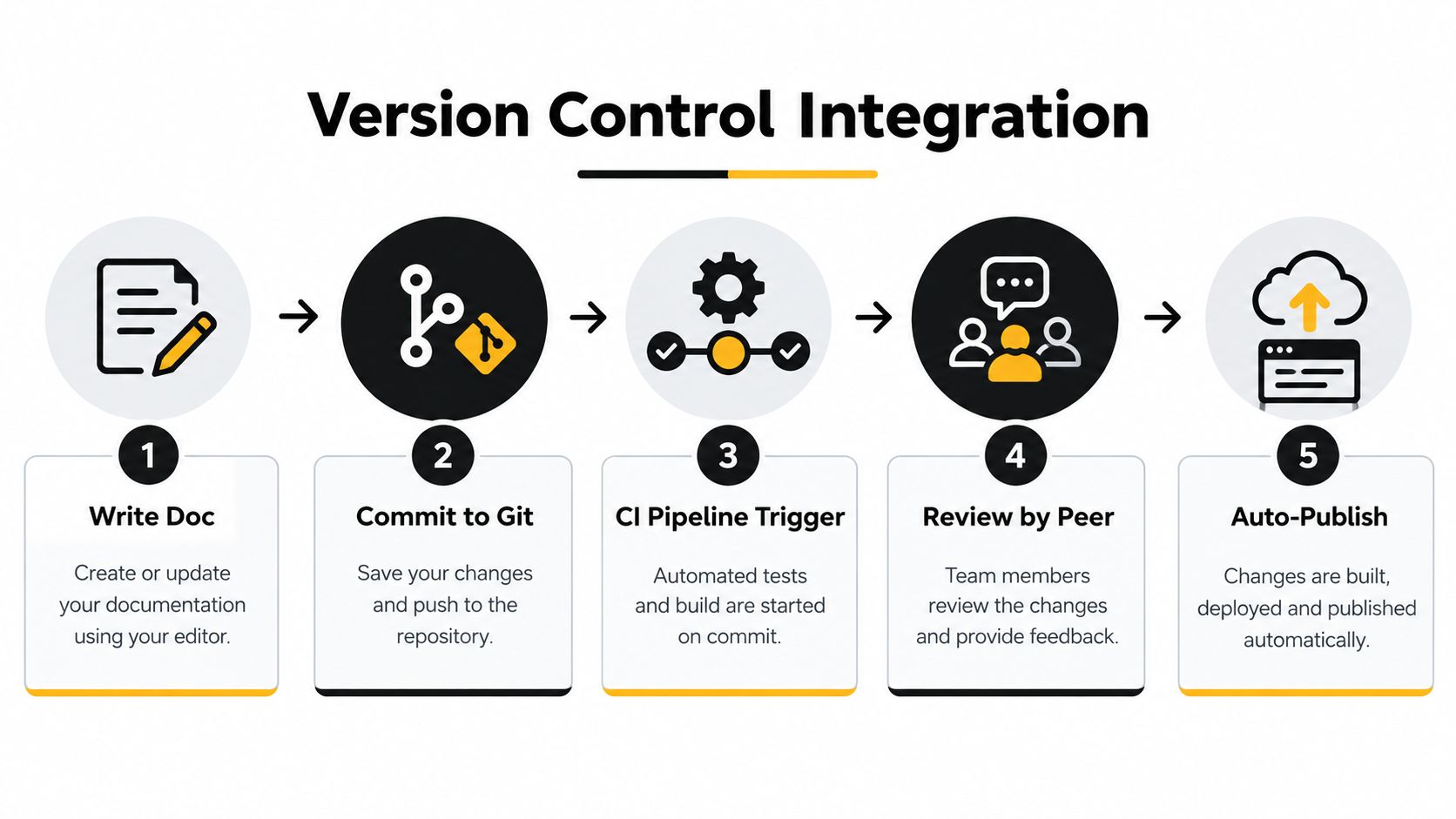
Documentation decays when releases can change software without changing the instructions that explain it. A Git repository may record every code change while an untracked wiki preserves an obsolete workflow. That gap creates support tickets, failed implementations, and emergency edits after deployment.
Treat documentation as code where the risk justifies it. Store technical content beside the repository or in a connected documentation repository, review material changes through pull requests, and make release preparation include a deliberate documentation impact check. The goal is not to force every note into Git. It is to connect high-impact content to the systems that can detect when it may be wrong.
Put controls in the delivery path
A practical CI/CD workflow can check:
- Broken links: Find references that no longer resolve.
- Code samples: Run executable examples or syntax checks where feasible.
- OpenAPI changes: Flag modifications to endpoints, schemas, authentication, or error behavior.
- Terminology: Catch deprecated product names and inconsistent labels.
- Version alignment: Compare release notes, version selectors, and migration guidance with the build.
- Preview builds: Give reviewers a working view of layout and navigation before publication.
These checks detect predictable failures. Reviewers can then spend their time on accuracy, clarity, and whether users can complete the intended task.
Each release pull request should include a documentation impact field. The author can record that no documentation is required, an existing page needs revision, a new guide must be added, or a deprecation notice is needed. This lightweight control exposes omissions before deployment without turning every release into an editorial project.
Separate review responsibilities
A documented review methodology recommends self-review, technical review, editorial review, play testing, and post-publication feedback. The stages have different owners and catch different defects.
Self-review removes obvious gaps before reviewer time is spent. Technical review checks actual system behavior. Editorial review improves consistency and scanning. Play testing shows whether a real user can complete the task without relying on tribal knowledge. Post-publication feedback connects the page to support questions, search behavior, and recurring points of confusion.
Practical rule: Make successful user execution the final gate, not technical accuracy alone.
For teams adopting DevOps and continuous delivery practices, documentation checks should sit in the same change conversation as tests, deployment notes, and rollback planning. The trade-off is deliberate preparation before release. The alternative is shifting that work to support staff and customers after launch, when correction costs more and trust has already been affected.
Assign freshness ownership
Every document needs a named owner, but that person does not need to edit every line. The owner monitors change signals, starts reviews, approves meaningful updates, and archives content that no longer serves a purpose.
Use event-based reviews for fast-moving material. Schema changes, process-owner changes, incidents, policy revisions, and recurring support questions should trigger review promptly. Scheduled reviews remain useful for stable content, but they work best as a safety net rather than the main freshness mechanism.
Optimizing Knowledge Bases for AI Agent Consumption
A documentation portal now has two audiences: people who read and act, and software agents that retrieve, interpret, and sometimes execute instructions. The second audience changes the design constraints. An agent needs unambiguous structure, explicit permissions, stable references, machine-readable metadata, and clear boundaries between factual instructions and illustrative context.

Consider an integration guide that tells a human, “Use the standard credentials and send the usual payload.” A human may infer the missing details from nearby context. An agent can't safely do so. The document should state the authentication requirement, required fields, allowed values, expected response, failure behavior, and whether the action is read-only or mutating.
Design for retrieval and safe action
A human-friendly page can remain readable while adding agent-friendly structure:
- Stable headings: Use predictable names for authentication, parameters, examples, errors, limits, and versioning.
- Canonical sources: Identify which page or schema is authoritative when related content exists.
- Explicit metadata: Include product area, audience, version, status, owner, and last review information.
- Machine-readable files: Follow relevant conventions rather than inventing opaque formats.
- Permission boundaries: State which actions require approval and which information is restricted.
- Short executable examples: Separate runnable snippets from conceptual explanations.
- Deprecation markers: Tell agents when a method is obsolete and what replacement to use.
A 2026 developer-experience paper recommends adapting portals for AI coding agents with machine-readable standards such as AGENTS.md, llms.txt, skill.md, and agent-permissions.json, together with analytics for AI referral traffic. These files shouldn't become another unmanaged layer. Store them with the same ownership, change review, and release controls as the human-facing documentation.
The emerging AI agent orchestration platform use case makes this especially important. An agent that routes a lead, updates a CRM record, or initiates a support workflow needs documentation that distinguishes intent, inputs, permissions, side effects, and escalation conditions.
The human portal still matters. Don't optimize for parsers by replacing useful explanation with dense schemas. Write the page for the person first, then expose the structure an agent needs through metadata, predictable sections, and machine-readable companion files.
A useful operating model is to monitor agent referrals separately from human search. If agents repeatedly retrieve the wrong page, encounter conflicting instructions, or request clarification, that behavior exposes information architecture problems that conventional page views may hide.
The maintenance implication is direct. AI consumption amplifies both quality and decay. Clean, current documentation can reduce ambiguity across automated workflows, while contradictory or stale content can distribute incorrect guidance faster. Governance isn't optional merely because the reader is non-human.
Measuring Impact and Scaling with MakeAutomation
Documentation earns continued investment when leaders can connect it to operational outcomes. Page count, publication volume, and author activity are useful production signals, but they don't prove that documentation helps users. A better measurement system follows the user's journey from question to successful completion.
Track behavior, not vanity metrics
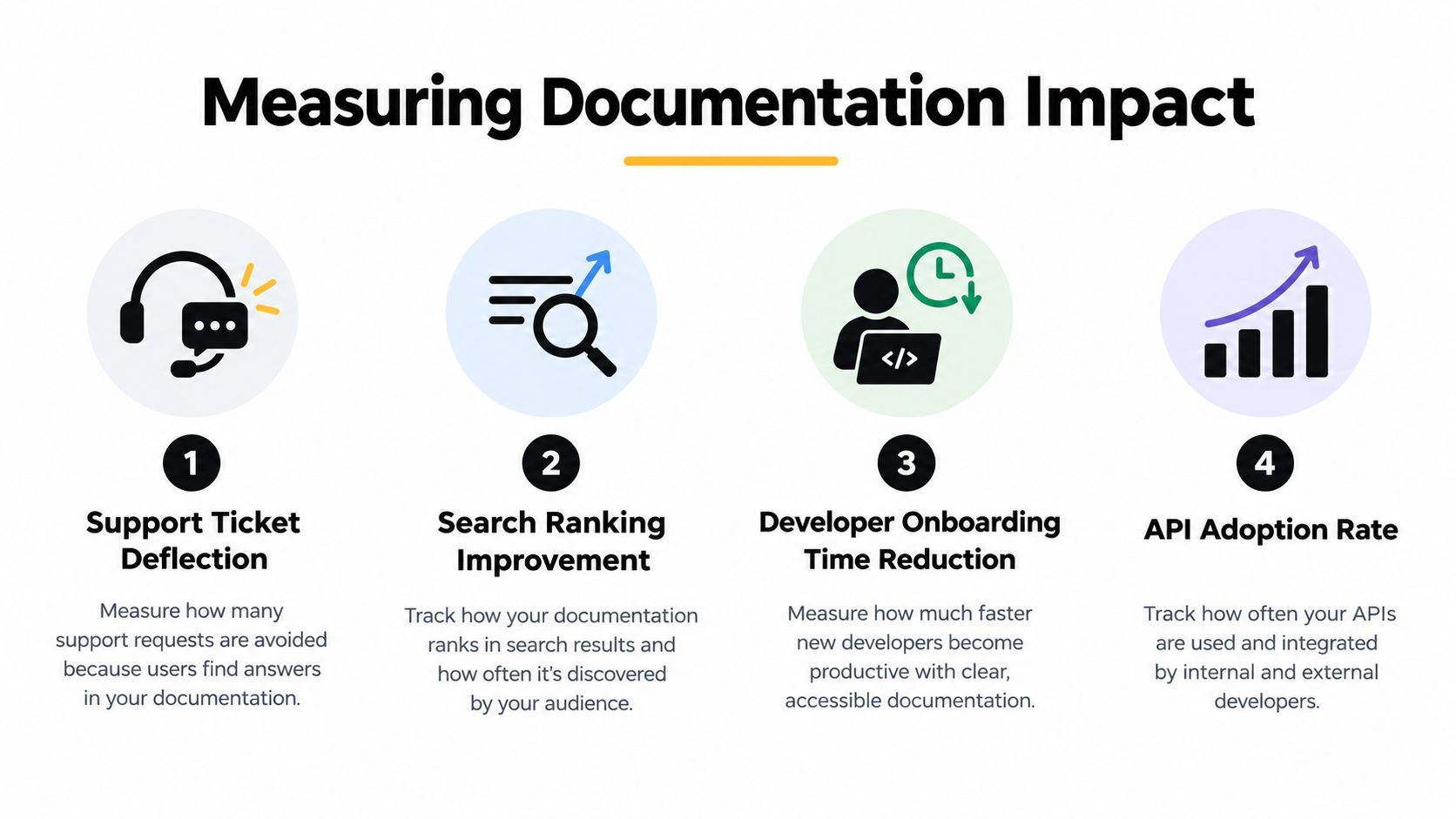
Useful measures include:
- Support ticket deflection: Compare recurring questions before and after a targeted guide is improved. Look for fewer repetitive tickets, not just more article views.
- Search success: Review searches that produce no result, searches followed by reformulation, and pages that users leave without completing the intended task.
- Onboarding friction: Ask new team members to complete defined workflows using the documentation alone. Record where they need help and which missing prerequisites slow them down.
- API adoption signals: Monitor use of documented endpoints, guide completion, integration errors, and support questions tied to authentication or payload design.
- Freshness performance: Track overdue reviews, broken links, unresolved feedback, and documents affected by recent product changes.
Don't interpret a metric without context. A rise in support tickets may reflect a product launch, not failing documentation. A fall in page views may indicate that search and navigation improved. Pair quantitative signals with ticket categorization, user interviews, and task observation.
Build a governance scorecard
A useful scorecard combines content health and business impact:
| Area | Management question | Evidence to review |
|---|---|---|
| Coverage | Are the highest-risk workflows documented? | Release changes, incidents, support themes |
| Accuracy | Does the content match the current product or process? | Technical checks, owner review, user feedback |
| Findability | Can users locate the right answer quickly? | Search queries, navigation paths, failed searches |
| Usability | Can the intended audience complete the task? | Play tests, onboarding observations, completion feedback |
| Freshness | Does change automatically create review work? | Pull requests, review queues, stale-content reports |
This framing aligns with the broader role of documentation. A U.S. government software documentation management guideline describes five purposes: communication to management, task-to-task communication, instruction and reference, quality assurance support, and historical reference. Documentation therefore supports more than customer education. It carries operational context between people, helps teams verify quality, and preserves decisions that would otherwise disappear.
Scale the system, not the backlog
Assign a documentation owner for each product or process area. Define templates, naming rules, review stages, archival criteria, and escalation paths. Connect updates to product delivery, incident management, support analysis, onboarding, and CRM workflows so authors don't have to remember every maintenance task manually.
MakeAutomation provides automation consulting, process documentation, team training, CRM automation, AI-enhanced operations, and custom integrations with supporting API documentation and runbooks. For a B2B or SaaS team, that kind of implementation support can connect documentation governance to the workflows that already generate change, rather than leaving maintenance as a separate administrative queue.
The strongest software documentation best practices are therefore operational. Write for a defined task, prioritize high-value artifacts, validate with real users, version changes with the software, expose machine-readable structure where agents need it, and measure whether the content reduces friction. The initial draft matters, but the system that keeps it trustworthy matters more.
MakeAutomation can help you design and implement documentation governance, automated review workflows, SOP systems, CRM integrations, and AI-ready operating processes for your B2B or SaaS team. Visit MakeAutomation to discuss the documentation and automation workflows you need to make reliable knowledge part of everyday delivery.