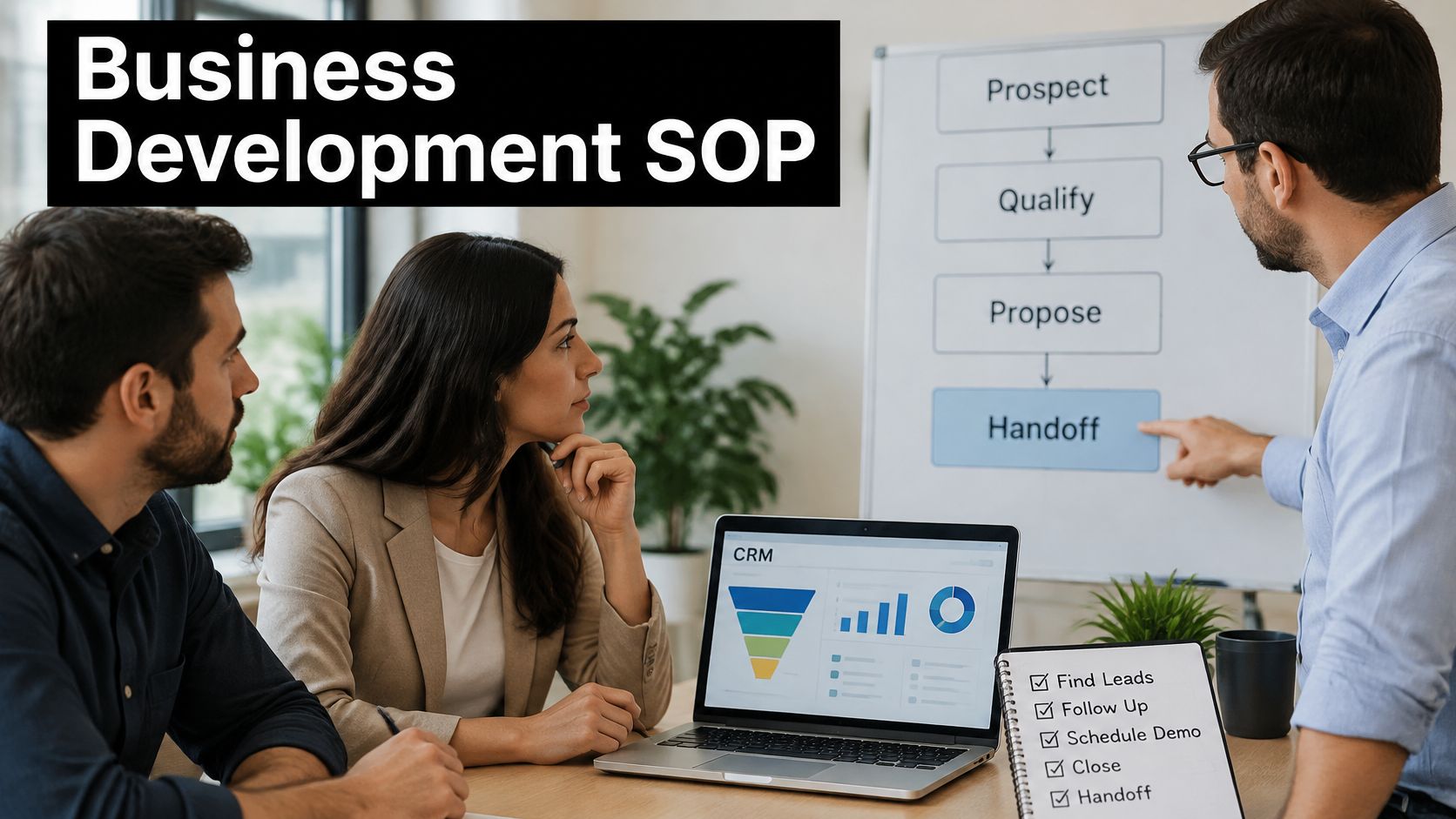
Business Development SOP Template That Actually Scales
Your best rep is on leave, a prospect asks what was promised last month, and nobody can find a straight answer in the CRM. The pipeline review turns into archaeology. One rep qualifies on budget, another on enthusiasm, a third advances deals because a call happened. That's not a people problem. It's what happens when business development runs on memory, and it's exactly what a usable business development SOP template is meant to fix.
Why Most Business Development SOPs Fall Flat
A founder I worked with could close almost anything personally. She knew which accounts mattered, which champion needed a nudge, and which stalled deal was dead. None of that knowledge lived anywhere her two new reps could use it. Onboarding meant shadowing her calls and absorbing judgment by osmosis, and when leadership asked why conversion dipped, nobody could produce numbers anyone trusted.
That scene repeats at growth-stage companies because the first SOP usually documents activity, not control. It says send emails, make calls, update the CRM, and schedule follow-ups. It doesn't say what evidence qualifies an account, which fields must be complete before a handoff, or when a deal should be disqualified. Reps then interpret each step on their own, and the document creates the appearance of consistency while every desk runs a slightly different process.
The Symptoms You Can Spot in One Pipeline Review
You don't need an audit to know an SOP is overdue. The signals show up in the CRM within minutes.
- Stalled late-stage deals: Opportunities sit in advanced stages with no next action, no owner follow-up date, and no evidence a buyer ever confirmed a problem.
- Inconsistent qualification: One rep's qualified lead is another rep's nurture contact, so conversion comparisons between reps mean almost nothing.
- Missing records: Source, timestamp, qualification notes, and disqualification reasons are blank, which makes coaching and forecasting guesswork.
- Slow, uneven follow-up: Inbound inquiries wait while reps prioritize whoever they remember, not whoever arrived first or fits best.
Each symptom looks small on its own. Together they mean leadership can't tell whether a weak quarter came from targeting, messaging, qualification, or simple neglect.
A checklist tells a rep what to do. A control system tells the whole team what counts as done, who owns it, and what happens when it's not.
Why Memory Is Expensive
Running development by memory creates dependency on a few experienced people. When they leave, get promoted, or go on leave, their method leaves with them. New hires take longer to become useful because they're learning preferences instead of decision rules. Managers spend pipeline meetings reconstructing basic facts instead of removing blockers.
The economic case for fixing this is concrete. Companies standardizing core processes can achieve operating costs up to 20% lower than organizations allowing substantial variation across teams, while ISO 9001-certified organizations have been associated with an average 16% improvement in on-time delivery within three years of certification, according to evidence on process standardization outcomes. Treat those as reported associations, not guarantees. The mechanism still applies to a sales floor: standardization reduces reliance on individual memory and makes performance comparable across people, teams, and markets.
This isn't an argument for bureaucratic documentation. A long procedure library that nobody opens solves nothing, and documenting every minor task in equal detail actively hurts adoption. The goal is narrower. You standardize the decision points that determine pipeline quality, namely targeting, qualification, stage movement, handoffs, and records, and you leave reps room to sell inside those boundaries.
The Five-Stage Control System That Anchors the Template
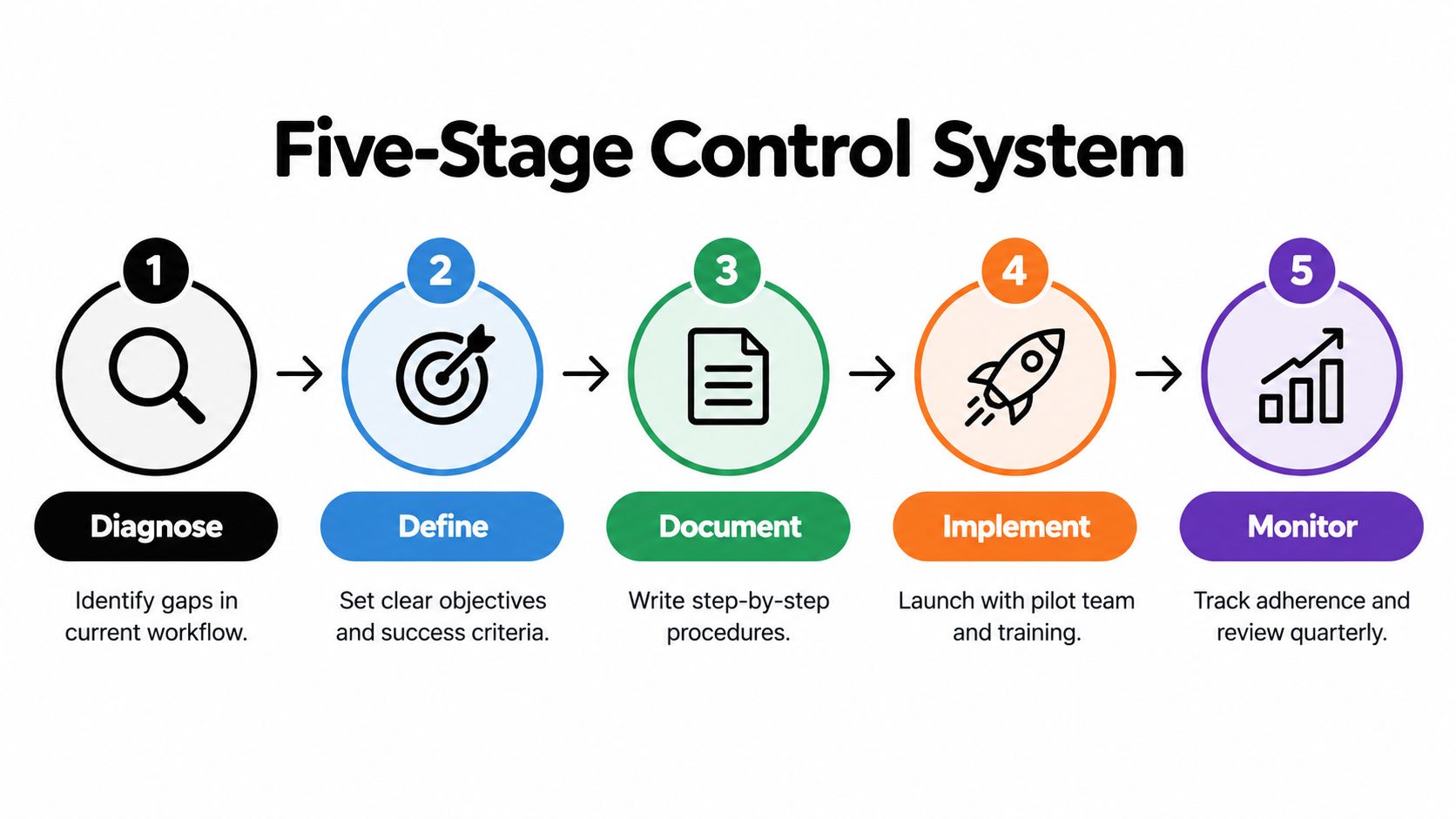
Most SOP projects start at the wrong stage. Someone opens a document, writes down the ideal workflow, sends it around for comment, and calls that implementation. A sturdier structure treats SOP building itself as a controlled process with five stages, each with an entry point, an exit condition, and a named owner. This sequence mirrors how a systematic review framework for SOP development groups the work into diagnosis, strategic planning, documentation, implementation and training, and continuous monitoring and improvement.
The diagram below maps that backbone before any template fields get filled in.
Diagnose Before You Document
Start with the workflow as it runs, not as leadership imagines it. Pull a sample of recent leads and trace each one from capture to close, recycle, or disqualification. Note where records lose fields, where handoffs stall, and where reps invent workarounds. Interview the people doing the work, because they'll surface exceptions and tool friction that a manager reviewing dashboards never sees.
Your exit from this stage is a short bottleneck list ranked by pipeline impact. If you can't name the specific failure you're fixing, you're not ready to write a procedure for it.
Define the Decision Rules
Next, convert tribal knowledge into explicit rules. Define your ideal customer profile, lead-source rules, qualification criteria, stage entry and exit conditions, response-time targets, escalation paths, and who owns version control. This is also where you align on qualification language, and it helps to ground that conversation in established sales qualification frameworks rather than inventing criteria in a workshop.
The design principle that matters most is making stages buyer-triggered or evidence-triggered. A prospect advances when an agreed event occurs, such as confirmed pain, business impact, authority, timeline, or a booked next meeting. A rep sending an email is activity. It should never move a stage by itself.
Document, Implement, Monitor
Write the procedure in operational language a new hire can follow without a translator. Each step names the actor, the input, the action, and the record produced. Stakeholder participation during this stage is not optional politeness. Procedures written without operator input turn bureaucratic and disconnected from real work, and reps eventually route around them within weeks.
Implementation means a controlled pilot, not a company-wide memo. Run the SOP with a small team first, train against real records, and audit adherence weekly. Documenting before diagnosing, or training everyone before a pilot exposes the gaps, are the two sequencing mistakes that kill most rollouts I've seen.
Monitoring closes the loop. Wire a small set of KPIs into the team's existing rhythm and revise the SOP when conversion data or tooling changes. That revision habit is what separates a living control system from a PDF with a creation date.
Adoption contract: Leadership funds the pilot time, sales follows the pilot rules without side processes, operations owns audits and revisions, and any AI vendor works inside the documented boundaries. Put those commitments in the SOP header so shared ownership is visible, not assumed.
Anatomy of a Ready-to-Use Business Development SOP Template
A business development SOP template earns its keep when a rep can open it mid-task and get a decision, not a paragraph of intent. That design expectation has older roots than most sales tools. The historical record on SOP origins in military procurement and quality standards shows that specifications, repeatable steps, quality checkpoints, and objective acceptance criteria were built into the format from the start, formalized through standards such as Mil-Q-9858 and later carried into ISO 9001 practice.
Your template should carry that same discipline into pipeline work. Eleven building blocks cover it.
The Eleven Building Blocks
- ICP definition: Firmographic and situational fit criteria written as pass or fail conditions. Example: company size band, industry, and a named operational problem you solve.
- Lead-source rules: Which sources are accepted, how source and timestamp get captured, and how duplicates are merged before routing.
- Qualification criteria: The evidence a rep must confirm, covering pain, business impact, authority, and timeline, before marking a lead qualified.
- Stage entry and exit conditions: The buyer event that opens a stage and the event that closes it. No event, no movement.
- CRM field requirements: The mandatory fields per stage, enforced by the system where possible rather than by reminders.
- Response-time targets: A measurable service level for first response per source, replacing vague instructions to follow up promptly.
- Handoff and disqualification paths: What a receiving owner accepts, what they can reject and why, and the reason codes used when a record exits.
- Escalation rules: Who intervenes when a record breaches a service level, a buyer requests an exception, or data conflicts appear.
- Role assignments: One accountable owner per stage and per record. Shared ownership means no ownership.
- Revision-control owner: The named person who approves changes, updates the version, and communicates what changed.
- Exception-handling rules: The documented alternate path for cases the standard steps don't fit, plus who approves departing from them.
If you're drafting this from scratch, reviewing the baseline requirements for a complete SOP document helps you separate mandatory structure from optional detail before your team starts arguing about wording.
Stage Triggers and Required Fields in Practice
The table below condenses the middle of the funnel into a reusable reference. Adapt the values, but keep the logic. Every stage needs an evidence-based trigger on both sides and a clean way out.
Business Development SOP Stage Triggers and Required CRM Fields
| Stage | Entry Trigger | Exit Trigger | Required CRM Fields | Disqualification Code |
|---|---|---|---|---|
| New lead | Inquiry captured or account assigned | Fit scored and owner routed | Source, timestamp, company, contact, owner | Duplicate record |
| Working | Owner accepts routing | Qualification conversation held | First response time, cadence step, next action date | No response after cadence |
| Qualified | Pain and impact confirmed by buyer | Authority and timeline verified, next meeting booked | Qualification score, evidence notes, next meeting date | No confirmed pain |
| Opportunity | Authority confirms evaluation | Decision made or handoff accepted | Owner, expected decision date, next action | No authority or timeline |
| Handoff | Receiving owner accepts record | First action logged by new owner | Handoff notes, evidence summary, open risks | Rejected, incomplete evidence |
Two details in that table do heavy lifting. First, disqualification codes turn dead leads into usable data. A quarterly review of codes tells you whether targeting, timing, or messaging needs work. Second, the handoff row requires acceptance. A record isn't handed off because someone changed a field. It's handed off when the receiving owner confirms the evidence is sufficient and logs a first action.
Tooling should support this structure rather than dictate it. If your prospecting data sits across disconnected tools, evaluating a unified access solution can simplify the enrichment and deduplication steps the SOP depends on, since fewer access points mean fewer places for records to diverge. Whatever you choose, the SOP names the required fields and the system enforces them. A template that relies on reps remembering to fill optional fields will decay within a quarter.
Keep each block short. The test is practical: hand the SOP to someone who didn't write it and ask them to work a real lead using only the document. Where they stall or ask questions, the template needs another decision rule.
Metrics That Prove the SOP Is Working
Documenting the workflow is half the job. The other half is knowing whether the documented workflow produces better economics than the improvisation it replaced. That requires separating metrics that warn you early from metrics that confirm results later, and refusing to let raw activity counts stand in for either.
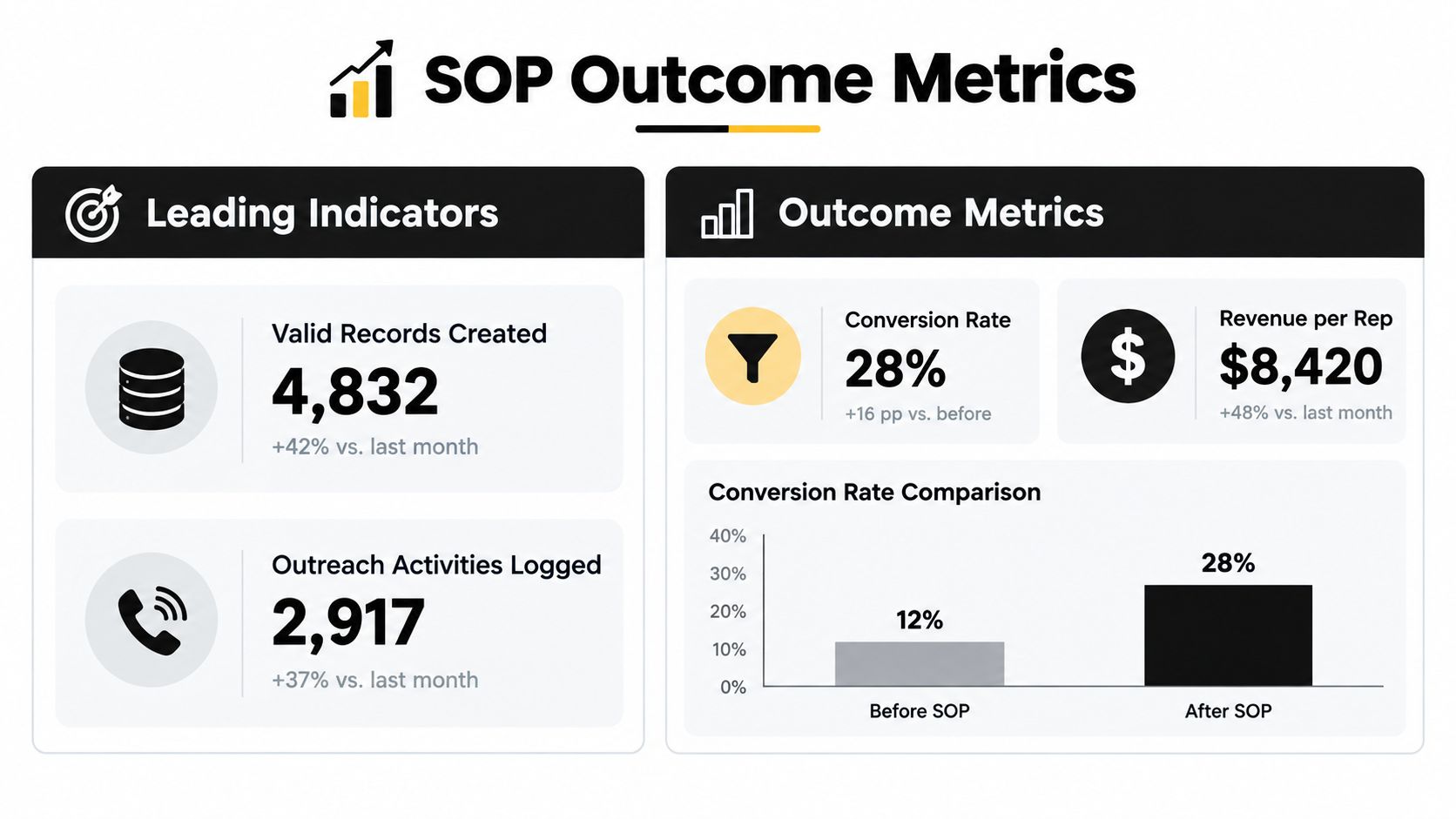
The dashboard view below shows how those two metric families sit side by side in a weekly review.
Leading Indicators Worth Watching Weekly
Leading indicators describe the health of the system while you can still fix it.
- Valid-record rate: The share of new records that are complete, deduplicated, and matched to a real account. A falling rate means everything downstream is built on sand.
- Time from lead capture to first action: Your speed-to-lead measure. One compilation reports that organizations responding to inbound inquiries within 60 minutes achieve roughly seven times higher conversion than organizations waiting at least 24 hours, as summarized in benchmarks on sales pipeline stages and response times.
- Positive-reply rate: Replies that express interest or a relevant problem, counted separately from total replies, which include objections and opt-outs.
- Human-review rate: How often automated outputs get checked where the SOP requires it. This belongs with the governance controls covered next.
The same benchmark compilations commonly place MQL-to-SQL conversion near 10–18% and opportunity-to-won conversion around 6–9%, but those ranges vary substantially by segment and qualification strictness. Use them as context only. Your internal trailing benchmarks, measured under consistent qualification rules, are the numbers to manage against.
Lagging Indicators That Confirm Value
Lagging indicators tell you whether the system pays. Track MQL-to-SQL conversion, SQL-to-opportunity conversion, opportunity win rate, sales-cycle length, pipeline coverage, pipeline created per labor hour, and cost per qualified meeting. Those last two matter more than many teams admit. An SOP that doubles meetings by tripling rep hours hasn't improved the system. It's just spent more.
This is also where pipeline visibility practices earn their place, because lagging metrics only stay honest when stage definitions and required fields hold steady across the team.
More outreach volume can be a negative result. If it increases duplicate records, irrelevant personalization, opt-outs, or unqualified meetings, the SOP is amplifying waste, not creating pipeline.
Raw email and call volume is seductive because it's easy to count and always goes up when you push. It's also where stale data poisons the math. Duplicate and incomplete records inflate activity, deflate apparent conversion, and send reps after accounts that should have been merged or disqualified weeks earlier.
End the metric design with one governance rule and enforce it without exceptions. Every active opportunity must contain a qualification score, evidence notes, a next action, an owner, and an expected decision date. A record missing any of those returns to review or nurture. It doesn't get to inflate pipeline coverage while incomplete.
Where AI Stops and a Human Takes Over
Most templates describe research, qualification, outreach, and CRM updates as linear tasks and say nothing about automation boundaries. That's the biggest gap in a modern business development SOP template. Your team is already using AI somewhere in that chain, formally or not. The SOP either governs it or pretends it isn't happening.
The evidence argues for explicit limits. Current sales-AI guidance on agentic system limitations identifies reliability, data protection, security, intellectual-property exposure, and inaccurate generated content as active limitations of agentic AI. Those aren't edge cases. They're the failure modes your buyers will meet first if an unsupervised system invents a claim about their company or mishandles their information.
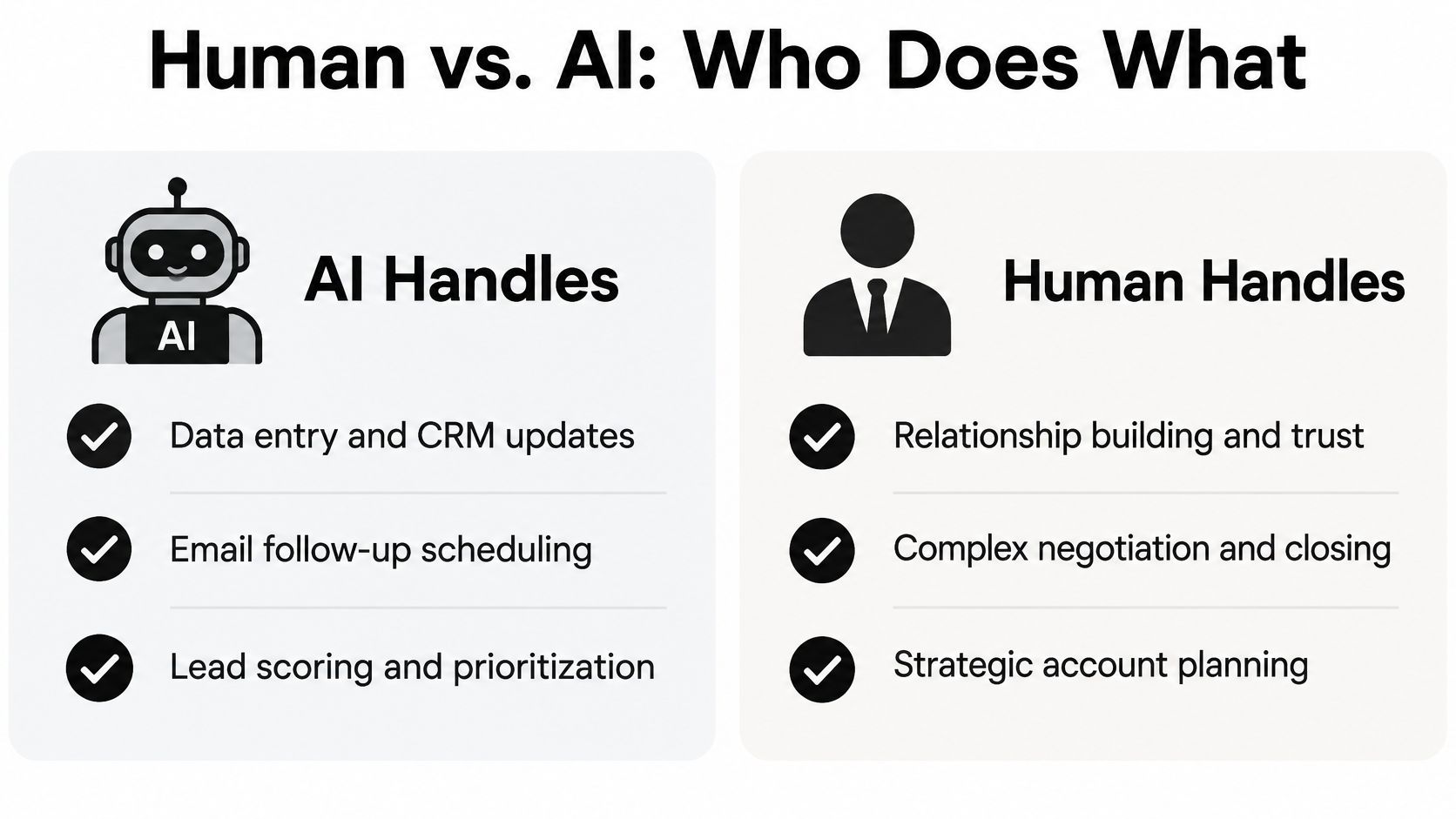
The comparison below shows the basic division of labor the SOP should encode.
Map Controls to Funnel Stages
A generic instruction to review AI output is not governance. Specify controls per stage.
- Research and enrichment: AI may gather and summarize from an approved knowledge base and named sources. It may not process prohibited data categories, which your SOP lists explicitly.
- Messaging: AI may draft within documented messaging boundaries. A seller approves any message containing a specific claim about the prospect's business, since that's where inaccurate personalization damages trust fastest.
- Qualification: AI may score fit against ICP criteria and flag missing evidence. A human confirms pain, impact, and authority before a stage advances.
- Meeting booking and handoff: AI may propose times and assemble handoff summaries. The receiving owner accepts or rejects, as with any manual handoff.
- Proposal: AI may assemble approved components. A manager or legal reviewer approves anything involving pricing commitments, contractual language, or customer references.
Wrap those stage rules in system-level controls: confidence thresholds below which output routes to a human, escalation rules that name who decides, audit logs that record what the system generated and who approved it, and a rollback process for when errors reach prospects anyway. Define stop conditions too. When complaint, bounce, or data-error rates exceed your thresholds, the sequence pauses automatically pending review.
This is also a build-versus-buy judgment about who operates the system day to day. If your team is weighing external support against internal tooling for prospecting, this comparison on choisir entre agence et outil de prospection is a useful input, because whichever route you pick still has to operate inside the approval boundaries above.
The fastest workflow is not the most automated one. It's the one where AI handles volume and humans protect the moments where a wrong sentence costs you the account.
The question to answer in writing, stage by stage, is simple: exactly where should AI stop and a seller, manager, or legal reviewer take over? If your SOP can't answer that, it isn't ready for voice AI, outbound automation, or enterprise buyers who will ask how their data was handled.
Rolling Out, Training, and Continuously Improving the SOP
An SOP nobody follows is shelf-ware with good formatting. Rollout deserves the same discipline as the document itself, starting with a small pilot rather than a launch event.
The review habit matters as much as the launch, as the working session below suggests.

Run the pilot with a small group of reps on real records. Audit adherence weekly, and keep the audit focused on the controls that protect pipeline quality: required fields, stage triggers, response times, and AI approval points. Open a single feedback channel into the revision-control owner so reps report friction in one place instead of inventing private workarounds. Teams building adjacent operating systems will recognize the same adoption logic in guidance on how to build CS operations, where documented ownership and review cadence determine whether a process survives contact with daily work.
That caution matches the available evidence. Recent sales-AI findings on workflow redesign and adoption warn that adding tools without redesigning seller workflows can produce low adoption and poor ROI, while fragmented or incomplete CRM data can make scoring and recommendations unreliable. Training by memo fails for the same reason. Reps adopt workflows they've practiced on live deals with coaching, not workflows they've read about.
The short walkthrough below reinforces how a documented process moves from draft to daily habit.
Protect the SOP from quiet decay with version control. Every change to ICP, CRM fields, tooling, or AI permissions triggers a revision entry with a date, an owner, and a short note on what changed and why. Review the full document quarterly against conversion data and exception logs. If exceptions cluster around one step, the step is wrong, not the reps.
That review answers the only question that ultimately matters: how do we know the SOP is improving the system rather than just increasing activity? When valid-record rates, response times, qualified conversion, and cost per qualified meeting move together in the right direction, the control system is working. When only activity rises, you've documented motion, not progress.
If your pipeline still runs on memory and heroics, MakeAutomation can help you turn it into a documented, AI-governed control system, from SOP design and CRM automation to voice AI for inbound and outbound calls. Visit MakeAutomation to see how a business development SOP built for B2B and SaaS teams can cut manual work, tighten qualification, and make growth repeatable.