

Documentation for AI Agents: What to Record
Only 4 of 30 prominent AI agents provided agent-specific system cards in the 2025 AI Agent Index. That's a narrow window into systems that can retrieve business data, change records, and communicate with customers. Useful documentation for AI agents needs to do more than describe capabilities: it must tell the agent where to find authoritative information and let an operator reconstruct, contain, and recover from its actions.
Why Production Agents Still Lack a Usable Record
A large-scale analysis of Hugging Face model repositories reported model-card coverage of 44.2%, while documented models represented 90.5% of total download traffic. Documentation was concentrated around the models people used most. That association doesn't prove documentation causes adoption, but it does expose a gap between widely scrutinized systems and those with less visible records.
For an internal agent, visibility is a poor way to decide whether documentation matters. A customer-facing support assistant attracts attention, while a background CRM agent may change deal stages or copy contact details between systems. The quieter workflow still needs an accountable owner and an explicit operating boundary.
Documentation for AI agents is the set of records that a new operator, an auditor, and the agent itself can use without opening the codebase. Those readers need different views, but they should reach the same answers about permitted behavior.
The jobs those records must cover
For founders, sales and support leads, and operations managers, the documentation has to cover the business job, not just the technical implementation:
- Purpose: What outcome should the agent produce, and which tasks are excluded?
- Instructions: What inputs, response format, tone, and refusal rules apply?
- Tools: Which systems can it access, using whose credentials and which scopes?
- Workflows: What starts a run, what happens next, and where does a person intervene?
- Safeguards: Which actions require authorization, and how does someone stop execution?
- Maintenance: Who tests changes, reviews incidents, and retires the system?
This applies equally to lead qualification, recruitment screening, CRM updates, and voice workflows. A recruitment agent that only drafts an assessment has a different boundary from one allowed to send rejection messages. Calling both systems a recruitment assistant conceals the operational distinction.
Why the prompt isn't the specification
A prompt tells the model how to behave during an interaction. A specification tells the organization what the deployed system is allowed to do, which controls enforce that boundary, and who owns the consequences.
Practical rule: If an operator must inspect source code or ask the original builder to learn how to stop the agent, the documentation isn't complete.
The prompt can change as reviewers improve wording. The record must state what stays true across those edits and which changes require fresh approval. A model card contributes model-level context, but it can't tell an operator which CRM credential to revoke, which message awaits approval, or which run changed a customer record.
The Agent Documentation Lookup Pack
Minimum documentation pack for a production AI agent
| Record | Primary reader | Minimum fields | Update when |
|---|---|---|---|
| Purpose card | Operator and auditor | Owner, job, in scope, out of scope, success measure, model | Job or model changes |
| Instruction set | Agent and reviewer | Rules, tone, required inputs, output shape, refusals | Prompt or policy changes |
| Tool and permission map | Security and builder | Tool, environment, scope, data class, rate limit, credential owner | A tool or scope is added |
| Workflow and handoff | Operations | Trigger, steps, human gate, external action, failure stop | The business process changes |
| Safeguard and escalation | Owner and compliance | Identity, approval threshold, escalation path, termination | A write action or data class changes |
| Navigation map | Agent and knowledge owner | Canonical URL, aliases, source priority, freshness, do-not-use | A source moves or a page is renamed |
| Run log | Investigator | Run ID, agent version, tool call, input and output IDs, decision, time | Every production run |
| Maintenance record | Owner | Version, changelog, test owner, review date, retirement | Release, incident, or retirement |
File the pack where operators start
Copy this table into the repository README or wiki index, then link each record name to its authoritative page. Don't copy the same permission rules into a wiki, a prompt, and a deployment checklist. Give the permission map an owner and let the other records reference it.
The table is an index, not a demand for a separate document-management system. A small deployment can keep these records as short Markdown files alongside its configuration. A team using a wiki can use the same structure, provided published versions remain identifiable and access doesn't depend on the builder's personal account.
Assign a named primary owner to each page. A department name can identify a backup team, but it doesn't identify the person who must resolve a stale tool scope before release.
Make each record usable independently
An operator opening a tool entry should immediately see its environment and permitted actions. An investigator opening a run should see the specification version that applied. Neither reader should need to interpret an informal chat thread to understand whether an action was authorized.
Keep secrets out of this pack. Record the credential's identifier, storage location, owner, and revocation procedure, not the secret value. Similarly, link sensitive execution evidence through access-controlled identifiers instead of putting customer data in a broadly readable wiki.
A model card fills only the model-related slice of the purpose record. It doesn't replace the tool map, workflow gate, navigation instructions, or execution history.
The purpose, instruction, and tool entries should support day-to-day review. The workflow and safeguard entries should support execution decisions. The navigation map should support discovery, while the run log and maintenance record should support investigation and change control.
Treat the update column as a release dependency. When someone adds a tool scope, the release isn't ready merely because the integration test passes. The corresponding entry must describe the new authority and identify the person responsible for it.
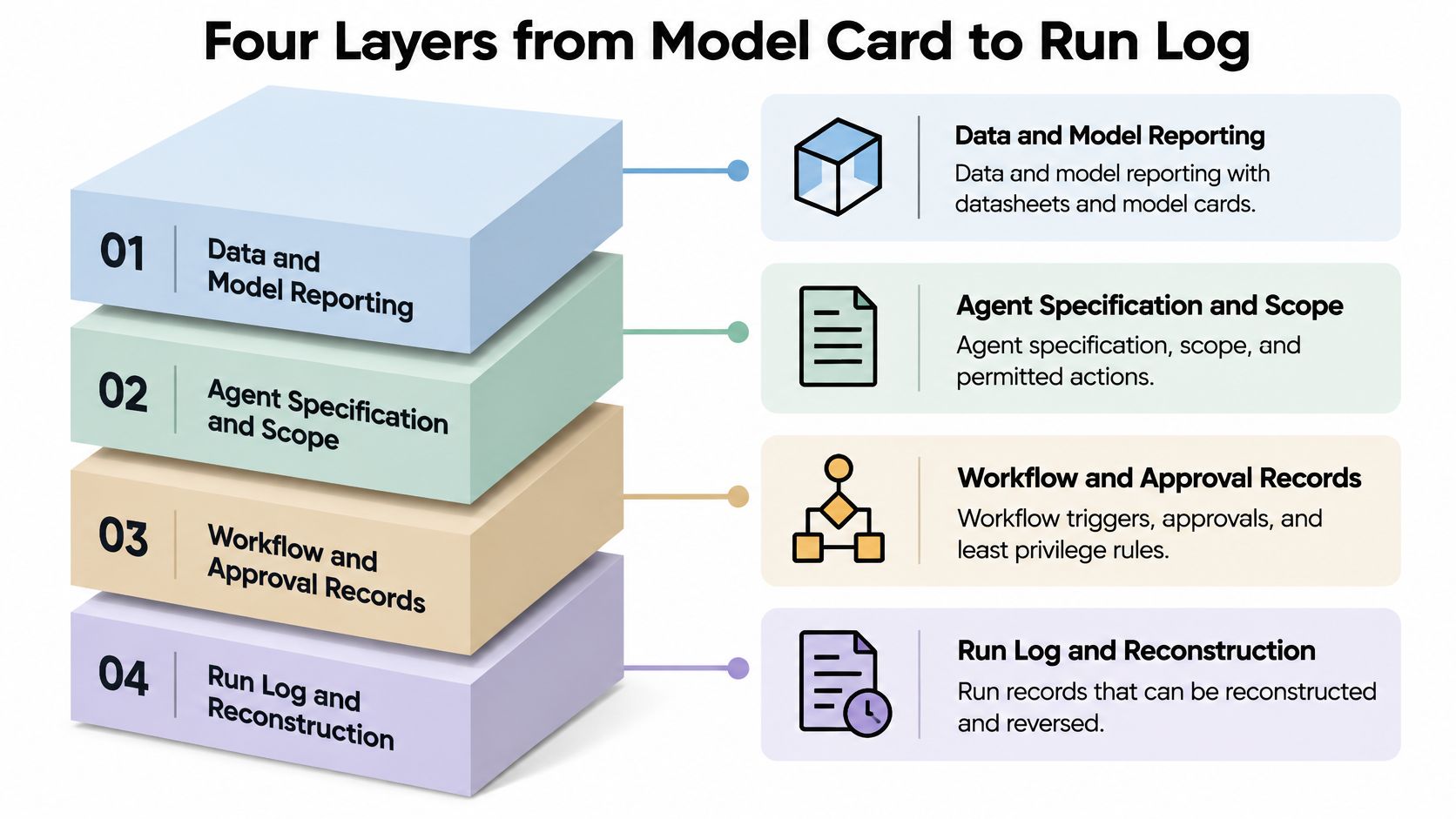
Four Layers from Model Card to Run Log
Dataset documentation and model documentation address different parts of the lifecycle. Model Cards for Model Reporting, developed by Margaret Mitchell and colleagues and published in 2019, followed related work such as Datasheets for Datasets, proposed in 2018. Model cards describe intended uses, evaluation conditions, performance, limitations, and relevant demographic or geographic differences.
That history matters because deployed agents add another set of questions. A model's evaluation results don't establish whether an agent may update a deal, retain conversation memory, or contact a prospect.
Assign ownership by layer
Four documentation layers and the records they own
| Layer | Records it owns | Owner | Update when |
|---|---|---|---|
| Data and model reporting | Model card covering intended use, evaluation, limits, demographic or geographic gaps | Model owner | The model changes |
| Operating specification | Purpose card, instruction set, tool map, workflow and handoff | Operations lead | The job, prompt, or process changes |
| Security record | Safeguard and escalation, identity, scopes, termination | Security and owner | A write action or data class changes |
| Run record | Run log and rollback pointer | Investigator | Every production run |
The data and model layer establishes what the underlying components are suitable for. The operating specification translates the business job into permitted tasks, inputs, outputs, tools, memory behavior, and stopping conditions.
The security record establishes authority independently of the model's instructions. The run record preserves evidence of a particular execution rather than another description of intended behavior.
Apply the split to sales qualification
Say a sales-qualification agent reads inbound leads and prepares follow-up drafts. Its model card identifies the underlying model and any documented language limitations. Its operating specification identifies the CRM fields it may populate and the evidence required to classify a lead.
The security record forbids sending mail without approval. The execution record stores the lead identifier, the generated draft, and the approval state that prevented delivery.
These aren't redundant descriptions. Each answers a different question: suitability, operating intent, authority, or actual execution.
Changing the model requires updating the model record and retesting the operating specification. Changing a tool scope requires reviewing both the operating and security records. Neither change should rewrite the historical evidence attached to completed runs.
Use software documentation best practices for stable structure, clear ownership, and reviewable changes. Keep the layers separate enough that a security reviewer can inspect authority without reading every prompt revision.
Deleting a layer because it feels repetitive leaves someone guessing. The model owner shouldn't have to explain a business approval rule, and the operations lead shouldn't have to infer execution history from the current configuration.
Purpose Instructions and Tool Entries
A useful entry names a boundary someone can test. Descriptions such as helpful support assistant or CRM integration leave too much room for interpretation.
The following examples describe a hypothetical support agent. They're templates for concrete decisions, not claims about a deployed system.
A purpose card that defines the job
| Field | Filled example |
|---|---|
| Business job | Classify known how-to tickets and draft replies |
| Owner | Support lead |
| In scope | Order-status explanation and password-reset guidance |
| Out of scope | Refund decisions, legal threats, medical claims, and account ownership disputes |
| Success measure | A supported draft a human can send without additional research |
| Model and version | Deployment model identifier and immutable release reference |
| Failure boundary | Stop order lookup when the order ID is absent or doesn't match the verified customer |
The model field must contain the actual deployed identifier before release. A nickname such as latest model won't let an investigator establish what ran.
For refunds, link the current refund policy and its approval boundary rather than inventing a monetary limit inside the prompt. If this agent can't decide refunds at all, say so directly. Narrow authority is easier to test than a vague instruction to handle reasonable exceptions.
Instructions that produce reviewable outputs
Weak instruction: Be helpful and resolve the customer's issue.
Usable instruction: Classify the request and return category, draft, confidence label, and sources used. Use only the supplied customer context and approved knowledge entries; if the order identifier is missing, request it rather than describing an order status.
Add the required inputs explicitly: ticket text, verified customer identifier, relevant product version, and retrieved procedure references. Define the output fields so downstream steps can validate them, including the permitted category values and what an empty source list means.
Tone belongs here too: concise, respectful, and no promises about refunds or delivery changes. Explicit refusal cases should route legal threats, medical claims, and account ownership disputes to the designated human queue.
A confidence label is a review aid, not authorization. The workflow must not treat a confident draft as permission to send.
A tool entry that distinguishes read from write
For a hypothetical crm.readContact tool, record:
- Environment: Production, with a separately identified sandbox equivalent.
- Objects and scope: Contact and associated deal summaries, read-only.
- Data class: Customer contact details and commercial relationship data.
- Rate-limit rule: Use the configured integration quota; stop and queue after a rate-limit response.
- Credential owner: The named integration administrator responsible for rotation and revocation.
- Output handling: Internal context only, with an explicit field allowlist for customer-facing drafts.
A create or edit operation needs a separate tool entry and authorization rule. It must never inherit permission because the agent can read the same object.
Document awkward cases. A sandbox-only tool is unavailable in production, not an invitation to substitute another endpoint. A tool using a human's account is a release blocker until actions can be independently attributed and revoked.
If tool output may be pasted into a customer channel, define what must be removed or transformed first. Internal notes and raw CRM fields aren't automatically safe to disclose.
The completeness test is practical: a reviewer who didn't build the agent can identify what it will refuse and which credential to revoke.
Workflows Approvals and Least Privilege Rules
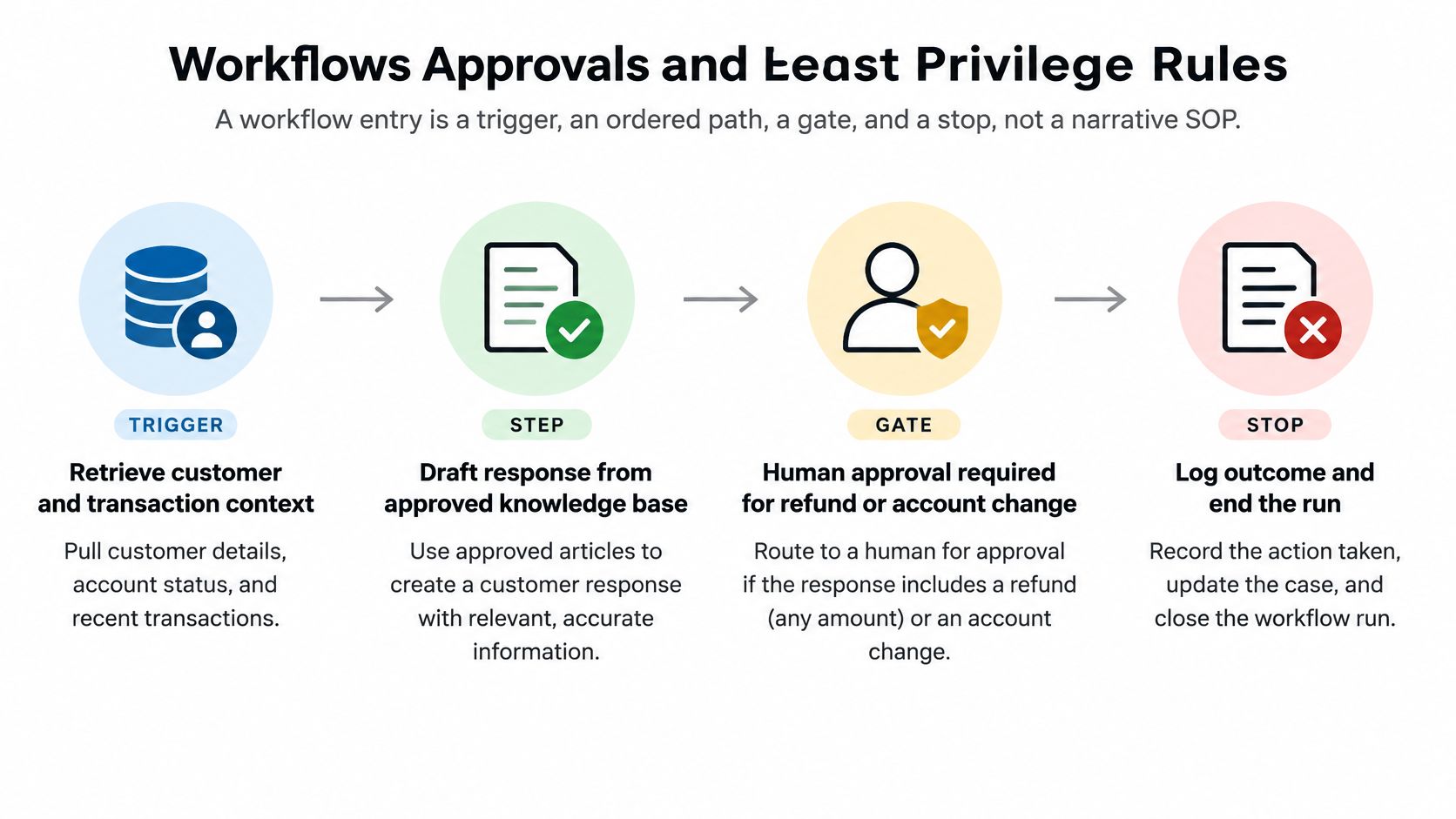
A workflow entry needs a trigger, ordered path, gate, and stop. A narrative SOP describing the general process won't tell the runtime whether it may proceed after a missing field or a rejected approval.
For a Salesforce-style support path, retrieve verified customer and transaction context, prepare triage and a reply draft, pause for human approval, then record the authorized message and delivery result. Keep the drafting step distinct from the sending step.
Write the execution gates
- Name the trigger and required record. Specify which ticket event starts execution and which verified customer or transaction identifier must exist before a tool call.
- List unattended reads. Identify the exact context-retrieval operations permitted without a new approval.
- Mark consequential actions. Require approval for writes, sends, payments, and deletes in this workflow. Name the action and payload the approver will review.
- Define missing-data behavior. Stop the affected path, record the absent field, and request clarification instead of substituting a guessed value.
- Assign escalation and expiry. Name the responsible queue or person, configure the permitted waiting period, and cancel execution when approval expires.
Bind approval to the actual payload. If the draft, recipient, refund request, or target record changes after review, the previous approval shouldn't authorize the modified action.
Give the agent independently revocable authority
The OWASP AI Agent Security Cheat Sheet recommends a dedicated agent identity, such as a service account, app, or bot user, rather than a developer's login. Document its owner, purpose, tools, scopes, data classes, approval thresholds, escalation rules, rate limits, logging, credential rotation, and termination procedure.
Production and sandbox credentials must remain distinct. A read-only support path should use a credential that cannot write, even if the prompt already says not to make changes.
For each action, bind the audit evidence to the agent identity, workflow run, tool, parameters, allow-or-deny decision, result, and timestamp. A denied request is useful evidence, not an event to discard because nothing changed.
An approval instruction is not an approval control. Enforce the gate outside the model before the external action executes.
Consider an outbound call that could disclose personal information. The gate must verify that the proposed disclosure is permitted for the recipient, and the stop must prevent the call from proceeding when verification fails.
A CRM stage change needs a different check: confirm the target deal, proposed transition, and required approval before writing. Test the stop by rejecting approval and verifying that the deal remains unchanged.
Use AI governance best practices to connect those controls to accountable business owners. The containment test is simple: disabling the agent identity should stop its access without locking the human team out of its tools.
Navigation Maps for Fragmented Knowledge
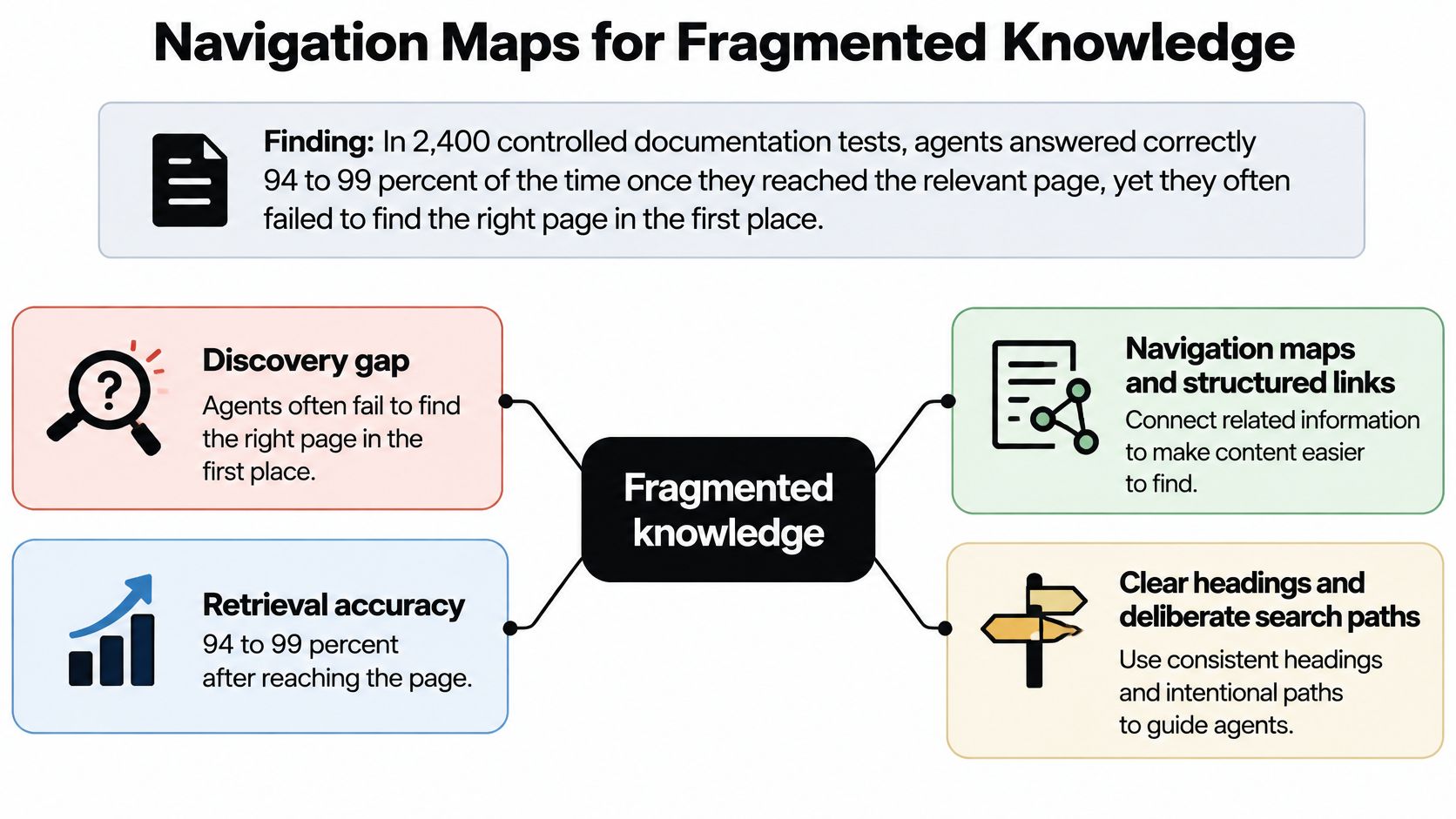
Mintlify's 2026 State of Knowledge report finds that AI agents have overtaken humans as the readers of technical documentation. The failure pattern underneath that shift matters more than the headline: an agent can understand a procedure perfectly and still fail because it never reached the right page. Comprehension is rarely the bottleneck. Discovery is.
Converting content to Markdown simplifies reading. It does not establish which source is authoritative, whether a procedure applies to the customer's version, or what the agent should do when no matching page exists. That gap is what the navigation map closes.
Define a retrieval contract
Treat the navigation map as a contract between a question and its approved record, not as a sitemap. Each task entry needs fields that a retrieval system can enforce and a human owner can audit:
- Canonical location: The actual approved URL or system reference, copied from the source rather than generated from a naming pattern.
- Aliases: Customer phrasing, internal terminology, product names, and former procedure names.
- Task-to-page mapping: Which procedure answers which task, including prerequisites.
- Source priority: Which system governs each fact when records disagree.
- Freshness boundary: Applicable product version, effective status, last verification, and owner.
- Do-not-use rule: Explicit exclusions, superseded pages, and conditions that require escalation.
Ambiguous vocabulary breaks retrieval before the model ever reasons about it. If customers use the same phrase for a subscription, a workspace, and an account, an entity index maps those terms to distinct entities and requires clarification when context does not resolve them.
Work an order-status request
An order-status question shows why source priority belongs in the contract. The order system supplies the transaction state. The help center explains what that state means and what the customer can do next. A changelog is not evidence of a particular customer's shipment.
The retrieval contract preserves that division. A wiki note about an old shipping process must not override the live transaction record, and a live transaction field must not be treated as the full procedure for handling a dispute.
If the order identifier is absent, ask for it. Generating a plausible tracking-page path or searching unrelated customer records until something looks close produces confident answers built on nothing.
When no procedure matches, return a named knowledge gap to the human queue with the task, the attempted sources, and the unresolved question. Withhold the unsupported answer entirely.
Ownership keeps the map accurate after launch. The knowledge owner updates each entry when a page moves, recording the redirect and the replacement reference, because a redirect is operational routing information rather than a convenience for human visitors.
Fix discovery before rewriting content that the agent never reaches.
Test a small set of real support questions before editing the articles. Record requests for nonexistent pages, incorrect source selections, stale-version retrievals, and unresolved tasks. Those failures tell you whether to repair the map, adjust source priority, or rewrite the underlying procedure.
Run Records You Can Reconstruct and Reverse
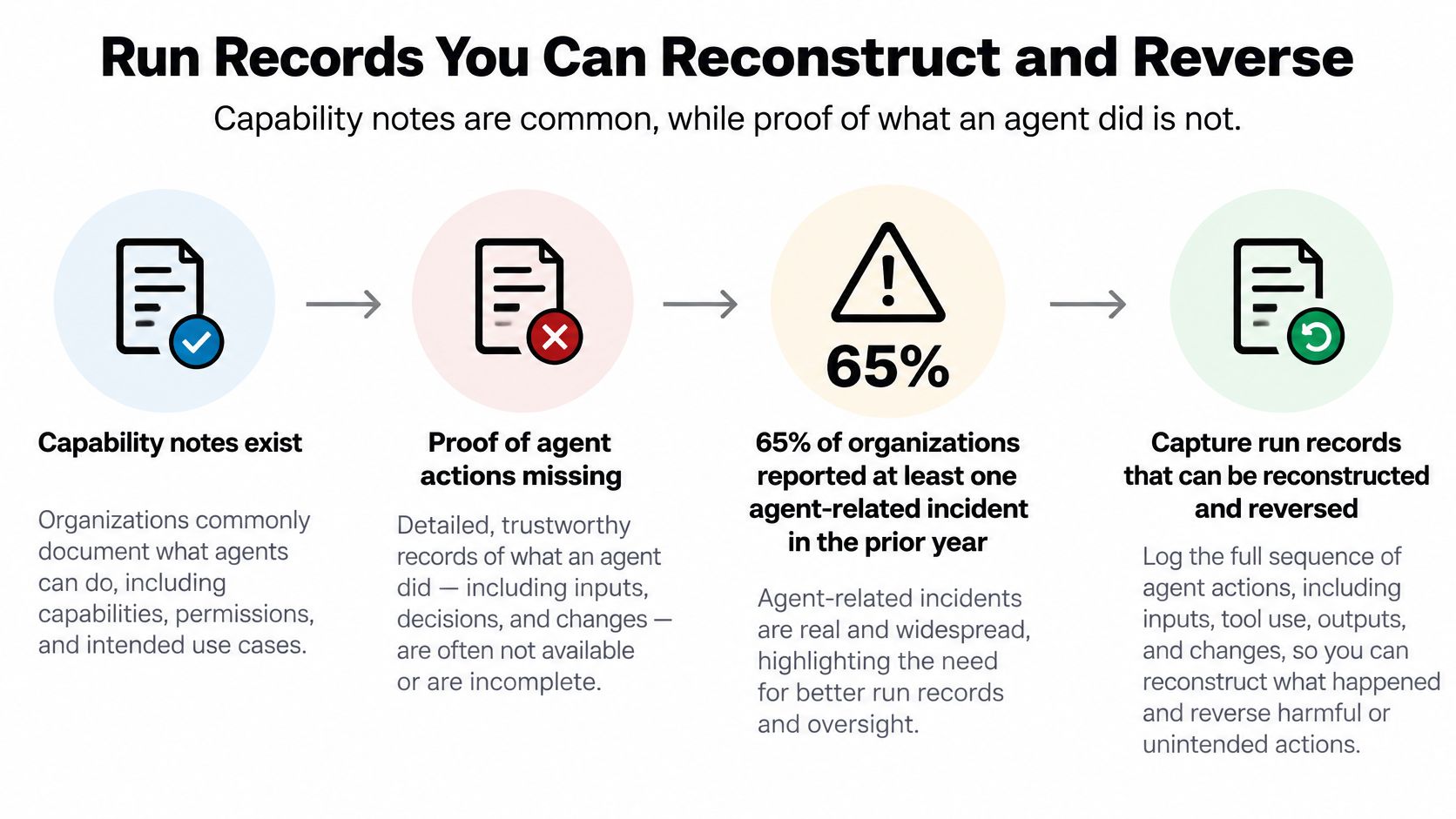
Capability notes describe what an agent might do. They do not prove what it did. Transparency analyses of indexed agents report limited disclosure of capability benchmarks and safety evaluations, which leaves the production log as the evidence that matters.
An investigator needs the action, inputs, authority, and result. A retrospective explanation generated after the fact is not evidence, so treat execution records as a release requirement rather than an optional observability feature. The run record is the recoverable half of the documentation contract: the purpose card and navigation map state what should happen, and the run log shows what did.
Store provenance rather than a prose summary
Use the W3C PROV Data Model as the backbone: entities represent inputs and outputs, activities represent tool calls and decisions, and agents identify responsible software, people, or organizations. Record the approving human separately from the software identity that executed the action. A support run approved by a named operator and executed by support-agent carries two responsible parties, and conflating them makes the approval gate unverifiable.
Store events as an append-only graph or linked event stream. Capture invocation, entity identifiers, timestamp, sequence, derivation relationships, and authorization metadata. Link the run to its business workflow, customer or lead record, approval event, and final external action. Those identifiers let a reviewer trace from a completed run back to the governing specification, which is what turns a log into a reconstruction path.
Fields every production agent run should store
| Field | Example to record | Used for |
|---|---|---|
| Agent ID and version | support-agent at version v1.4.2 |
Know which spec applied |
| Tool invocation | crm.readDeal, with model invocation recorded separately |
See which system was called |
| Input entity ID | Verified ticket and customer record references | Trace data touched |
| Output entity ID | Stored draft reference and content hash | Find what was produced |
| Timestamp and sequence | UTC event time and ordered event identifier | Order the events |
| Authorization decision | Allow read, deny send, with policy reference | Show the policy result |
| Approval event | Approver identity, reviewed payload, and approval time | Prove the human gate |
| Rollback pointer | Prior deal stage, target record, and restore procedure | Undo the write |
If you use provenance bundles, use them to describe the provenance of the log itself. Do not create a competing execution history.
Preserve failure and recovery evidence
Success paths are the easy half. The record must explain failures as clearly as successful actions:
- Failed tool call: Request reference, error, retry decision, and whether the remote system might have committed.
- Ambiguous input: Unresolved field and clarification requested.
- Permission denial: Attempted action and policy that blocked it.
- Suspected prompt injection: Source reference, detection event, and containment decision.
- Partial completion: Committed steps and remaining work.
- Customer-facing error: Delivered content, affected recipient, and correction owner.
For reversal, store what changed, the prior value, who may restore it, and the tested recovery procedure. A CRM edit may support restoration. A sent message cannot be made unread, so its recovery procedure is a correction and escalation path, not a fictional undo. Calendar cancellations may also require recipient notification. Record the realistic remedy for each action class, because a rollback pointer that names an impossible restore is worse than none.
State retention as an explicit policy: the configured retention period, deletion behavior, authorized readers, and incident-hold process. Keep sensitive payloads restricted rather than duplicating them across logs.
The incident test is whether someone outside the build can determine what ran, what data it touched, why the action was allowed, and what recovery remains possible.
Cross References Versions and the Go Live Check
The documentation pack stays useful when its links match the deployed system. Treat broken references, missing owners, and unversioned instructions as release defects rather than housekeeping.
A reviewer should be able to follow a task from business purpose to authorized action, then identify the exact configuration behind a completed run.
Keep references explicit
Use these linking rules:
- Purpose card: Link to the deployed instruction version and model record.
- Workflow steps: Link each tool call to its tool entry and applicable safeguard gate.
- Navigation map: Connect task names to current workflow pages and preserve redirects.
- Run records: Point to agent version, workflow ID, and approval ID instead of copying mutable instructions.
- Maintenance page: Identify the current release, accountable owners, and review status.
These references make changes inspectable. A reviewer assessing a new send capability should be able to reach its permission entry, approval rule, and failure test directly.
Maintain a changelog entry for each release with the date, editor, change description, and tests rerun. Keep historical executions pinned to the version that produced them, even when the current documentation has moved on.
Review changes and retire deliberately
Choose a review cadence and put the next review date in the maintenance record. Trigger an additional review after an incident, a new write tool, or a model substitution.
At MakeAutomation, Discovery & Audit maps current workflows, identifies bottlenecks, and pinpoints where AI automation can deliver the highest ROI. That process should also expose undocumented handoffs and consequential decisions before the team automates them.
We design workflows to be maintainable and provide documentation and training so clients can modify them themselves. For triage, drafting, extraction, and customer conversations, we place deterministic controls and human handoff around consequential decisions. The practical companion is a release discipline built around AI agent best practices, not prompt edits alone.
Retirement needs an executable procedure. Disable the agent identity, revoke its credentials, retain evidence under the stated policy, and mark navigation entries as do-not-use. Remove active triggers and queued work so a retired workflow can't restart through an overlooked schedule.
Require a yes on every go-live check
- Purpose: Are the business job and out-of-scope tasks written down?
- Instructions: Do required inputs, output fields, and refusal cases exist?
- Tools: Does every tool have an explicit environment and scope?
- Writes: Do consequential write and send actions have a human gate?
- Identity: Does the agent use its own independently revocable identity?
- Navigation: Does the map contain approved canonical locations?
- Evidence: Can a sample run record reconstruct an external action?
- Recovery: Has the applicable rollback or compensating procedure been tested?
- Ownership: Are an accountable owner and review date named?
- Termination: Can an operator disable execution using the documented procedure?
MakeAutomation builds maintainable AI workflows with documentation, training, and human handoff around consequential actions. Visit MakeAutomation to discuss an audit of your agent's navigation paths, permissions, and recovery records before expanding its production access.