

Workflow Automation in CRM: A Practical Guide for 2026
A demo request lands through your web form at 4 pm on Friday. The record exists in the CRM with a timestamp and little else: no owner, no task, no follow-up email. It sits there all weekend. By Monday morning the prospect has already spoken to the company that replied within the hour.
Nothing about that failure is unusual, and nothing about it needs new software. The CRM already had the record. What it lacked was a rule that noticed the record, checked whether it had an owner, and acted on it without waiting for a person to remember.
That rule is workflow automation in CRM, and the teams that get it right treat it as an operating discipline rather than a feature toggle. It starts with clean fields, runs on mapped steps, and stops at a human wherever the consequences of a wrong action are expensive.
What CRM Workflow Automation Means
A web form captures a demo request at 4 pm on Friday. Nobody owns it. By Monday the prospect has booked a call elsewhere. The record existed all weekend; the process didn't.
CRM workflow automation is a set of rules that watches records for a trigger, tests a condition, and runs actions on the record without anyone pressing a button.
Think of it as a thermostat for your pipeline. You set the rule once, and it acts every time the temperature crosses the line, including at 4:07 pm on a Friday when the office is empty.
The moving parts are easier to see laid out than described.
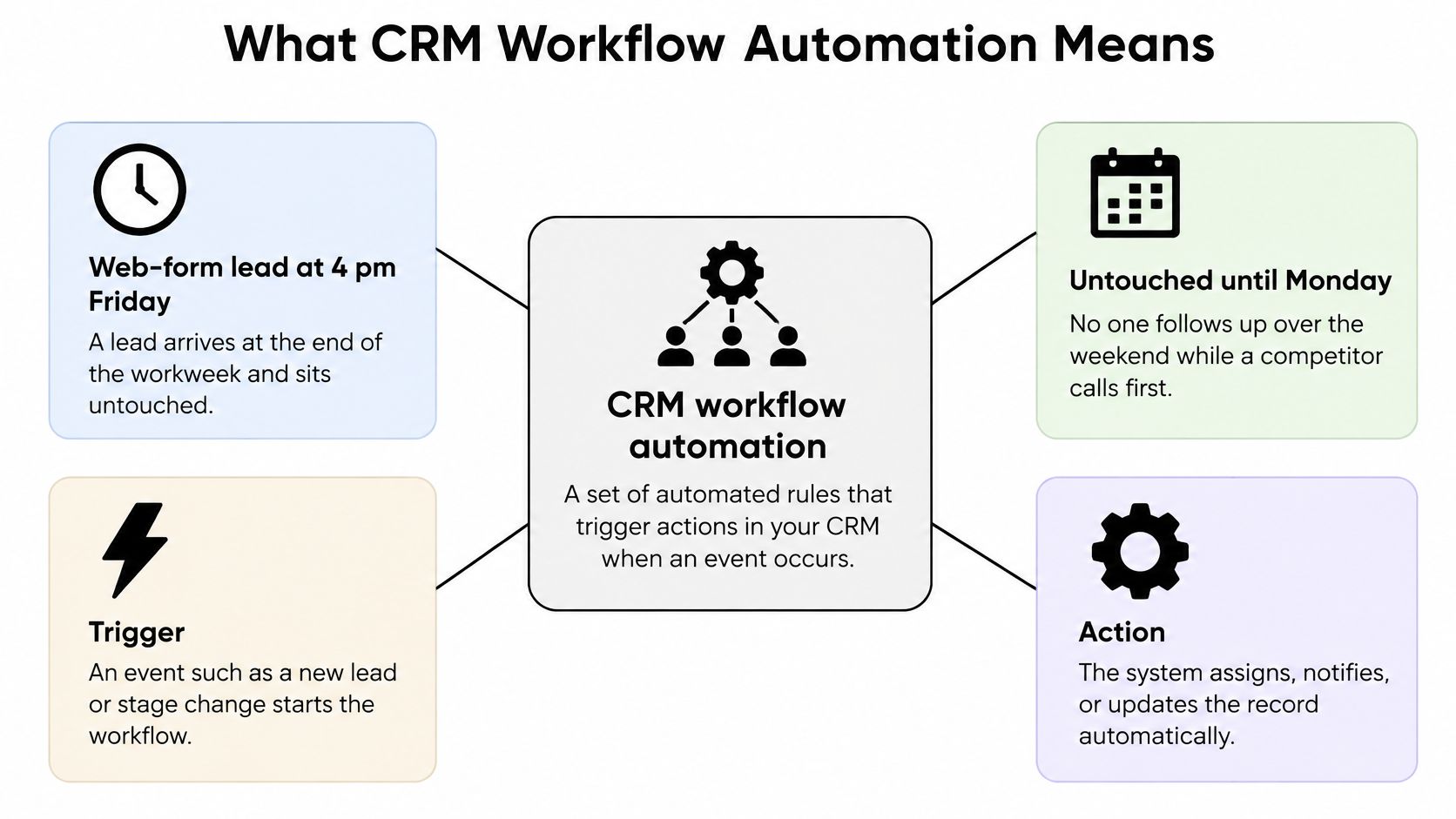
The four parts of any workflow
- The trigger. Something changes: a new lead arrives, a deal moves stage, a date is reached, a form is submitted. No trigger, no automation.
- The condition. The rule tests fields before it acts, such as region, deal size, or whether a required field is filled. Conditions are where most workflows break.
- The action. Assign an owner, create a task, send an email, change a stage, post to a channel.
- The record update. The workflow writes back what it did and when, so the history shows what happened rather than who to ask.
The line that matters: a reminder asks a person to act. An automation acts, then tells the person what it did. Teams that blur the two end up with notification noise and call it automation.
The concept didn't arrive with AI. It grew out of sales-force automation, which first digitized repetitive work such as lead tracking, opportunity updates, forecasting, and order administration, as 2006 research on sales-force automation adoption and failure rates documents.
That same research carries a lesson worth pinning above the desk. Implementation failure estimates for sales-force automation ran from roughly 50% to 60–75% across studies, and buying the software did not by itself improve a process. Workflow design, data quality, and user adoption decided the outcome.
Almost every workflow worth building starts with one of two events: a form submission or a stage change. Which of those you automate first is a business decision, not a technical one.
Common CRM Workflows and What Each One Does
Most B2B and SaaS teams end up building the same handful of workflows, roughly in the order below. Read each row as a trade: the trigger starts the rule, the actions are what the system does, and the benefit is the specific failure it prevents.
| Workflow | Trigger | Typical actions | Main benefit |
|---|---|---|---|
| Lead routing | New form submission or inbound lead | Assign owner by region or segment, create task | First response in minutes, not hours |
| Lead scoring | Page visit, email open or demo request | Add score points, change lifecycle stage | Sales sees the most ready leads first |
| Follow-up sequence | No reply to a lead after 3 days | Send email, create reminder task | Fewer leads dropped after the first contact |
| Deal-stage notification | Opportunity moves to Proposal | Notify owner, create tasks, update forecast field | Handoffs and forecast changes stay visible |
| Renewal reminder | Contract end date 60 days away | Create renewal task, alert account owner | Fewer missed renewals |
| Onboarding handoff | Deal marked Closed Won | Create project, notify support, copy key fields | Faster kickoff with complete data |
| Data cleanup | New or edited record | Validate required fields, flag duplicates | Cleaner reports and routing |
Lead routing and follow-up sequences address the most expensive failure in most pipelines: an inbound lead waiting through a weekend, or a lead abandoned after one unanswered email. If you're rebuilding the process behind that rule, start with the lead generation process itself, because owner assignment is only as good as the segment fields it reads.
Lead scoring solves a different problem. It doesn't respond faster; it sorts a long queue so reps call the most ready leads first. Scoring only works once the input fields are standardized, which is why projects built on free-text job titles fail.
The rest of the list is mostly hygiene with commercial value. Stage notifications keep forecast fields current without a rep filing a status update, renewal reminders create the task 60 days out, and onboarding handoffs turn a Closed Won deal into a project with complete data. The row teams skip is data cleanup, and it's the one protecting all the others, since routing, scoring, and reporting read the same fields.
Judge each workflow by the failure it prevents, not by how impressive the logic looks in a demo.
How a CRM Workflow Runs From Trigger to Record
A workflow can look correct in a diagram and still write bad data at scale. The reliable path from event to CRM record depends on clean inputs, explicit rules, and controls that decide when a person must review the result.
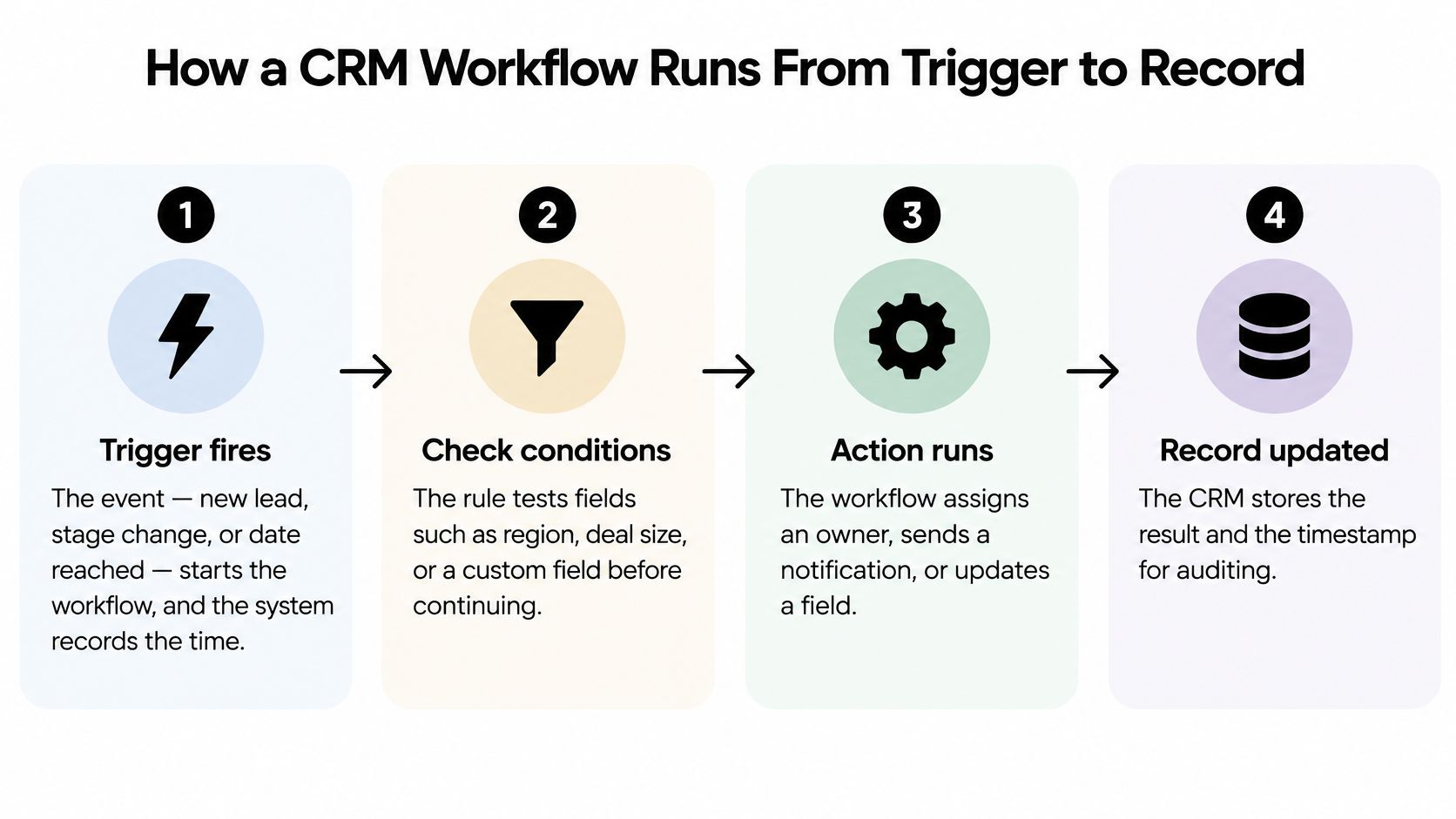
- The trigger fires. A new lead, a stage change, or a reached date starts the run. Record the event time so the team can trace when the workflow began and diagnose delays.
- Conditions are checked. Rules may use region, deal size, or a required field to select a path. Normalize values before testing them: “UK,” “United Kingdom,” and “U.K.” can otherwise produce different outcomes.
- The record is enriched. Relevant company, industry, or contact details can come from connected systems. Check that data is current and mapped to the right CRM fields before relying on it for routing.
- Actions run in sequence. Assign an owner, create a task, send an email, or update a stage in the order the process requires. If a notification runs before assignment, it may have no owner to name.
- Changes are written and logged. Update the CRM fields and record which actions ran and what changed. A traceable write makes it easier to investigate an incorrect update.
- Exceptions are routed for review. Missing or conflicting values should go to a named owner, not be guessed. An incorrect record can distort routing and reporting long after the workflow runs.
Safeguards that keep writes honest
Separate actions by risk. Reading a record or proposing an owner is lower risk than changing a deal stage or sending a customer message. Start sensitive actions with a person reviewing the recommendation, then allow automatic writes only where the inputs and outcome can be checked.
Useful controls include schema-checked inputs, duplicate protection on retries, precondition checks before changing an opportunity, permission-aware execution, and logs that preserve what happened. These controls help prevent malformed data, repeated tasks, and unauthorized changes. A workflow should also handle missing data safely, with a clear exception path rather than a silent fallback.
Measure failure severity alongside completion. A missed internal task and an incorrect forecast update do not carry the same consequence. Treating them as one success rate can conceal the failures that need attention.
Begin with read-only recommendations: the workflow proposes an owner or next step, and a person confirms it. Allow low-risk writes next. Expand permissions only when the team has defined and met a reliability threshold.
Measurable Time Savings and the Metrics That Prove Them
The most concrete measurement available comes from a controlled study of an integrated CRM workflow-automation layer, which timed eight core sales tasks across 160 paired observations. Mean completion time fell from 20.78 minutes manually to 3.70 minutes with automation, an 82.17% reduction that was statistically significant (controlled study of CRM workflow automation).
The numbers land harder as a dashboard.
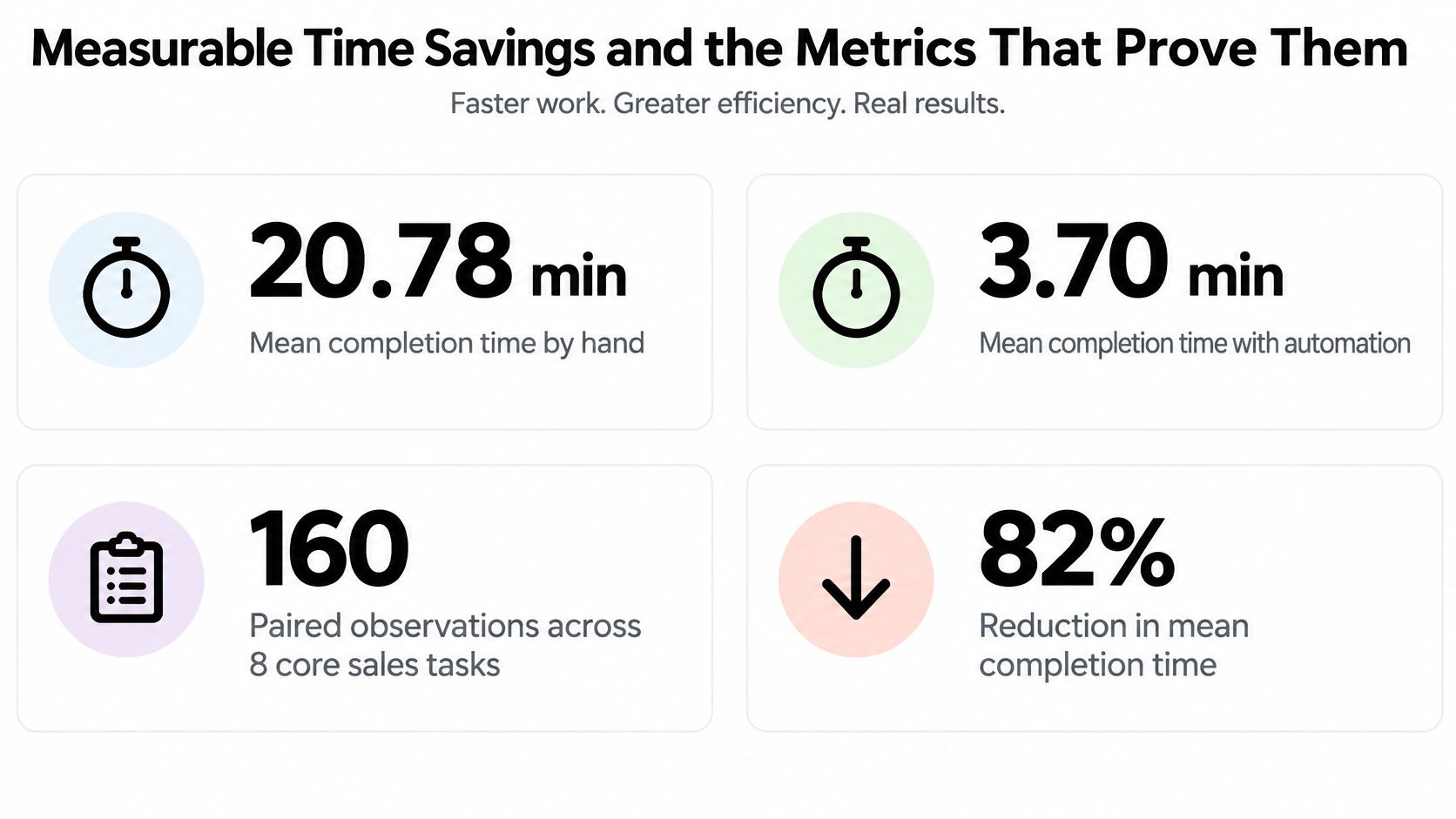
The mechanism isn't cleverness. Rules execute deterministic actions immediately, so queue time disappears and nobody spends four minutes switching between tabs to update one field. Target repeatable state transitions, such as lead qualification, task creation, follow-up routing, and opportunity updates, rather than bolting more notifications onto a process.
Faster is not the same as better: a routing rule that fires twice as fast but sends a third of your leads to the wrong owner has automated a loss.
What to measure per workflow
Capture a timestamp before and after each workflow, segment the results by task type, and watch exception rates as closely as completion times. Then add the outcome metrics that matter more than minutes saved: downstream conversion, SLA adherence on first response, duplicate-record rate, and revenue attribution. Without those, you're measuring activity.
| Workflow | Speed metric | Quality metric 1 | Quality metric 2 |
|---|---|---|---|
| Lead routing | Minutes to first response | Routing accuracy | Duplicate-record rate |
| Follow-up sequence | Minutes from no-reply trigger to follow-up | Reply rate after sequence | Exception rate |
| Deal-stage notification | Hours from stage change to owner action | Forecast accuracy | Stage corrections per month |
| Data cleanup | Minutes to validate a new record | Field completeness | Correction hours per week |
Copy one speed metric and two quality metrics per live workflow, review them monthly, and retire any workflow whose quality metrics move the wrong way while its speed metric improves.
Here's the same ground covered from the operations side, including how teams decide what to time in the first place.
Speed also has a scaling argument that spreadsheets can't match. A rule handles the 500th inbound lead exactly as it handled the first, so first-response SLA adherence holds steady while volume climbs and headcount doesn't. Track that alongside the minutes saved, because scalability only counts if quality survives the volume.
Fixing CRM Data Quality Before You Automate
A routing rule assigns leads by country. The country field is free text, so "UK", "United Kingdom" and "U.K." send three identical prospects into three different queues, and one region ends up with no owner at all. The automation worked exactly as designed. The data didn't.

That failure isn't an edge case. In a survey of Italian companies, 47% of employees still enter CRM data by hand, 37.5% of companies have no data-governance policy, and 65.5% of staff lose at least one hour a week searching for or correcting records (SDA Bocconi insight on CRM adoption and the work left on data).
Automating a broken CRM scales misinformation faster than it scales productivity. The workflows don't create the mess; they reproduce it at machine speed, in more places, with more confidence.
Controls, in the order to set them
- Set field-level standards. Dropdowns instead of free text, required fields by stage, a defined format for country, industry and source. This single step prevents the routing failure above.
- Validate at every entry point. Web forms, list imports, and API integrations each need their own checks, because the import that bypasses validation is the one that corrupts the segment.
- Deduplicate and enrich on creation. Match on email domain and company name before a record is written, then fill missing firmographic fields from a connected source.
- Assign a named owner to each field. Unowned fields decay. Owner, stage and close date belong to sales; lifecycle and source belong to marketing; nobody's field is nobody's job.
- Define the exception path. Records that fail validation go to a review queue with a deadline, not into a pipeline where a rep inherits the ambiguity.
Measure whether any of it worked with four numbers: duplicate rate, field completeness, routing accuracy, and correction hours per week. Those four are also the fastest way to audit an inherited CRM before you build anything on top of it, which is the discipline behind our data quality assurance work.
Fix the three most-used fields before you build the next automation. Country, owner and deal stage cover most routing, reporting and forecast logic, and cleaning them takes an afternoon rather than a project.
Risk Tiers That Decide Which Automations Run Alone
A CRM can apply the wrong rule faster than a sales team can catch it. LeanData's 2026 State of AI Go-to-Market Readiness Report found that 79% of organizations were scaling or deploying AI agents, while 70% reported data quality degrading go-to-market execution and 30% had agents running without audit trails.
Revenue teams also make pipeline and marketing decisions with data they later discover, or suspect, is wrong. Agreement on which fields an inbound record must contain can be limited, particularly when teams use AI lead scoring. That makes governance a design requirement: set each workflow's authority according to the consequence of a mistaken action.
| Risk tier | Example actions | Automation mode | Required control |
|---|---|---|---|
| Low | Deduplication suggestions, internal reminders | Runs automatically | Action logged and reviewable |
| Medium | Lead-stage changes, outbound sequence enrollment | Runs above a confidence threshold | Sampling and an exception queue |
| High | Customer commitments, pricing changes, compliance-sensitive messages | Human approval before it runs | Approval step and a documented undo path |
Controls every tier needs
Permissions by role should control who can change a rule, not just who can run it. Log each automated write with the rule that triggered it, and direct exceptions to a named person for review. For actions that change many records, define and test a rollback procedure before relying on it. A monthly audit should sample decisions and assess their quality, not just count how many ran.
The approval point deserves particular care. A workflow that prepares a recommendation or draft can save manual effort while leaving a person responsible for consequential decisions. MakeAutomation describes this approach as human-in-the-loop automation, with approval built into the process where needed.
The rule I'd write into any AI CRM program: if a wrong action can't be reversed in one step, a person approves it first. Everything else can run alone with a log.
Data quality and governance set the ceiling on safe autonomy. When the record is incomplete or its meaning is disputed, a confidence score cannot make the underlying decision reliable. Keep actions reversible and reviewable at lower risk tiers, and require approval when an error could create a customer commitment, alter pricing, or affect a compliance-sensitive message. The goal is automation with clear limits, not maximum autonomy.
Choose Your First CRM Workflow to Build
- Pick a repeated step with high volume, a clear rule and a real cost of delay. Lead routing and renewal reminders usually qualify. A bespoke approval chain with four exceptions usually doesn't.
- Map the current process. List every trigger, decision and handoff, then mark where people wait or retype data they already entered somewhere else.
- Fix the fields the rule depends on. Dropdowns instead of free text, required fields by stage, one owner per field.
- Build it read-only first. The workflow recommends an owner or a next step, a person confirms, and you read the log for two weeks before granting write access.
- Measure, then widen. Compare against the scorecard you set, then expand permissions one risk tier at a time.
Our work fits a specific situation: a real operating bottleneck and an owner inside the company who can help define the workflow. When both exist, automation consulting maps the current process, identifies the highest-value opportunities and leaves a practical sequence for what to build first. A simple automation such as an email sequence or a basic workflow typically takes 1-2 weeks, and the documentation and training stay with your team so you can change the workflow yourself later.
If the same manual step has annoyed your team for three months, it's the right place to start. Bring that step, the fields it reads, and the person who owns the outcome.
MakeAutomation designs and implements CRM workflow automation, from lead capture and enrichment through scoring, owner assignment, compliant follow-up and task creation, with each status written back to the record. If you'd rather start with a mapped process than another tool trial, MakeAutomation can build the first workflow with the logging, exception handling and approval steps this guide describes, then hand over the documentation so your team can run it.