CRM Automated Emails: A Setup and Optimization Guide
Automated email isn't a side channel anymore. One benchmark cited in 2026 industry reporting found that automated emails generated 41% of email revenue while representing only 5.3% of total sends across more than 183,000 brands (Omnisend benchmark coverage). That should change how teams think about CRM email.
Too many companies still treat CRM automated emails like a copy problem. They workshop subject lines, tweak headers, and celebrate open rates. Meanwhile, the real leverage sits earlier in the system. Trigger design, contact hygiene, suppression logic, and inbox placement decide whether the right person gets the right message at the right moment.
That's why I treat CRM email as revenue engineering. The email body matters. But the plumbing matters more.
What CRM Automated Emails Actually Are and Why They Outperform Broadcasts
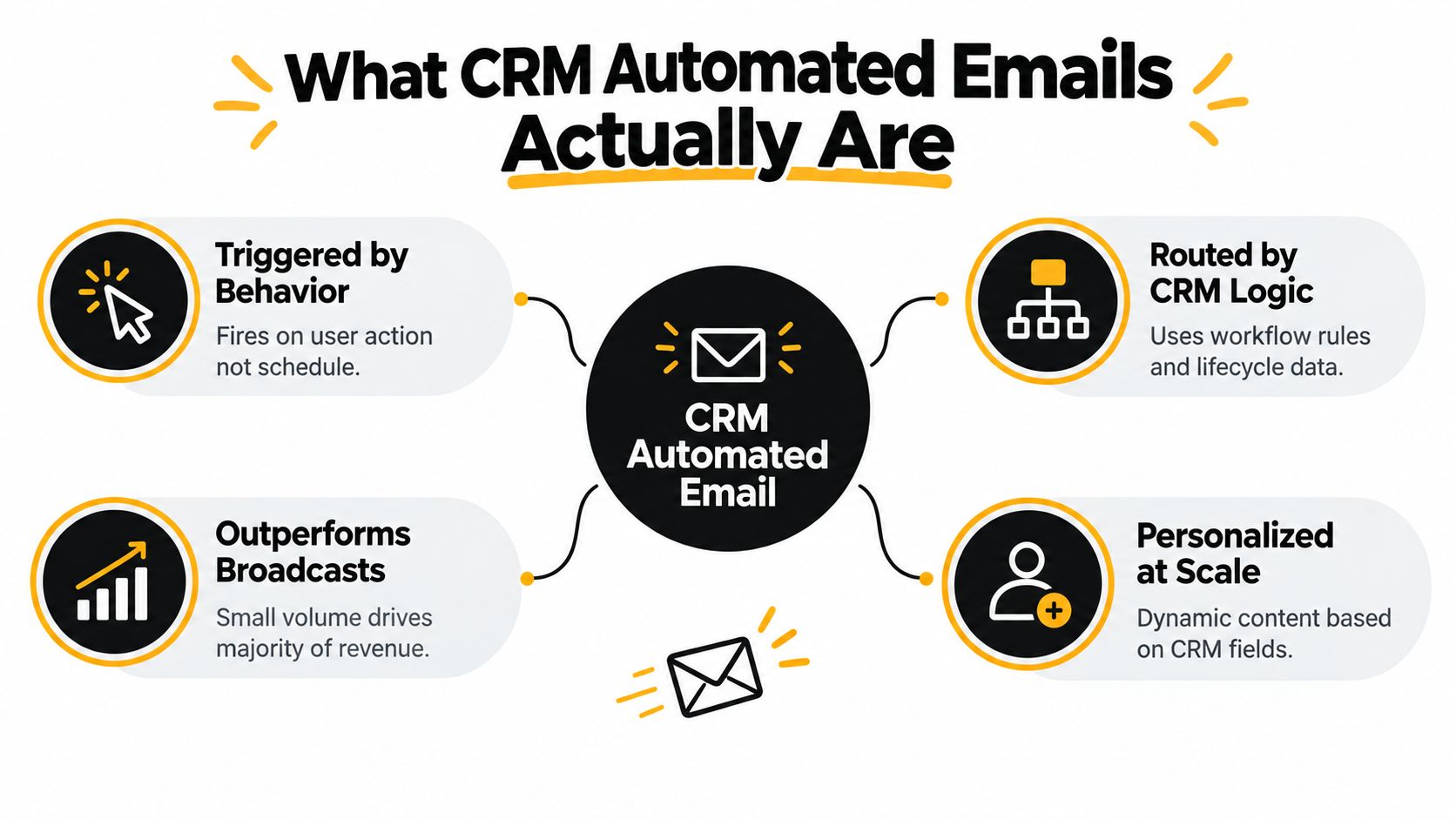
CRM automated emails are behavior-triggered messages sent through workflow logic inside tools like HubSpot, Salesforce, Pipedrive, ActiveCampaign, or Customer.io. They don't go out because it's Tuesday. They go out because a contact started a trial, booked a demo, hit a usage milestone, stalled in a pipeline stage, or stopped engaging long enough to justify a reactivation attempt.
Broadcasts do one thing well. They let a team say the same thing to a large audience at the same time. That's useful for launches, newsletters, and broad announcements. It's weak for lifecycle movement.
By contrast, automated flows respond to context. That's why they tend to outperform batch sends. Another benchmark summary reported that triggered emails generated 41% of email-driven revenue from 5.3% of send volume, while a separate benchmark reported 37% of email sales from just 2% of total volume. It also noted that welcome, abandoned-cart, and browse-abandonment flows produced 87% of automated orders in the cited dataset (Stripo benchmark summary). The exact flow mix differs in B2B and SaaS, but the lesson holds. Relevance beats volume.
The five parts that matter before template writing
I'd start with data before worrying about copy.
A clean contact record
If lifecycle stage, owner, product activity, and consent status are unreliable, the workflow will misfire.A defined trigger event
“Lead is interested” isn't a trigger. “Requested demo,” “invited teammates,” and “entered expansion review” are.A segmentation rule
The workflow needs a clear audience boundary, not a fuzzy persona deck.A suppression check
Contacts who already converted, unsubscribed, or entered a higher-priority sequence shouldn't keep getting nurtured.A measurement hook
Every workflow needs one observable business outcome. Booked meeting. Activated account. Reopened opportunity. Expansion conversation.
Practical rule: If a workflow doesn't have a trigger, a suppression rule, and a measurable outcome, it isn't automation. It's scheduled sending with extra steps.
Teams that need a basic operational checklist before they build can use this set up email campaigns guide as a simple starting reference.
Designing Segments That Match Real Buyer Behavior
Bad segmentation makes good automation impossible. The common mistake is building segments around static personas, then trying to force every lead into a content calendar. CRM automated emails work better when each segment reflects an actual state change in the buyer journey.
Use operational segments, not marketing personas
In B2B and SaaS, the strongest segments usually come from system behavior and commercial status:
| Segment | Defining CRM Event | Triggered Outcome |
|---|---|---|
| Product-qualified lead | User completes meaningful in-app activation event | Push toward demo, sales handoff, or expansion conversation |
| Trial-to-paid mover | Billing or upgrade event recorded | Reinforce adoption and reduce buyer hesitation post-upgrade |
| Dormant deal | Opportunity sits in a stage beyond acceptable age | Reopen conversation or confirm disqualification |
| Expansion account | Account approaches usage ceiling or adds new stakeholders | Start upgrade or seat-expansion motion |
| Cold-fit nurture | Contact matches ICP firmographics but shows low engagement | Maintain light education until intent changes |
This sounds obvious, but most broken workflows come from segments with too many reasons to exist. A segment should answer one question: why did this contact enter now?
A product-qualified lead isn't “someone from a target account who visited the pricing page twice, downloaded a guide, and attended a webinar.” That's a committee-built monster. A stronger version is simpler: “user completed the activation pattern that historically tells the sales team this account is ready for a commercial conversation.” Even if you don't score it numerically, you can still define it operationally.
Keep one segment tied to one motion
Each segment should map to one trigger and one expected outcome. That discipline prevents messy overlap.
The workflow should have a single job. If one segment needs three different CTAs, it probably contains three different buying states.
Here's what breaks downstream systems:
- Too many nested conditions: Teams combine lifecycle stage, product use, source, region, firmographics, owner status, and lead score into one audience. Nobody can audit it later.
- The same segment living in multiple tools: Marketing automation says one thing, the CRM says another, and the CDP says a third. Suppression fails because each platform thinks it owns eligibility.
- No exclusion hierarchy: Expansion and churn-risk records often meet the same behavioral conditions. If priority isn't explicit, both workflows may fire.
For teams refining their logic, these customer segmentation strategies are useful when you need to translate broad audience thinking into workflow-ready criteria.
A practical standard for segment quality
A segment is ready when a RevOps or lifecycle manager can answer these four prompts without debate:
- What changed: The event or state transition
- Who qualifies: The exact field logic
- Who is excluded: Sales-owned, converted, unsubscribed, or higher-priority records
- What success looks like: The one downstream action the email should influence
That level of clarity prevents a lot of silent failure.
Building Triggers, Timing, and Suppression Rules
A trigger isn't just an event. It's a controlled entry into a system with timing, exits, and collision avoidance. CRM automated emails either start behaving like infrastructure or keep acting like improvised campaigns.
What a real trigger contains
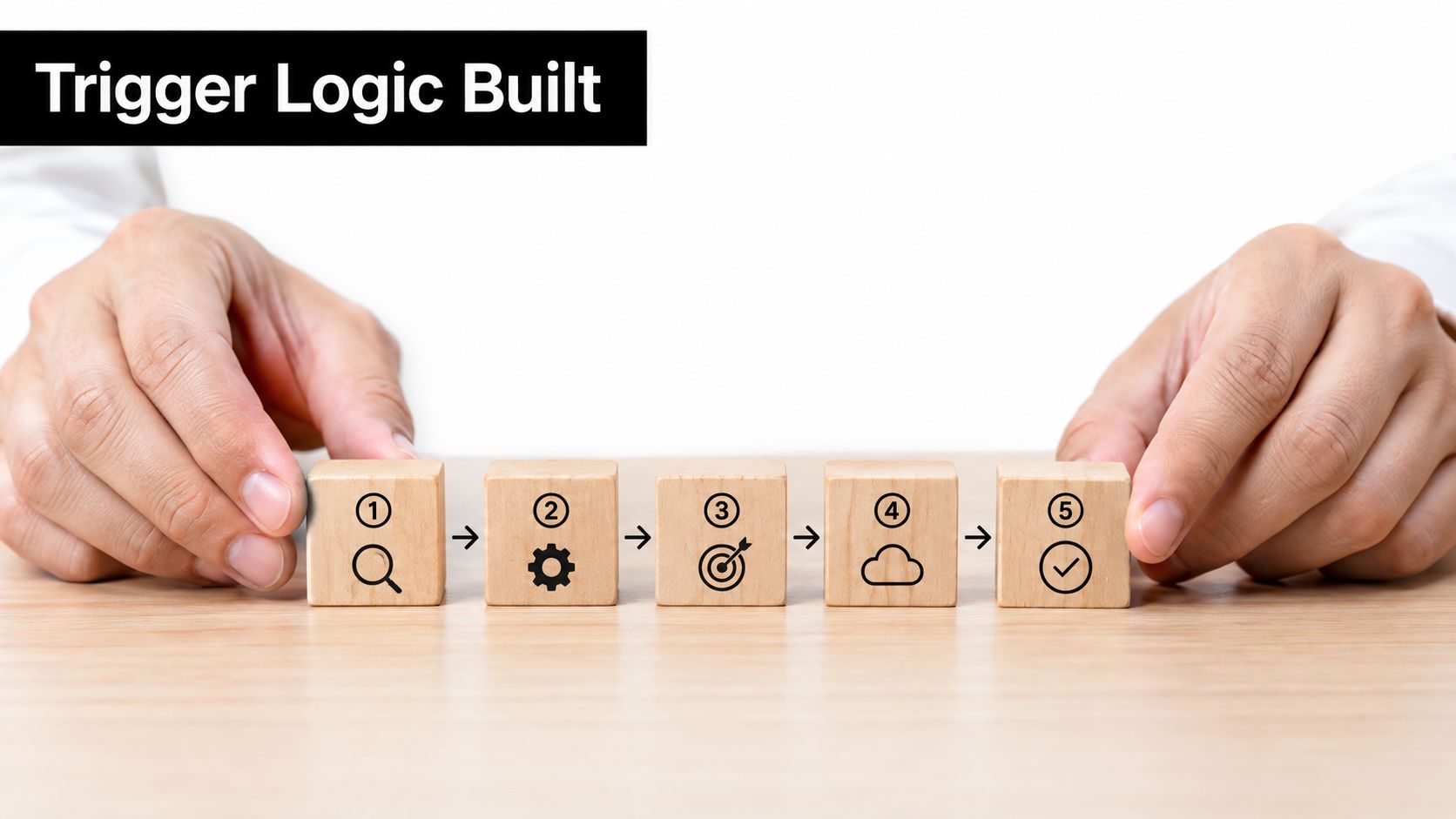
For most flows, I want five mechanical parts:
Event definition
The system event that starts eligibility. Example: trial started, demo completed, opportunity moved to stalled, customer inactive for a defined period.Entry condition
The filters that must also be true. Example: valid email, right market, not in closed-lost archive, no current sales sequence.Timing window
The period in which the send still makes sense. A welcome email sent long after signup feels broken.Wait steps
The spacing between messages. This shapes attention and avoids crowding the inbox.Exit condition
The rule that removes the contact once the desired action happens or the workflow becomes irrelevant.
The failure mode I see most often is simple. Teams build entry rules and wait steps, then forget exits. The contact converts, but the nurture keeps going. Or the contact requalifies for the same workflow and loops back in.
Two common workflows
A welcome sequence usually works best when each send earns its place.
- Email one: deliver the immediate promise
- Email two: show the first meaningful action
- Email three: remove one objection
- Email four: introduce a stronger proof or use case
- Email five: escalate to a direct CTA such as booking time or completing setup
A re-engagement workflow should behave differently. The trigger is usually inactivity or stagnation, not new intent. That means the message cadence should be more cautious, and the exit rules should be strict. If the contact replies, reactivates, or moves into an active rep-owned sequence, the workflow should stop.
For a visual walkthrough of how these pieces fit together in practice, this marketing automation workflow reference is a useful companion.
Suppression is where mature teams separate themselves
Suppression logic is not optional. It protects trust, deliverability, and attribution.
Common suppressions that should be global or near-global:
- Unsubscribed or opted-out contacts: obvious, but often inconsistently synced across systems
- Recent converters: stop onboarding or evaluation nurture when the account already took the desired action
- Active sales sequences: prevent marketing workflows from stepping on rep outreach
- Higher-priority journeys: expansion, renewal, and rescue flows should override generic nurture
- Internal and partner records: avoid junk metrics and accidental sends
A short demo can help teams pressure-test their own build logic before launch:
If a contact can qualify for two flows at once, the system needs a referee. That referee is suppression priority.
Writing Templates That Personalize Beyond the First Name
Most personalization in CRM email is cosmetic. First name. Company name. Maybe job title. None of that changes the decision if the message still asks the wrong person to do the wrong thing at the wrong time.
Real personalization comes from context the CRM already holds.
Three layers that move decisions
The first layer is dynamic fields tied to current account state. That includes plan tier, deal owner, renewal timing, feature usage, or implementation status. If a user is already on a paid plan, the email shouldn't read like trial nurture. If an opportunity is in procurement, the CTA shouldn't ask them to “learn more.”
The second layer is behavioral content blocks. A product onboarding email should look different for someone who invited teammates than for someone who signed up and went quiet. Same template shell. Different proof, different prompt, different next step.
The third layer is conditional CTA logic. If the contact already booked a demo, remove the “book a demo” button. If the account has a CSM assigned, send to the support or success path instead of the general sales path.
A better onboarding template
A strong onboarding email usually branches at four points:
- Greeting context: acknowledge signup source, trial state, or owner handoff
- Feature highlight: show the next best action based on what the user has or hasn't done
- In-app prompt: direct them to one concrete milestone, not a menu of options
- Support path: swap generic help copy for the right owner, knowledge base, or implementation route
That's decision-driving relevance. It reduces friction because the reader doesn't have to translate the email into their own situation.
Audit your existing templates
Use this quick checklist:
- Does the email reflect the trigger that caused it?
- Would the CTA still make sense if the contact converted yesterday?
- Does the message change based on lifecycle stage or account state?
- Is there one next action, not three?
- Are you using tokens to clarify relevance, not just decorate the greeting?
Personalization should narrow the decision. If it expands the number of things a contact could do, it's probably making the email weaker.
The most common template mistake is overloading one email with every available token and branch. That usually creates clutter, not relevance.
Testing Variants Without Trusting Open Rates
Open rate used to be the easy dashboard metric. It was never perfect, and now it's much less useful. Recent industry coverage notes that open rates are no longer a reliable success metric under privacy changes such as Apple Mail Privacy Protection, which is why teams need to shift attention toward inbox placement, clicks, revenue attribution, and list hygiene (Litmus email trends coverage).
That changes how you test CRM automated emails. You can still test subject lines. You just can't treat opens as the verdict.
What to test instead
Here's the testing stack I trust more:
| Test Variable | Primary Metric | Secondary Metric | Notes |
|---|---|---|---|
| Send time by segment | Clicks | Conversion event | Useful when buyer attention differs by role or stage |
| Subject line | Conversion event | Clicks | Judge by downstream action, not opens |
| Content block | Conversion event | Replies or clicks | Best tested with a holdout or clean variant split |
| CTA format | Conversion event | Clicks | Compare meeting request, product action, or reply prompt |
| Inbox placement | Inbox placement result | Clicks | Technical test, not creative test |
One discipline matters more than the testing tool. Test one variable at a time unless you have enough workflow volume to support a more complex design. If you change send time, subject line, and body copy at once, the result is hard to trust.
A cleaner CRM testing method
Before you launch a test, lock these decisions:
- Choose one conversion event: booked demo, activated workspace, replied to rep, upgraded account
- Define the audience window: only contacts entering under the same trigger logic
- Set a stop rule: decide when you'll call the test and avoid checking every few hours
- Document exclusions: sales-owned or recently converted contacts can skew results badly
Once a team has stable volume, multivariate testing can help. But I'd still earn that complexity. There is more upside from better segmentation and better suppression than from fancy test design.
Put deliverability into the testing rotation
Creative tests get all the attention because they're visible. Deliverability tests often produce bigger operational gains because they determine whether anything gets seen. Seed-account checks across major inbox providers belong in the same review cycle as subject-line and content experiments.
One practical way to prioritize tests is to rank ideas by expected revenue effect, not ease of execution. A send-time test for a high-value trial nurture often matters more than polishing a low-intent newsletter subject line.
Hardening Deliverability Before You Scale Volume
Most automation problems blamed on copy are really deliverability problems. If the inbox never sees the message, the sequence didn't fail creatively. It failed technically.
A global benchmark found an average inbox placement rate of 87.2% for 2025, implying that roughly 12.8% of messages missed the inbox. The same benchmark context also cites a median spam-folder placement rate of 6.1% and a missing or blocked rate of 4.9% (Validity benchmark report). That's why scaling CRM automated emails without deliverability controls is reckless.
Start with authentication and domain structure
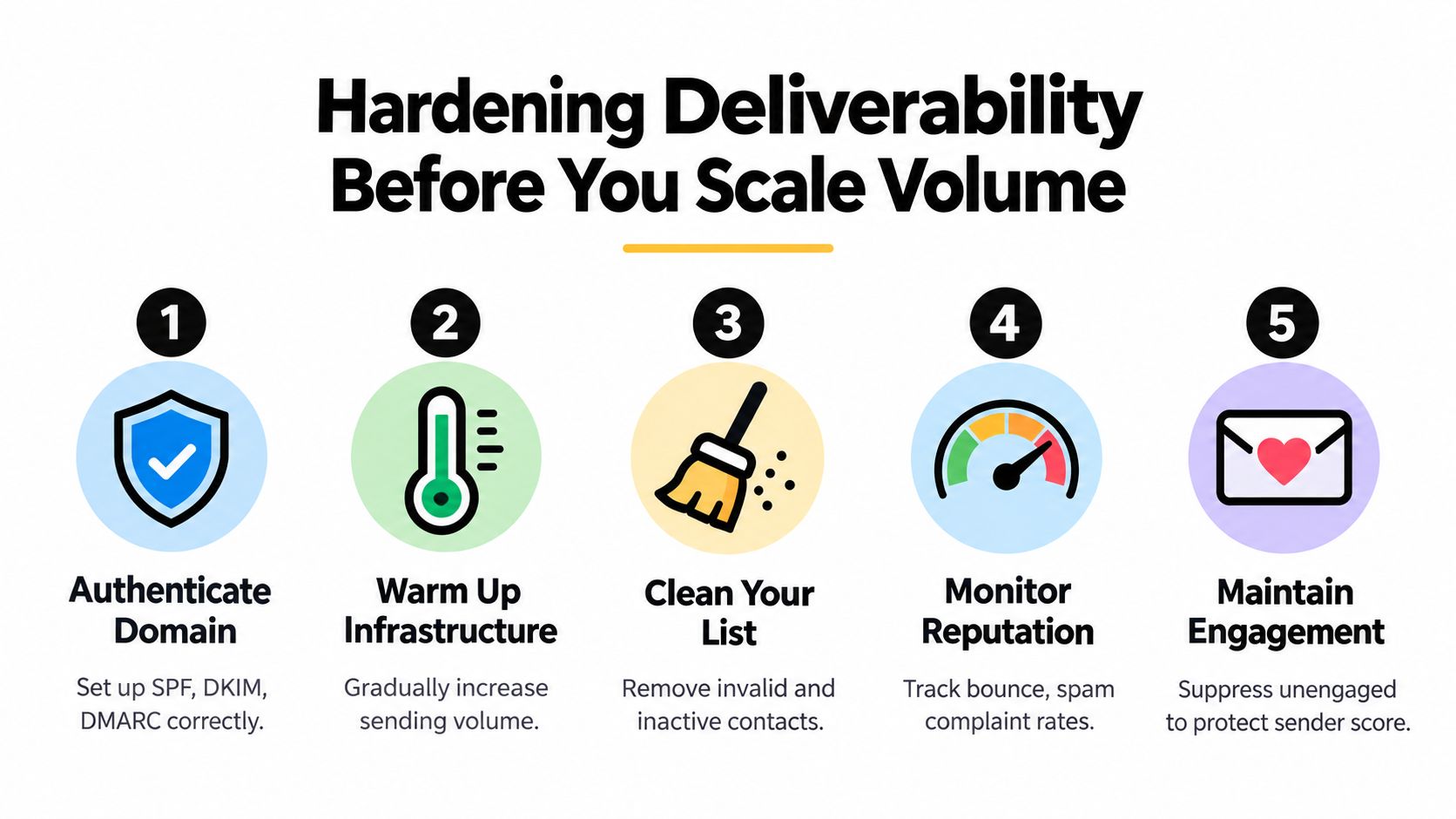
You need proper SPF, DKIM, and DMARC alignment before you send any meaningful automation volume. Marketing sends should also be separated from the main corporate domain where practical, so campaign reputation issues don't spill into core business mail.
If your team needs a plain-English reference for the mechanics, this explainer on how email authentication works is worth sharing internally with ops and IT.
Authentication alone won't save a bad program. But without it, you're asking inbox providers to trust traffic that hasn't earned trust.
List hygiene does more than protect compliance
List quality is a delivery input, not just a database cleanup task.
Use a weekly routine that covers:
- Role-based addresses: info@, admin@, support@, and similar addresses often create weak engagement and routing ambiguity
- Known complainers: suppress people who signal they don't want the messages
- Questionable new signups: confirm intent before dropping them into high-frequency flows
- Dormant contacts: run reactivation attempts, then sunset records that keep dragging engagement down
Operational note: Teams often hold onto dead contacts because deleting them feels like losing pipeline. Keeping them can cost more by damaging sender reputation for everyone else.
Infrastructure and content checks
Deliverability also depends on how you ramp and how you format.
A few habits consistently help:
- Warm new sending infrastructure gradually: don't move from low volume to aggressive automation overnight
- Avoid URL shorteners in primary sends: they often create unnecessary filtering risk
- Keep layouts balanced: heavily image-led emails can create poor scanning signals in some environments
- Monitor by mailbox provider: delivery logs aren't enough if Gmail performs differently from Outlook
For teams that want a practical checklist they can adapt, this guide on improving email deliverability covers the operational side well.
A Tuesday-morning checklist for ops
By the time an ops lead approves sends, these questions should already have answers:
- Is authentication aligned and unchanged?
- Did any recent import or sync add low-quality contacts?
- Are complaints, bounces, or unsubscribes flowing into suppression lists correctly?
- Have seed accounts shown any provider-specific placement issues?
- Did a recent ESP, domain, or workflow change alter send patterns?
This is also where a specialist implementation partner can help. Tools and services vary by stack. Some teams use native HubSpot or Salesforce workflow controls, others add platforms like Customer.io or Iterable, and some work with firms such as MakeAutomation for workflow documentation, CRM automation setup, and follow-up sequence implementation when internal resources are thin.
Measuring What Matters and Rolling Out in 30 Days
The reporting layer should answer one question first: did the workflow move revenue forward? If the dashboard can only tell you sent volume and opens, it isn't helping leadership make decisions.
For CRM automated emails, I'd build a KPI hierarchy around commercial movement, then keep engagement metrics in a secondary diagnostic role.
The KPI hierarchy that actually matters
Primary metrics should map to lifecycle progress:
- Pipeline created
- Stage velocity
- Demo-to-opportunity conversion
- Free-to-paid conversion
- Net revenue retention
Secondary metrics still have value, just not as top-line truth. Clicks can show whether the offer was compelling. Replies can reveal objection patterns. Sent volume can flag flow coverage issues. But they don't deserve the headline slot unless they connect back to revenue movement.
Attribution has to be wired before launch
A lot of teams get false confidence. They launch the workflows, see click activity, and assume influence. But if CRM stages, campaign objects, and UTM conventions aren't connected, the revenue story stays muddy.
At minimum, each workflow should have:
- A clear campaign or workflow identifier
- A defined conversion event in the CRM
- Lifecycle stage updates that sync reliably
- Naming standards that survive reporting exports
- A suppression log that explains why eligible contacts were skipped
That setup works across Salesforce, HubSpot, and Pipedrive with different mechanics, but the reporting principle is the same. Every automated sequence needs a traceable path from send to business outcome.
Replace the open-rate leaderboard with a workflow scorecard. Rank automations by influenced pipeline, conversion movement, and quality of contact progression.
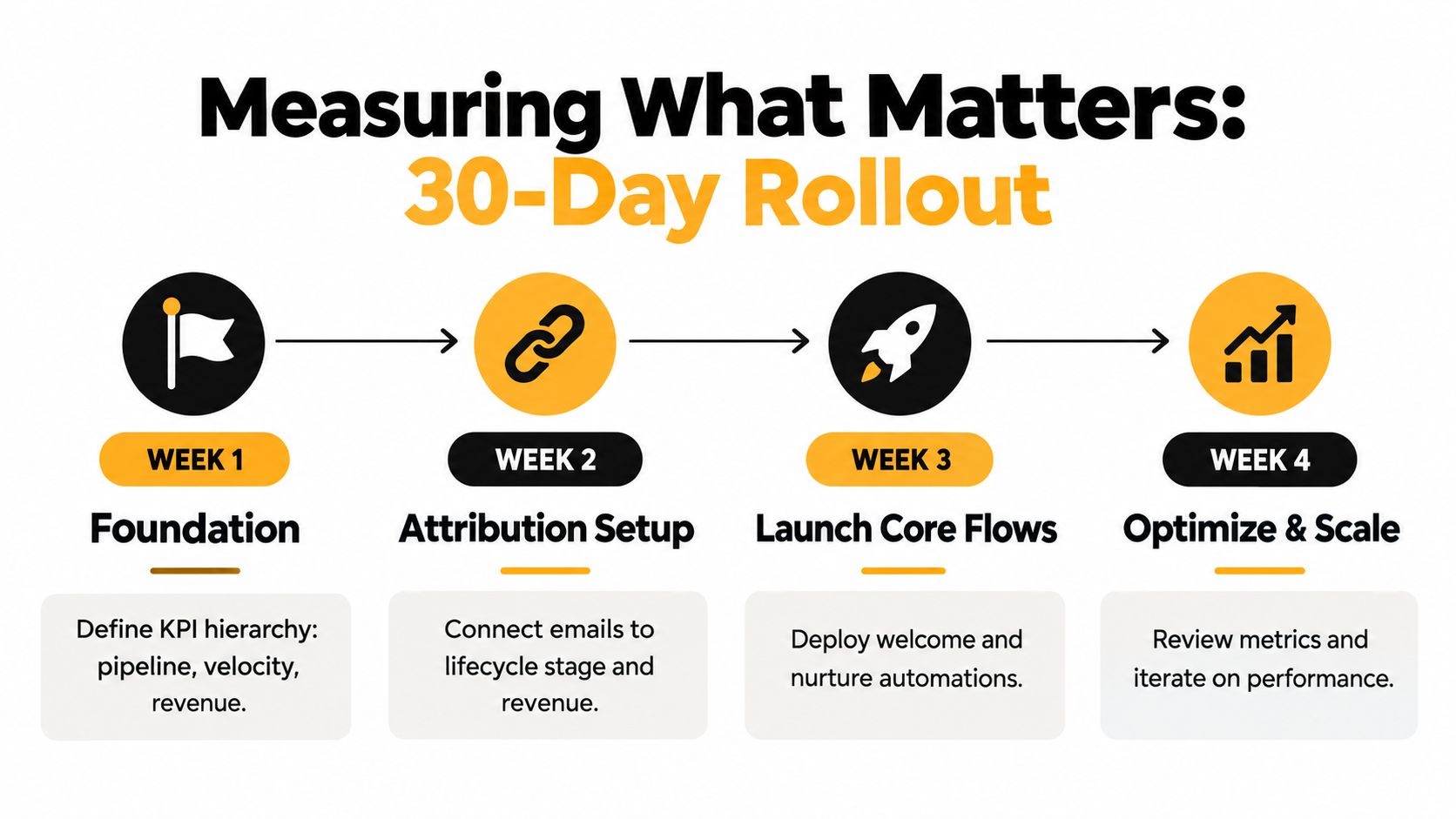
A practical 30-day rollout
Keep the first month tight. Don't try to automate the entire lifecycle at once.
Week one
Audit the current state. Review live workflows, segment definitions, data fields, suppression lists, and deliverability basics. Produce a flow inventory, a field map, and a suppression-policy draft.
Week two
Rebuild the two highest-value segments and their trigger logic. For most B2B or SaaS teams, that's usually a welcome or trial nurture and one re-engagement or stalled-opportunity flow. Produce trigger specs, exit rules, and measurement definitions.
Week three
Launch the core flows with templates, dynamic logic, and testing rules in place. Confirm attribution tags, internal notifications, and fail-safes. Produce approved templates, QA checklists, and a live monitoring sheet.
Week four
Harden deliverability, finish remaining priority flows, and review the first baseline results. Produce an inbox-placement review, a workflow scorecard, and a backlog of next tests ranked by revenue impact.
At the end of those 30 days, you should have something more useful than “better emails.” You should have a controlled system that sends fewer irrelevant messages, reaches more of the right inboxes, and creates cleaner evidence about what moves pipeline.
If your team needs help turning CRM automated emails into a reliable operating system, not just a pile of sequences, MakeAutomation can help with workflow design, CRM automation setup, segmentation logic, and AI-enhanced follow-up implementation. It's a good fit when you need the triggers, suppression rules, attribution, and deliverability pieces wired correctly before you scale volume.