Lead Generation Strategies for B2B: A Working Playbook
Your campaign is generating leads, but sales says most aren't ready. Marketing points to form fills, sales points to missed follow-up, and the pipeline still doesn't explain where revenue is getting stuck. Before adding another channel, trace each lead from first inquiry to closed business. The strongest lead generation strategies for B2B teams treat lead generation as a qualification system, then build channels and automation around the places where qualified opportunities can move forward.
Diagnose Funnel Gaps Before You Add Channels
Which stage is leaking: lead capture to MQL, MQL to SQL, SQL to opportunity, or opportunity to closed revenue? Pull four weeks of CRM data, calculate each conversion rate, and split the results by source, segment, and salesperson. The B2B lead quality benchmark analysis estimates that about 31% of captured leads become MQLs, approximately 13% of MQLs become SQLs, and 30% to 59% of SQLs become opportunities.
| Funnel stage | Planning benchmark | Typical gap signal |
|---|---|---|
| Lead capture to MQL | About 31% | Scoring too loose or offer too broad |
| MQL to SQL | About 13% | Qualification criteria unclear or slow sales follow-up |
| SQL to opportunity | 30% to 59% | Weak discovery or messy handoff from marketing |
| Lead response time | About 60 seconds with automation | Speed-to-lead gap; manual teams often take hours |
| Opportunity to closed revenue | No benchmark specified | Pricing, proposal, or deal-stage hygiene |
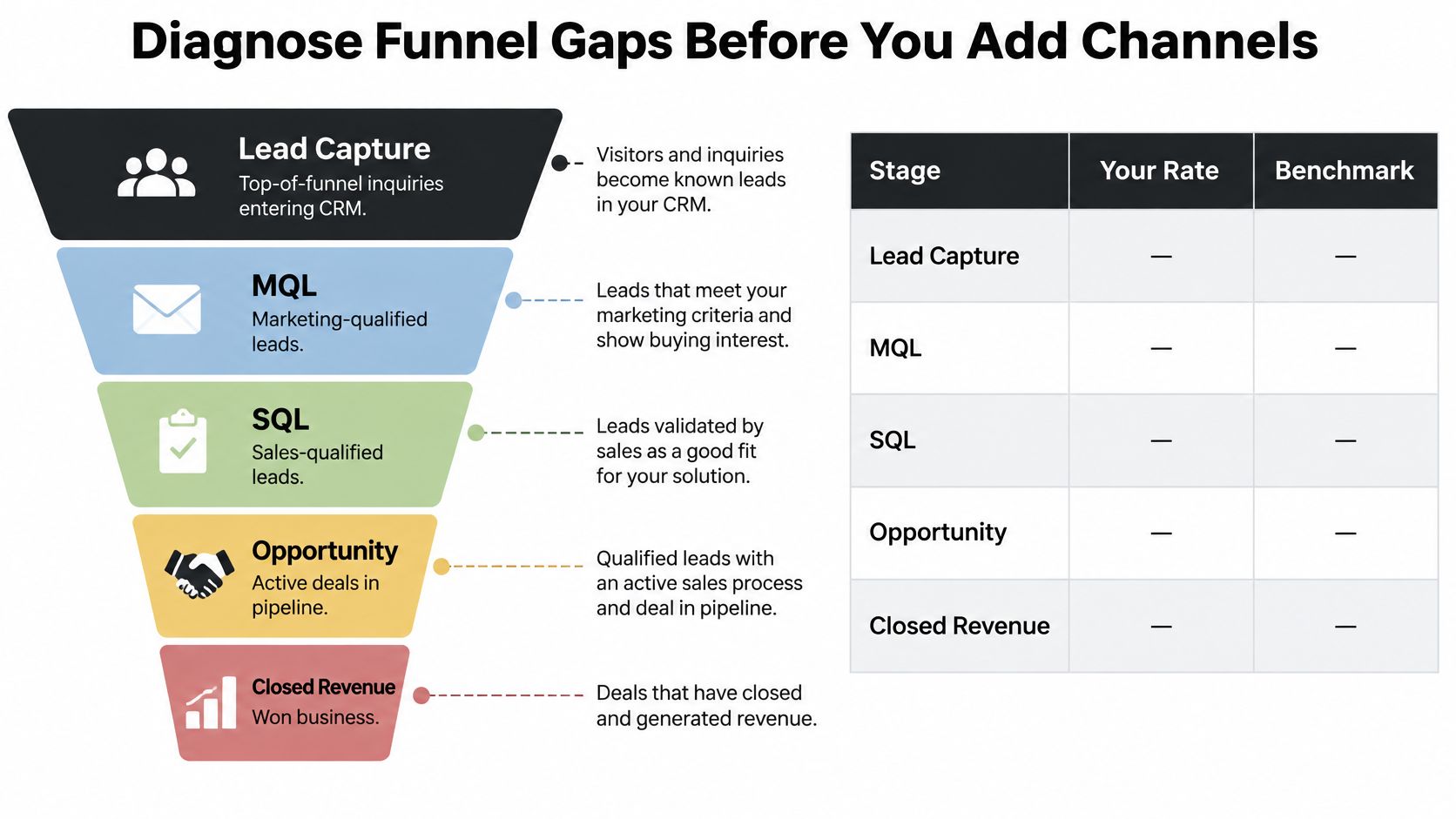
These figures are planning benchmarks, not targets to apply blindly. If lead capture to MQL is weak, your offer may be attracting the wrong audience, or the scoring rules may be too permissive. If MQL to SQL is weak, marketing and sales may not agree on qualification, or sales may be responding too slowly. A low SQL-to-opportunity rate points toward discovery, fit, or handoff problems. Use the same stage definitions across teams before comparing results.
For a worked example, 1,000 captured leads at the cited average rates produce about 310 MQLs and 40 SQLs. If your team turns the same lead volume into 15 SQLs, buying more traffic is unlikely to fix the underlying gap. Check whether the right accounts are entering the funnel, whether qualification fields are complete, and whether sales has a clear next action for each MQL.
Find the leak by segment, not by average
One aggregate conversion rate hides the cause. Break the funnel down by channel, ideal-customer segment, and assigned rep. Search may produce strong MQL volume but weak SQL conversion, while a focused partner channel may bring fewer leads and more opportunities. A rep-level difference can reveal inconsistent qualification or a handoff that needs clearer ownership.
Speed-to-lead deserves its own check. In a marketing agency case study, MakeAutomation reduced lead response time from 4 hours to 60 seconds. A fast acknowledgment gives an interested buyer a clear next step, but it doesn't replace a thoughtful sales conversation. For a broader explanation of how each stage connects, use this practical guide to the B2B lead generation funnel.
Practical rule: Name the owner for every funnel stage. Review leakage weekly by source, segment, and rep, and fix the biggest qualified-pipeline leak before adding spend.
Keep one baseline sheet with all five stage rates, a named owner for each rate, the weekly review date, and the single leak you'll address first. If search is a core channel, a comparison of what to look for in a B2B SaaS SEO agency can help you evaluate outside support without mistaking rankings for pipeline.
Pick a Channel Mix That Matches Your Deal Size
| Channel | Time to first leads | Lead quality | Best fit | Main cost |
|---|---|---|---|---|
| Outbound email and LinkedIn | 2 to 4 weeks | Medium to high when targeted | Mid-market and enterprise accounts | Team time and list data |
| SEO content | 4 to 9 months | High for research-stage buyers | Long cycles needing category education | Writing and editing time |
| Paid search | Days to 2 weeks | High for high-intent terms | Clear, urgent problems | Per-click spend |
| Webinars and events | 4 to 8 weeks to plan | High when followed up within a day | Products needing demonstration | Production and promotion |
| Referrals and partners | 1 to 3 months to set up | Very high | Services and integrations | Partner incentives |
| AI-mediated shortlist presence | 3 to 12 months | High when included | Comparison-heavy categories | Evidence and review building |
Choose channels based on average deal value and the amount of buyer education required before a useful sales conversation. A lower-priced SaaS product with a short buying cycle can often lean on paid search, clear product pages, and a self-serve trial. Mid-market or enterprise sales usually need more coordinated education and outreach, because several people may need to trust the product before a deal advances.
Buyer familiarity should also shape the handoff. In a 2017 McKinsey survey of more than 1,000 B2B buyers across four countries and multiple industries, 76% said speaking with a salesperson was helpful when researching a new product or service. The share fell to about 50% for repeat purchases with new or different specifications, and 15% for an identical repurchase, according to McKinsey's B2B buyer research. Give prospects useful digital research tools, but make human help easy to access when the offer is unfamiliar or complex.
The same survey found that 10% of respondents were making online B2B purchases at the time, while 46% said they'd be willing to buy through a supplier website if the process were available and efficient. That's a case for improving the self-serve experience, not for removing sales from the journey. Make the path to a demo, consultation, or purchase clear, and let buyers choose when they want help.
Test a small, deliberate mix
Choose two primary channels and one test channel per quarter. Launching several channels at once makes it harder to know whether the audience, offer, or execution caused a result. Score each channel from 1 to 5 on speed, lead quality, and cost, then remove the lowest-scoring channel after a 90-day review if it isn't supporting qualified opportunities.
For the education channel you keep, build three useful assets before opening a third channel:
- A problem page focused on one workflow, such as manual CRM operations or inbound-call handling.
- A proof asset that explains a customer result, the implementation timeline, and the tools involved.
- A comparison page that plainly covers integrations, pricing model, and product limits.
This is more useful than publishing broad content with no clear buyer or problem in mind. A visitor researching a specific workflow needs to see whether you solve it, what implementation involves, and where your product fits against alternatives. Make each channel lead to the right asset, then judge it by its contribution to qualified pipeline.
Sell to the Buying Group Not Just One Lead
A demo request may come from one person, while approval depends on colleagues who assess budget, technical fit, daily use, and contract terms. A single MQL score captures one contact's fit, not whether the account is ready to buy. The Demandbase State of the B2B Buyer report reports that 72% of B2B purchases involve complex, multi-stakeholder buying groups and 77% of buyers prioritize integration capabilities over standalone features.
| Stakeholder | Core risk | Evidence to send | Owner on your team |
|---|---|---|---|
| Economic buyer (CFO or COO) | Payback and budget | ROI model with customer benchmarks | Account executive |
| Technical evaluator (IT or RevOps) | Integration and security | Integration docs and security summary | Solutions engineer |
| End user (sales or ops team) | Extra daily workload | Demo of the actual daily workflow | Customer success |
| Internal champion | Getting internal approval | One-page internal summary and peer reference | Account executive |
| Procurement or legal | Contract and data terms | Standard terms and data processing agreement | Deal desk |
Give each role proof it can use
Map the economic buyer, technical evaluator, end user, and internal champion in each target account. Record their roles in the CRM, note who is engaged, and assign a next milestone. A contact's interest is a useful signal, but the opportunity remains exposed if nobody has reviewed the integrations or assessed the effect on daily work.
Give the champion material they can circulate: a one-page internal summary, a simple cost-and-time comparison, and a customer reference who can discuss implementation. Peer trust also shapes decisions. The Demandbase report says 54% of SaaS buyers speak with a user before purchasing, while 77% consult user reviews. Include reference access and review visibility in the deal plan, rather than waiting until the final sales conversation.
For named accounts, an account-based marketing automation workflow can connect CRM activity with stakeholder mapping and follow-up. Measure buying-group progress, not just new contacts: track verified stakeholders engaged, whether the champion has usable evidence, consensus milestones, and opportunity conversion.
Test the process on five open deals. List which roles are engaged and which are missing. If a deal reaches the demo stage without a technical evaluator, send an integration briefing before the next meeting. Each stakeholder needs evidence relevant to the risk they are responsible for, not another copy of the same pitch.
Build Outbound Sequences That Earn Replies
| Sequence mix | Reply rate benchmark | Best use |
|---|---|---|
| Cold email only | 1.4% | Low-cost test on large lists |
| Email plus LinkedIn connection | 3.2% | Mid-market accounts with a named buyer |
| Email, LinkedIn messages, and voice note | 4.8% | High-value accounts where consent allows |
These figures are directional, not a promise. The Konsyg B2B outbound benchmark synthesis reports the rates above, but audience, deliverability, offer strength, and reply definitions can all affect results.
Choose one narrow use case. Write to a specific operational problem, such as manual CRM updates or missed inbound calls. A focused use case helps a prospect decide quickly whether the message is relevant.
Find a verifiable account signal. Use a business change you can confirm, such as hiring growth, a new market launch, or added operational complexity. Connect that signal to the problem rather than pretending to know more about the account than you do.
Sequence the channels carefully. Start with email, add a LinkedIn connection and message, and use a voice note or phone step only where consent and local law allow. Space the touches over two to three weeks so the sequence feels like a considered follow-up, not a burst of noise.
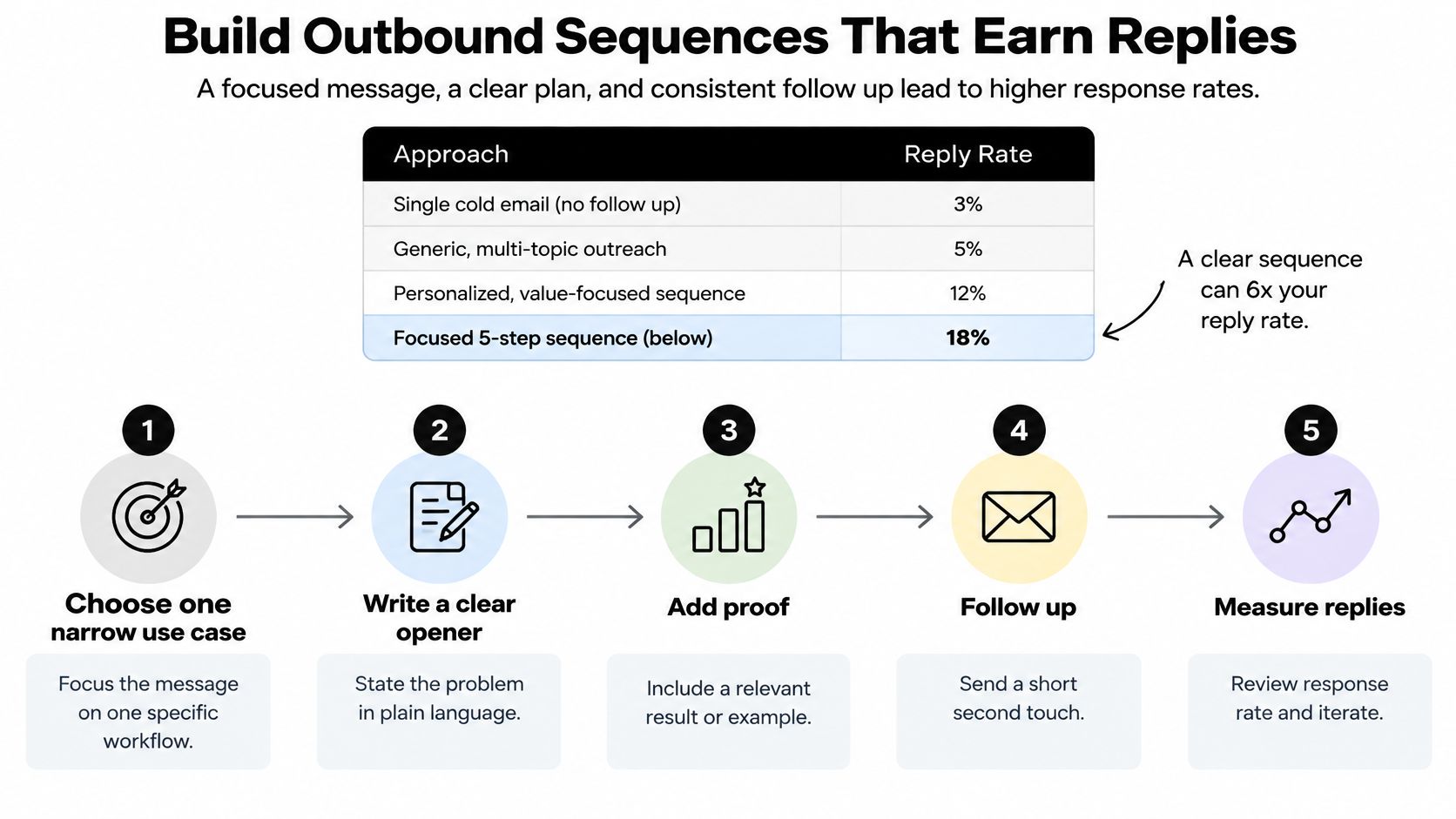
Test one variable at a time. Keep the account segment constant while testing the subject line, pain-point framing, call to action, or sequence timing. If several variables change at once, a better or worse result won't tell you what to keep.
Protect trust and measure the right outcomes. Suppress uninterested contacts and honor opt-outs immediately. Track positive replies, qualified meetings, show rate, opportunity rate, and pipeline per account, alongside bounces, spam complaints, and domain reputation.
Keep the research automated and the judgment human. Use automation for enrichment, deduplication, scheduling, and CRM logging, but have a person confirm strategic relevance before high-value messages go out.
Generic personalization at scale is a common failure mode. Dropping a company name into a template doesn't make the message relevant, and a weak sequence can damage deliverability while generating activity that sales can't use. For a practical checklist on making outreach clearer, use these cold email tips from CleanMyList. Then document the timing and ownership in your sales cadence operating guide.
Earn Shortlist Spots in AI-Mediated Research

A buyer can narrow the vendor field before visiting your website. If reporting counts only clicks and form submissions, it misses whether your brand made the initial shortlist. The 2025 U.S. B2B buyer research from NRG MR found that around 60% of surveyed U.S. B2B buyers use generative AI tools to build vendor lists, summarize content, or identify competitors, and 82% ultimately buy from a pre-existing shortlist. Treat shortlist presence as a qualification signal alongside lead volume.
Track whether you appear in the shortlist
Choose category prompts that reflect how your buyers describe their needs. Each month, run the same prompts through the AI tools your audience uses, record which vendors appear, and compare your presence with two or three competitors. Keep the wording fixed. Otherwise, a change in the question can look like a change in visibility.
Make your claims easy for buyers and AI tools to verify:
- First-party evidence: Publish customer results with enough context to show what changed.
- Verifiable expertise: Make case studies, practitioner guidance, and third-party profiles easy to find.
- Review visibility: Invite customers to share honest feedback on platforms buyers consult.
- Structured comparisons: State integrations, pricing model, and product limits plainly.
- Human validation: Have sales clarify inaccurate assumptions when a buyer's questions need more than an AI summary.
For example, an automation consultancy can publish an integration matrix for the CRMs its clients use and outline its implementation process. That gives buyers a concrete basis for comparison and helps represent the consultancy's capabilities accurately.
More content does not guarantee a shortlist position. Focus on being a credible, accurately described option when buyers ask for alternatives. Then ask new leads where they first heard about your company and record their answers in the CRM. That helps distinguish shortlist visibility from traffic and form fills, and shows whether those opportunities progress through qualification.
Automate Routing, Follow-Up and CRM Handoffs
A demo request that waits in a shared inbox can become a lost opportunity. A B2B SaaS company was losing deals because its sales team could not respond quickly enough. Build the workflow so each inquiry reaches a clear owner with enough context to qualify it and take the next step.
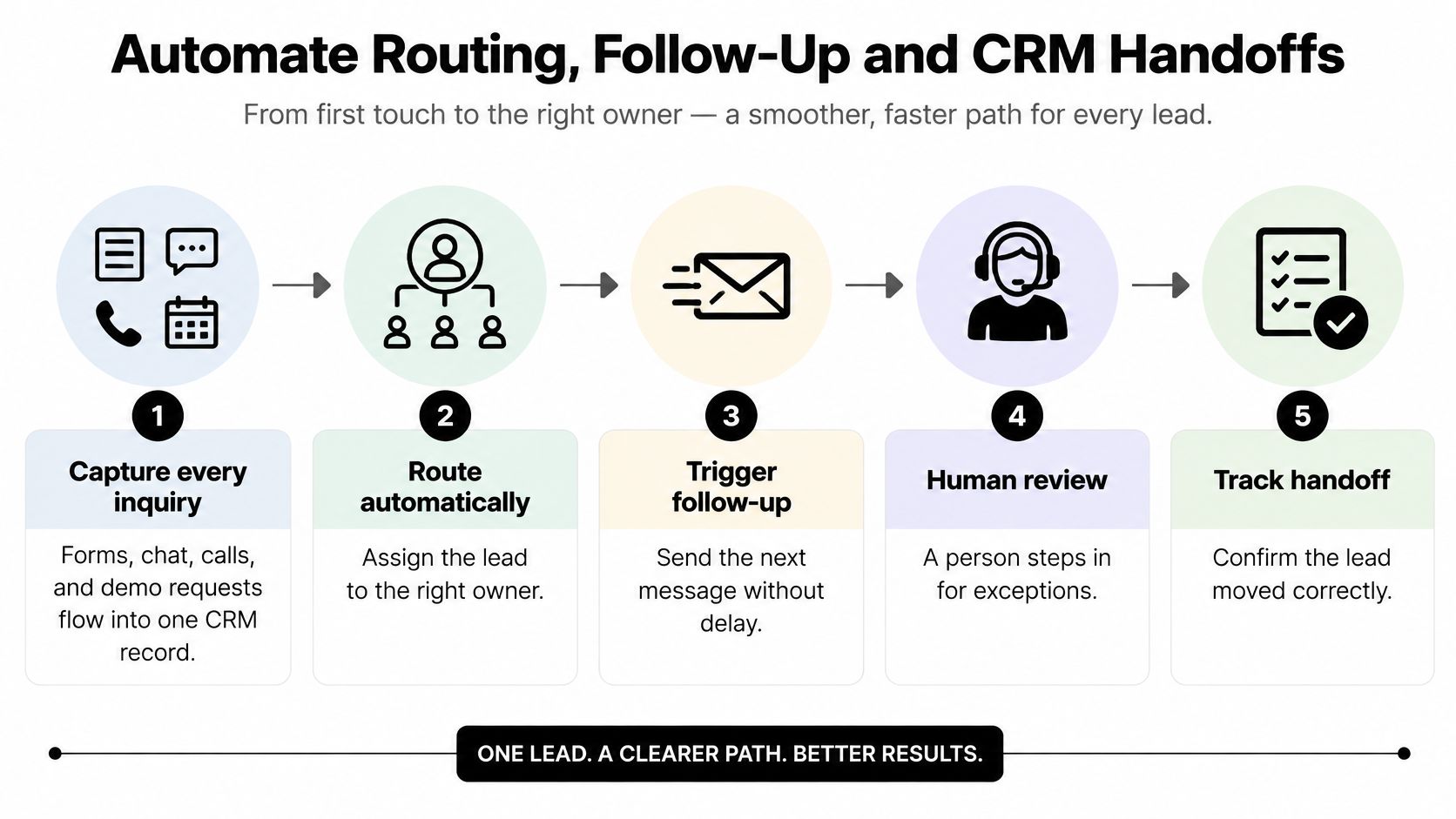
Capture every inquiry. Send forms, chat, calls, and demo requests into a single CRM record. Centralized capture helps prevent inquiries from going unnoticed in personal inboxes.
Enrich before assignment. Add useful company context, such as size, industry, and technology stack. The owner can then assess fit without starting with an empty record.
Apply the agreed qualification thresholds. Use the existing criteria for company fit, business problem, urgency, and authority. A separate scoring model can create conflicting signals and make it harder to audit why a lead was handed off.
Route to a named owner. Send high-fit leads to the appropriate rep and place others in a relevant nurture path. An assigned lead without a responsible person is still an unworked lead.
Acknowledge promptly and set a fallback. Send an acknowledgment with a booking link within about 60 seconds. If a lead has not booked within 24 hours, enroll them in a nurture sequence.
Log every touch. Record messages, call outcomes, and scheduling activity on the lead record, so the sales owner can see the history at handoff. Keep outbound email health checks separate from CRM handoff rules.
Hand off with a brief when the lead clears the SQL bar. Include account context, the stated problem, qualification signals, prior interactions, and the agreed next action. Lead response automation can respond to inquiries within 60 seconds, 24/7, qualify leads automatically, and book meetings without human intervention.
Make escalation explicit
Automate enrichment, deduplication, scheduling, and CRM logging. Keep people responsible for fit review before high-value outreach, objection handling, and pricing conversations. Those decisions depend on context a template may miss.
MakeAutomation designed a four-stage sales pipeline with automated stage advancement and built 12 automated nurture sequences for a B2B SaaS client. For leads that do not book within 24 hours, the workflow enrolls them in nurture sequences. Each stage should have a clear exit condition and an owner for exceptions. Advancing a record only because time has passed can send a poor-fit opportunity further down the funnel without resolving the issue.
Start a 30-Day Sprint and Lock in Your SOPs
Treat the first month as a build sprint, not a promise that every channel will be fully mature. The target is a working system with owners, a visible funnel, and one focused test.
Week 1: Establish the baseline. Pull four weeks of CRM data, fill in the five stage rates, name an owner for each, and select the first leak to fix. Set the weekly review date now so it doesn't disappear behind campaign work.
Week 2: Test a focused outbound sequence. Choose one use case, such as manual CRM operations, and keep the account segment constant while you test one message element. Record positive replies and qualified meetings, not just total responses.
Week 3: Map the buying group. Identify the economic buyer, technical evaluator, end user, and champion across your top accounts. Draft a one-page champion summary and arrange a suitable reference customer for deals that need peer reassurance.
Week 4: Turn on the routing workflow. Connect capture, enrichment, acknowledgment, and assignment, then review SQLs and show rate alongside outbound replies. Keep form fills visible, but don't use them as the sprint's measure of success.
Write an SOP with an owner, trigger, steps, tool, metric, review date, and escalation owner. Set a weekly review of leakage by source and rep, a monthly check of shortlist prompts and reply rates, and a quarterly channel score that removes the weakest channel when it isn't earning its place.
Build time depends on the work. At MakeAutomation, basic HubSpot setup takes 1 to 2 weeks, marketing automation implementation takes 3 to 4 weeks, a full CRM migration with pipeline setup takes 4 to 6 weeks, and complex multi-hub implementations with custom integrations take 8 to 12 weeks. A 30-day sprint can still deliver a first working version; it doesn't need to include every integration or channel.
Publish the SOP, name the owners, and hold the first weekly review on the date you chose in Week 1. MakeAutomation offers a free 15-minute discovery call for HubSpot consulting to teams that want help planning lead routing and CRM workflows.
If your team needs a clearer path from inquiry to qualified opportunity, MakeAutomation can help design and implement CRM automation, lead routing, follow-up workflows, and voice AI for inbound and outbound calls. Visit MakeAutomation to book a free 15-minute discovery call for HubSpot consulting and discuss the workflow your team should fix first.