

Marketing Automation Using AI: A B2B Rollout
Nearly 90% of marketers reported using generative AI tools at work in 2024, according to an American Marketing Association survey conducted with Lightricks. Tool access is no longer a useful measure of competitive advantage. The harder question is whether those tools create qualified opportunities that wouldn't have existed otherwise.
For B2B and SaaS leaders, marketing automation using AI should be a revenue-operations project, not a content-production target. Start with a reversible workflow, preserve a credible comparison group, and require human approval wherever a mistake could reach a customer or change a commercial commitment.
Workflows Worth Automating Before You Scale
In 2024, about 30% of organizations were implementing initial generative-AI solutions, while another 27% were evaluating their effectiveness, according to Statista's AI-in-marketing overview. Adoption and operational maturity aren't the same thing. Installing a model connector doesn't establish reliable inputs, accountable owners, or measurable business value.
Choose the job before choosing the software. A good starting workflow has a clear input, a constrained decision, a recoverable output, and a revenue-stage metric. Generating more campaign assets rarely meets that standard on its own.
B2B workflows to automate first
| Workflow | Risk tier | Human gate | Metric to watch |
|---|---|---|---|
| Lead scoring and routing | Low | Weekly spot-check of scored leads | Cost per qualified opportunity |
| CRM field enrichment | Low | Sample review of new fields | Field accuracy rate |
| Lifecycle segmentation | Medium | Approve segment rules before use | Conversion rate by stage |
| Source-grounded content variants | Medium | Approve claims and offers | Reply rate versus holdout |
| Predictive next-best action | Medium | Human sends for high-value accounts | Pipeline velocity |
| Campaign trigger orchestration | Medium | Approve triggers before go-live | Unsubscribe and complaint rate |
| Outbound voice, pricing, or eligibility claims | High | Approval on every send | Complaint rate and win rate |
These tiers assume bounded permissions. Enriching a company's industry field is low risk when the original value remains recoverable. Overwriting account ownership, inferring sensitive characteristics, or immediately launching outreach from that enrichment changes the risk.
Likewise, scoring should prioritize review rather than automatically discard prospects. Keep an exception queue for low-confidence records and leads that contradict the score. Otherwise, sales may never discover which promising accounts the model suppressed.
Start with reversible decisions
I would start with scoring or enrichment because both can support qualified pipeline without giving the model authority to make commercial promises. For scoring, compare its priorities with sales acceptance and eventual opportunity qualification. For enrichment, retain the source, timestamp, original value, and proposed replacement.
Don't combine these into an unrestricted chain immediately. An incorrect industry field can produce an incorrect segment, which can trigger an irrelevant message. Separate the write permission from the send permission so a recoverable data error doesn't become a customer-facing incident.
For a useful companion checklist, AdCrunch's guide to governance for AI marketing workflows can help frame ownership and approval decisions before activation. Turn those decisions into actual workflow conditions, not a policy document nobody checks.
Practical rule: Automate a recommendation before automating the consequence of that recommendation.
Watch failure metrics alongside success metrics. A higher reply rate means little if the replies are complaints; faster routing isn't useful if sales rejects the accounts. Field accuracy should be assessed against authoritative records, not whether the generated value looks plausible.
Circle a low-risk row and choose an outcome, such as qualified pipeline or cost per qualified opportunity. Write down who can stop the workflow. Do that before writing prompts.
Choosing Tools for the First Workflow
Choose tools against the workflow you've selected, not the longest feature list. A native CRM feature may be sufficient for scoring; a workflow orchestrator may be better when enrichment requires external lookups, validation, and approval.
Compare alternatives using the same test record and failure scenario. A polished demonstration won't tell you what happens when consent is missing or an API request retries.
Tool selection criteria
| Criterion | What to check | Red flag |
|---|---|---|
| Connectors | Native or tested links to CRM and alerts | Manual CSV export only |
| Data control | Consent fields, PII handling, role-based access | Consent stored outside the CRM |
| Human gates | Approval steps and routing by risk tier | No pause before sends |
| Audit and versioning | Logs of prompts, sources, sends, and versions | No version history |
| Holdout support | Split of matched accounts and event tags | Cannot exclude a control group |
| Owner after launch | Named team member and maintenance cost | Knowledge held only by the vendor |
Test connectors against your actual HubSpot, Salesforce, or Pipedrive configuration. Custom fields, object associations, and permissions matter more than a connector logo. Send failed-run alerts to an owned Slack channel, with enough context to investigate without exposing unnecessary contact data.
Before contact data moves, complete the data-processing agreement and review retention, deletion, access, and subprocessors. A connector that works technically can still be unsuitable for the data you're handling.
Compare recovery costs, not just subscription costs
Score candidates as supported, configurable, or missing against each criterion. Shortlist the candidates that meet every mandatory control; don't average away a missing approval gate with attractive drafting features. Use the marketing automation tools comparison to organize alternatives around the job rather than vendor categories.
- Recovery: Confirm you can disable the selected workflow without stopping unrelated campaigns.
- Portability: Export event logs, configuration, and approved outputs before committing.
- Maintenance: Include exception handling, connector changes, model usage, and reviewer time in operating cost.
- Restore: Demonstrate a return to the last approved configuration, including prompts and field mappings.
The cheapest subscription isn't necessarily the cheapest workflow. Choose the option your team can inspect, maintain, and stop.
How to Implement AI Across Five Stages
Implementation should proceed through exit checks, not through a list of installed tools. A systematic review published in Discover Artificial Intelligence examined 381 academic articles, identifying personalization and engagement, predictive analytics, generative content, ethics/privacy, and B2B/SME adoption as dominant themes. Operationally, that means treating data quality and governance as prerequisites rather than cleanup work.
Use this sequence to keep the build attached to a business decision.
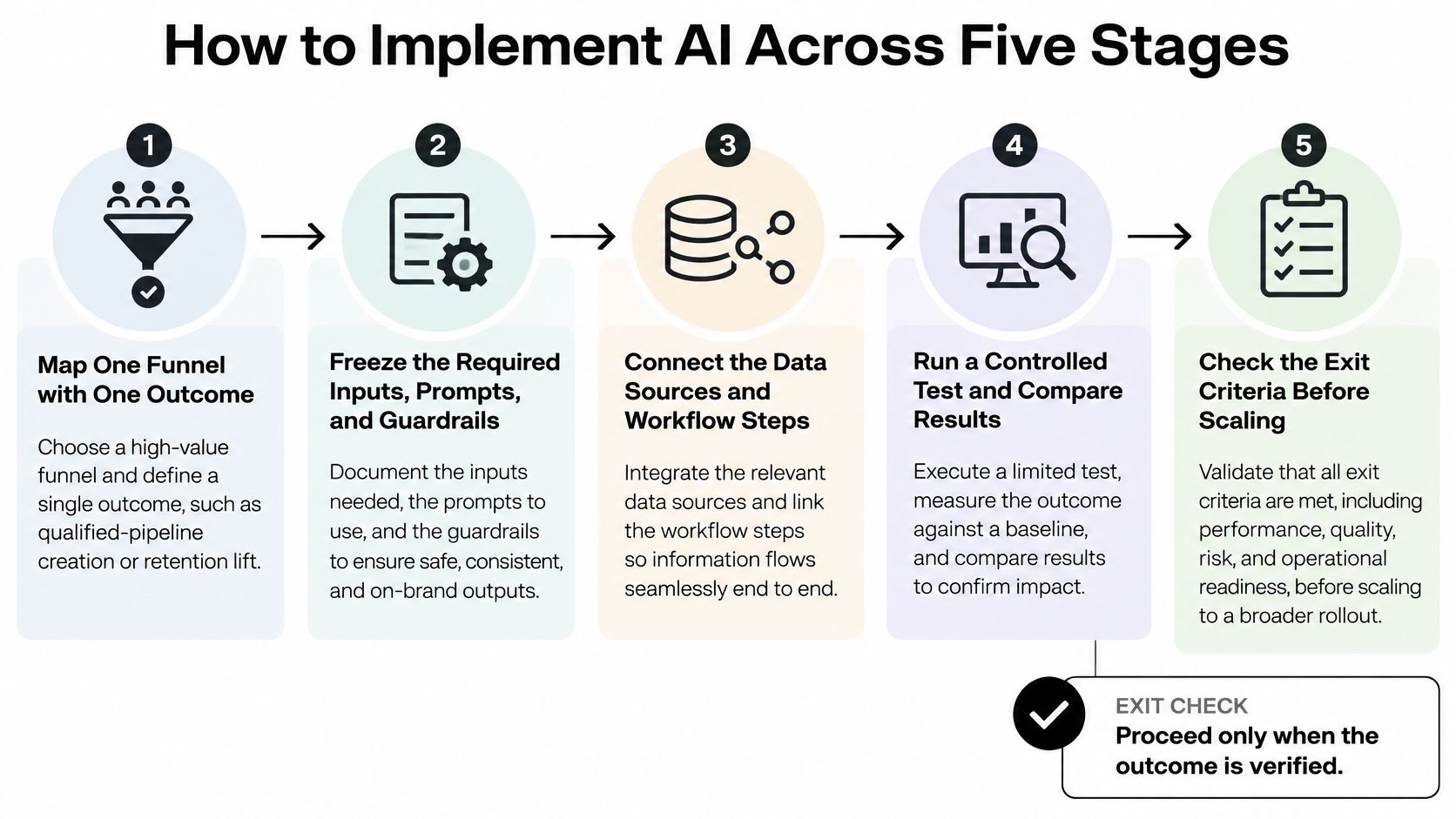
Define the outcome and prepare the inputs
1. Map a funnel and name the outcome. Choose inbound acquisition or account expansion rather than mixing both. Specify what qualifies as an opportunity, who accepts it, and which CRM event records acceptance.
Freeze unrelated use cases. If the project aims to improve qualified-pipeline creation, don't add social scheduling because the integration looks easy.
Exit check: Marketing, sales, and finance agree on the outcome definition and its system of record.
2. Standardize first-party data before model work. Establish required fields for consent status, lifecycle stage, account owner, and the taxonomy for industry, product, and intent. Missing values should enter a repair queue rather than receive invented defaults.
Keep historical outcomes separate from inputs available at decision time. Training a score with information recorded after qualification creates misleading apparent accuracy.
Exit check: Eligible records pass validation, and incomplete records cannot enter the automated path.
Build a bounded decision and test it
3. Deploy AI on the chosen task. For routing, let the model propose a destination within an approved owner list. For enrichment, allow writes only to specified fields and preserve the previous values.
Don't grant authority to negotiate, close an opportunity, or decide pricing. Keep deterministic rules for hard exclusions and permissions; use AI where interpretation adds value.
Exit check: The workflow completes a normal case, rejects an invalid case, and routes an uncertain case to a person.
4. Run a controlled test. Compare conversion rate, cost per qualified opportunity, revenue per account, processing latency, and unsubscribe or complaint rates. Keep qualification standards stable so the test doesn't reward looser opportunity creation.
Agree on stop conditions before launch. A workflow that improves conversion but creates unacceptable customer harm hasn't passed.
Exit check: Assignment, event tracking, and outcome reporting reconcile to CRM records.
Make operation accountable
5. Activate review and recovery controls. Record prompt and model versions, source references, decisions, approvals, and downstream actions. Test rollback with a real failed execution rather than assuming an inactive toggle is sufficient.
Assign ownership for hallucinated claims, biased targeting, privacy failures, unexplained scores, and objectives that drift away from revenue. Each incident needs a person who can pause execution and authorize restoration.
Exit check: An operator can explain a decision, stop pending actions, and restore the approved configuration.
At MakeAutomation, our agency automation process follows Discovery & Audit, Solution Architecture, Build & Integration, and Deploy & Optimize. Those delivery phases don't replace the revenue team's exit checks. Approval rules must specify what the reviewer sees and what the workflow does when approval never arrives.
Proving Incremental Revenue Not Just Output
Demonstrating marketing's impact on financial outcomes remains the top challenge for 64% of marketing leaders, while only 49% of surveyed organizations can measure the ROI of their AI investments, according to Jasper's State of AI Marketing 2025. More activity doesn't resolve that measurement gap. You need a credible estimate of what would have happened without the automation.
The useful distinction is between additional qualified demand and work completed more cheaply.
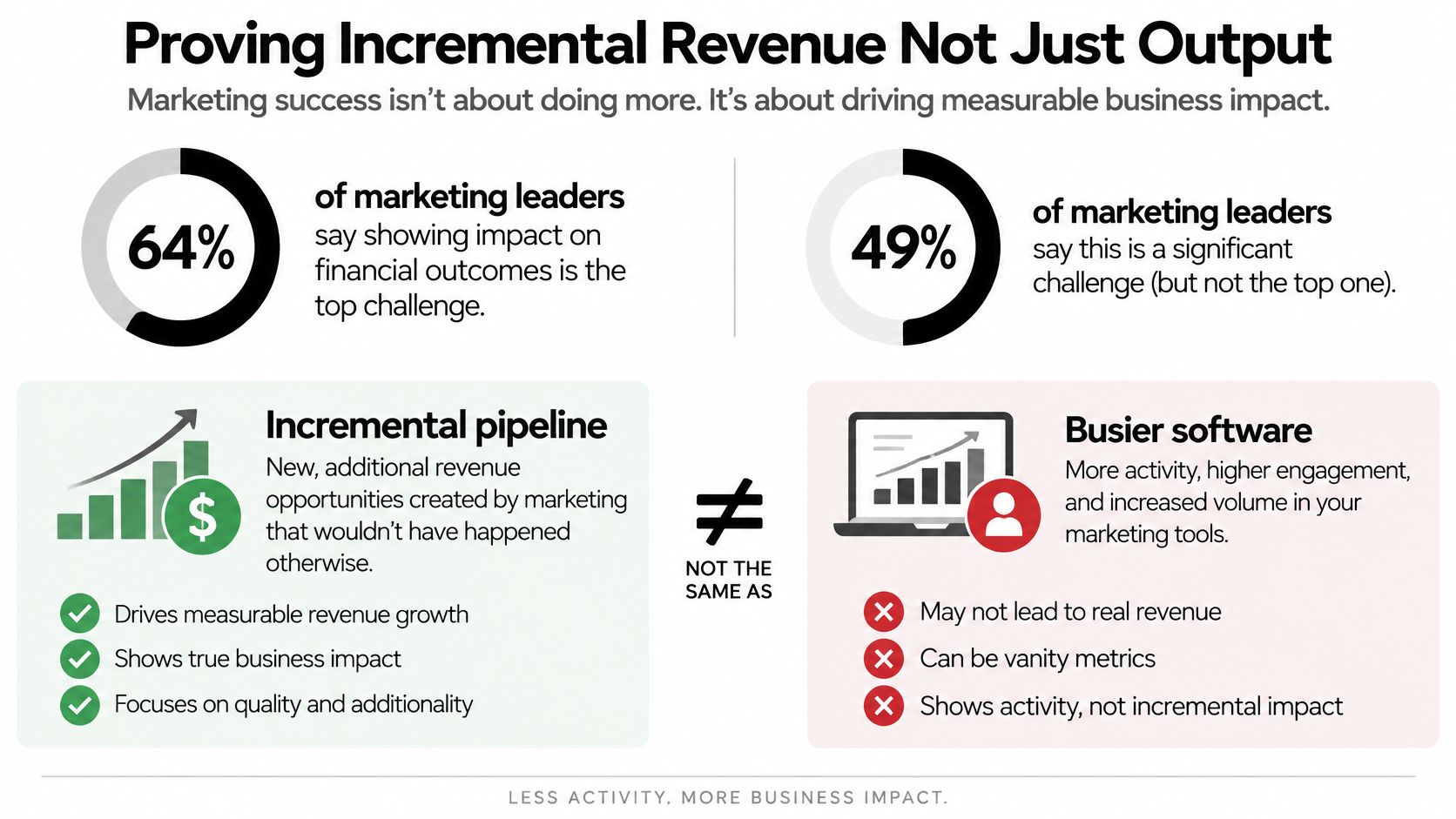
Holdouts that show incremental pipeline
| Activity | Holdout design | Business metric | Ignore |
|---|---|---|---|
| Lead scoring | Randomly assign inbound accounts to AI-assisted prioritization or existing scoring; keep follow-up policy consistent | Qualified pipeline and cost per qualified opportunity | Emails scored |
| Content variants | Same eligible audience and offer, randomized variants plus a business-as-usual holdout | Opportunities from replies | Words produced |
| Nurture sequences | Matched accounts assigned to adaptive nurture or the existing sequence | Revenue per account and stage velocity | Open rate |
| Next-best action | Matched accounts, one arm left on the manual play | Win rate and cycle length | Clicks |
Randomize at account level when several contacts belong to the same buying group. Otherwise, a treated contact can influence a supposedly untreated colleague, weakening the comparison. Balance assignment using pre-treatment characteristics such as company size, acquisition channel, lifecycle stage, and existing intent.
For scoring, change prioritization while holding outreach cadence and qualification rules steady. If you score leads without letting the score affect any action, you're validating predictions, not testing incremental pipeline.
A holdout isn't a list you neglect. It's the business-as-usual experience against which you judge the proposed improvement.
Give finance a defensible calculation
Instrument events with account ID, assignment, variant, holdout flag, timestamp, and opportunity ID where available. Keep original assignment even if a salesperson ignores the recommendation. Removing inconvenient accounts after assignment makes the result look better than the operating reality.
Calculate the difference in qualified-pipeline value per eligible account between treatment and holdout. Apply that difference to the treated population to estimate incremental pipeline, while reporting uncertainty and unusual deal concentration. Pipeline isn't revenue, so continue tracking realized revenue and gross profit as opportunities mature.
Include model usage, integration maintenance, review time, and additional sales effort in cost. Operational savings can justify a workflow independently, but report them separately from additional demand. The distinction matters when evaluating marketing automation benefits for a budget decision.
For a B2B SaaS client, we designed a 4-stage sales pipeline with automated stage advancement and built 12 automated nurture sequences. That describes implementation scope, not proven lift. Each sequence still needs an eligible comparison population, consistent stage definitions, and traceable outcomes.
Preserve partner influence and sales follow-up in the event history rather than assigning all credit to the last automated touch. Compare conversion velocity and revenue per account alongside qualified pipeline, and inspect whether a large deal dominates the result.
Scale only after the treated arm shows a credible qualified-pipeline advantage across a complete sales cycle, with acceptable costs and harm metrics. If the sample remains inconclusive, keep the test bounded rather than announcing a win.
Prompt Gates and Failure Fixes
Require the model to abstain when approved evidence is missing. Require a named person to approve customer-facing statements that create commercial, legal, or reputational exposure. A prompt asking the model to be careful isn't an enforcement mechanism.
Use the review checkpoint to inspect evidence and permissions, not just grammar.

Put approvals inside the execution path
Build an approved knowledge base containing the offer, proof points, current product details, banned claims, and tone constraints. Retrieve only relevant approved material, and require source references for factual assertions. Missing evidence should produce a review request, not plausible copy.
Route pricing, legal, regulated, and high-value-account communications to named approvers. Put the approval state inside n8n, Make.com, or Zapier before the action reaches HubSpot, Salesforce, or Pipedrive. A side-chat approval isn't sufficient if the workflow can't verify it.
For voice workflows, specify human escalation conditions and what happens when no human is available. Any action involving billing, outbound communication, or CRM-stage changes needs an explicit authorization condition. Use human-in-the-loop automation to design those handoffs as operational steps rather than informal expectations.
Choose models by role and test performance on your own examples. Drafting, long policy-context interpretation, and Workspace-connected tasks can require different configurations; brand familiarity doesn't establish factual reliability.
Diagnose the failure before rewriting the prompt
A review in the Journal of the Academy of Marketing Science finds stronger support for efficiency benefits than consistent effectiveness, while identifying risks including hallucinations, opacity, bias, privacy, and intellectual property. Those aren't all prompt problems. Several require repairing permissions or customer records.
| Symptom | Likely cause | Fix |
|---|---|---|
| Hallucinated product or pricing claim | Model answered outside the approved base | Shrink retrieval to approved sources and block ungrounded lines |
| Wrong accounts in a segment | Broken lifecycle or industry taxonomy | Repair the field rules and rescore only clean records |
| Send with no consent on file | Consent not joined to the contact | Block send until a consent record is stored |
| Score nobody can explain | Features and model version not logged | Log inputs, model version, and a human spot-check |
| Complaint or unsubscribe spike | Prompt or offer drift | Roll back to the last approved prompt version |
| Duplicate outreach to one account | No account-level dedupe | Dedupe on account ID before any send |
The IAB State of Data 2025 report reports that 70% of agencies, brands, and publishers aren't fully integrating AI across media planning, activation, and analysis. Expanding autonomy won't repair fragmented permissions or missing data lineage.
Use this operational lens when reviewing an automated marketing workflow.
- Minimize exposure: Pass only necessary personal information and restrict access by role.
- Test hostile inputs: Treat retrieved documents and inbound messages as untrusted content that cannot override workflow instructions.
- Sample factuality: Compare claims with their cited evidence and check targeting errors across market segments.
- Monitor drift: Inspect changes in outputs, input distributions, approval rejection, and complaints after updates.
Widen autonomy only after repeatable controlled results and closure of outstanding incidents. A clean copy sample isn't enough if the workflow can bypass consent or duplicate a send.
Release condition: No send unless source, claim, and consent are logged.
Start With One Bounded Workflow
Launch a workflow, not a platform program: a low-risk job, a revenue outcome, a holdout, and a named approver. Give the operator authority to keep the pilot narrow when stakeholders request additional channels or use cases.
A calendar can organize the work, but it can't shorten your sales cycle. Treat the following as a hypothetical month-long operating plan, not a promise that pipeline impact will be measurable by month-end.
A practical launch calendar
- Opening week: Audit the chosen CRM object, required fields, consent records, and ownership. Produce a repair queue and agree which records are eligible.
- Build week: Configure scoring or enrichment inside the CRM the team already uses. Test missing inputs, permission failures, retries, and restoration before enabling the live path.
- Pilot week: Activate the controlled comparison with identical human follow-up policies. Inspect rejected records and execution failures daily without changing assignment to improve appearances.
- Decision week: Review incidents, operating cost, reviewer workload, and available outcomes. Choose keep, fix, or rollback, with a written reason and accountable owner.
Don't interpret keep as permission to scale. When opportunities haven't matured, keep means continuing the bounded test with its comparison group intact. Fix means correcting a specific defect and recording the configuration change; rollback means restoring the prior process and stopping pending actions.
Buy implementation help only where ownership is missing
If nobody can maintain the build, bring in a technical builder for that workflow rather than replacing the full stack. We offer white-glove AI ops support and design the system between a client's tools, data, and team, including AI agents, n8n workflows, internal dashboards, and custom APIs. Our integrations cover more than 200 platforms, including HubSpot, Salesforce, Pipedrive, and Slack.
The useful starting request is an audit of the selected workflow: its inputs, permissions, failure paths, and measurement design. Keep acceptance tied to inspectable behavior, not a demonstration that produces polished output.
Don't add another workflow until the initial one has demonstrated a credible qualified-pipeline advantage over its holdout. Faster content isn't the success test. Incremental qualified pipeline is.
MakeAutomation offers hands-on workflow design, integration, and AI ops support for B2B and SaaS teams. Visit MakeAutomation to discuss a bounded workflow audit and a rollout with measurable outcomes, human approval gates, and a recovery path.