Steps of Making a Website That Converts for B2B & SaaS
Founders waste months on websites that look polished and sell nothing because they start in the wrong place.
The usual advice on the steps of making a website starts with themes, color palettes, and homepage layouts. That order serves designers and website builders. It does not serve a B2B founder who needs pipeline. A site should collect intent, qualify interest, push clean data into your CRM, trigger follow-up, and make conversion gaps obvious in your analytics.
Treat the website like revenue infrastructure from day one.
That changes the build process. You define the conversion paths before you pick components. You decide what each form should capture before you write the copy. You map CRM fields, attribution tracking, and lead routing before launch, because bolting those on later creates messy data, missed handoffs, and a site that looks finished while underperforming.
A practical website build process covers planning, content, testing, launch, promotion, and ongoing maintenance. That framing is useful. The mistake is treating those steps like a publishing checklist instead of a growth system. Build the capture, tracking, and automation architecture first. Then design the pages around it.
Why Most Website Guides Set B2B Founders Up to Fail
Most website guides assume the job is done when the site is live.
That's wrong for any founder who needs pipeline. A site that exists online isn't an asset. It's overhead. It becomes useful only when it helps a buyer understand your offer, trust your team, and take the next step without friction.
The template-first mistake
Founders get bad advice because the popular content around website creation is aimed at beginners who want to publish something quickly. That advice overweights setup and underweights business architecture. You get long sections on templates and short mentions of analytics, lead capture, and post-launch iteration.
That creates the wrong order of operations:
- Page design comes too early. Teams start choosing layouts before they know what each page must do.
- Forms get added late. Lead capture becomes a widget in the footer instead of a core path.
- Analytics becomes cleanup work. Tracking is treated like post-launch admin instead of part of the build.
- CRM integration gets postponed. Sales teams keep copying leads manually because nobody planned the handoff.
A B2B website should behave like a sales system with pages attached, not a page collection with a contact form attached.
What a real growth website does
A conversion-first website has a narrower mission. It helps the right visitor move forward. That usually means booking a demo, requesting a quote, starting a conversation, downloading a useful asset, or joining a nurture sequence.
The practical difference is simple. Every page needs a job. Every CTA needs a destination. Every form submission needs a workflow after the click.
That changes the steps of making a website from a design project into a revenue project. You don't ask, "What should the homepage look like?" You ask, "What should happen when an operations leader lands on this page from a high-intent search, and how do we route that intent into the right follow-up?"
The founder standard
Use this standard: if your site launches without analytics, lead routing, and measurable conversion paths, it isn't launch-ready. It's a draft in production clothing.
The Blueprint Before the Build
Founders waste months on website projects because they start with screens instead of system design.
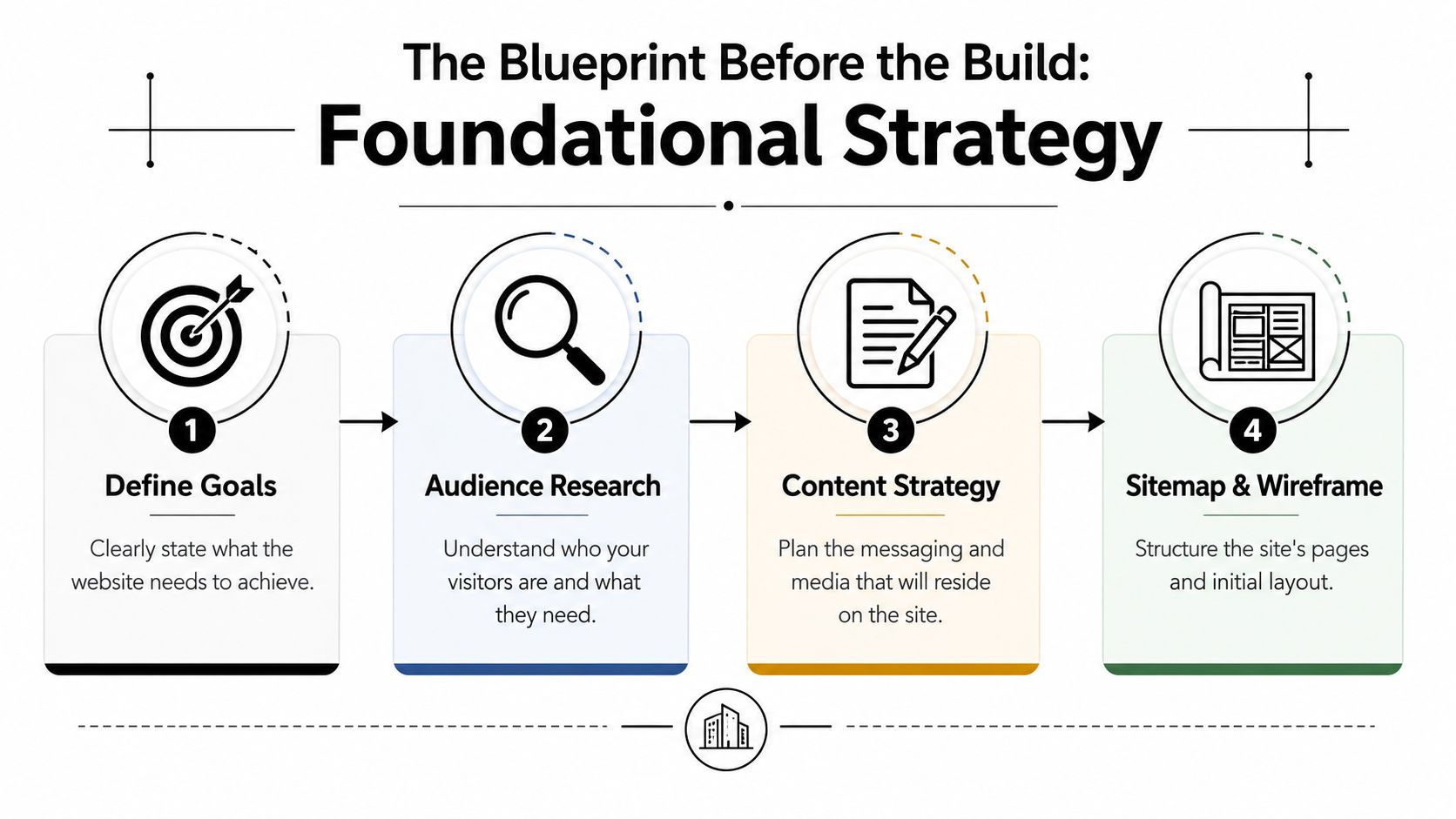
Before anyone touches WordPress, Webflow, Figma, or a headless CMS, lock four decisions: the conversion goal, the buyer path, the data you need to capture, and the handoff into sales or automation. The build comes after that. Moburst breaks the website process into strategy, design, development, testing, and launch in its overview of the website development process. That sequence is right. The mistake is treating strategy like a light kickoff exercise instead of the part that determines whether the site produces pipeline.
Set the revenue objective first
"We need a new website" is not a strategy. It is a budget line.
Pick the primary business outcome the site must produce. For B2B and SaaS teams, that usually means one of four things:
- Book qualified demos
- Capture high-intent sales inquiries
- Generate leads for nurture and follow-up
- Pre-sell a niche audience before a sales conversation
Choose one as the dominant objective. Then define the mechanics behind it. What counts as a qualified conversion? Which pages should drive that action? Which form fields are actually useful? Which CRM stage should that lead enter? If you cannot answer those questions before design starts, the site architecture is still unfinished.
Define the buyer with buying context
Skip the bloated persona workshop. Write the buying reality in plain language.
Document who initiates the search, who evaluates options, who signs off, and who blocks the deal. Then list what each person needs to see before they will move forward. A founder may care about speed and commercial upside. An operations lead may care about implementation risk, integrations, and reporting. Procurement may care about process, security, and contract clarity.
That context should shape the site structure. It also shapes your forms, CRM routing, and follow-up logic.
Map the conversion paths before the sitemap
A website should have named journeys, not a stack of pages.
Start with the high-intent paths you want to create. Examples:
- Search visitor to demo request
- Use-case page visitor to qualified inquiry
- Resource download to nurture sequence
- Direct traffic visitor to contact form
- Pricing page visitor to sales conversation
For each path, define the entry page, supporting proof, CTA, form, CRM destination, and next action after submission. This is the part founders skip, then regret. If the form submits and nothing useful happens after that, the page did not convert. It only collected data.
If your team needs a formal planning document, use a structured project plan for website development to assign scope, ownership, dependencies, and launch responsibilities before design review starts.
Study competitors for path design
Competitor research matters. Style copying does not.
Review competing sites for structural decisions that affect conversion:
- How quickly the offer becomes clear
- How many clicks it takes to reach a money page
- Where proof appears
- How they separate industries, use cases, or buyer types
- How much friction exists in forms
- What happens before and after the primary CTA
Keep the architecture shallow. A buyer should not have to dig through layers of navigation to figure out what you sell and how to act. If you want a broader comparison of platforms while reviewing competitor patterns, Northpoint Web has a useful roundup of top website builders for small businesses. Use it to compare publishing and integration options, not to copy templates.
Build the page inventory around intent
The sitemap comes after the journey map.
A strong B2B site usually includes these page types:
- Homepage
- Product or solution pages
- Use-case or industry pages
- Pricing, qualification, or how-it-works page
- Trust and company pages
- Resources
- Contact or demo page
- Legal and privacy pages
Now assign one job to each page. Then assign one primary CTA. Then define what data the page should capture and where that data should go. If a page has no clear role in acquisition, qualification, education, or trust building, cut it.
Plan message hierarchy before wireframes
Wireframes should organize persuasion, not decorate empty space.
For every core page, answer these questions first:
- What intent brought the visitor here
- What question needs to be answered immediately
- What proof removes the biggest objection
- What CTA fits this stage of awareness
- What information should the form collect
- What workflow starts after submission
That last point matters more than teams admit. A conversion-first website is part of your operating system. Form submissions should trigger CRM records, lead source tracking, routing rules, notifications, and the right follow-up sequence from day one.
Wireframe the decision flow
Good wireframes make decisions visible.
They should show reading order, proof placement, CTA rhythm, fallback actions for lower-intent visitors, and where lead capture happens. They should also show where analytics events need to fire so you can measure page performance, form completion, and handoff quality once the site goes live.
Pretty wireframes are irrelevant. Useful wireframes make the next step obvious and measurable.
Choosing Your Tech Stack for Scalable Growth
Your website platform is a growth decision, not a design preference.
Pick the wrong stack and you'll spend the next year fighting plugin conflicts, awkward integrations, slow updates, or expensive rebuilds. Pick the right one and your team can publish fast, integrate with the rest of your go-to-market system, and evolve the site without rebuilding the business around it.
Start with the actual decision criteria
Founders usually ask, "Which platform is best?" That's lazy framing. Ask this instead: "Which stack fits our team, content model, integration needs, and tolerance for maintenance?"
Use these filters:
- Team capability. Can your team handle code, or do they need a visual builder?
- Marketing velocity. How often will pages, CTAs, and forms change?
- Integration depth. Do you need CRM, email automation, webhooks, product data, or app-level content delivery?
- Governance. Who can publish, edit, approve, and maintain the site safely?
- Maintenance load. How much ongoing technical overhead can you absorb?
If you want a broader platform roundup before making the call, Northpoint Web has a practical review of top website builders for small businesses. Use it as a starting list, then evaluate each option against your lead gen workflow, not just design flexibility.
The three serious options
For most B2B and SaaS teams, the choice lands in one of three camps. Self-hosted WordPress, Webflow, or a headless CMS with a modern frontend.
| Criteria | WordPress (Self-Hosted) | Webflow | Headless CMS (e.g., Sanity + Next.js) |
|---|---|---|---|
| Ease of editing | Strong for content teams once configured well | Strong for marketers and designers | Depends on implementation |
| Design flexibility | High, but often plugin-dependent | High within visual system | Very high |
| Integration approach | Broad plugin ecosystem and custom options | Good with forms, embeds, apps, and custom workflows | Best for custom integrations and complex architecture |
| Maintenance burden | Highest of the three | Lower than self-hosted WordPress | Higher technical ownership |
| Security management | Requires active management | More controlled platform environment | Depends on hosting and implementation choices |
| Publishing speed | Fast if admin is clean | Fast for landing pages and site updates | Fast after setup, slower to implement changes without dev support |
| Best fit | Content-heavy teams that want flexibility | Growth teams that need speed without deep engineering | Companies expecting custom product experiences and long-term scalability |
WordPress when flexibility matters more than simplicity
WordPress still works well for B2B companies with active content programs, SEO needs, and access to technical support. It gives you broad control and a huge plugin ecosystem. That matters if you're connecting forms, CRM tools, scheduling software, analytics, and gated content.
But self-hosted WordPress creates operational responsibility. Someone has to manage updates, plugin quality, backups, performance, and security. If nobody owns that, the site degrades gradually.
Choose WordPress if:
- You publish lots of content
- You need broad plugin support
- You have reliable technical ownership
- You want flexibility without fully custom development
Avoid it if your team wants low maintenance and hates plugin management.
Webflow when speed and control need to coexist
Webflow is often the cleanest option for growth-stage teams that care about launch speed, visual control, and easier maintenance. Marketers can update pages without opening a ticket. Designers can preserve quality. The platform is more structured, which helps avoid the chaos common in poorly governed WordPress installs.
Its main limit appears when you need deep app behavior, unusual backend logic, or highly custom content relationships. Then you're outside the comfortable zone.
Choose Webflow if:
- Your site is mostly marketing-driven
- Your team wants visual editing with less technical overhead
- You need fast landing page iteration
- You value cleaner maintenance workflows
Headless CMS when the website is part of the product experience
Headless is the right move when your website isn't just marketing. It may power customer-facing resources, dynamic product content, structured data across channels, or custom app experiences. A stack like Sanity plus Next.js can be excellent for scale, but only if that flexibility is necessary.
A lot of founders choose headless too early because it sounds advanced. That's a mistake. Headless adds capability, but it also adds dependency on engineering and stronger process discipline.
Build on headless because your requirements demand it, not because your developer likes the architecture.
Choose headless if:
- You need custom content models
- You expect heavy integration work
- You have engineering support
- You want long-term architecture control
My blunt recommendation
Most B2B founders should not start with headless. Many should not even start with WordPress. If your immediate goal is a conversion-first site that marketing can operate, Webflow is often the cleanest path.
WordPress is still strong when content depth and plugin breadth matter. Headless is for organizations with real complexity, not aspirational complexity.
Your platform should make these steps of making a website easier: publish pages, capture leads, sync data, measure behavior, and improve conversion paths. If the stack makes those harder, it's the wrong stack.
Designing for Conversion Not Just Aesthetics
Design that doesn't move buyers toward action is decoration.
B2B founders often approve websites the way consumers judge a landing page template. It looks modern. The colors feel premium. The animation is smooth. None of that matters if a visitor can't understand the offer, trust the company, and act without friction.

Good design answers buying questions fast
Every high-converting page should answer a predictable sequence:
- What is this
- Is it for me
- Why should I trust it
- What do I do next
That's design. Not in the visual-art sense. In the decision-sequencing sense.
Your hero section should make the offer obvious. Your page body should handle objections in order. Your CTA should match intent. If the first clear next step appears only after a long scroll, you've buried the action.
Wireframes should control the sales conversation
A wireframe is where conversion design really happens. You're setting reading order, proof placement, CTA cadence, and form timing.
For a service page, that often means:
- Opening with a sharp value proposition
- Following with problem-solution fit
- Adding proof and process clarity
- Ending with a low-friction next step
For a product page, it might mean feature explanation, use-case fit, integration clarity, and then demo or trial action.
If you need a sharper lens on balancing visual appeal with practical performance, this piece on form and function in design is useful. The core idea is right. Function isn't the enemy of aesthetics. It's what gives aesthetics a job.
Fix the usual conversion killers
Most low-performing sites share the same design errors:
- Headline fog. The page opens with a slogan instead of a value proposition.
- CTA overload. Every button says something different, so nothing stands out.
- Proof buried too low. Buyers must hunt for credibility.
- Forms ask too much. Teams collect data they won't use and lose submissions they needed.
- Visual hierarchy is weak. Everything looks equally important, so the page has no direction.
If the eye doesn't know where to go, the buyer doesn't know what to do.
Accessibility is conversion work
Many founders and designers get exposed.
A website can look complete and still be structurally incomplete if it fails accessibility basics. Accessibility validation should happen immediately after wireframing and before content finalization, not after deployment, based on the guidance summarized from the YouTube accessibility and design workflow resource.
That means checking for:
- Clear page titles
- Logical H1 and heading hierarchy
- Readable contrast
- Keyboard-friendly navigation
- Screen-reader awareness
- Responsive behavior across devices
Accessibility isn't a charitable add-on. It improves usability for everyone. Better structure helps scanning. Better contrast improves readability. Better semantic hierarchy helps comprehension and often supports search visibility too.
Forms deserve design attention
Your lead form is often the highest-stakes element on the page. Treat it that way.
A few hard rules:
- Ask only for data tied to follow-up. If sales won't use it, remove it.
- Match form length to offer value. A newsletter signup and a demo request should not ask the same questions.
- Write the CTA like an action. "Book demo" beats "Submit."
- Clarify what happens next. Tell people whether they'll get a calendar link, email response, or call.
A practical page review checklist
Use this before approving any page:
- Clarity above the fold
- One primary CTA
- Logical information order
- Visible trust signals
- Accessible structure
- Low-friction form
- Mobile readability
A founder doesn't need to become a designer. But you do need to judge design by business outcome. If the page looks expensive and converts poorly, it failed.
Your Technical Pre-Launch and Deployment Checklist
A website can look polished in staging and still fail on day one.
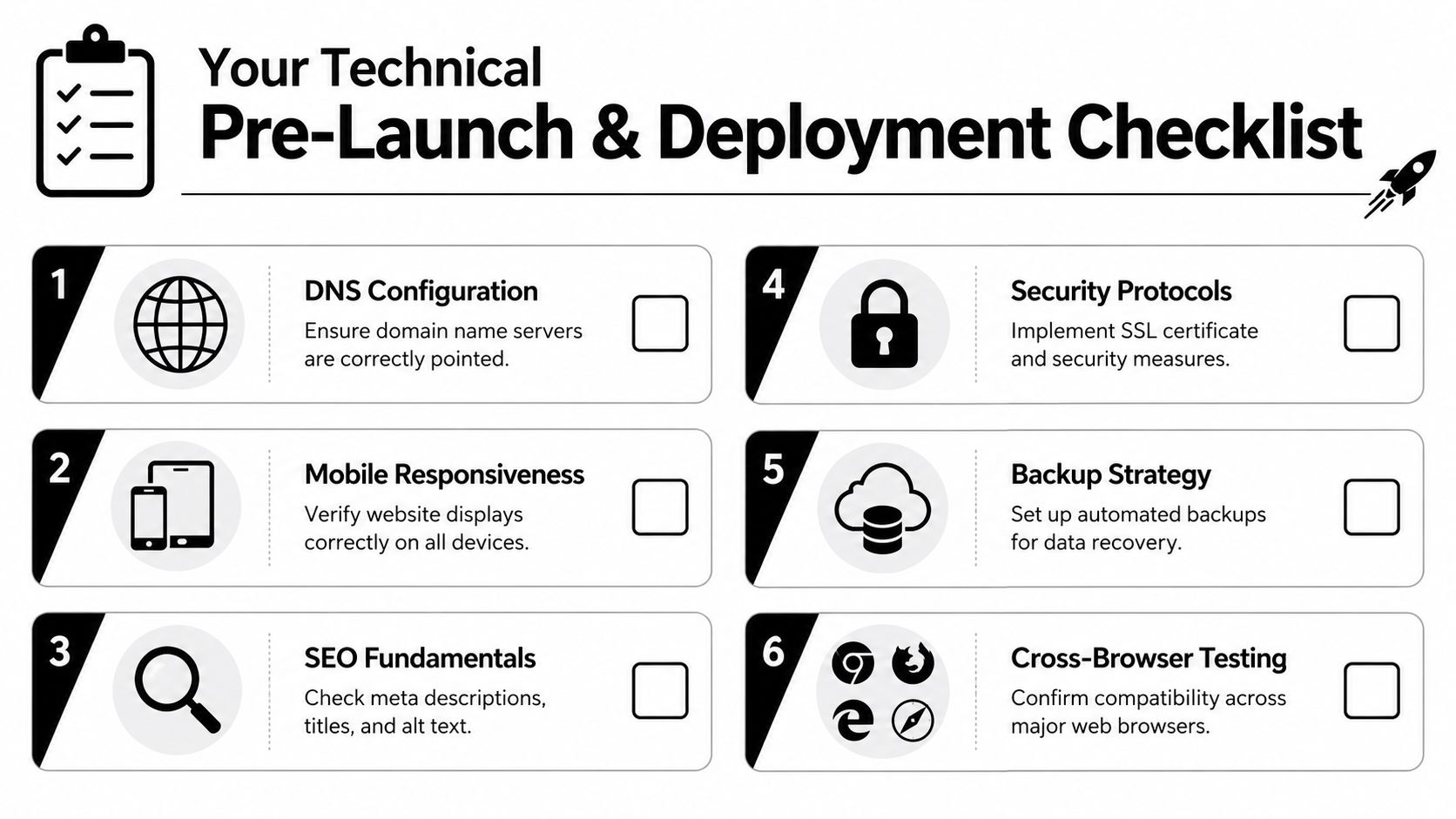
The failure usually happens in the invisible layer. Forms submit but never hit the CRM. Analytics loads on some pages but misses conversions. Redirects break high-intent traffic. DNS propagates, but the wrong version of the site gets indexed. Founders who treat launch as a publishing task end up fixing preventable revenue leaks after traffic starts arriving.
What must be true before launch
Run launch like a release, not a reveal.
- Analytics and conversion tracking are live. Install GA4, Search Console, and your ad platform pixels before traffic hits the site. Define key events such as form submissions, booked meetings, CTA clicks, and thank-you page views.
- Lead capture connects to your CRM. Every form should create or update a contact record, tag the source, and trigger the right internal notification or workflow.
- HTTPS works on every version of the domain. Test
http,https,www, and non-wwwversions so users and search engines land on the preferred canonical version. - Core search setup is in place. Important pages need title tags, meta descriptions, clean URLs, canonical rules where needed, and image alt text when it supports meaning.
- Forms work under real conditions. Test with real email addresses, edge-case inputs, mobile devices, and every routing path. Confirm thank-you messages, autoresponders, CRM field mapping, and ownership assignment.
- Key pages are easy to reach. Prospects should not have to dig through layered navigation to find solutions, pricing context, proof, or contact paths.
- Responsive QA is complete. Review priority pages on actual phones, tablets, and desktop breakpoints. Check layout, tap targets, form usability, and load behavior.
The overlooked deployment tasks
This is the part B2B founders skip, then regret.
- Submit your XML sitemap and verify robots directives
- Map and test redirects if you are replacing an existing site
- Check that no important page is blocked from indexing
- Compress large images, video thumbnails, and downloadable assets
- Verify favicon, social preview metadata, and brand presentation in shared links
- Review privacy policy, cookie behavior, consent tooling, and form compliance language
- Test transactional emails from the site so confirmations do not land in spam
If a lead submits a form and the handoff breaks, your website is not launched. It is exposed.
Performance and release discipline
Treat website deployment with the same control you would use for product changes that affect pipeline.
A disciplined process includes a staging environment, final QA ownership, backups, rollback steps, and a post-launch smoke test on your money pages. Check homepage load, form completion, CRM record creation, calendar booking, conversion events, and alerting workflows. For teams publishing frequent updates, a working knowledge of DevOps and continuous delivery practices for release control helps reduce avoidable errors and keeps growth experiments from breaking the site.
If you need a broader release framework, this strategic website launch guide is a useful reference for planning the final go-live sequence.
The launch standard
Use one standard. Every critical user path must be tested by a human from click to system handoff.
That means someone visits the page, fills the form, receives the confirmation, appears correctly in the CRM, triggers the right automation, and gets routed to the right owner. Anything less is guesswork. Launch means the site is ready to capture, track, and route demand without manual patchwork.
Activating Your Growth Engine Post-Launch
Launch is where the real work starts. A website that looks polished but fails to capture, route, and follow up on demand is a liability, not an asset.
The first week after launch decides whether your site becomes a lead engine or another manual admin problem. Your job is to turn every key action into a tracked workflow. Form submission. CRM record creation. owner assignment. confirmation email. sales alert. analytics event. If any step breaks, growth breaks with it.

Connect forms to the systems that close deals
Stop sending form fills to a shared inbox and calling that a process. Every submission should create a contact, tag the source, assign ownership, and trigger the next action automatically.
Start with four connected systems:
- A CRM such as HubSpot or Salesforce
- A scheduling layer if the goal is to book calls or demos
- An email automation tool for confirmations and nurture
- An internal alerting path so sales responds fast
Make the routing rules explicit. Enterprise inquiries should not follow the same path as low-intent downloads. Partner requests should not sit in the same queue as demo requests. Build the logic now, while traffic volume is still manageable.
If you need middleware between the site and downstream tools, MakeAutomation can connect website triggers, process webhook-based workflows, and map form data into follow-up actions across your operating systems.
Build the first automation sequence
You do not need a complex nurture system on day one. You need a fast, reliable first response.
A strong starting sequence includes:
- Immediate confirmation to the lead
- CRM record creation or update
- Ownership assignment
- Internal notification
- Timed follow-up if no rep responds
- Segmented nurture for leads not ready to buy
Speed matters. So does consistency.
A founder should be able to test the form, submit it, and watch the lead move through the full chain without asking anyone to push it along manually. That is the standard.
Captured demand has no value if your team still has to sort, assign, and chase it by hand.
Measure behavior that affects pipeline
Post-launch reporting should answer one question. Where is the site helping revenue, and where is it leaking intent?
Use your analytics stack to track the basics from day one: traffic source, landing page performance, CTA clicks, form starts, form completions, booking completions, and assisted conversions. Standard engagement metrics such as bounce rate, session depth, time on site, exit points, and conversion rate are useful only when tied to action.
Review the site with commercial intent in mind:
- Which landing pages attract traffic but fail to create leads
- Where visitors abandon the demo or contact flow
- Which forms get started but never submitted
- Which traffic sources turn into qualified conversations
- Which pages support conversion before the final inquiry
This review process needs structure. If you want a broader tactical reference, Netco Design has a useful strategic website launch guide that complements a conversion-first operating model.
Run a one-month benchmark review
Thirty days is enough time to spot friction, weak messaging, and broken routing. It is not enough time to justify a redesign.
Review the site across five areas:
- Primary CTA paths
- Top landing pages
- Exit behavior on key pages
- Lead quality by source and page
- Sales feedback on submission quality and follow-up speed
- Speed or usability issues raised by real visitors
Then fix the obvious problems first. Rewrite weak headlines. Tighten CTA copy. Cut unnecessary form fields. Add proof where buyers hesitate. Adjust routing rules where lead ownership is unclear.
Founders waste time when they jump to visual changes before fixing conversion friction. The site usually needs sharper decisions, not prettier layouts.
Turn reporting into operating discipline
A website becomes a growth system when teams use reporting to change behavior.
That means marketing improves pages with weak conversion paths. Sales flags low-fit inquiries and response gaps. Operations fixes routing, enrichment, and ownership rules. Leadership reviews pipeline contribution, not vanity traffic spikes.
Keep the process simple. Pick one bottleneck, fix it, measure the result, and repeat.
A short walkthrough can help teams think about that operating model in a more practical way.
The founders who get results from their website treat launch as the start of system management. Traffic comes in. Behavior gets measured. Friction gets exposed. The site improves because the operating model behind it improves.
If you want a website that does more than sit online, MakeAutomation can help you design the workflows behind it. That includes lead capture logic, CRM routing, automation mapping, and the operating systems that turn a website into something your sales and marketing teams can use.