
Master Human-in-the-Loop Automation: Scale Your Business
You can usually spot the moment a workflow stops being “good enough.”
Leads start piling up in a shared inbox. Sales ops adds another spreadsheet. Someone on the team builds a quick Airtable or Notion workaround. Reps begin second-guessing lead scores because the model looks fast but misses obvious context. Then leadership asks the dangerous question: can't we just automate all of this?
That's where most B2B teams get stuck. Manual review doesn't scale, but full autonomy creates risk you feel immediately in pipeline quality, customer experience, and compliance. Human-in-the-loop automation sits in the middle, but only if you design it correctly. If you treat it as a last-minute approval layer, you often end up with slow workflows, reviewer fatigue, and false confidence in bad outputs.
The Tipping Point from Manual Work to Smart Automation
A familiar example is lead qualification.
A SaaS company starts with founder-led sales. Every inbound form gets reviewed by a human. Early on, that works because volume is manageable and the founders know the market well enough to spot strong accounts, weak fits, and fake interest quickly. Then growth kicks in. Campaigns expand, partnerships drive more inbound, and SDRs inherit a queue that gets messier every week.
The first fix is usually more manual labor. Hire another rep. Add another handoff. Create more routing rules. That buys time, but it also creates drag. Good leads wait too long. Low-fit accounts still sneak into demos. Reviewers interpret the same signals differently. The process becomes expensive without becoming reliable.
The second fix is often overcorrection. Teams push for full automation with CRM scoring, enrichment, LLM-based summaries, and rigid routing logic. That works for the obvious cases. It breaks on nuanced ones: multi-product buyers, unclear intent, conflicting firmographic data, or regulated industries where a wrong next step has real downstream cost.
Practical rule: If a workflow has high volume, recurring patterns, and a steady stream of ambiguous edge cases, it's a strong candidate for human-in-the-loop automation. An n8n automation specialist can translate those edge cases into approval steps, fallbacks, and audit trails.
This isn't a niche problem. According to the World Economic Forum, 42% of business tasks will be automated by 2027, a projection highlighted in this analysis of automation and HITL workflows. That same discussion points to the core value of HITL: it limits the blast radius when automation meets messy reality.
Why the middle layer matters
For B2B teams, the goal isn't to keep humans reviewing everything. The goal is to reserve human attention for decisions where context matters more than speed alone.
That changes the economics of the workflow:
- Automation handles the bulk work so teams stop wasting time on repetitive triage.
- Humans handle uncertainty where customer intent, policy, or risk can't be reduced to a simple rule.
- The system gets better over time because every human correction becomes operational feedback.
A scaled workflow doesn't remove people. It places them where their judgment has the most impact.
What Human-in-the-Loop Automation Really Means
The concept is analogous to autopilot in commercial aviation. The system handles stable, repeatable conditions well. Human operators stay responsible for setup, exceptions, and moments when context changes faster than the machine can interpret it.
That's the right mental model for human-in-the-loop automation in B2B operations.
The machine does the routine work. It classifies, routes, summarizes, extracts, scores, or recommends. A person steps in when confidence drops, rules conflict, or the consequence of a wrong decision is too high to leave unattended.
What HITL is and what it isn't
HITL is not “AI does everything and a manager clicks approve.”
That design sounds safe, but it usually creates a rubber-stamp workflow. Reviewers stop reading closely, bottlenecks form, and nobody learns much from the approvals. Real HITL means the human role is intentional. The person reviews only the subset of tasks where their judgment changes the outcome.
A strong HITL workflow usually includes these ingredients:
- Clear auto-pass conditions for low-risk, high-confidence tasks
- Escalation triggers for ambiguity, exceptions, or policy-sensitive cases
- A review interface that gives the human enough context to decide quickly
- A feedback path so corrections improve future behavior
A human checkpoint is useful only when it changes the system's behavior, not when it simply slows the queue.
Workflow comparison
| Attribute | Manual Workflow | Fully Automated Workflow | Human-in-the-Loop (HITL) |
|---|---|---|---|
| Speed | Slowest, depends on staff capacity | Fastest on routine tasks | Fast on routine tasks, slower only on exceptions |
| Cost structure | Labor-heavy | Low marginal cost, higher error risk in edge cases | Balanced cost with targeted human review |
| Scalability | Hard to scale without headcount | Easy to scale technically | Scales well if exception routing is disciplined |
| Accuracy on ambiguous work | Often good, but inconsistent across reviewers | Often weak without enough context | Stronger because humans handle ambiguity |
| Auditability | Depends on documentation discipline | Can be opaque if decisions aren't surfaced well | Strong when review actions and overrides are logged |
| Best fit | Low volume, high nuance | High volume, low ambiguity | High volume with meaningful edge cases |
Where HITL wins
HITL tends to outperform both extremes when the workflow has mixed predictability.
Some records are obvious. Some are not. If you force a human to inspect everything, cost rises and throughput drops. If you force the model to decide everything, you invite silent errors. HITL creates a routing layer between those two failure modes.
That's why it fits common B2B workflows so well:
- Lead qualification where enrichment signals conflict
- Customer support triage where urgency and sentiment don't always align
- Invoice or document processing where extraction is easy until formatting breaks
- Content moderation and QA where policy interpretation matters
The key distinction is simple. Automation should own volume. People should own judgment.
Core Architecture and Integration Patterns
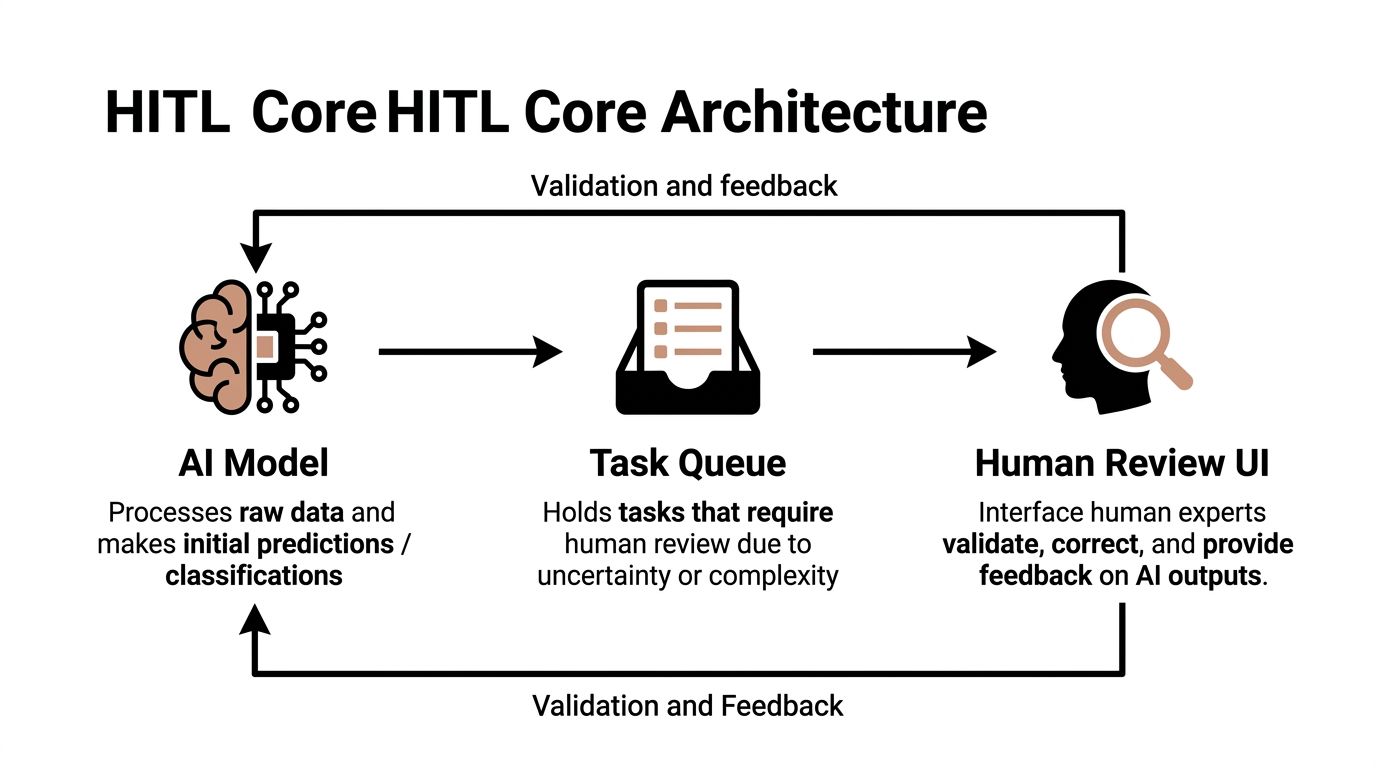
Most human-in-the-loop systems that scale use the same basic shape. The labels vary by stack, but the architecture is consistent: an AI layer makes a first pass, an orchestration layer routes exceptions, and a reviewer interface captures final decisions.
The three components that matter
AI model
This can be a classification model, extraction model, ranking model, or LLM-based decision layer. Its job is to process incoming data and return an output with enough metadata to support routing. In practice, that usually means a recommendation, a rationale, and a confidence signal.
Task queue
This is the traffic controller. It decides what gets auto-processed, what gets held, and what goes to a person. In lean systems, the queue might be implemented in a workflow platform, a message bus, or a ticketing layer. What matters is deterministic routing and visibility into backlog.
Human review UI
Many projects fail at this stage. If reviewers have to jump between Slack, email, CRM records, PDFs, and dashboards to make one decision, your HITL layer becomes a tax. The UI should show the original input, the model output, the reason for escalation, the allowed actions, and the audit trail in one place.
How the loop improves over time
IBM's overview of HITL machine learning notes two practical mechanisms worth understanding: Reinforcement Learning from Human Feedback and active learning. RLHF uses a reward model trained with direct human feedback to optimize an AI agent. Active learning narrows human review to the model's most uncertain predictions.
That has direct operational value.
Instead of reviewing random samples, you review the cases most likely to teach the system something useful. That concentrates human effort where it compounds.
A practical stack often looks like this:
- Input systems such as HubSpot, Salesforce, Zendesk, Intercom, Stripe, email, or document uploads
- Model layer using OpenAI, Anthropic, Azure AI, custom classifiers, or rules engines
- Orchestration layer using n8n, Make, Temporal, Airflow, LangGraph, or internal workflow services
- Queue and state management through a database, message queue, or task system
- Review layer built in Retool, React, an internal admin panel, or a workflow product with human task support
- Logging and analytics for overrides, latency, queue depth, and reviewer consistency
If your team is trying to streamline data analysis workflows, the architecture should also support clean movement between source systems, model outputs, and reviewer actions. HITL breaks down when your data layer is fragmented.
Integration patterns that work in practice
The most reliable pattern is confidence-based routing plus rule-based escalation. Don't rely on confidence alone. Add explicit triggers such as account size, regulated keywords, contract risk, missing fields, or customer tier.
A second pattern is review by exception type, not just by queue order. Finance exceptions should go to finance reviewers. Support escalations should go to experienced support leads. “Human review” is not one role.
For teams building agentic workflows, AI agent workflow builders are useful when they let you combine deterministic rules, model calls, and human approval states in one observable system. If the workflow logic lives in five tools, nobody can govern it properly.
Design the review step like a product, not an afterthought. Reviewers are users. If the interface is clumsy, your whole automation layer gets slower and less trustworthy.
Real-World Use Cases for B2B and SaaS
The best use cases share one trait. They contain a large amount of repetitive work plus a smaller set of cases where nuance decides whether the action is right or wrong.

Lead qualification without SDR overload
A growth-stage SaaS company usually has enough inbound volume to justify automation, but not enough tolerance for bad routing to trust full autonomy.
A practical HITL setup works like this. The system ingests form submissions, enrichment data, website behavior, and email context. It drafts account summaries, tags intent, and recommends a route: book with AE, assign to SDR, nurture, or disqualify. Straightforward cases move automatically. Mixed-signal accounts go to a human reviewer.
The reviewer doesn't start from scratch. They inspect the model's recommendation, check supporting context, and make a final call. Over time, the team learns which firmographic signals, buying committee patterns, or product-fit edge cases confuse the model most often.
Support routing and escalation
Customer support is another strong fit because ticket volume is repetitive, but customer emotion and urgency are not.
A system can classify incoming tickets, suggest priority, draft summaries, and route standard requests automatically. The human layer handles policy exceptions, billing edge cases, cancellation risk, and messages where a literal reading misses the customer's real issue. Teams exploring AI agents for customer service often find that the routing logic matters more than the chatbot itself.
A weak support HITL design sends every uncertain ticket to a general queue. A stronger one routes by expertise, such as technical support, finance ops, or customer success.
Marketplace moderation and content QA
B2B marketplaces and user-generated platforms need speed, but they also need judgment.
Automated systems can flag duplicate listings, suspicious language, policy risks, or incomplete submissions. Human reviewers then inspect the edge cases, especially when context affects whether something is acceptable. This keeps the moderation team focused on interpretation rather than manual scanning.
Operations and finance review
Document-heavy workflows are ideal for human-in-the-loop automation because extraction and validation are not the same task.
An OCR or LLM pipeline can read invoices, purchase orders, contracts, or onboarding documents and propose structured outputs. A finance or ops reviewer checks only the records that fail business rules, contain missing values, or present unusual combinations. That's close to what happens in manufacturing environments, where AI can make recommendations while human experts retain final authority. Tulip describes this as a permanent operating model that removes people from “coordination taxes” and refocuses them on more impactful decisions in the workflow, as outlined in its explanation of human-in-the-loop AI in manufacturing.
The common thread across these use cases is simple. Automation handles repetition. Humans handle the cases where context changes the meaning of the data.
Your Step-by-Step Implementation Roadmap
Teams often make HITL harder than necessary. They attempt to build a polished end-state platform before learning where humans add value.
Start smaller.
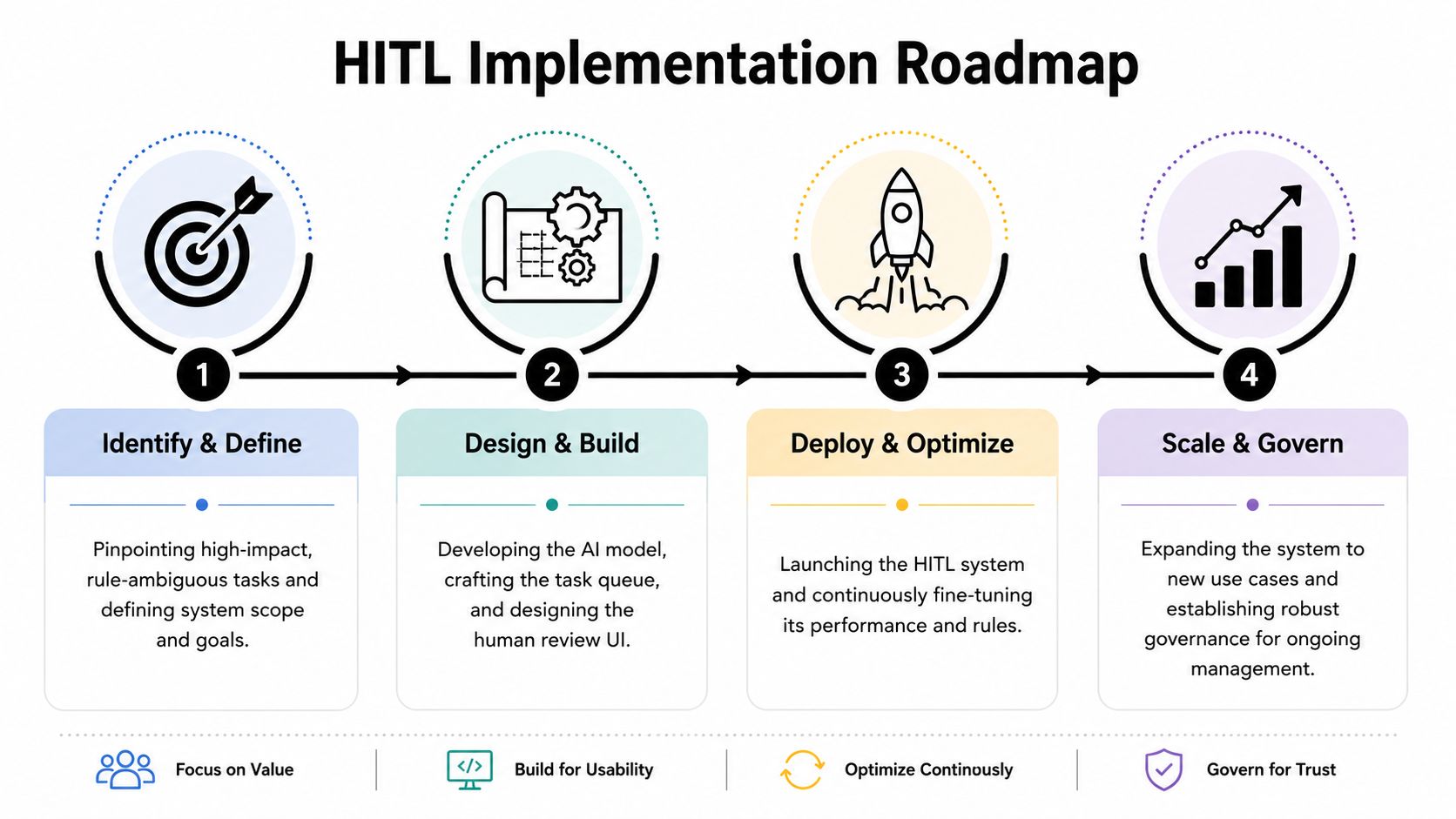
Phase one Identify and define
Pick one workflow where three conditions are true:
- Volume is recurring so automation can remove obvious manual work.
- Errors are visible so the team can tell when the system is wrong.
- Some cases need judgment so a human layer has real value.
Good first candidates include inbound lead routing, support triage, document review, or vendor onboarding.
Define the decision points before you touch the model. What counts as safe to automate? What must be reviewed? What data is required for a reviewer to act confidently? Teams often skip this and go straight to prompt engineering, which is backwards.
Phase two Build the smallest useful system
Your first version does not need advanced agent behavior. It needs clear routing, a workable queue, and a review surface that people will use.
Build these pieces:
- One model output that recommends an action
- One routing layer that decides auto-process or review
- One review UI with enough context for a fast decision
- One audit log that captures the original output and the human correction
This implementation walk-through is useful if you want a concrete view of a production-minded setup:
Phase three Run in parallel and calibrate
Before going live, run the workflow in shadow mode or assisted mode.
Let the model produce recommendations while humans still own the final action. Compare where the model agrees, where it hesitates, and where humans consistently override it. That gives you the evidence to tune thresholds, revise instructions, and tighten review policy.
Don't start by asking, “How much can we automate?” Start by asking, “Which decisions are safe to automate with the current evidence?”
Phase four Deploy and iterate
Go live with explicit guardrails.
Route only the decision classes you trust. Keep fallback paths for unclear records. Review override logs weekly. Update prompts, rules, or labels based on patterns, not anecdotes. As the workflow stabilizes, expand the auto-process bucket carefully.
SOP snippet for the human review step
A simple SOP keeps the review layer from becoming tribal knowledge.
Task purpose
Review flagged records where the system lacks confidence or policy rules require approval.
Reviewer inputs
Original record, model recommendation, rationale, source data, prior account history, allowed actions.
Decision options
Approve model output, modify output, reject output, request more information, escalate.
Required notes
Capture why the model was wrong if the issue reflects a repeatable pattern.
Escalation rule
Escalate when the case contains policy conflict, unclear ownership, or missing source evidence.
That level of documentation sounds basic. It's also what separates a workflow that scales from one that depends on the memory of two experienced operators.
Measuring Success with KPIs and Governance
If you can't tell whether the human layer is helping, you don't have a system. You have a habit.
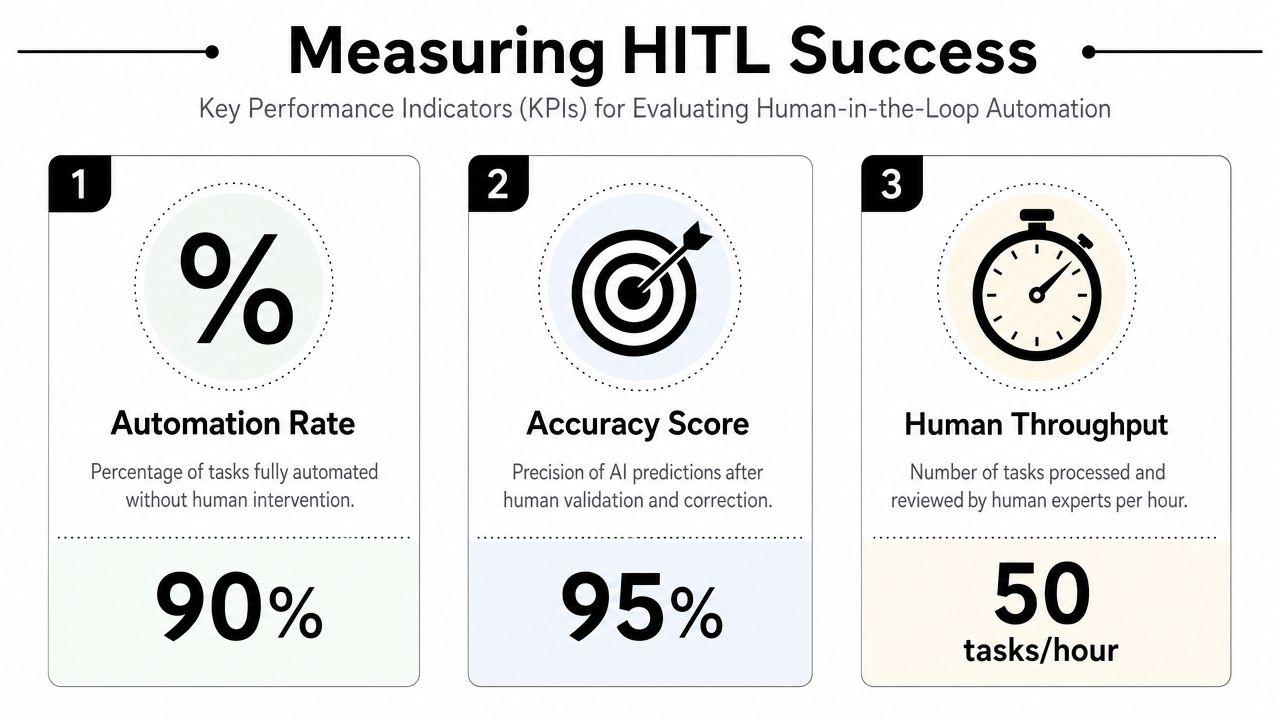
The most useful HITL metrics are operational, not theatrical. They tell you whether the model is trustworthy, whether reviewers are overloaded, and whether the workflow is getting faster or just more complicated.
The KPI set that actually matters
Start with four measures:
- Automation rate tracks how much work moves through without human touch.
- Intervention rate shows how often records need review.
- Override rate reveals how often humans reject or change the system's recommendation.
- Time-to-decision tells you whether the review layer is becoming a bottleneck.
According to Improvado's guidance on mature HITL workflows, teams target a human intervention rate between 2% and 10%. The same guidance says that if the override rate exceeds 50%, the model likely needs retraining or the rules need adjustment. It also notes that time-to-decision should stay under two minutes to avoid destroying the efficiency gains of automation.
Those thresholds are useful because they force hard conversations.
If intervention is too high, you may be escalating noise. If override is too high, the model isn't ready or your rules are wrong. If review time is too long, the reviewer experience is poorly designed or the cases are under-specified.
Governance keeps the gains
Metrics alone won't protect you. Governance is what stops a useful workflow from drifting into inconsistency.
A workable governance layer includes:
- Named reviewer ownership so each exception type has a responsible role
- Decision policies that define what can be approved, modified, or escalated
- Audit trails that log model output, human action, and final resolution
- Periodic QA to catch reviewer inconsistency and rule drift
For teams building broader ops reporting around automation, these operational efficiency metrics help connect workflow performance to real business outcomes instead of vanity dashboards.
If you're evaluating observability for LLM-driven decision systems, this guide to best LLM monitoring tools is a practical starting point for tracking output quality, drift, and review patterns.
What ROI looks like in practice
The ROI case is usually straightforward even without forcing fake precision.
You reduce labor on routine tasks. You shorten turnaround time on the easy cases. You concentrate experienced staff on exceptions that need them. Above all, you create a system that can improve instead of a static process that becomes more expensive with scale.
Common Pitfalls and the Human-at-the-Left Strategy
A lot of teams think HITL fails because the model is weak.
Often, the bigger problem is workflow design.
The most common mistakes are predictable: review screens that hide key context, thresholds that escalate too many low-value cases, and approval steps that train humans to click through without thinking. The last one matters more than is often realized. MIT and SiliconAngle data, cited in SiliconAngle's discussion of HITL failure modes, point to 60% of HITL failures stemming from automation bias, where humans trust flawed outputs too readily.
Why downstream review isn't enough
If the human only appears at the end to approve a recommendation, they inherit the framing of the machine.
They see the suggested answer first. They see the model's confidence. They often review under time pressure. That makes “human oversight” look real on paper while functioning as little more than approval theater in practice.
A better approach is human-at-the-left design.
That means humans shape the system before runtime. They define decision classes, escalation rules, policy constraints, disallowed actions, evidence requirements, and exception ownership before the agent or model starts making live recommendations. SiliconAngle captures the core move clearly: shift HITL to the left by putting humans at the beginning, designing tasks, rules, policies, and constraints for agentic systems.
The safest review step is the one that prevents the bad decision from being considered valid in the first place.
What this changes in practice
Human-at-the-left teams do a few things differently:
- They define policy before prompts so the model operates inside real business boundaries.
- They design exception taxonomy early so review queues reflect business meaning, not generic uncertainty.
- They constrain actions upfront so the system can't improvise where it shouldn't.
- They train reviewers against disagreement patterns instead of treating review as casual approval work.
That shift is strategic, not cosmetic. It turns human-in-the-loop automation from a safety patch into a scalable operating model.
If your team is trying to automate lead routing, support workflows, ops review, or agentic processes without creating new bottlenecks, MakeAutomation can help you design the workflow, documentation, review logic, and governance needed to make it work in production.