10 CRM Workflow Examples for Smarter Growth
A CRM can store every lead, account, and activity while still failing the people who depend on it. The difference is workflow design. A record becomes useful when a trigger turns it into a timely decision, a routing rule sends it to the right owner, and a human knows exactly when to intervene.
That shift matters because CRM adoption is already mainstream. For organizations with 10 or more employees, CRM usage has reached 91%, with reported penetration around 91% for mid-market companies and 97% for enterprises in one 2026 industry summary (CRM adoption data). The question isn't whether your team has a CRM. It's whether the system coordinates action across the customer lifecycle.
The CRM workflow examples below run from lead capture and qualification through pipeline control, onboarding, feedback, retention, outreach, and hiring. Each one is evaluated through its trigger, decision logic, handoff, human intervention point, measurable outcome, and implementation risk. The examples also reflect a current gap in CRM thinking: valuable workflows increasingly begin in WhatsApp, Instagram DMs, call summaries, and other conversation channels, then continue through enrichment, quoting, fulfillment, and service routing (CRM automation trends).
MakeAutomation is a relevant implementation partner for B2B and SaaS teams that need documented CRM, AI, and Voice AI processes. The right automation won't replace judgment. It will make sure judgment is applied where it creates the most value.
1. Inbound Lead Capture and CRM Synchronization Workflow
A CRM cannot support the customer lifecycle if inbound records enter with inconsistent fields, missing context, or no owner. Form submissions, trial signups, chatbot conversations, inbound emails, and social messages need one intake process that captures the signal, checks its quality, and routes it reliably.
The trigger may be a web-form submission, free-trial signup, chatbot conversation, inbound email, or social message. Start by validating required fields, normalizing phone numbers and company names, then comparing the record with existing contacts before creating a new one. A B2B agency might send a demo request to HubSpot, while a SaaS company sends trial data to Salesforce with product, plan, and acquisition context attached.
Build the handoff around data quality
Use separate paths for each source because a chatbot lead carries different context from a trial signup. Map source-specific inputs into consistent CRM fields, retain the original channel, and notify an operations owner when synchronization fails. Document the systems, ownership rules, and status changes in a CRM integration guide so future changes do not create hidden routing gaps.
Apply these safeguards:
- Validate at entry: Reject malformed email addresses and incomplete submissions before they reach sales.
- Detect likely duplicates: Match against email, domain, company name, and contact identity using exact and fuzzy checks.
- Preserve context: Store campaign, page, conversation, product, and referral details so the rep can judge intent.
- Create an exception queue: Send uncertain matches and failed integrations to human review instead of discarding them.
Practical rule: Faster duplicate creation is a data-quality incident, not an automation win.
The workflow creates value when it gives sales a trustworthy record and a clear next action. Measure failed synchronizations, duplicate creation, missing fields, assignment accuracy, and the time from submission to ownership. Add a retry path for every integration and assign a named person to review exceptions. The trade-off is straightforward: stricter validation can delay borderline leads, while loose rules pass errors downstream. Set the threshold according to lead value and review uncertain cases manually.

2. AI-Powered Lead Research and Enrichment Workflow
AI enrichment should improve a sales decision, not just add more fields. New leads often contain only a name, email address, and one form response, leaving routing and outreach teams without enough context. This workflow combines approved data providers and APIs with CRM records to add firmographic, technographic, and behavioral information.
Start the workflow when a new lead arrives, a target account enters a campaign, or an important record becomes incomplete. AI can classify the company, summarize likely priorities, identify its technology environment, and flag fields that require verification. A B2B technology seller might use intent information from 6sense, contact data from Apollo or Hunter, and account context from Dun & Bradstreet before assigning an opportunity.
Enrich according to decision value
The operating rule is simple: enrich records when the result changes routing, messaging, qualification, or account planning. Apply the process first to high-value accounts, then extend it when the team can show consistent field quality. Map provider outputs to the CRM's existing vocabulary. If the CRM stores an “employee band” but a provider returns a raw employee count, define and document the transformation once.
A practical prospect research process should identify authoritative sources, specify which fields AI may write directly, and route proposed changes for approval when confidence is low. Apply enrichment to new records and priority existing accounts, while protecting reliable human-entered information with overwrite rules.
- Use intent as a trigger: Send active research signals to timely human outreach.
- Separate fact from inference: Store verified company data apart from AI-generated hypotheses.
- Set freshness rules: Flag key attributes for review when they may no longer be reliable.
- Log provenance: Record the provider and timestamp for every enriched field.
False confidence is the main risk. A wrong industry classification can route a lead to the wrong segment, produce irrelevant messaging, and distort reporting. Track useful fields, correction rates, routing accuracy, and rep adoption. Add a human review queue for uncertain classifications and a retry path for provider failures. The trade-off is speed versus control. Direct AI updates reduce manual work, while approval rules protect data quality and slow processing for borderline records.
3. Lead Scoring and Qualification Workflow
A scoring model earns trust when it changes a specific action. Who deserves attention now, and what should happen to everyone else? Treat the score as a prioritization signal, not a verdict on the buyer. Marketing, sales, and customer-facing teams can then work from the same qualification rules.
Start with the buying context. A SaaS company may combine product-signup activity, pricing-page visits, company fit, job role, and stated use case. A B2B services firm could prioritize an enterprise prospect showing active evaluation, while sending a low-fit contact into nurture. Once a record crosses the agreed threshold, the workflow assigns the right representative and creates the next task.
Make scoring explainable
Use criteria sellers can verify. Separate fit signals, such as industry and company profile, from engagement signals, such as a meaningful product action or direct reply. Add negative scoring for an unsuitable market, invalid contact type, or explicit opt-out. Keep the reason codes visible in the CRM, so a rep can challenge a score without reverse-engineering the model.
Set the workflow branches before launch:
- High-priority records: Assign an owner, create a task, and notify the responsible team.
- Promising but unready records: Start a relevant nurture sequence and watch for new intent.
- Poor-fit records: Suppress unsuitable outreach and preserve the exclusion reason.
- Existing accounts: Recalculate priority when new contacts or buying signals appear.
A score should tell a salesperson why a lead matters, not merely announce that a number changed.
Agree on thresholds across sales and marketing, then test them against actual win and loss patterns. Review records that sellers override, identify whether the rule or the underlying data caused the mismatch, and adjust only after examining the pattern. Track qualified acceptance, routing corrections, progression into opportunities, and the share of sales follow-up that produces a useful conversation.
4. Sales Engagement and Follow-up Sequence Workflow
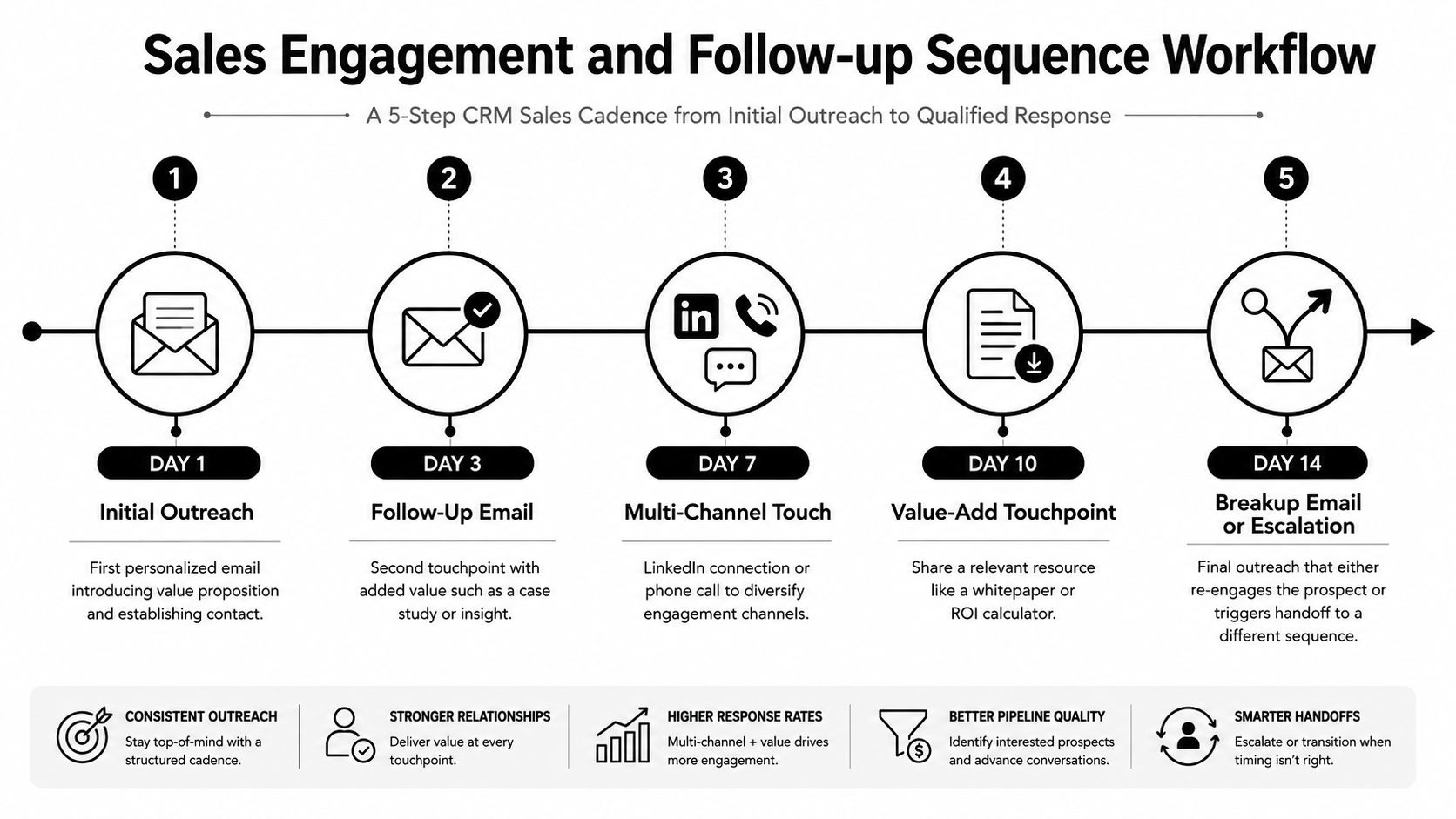
A follow-up sequence should coordinate seller actions, not increase message volume by default. It can combine email, call tasks, social touches, reminders, and reply detection, giving prospects consistent attention while removing routine follow-up from a seller's memory.
Start the sequence when a lead meets the agreed qualification standard, a prospect accepts a meeting request, or an opportunity becomes inactive. Select the path using segment, use case, source, or sales stage. Define exit rules before launch: a reply, booked meeting, opt-out, request for another contact, or qualification change should pause or end the sequence immediately.
Design each touch around a buying decision
Trial users, demo requests, and stalled opportunities need different reasons for contact. A B2B agency might assign an account executive a call task while marketing sends educational material to contacts that are not ready to speak. Each task should show recent activity, the contact's stated need, and the intended outcome. A generic reminder gives the seller work without improving the conversation.
Build timing, task creation, and activity logging into the CRM, while reserving research and message changes for situations where they affect the buying decision. Personalize the opening and closing touches, then vary the middle steps by use case or objection. Review the sequence using qualified replies and meetings, not opens alone. High-value accounts may justify manual research, while lower-touch segments benefit from a consistent path.
Set frequency limits and suppression rules before adding more steps. More automation improves coverage, yet excessive contact can create fatigue and damage trust. AI may flag intent or classify a reply, but a seller should review ambiguous, emotional, or high-stakes responses before the next action fires.
The main safeguard is deliverability. Run an email spam checker before expanding outbound sequences, and monitor bounces, complaints, opt-outs, and reply quality. Remove invalid contacts, suppress people who disengage, and stop broadcasting once a buyer starts a real conversation. A sequence creates value when it produces a timely, relevant next step, not when it records more activity.
5. Opportunity Pipeline Management and Deal Velocity Workflow
A pipeline becomes useful when it drives decisions, not when it displays deal totals. This workflow monitors stage changes, required evidence, recent activity, forecast category, and ownership. It then routes specific exceptions to the person who can address them.
For example, entering a demo stage can require a completed discovery summary. Reaching proposal can create a follow-up task and request finance review. An unchanged opportunity can alert the owner and escalate to a manager when no next step is recorded. Pipeline hygiene becomes part of daily execution instead of an end-of-month cleanup.
Set exit criteria before automating alerts
Stage names need operational definitions. “Proposal” means the buyer received a defined commercial document. “Commit” means the record contains buying evidence, not only a manually selected forecast label. These definitions make deal reviews comparable across representatives.
Configure the workflow around four controls:
- Stage requirements: Capture the customer problem, next meeting, decision process, and commercial status before progression.
- Probability calibration: Compare forecast categories with historical outcomes and adjust guidance when actual results diverge.
- Stall detection: Flag opportunities without recent activity or a meaningful next step, then assign an owner for intervention.
- Pipeline separation: Use separate pipelines when products, sales motions, or implementation paths differ materially.
A manager might receive an alert about a stalled enterprise opportunity while the representative remains responsible for the customer relationship. Automation should prepare a focused review, not replace it.
Track stage conversion, time in stage, forecast variance, missing next steps, and opportunities rescued through intervention. The trade-off is administrative friction. Required fields can improve visibility, but excessive form filling leads representatives to enter weak data or avoid updates. Tie each requirement to a decision leaders make.
Before expanding automated notifications, run an email spam checker for any email component and review suppression rules. Keep deal alerts focused, because unnecessary notifications can bury the exceptions the workflow is meant to surface.
6. Account-Based Marketing and Account Management Workflow
Account-based workflows coordinate the full buying group, not isolated contacts. In enterprise sales, marketing may engage one stakeholder while sales speaks with another, and procurement or security may join later. The account record must connect these interactions so teams can act on one commercial picture.
Start when an account enters a target list, a new contact appears at a strategic company, or several stakeholders show meaningful engagement. The workflow assigns contacts to the correct account, updates engagement context, alerts the account owner, and coordinates marketing and sales actions. A professional services firm can organize a multi-contact strategy, while a B2B SaaS company can prepare industry-specific messaging for selected accounts.
Map the buying group
Build the account view around roles, open conversations, content engagement, objections, and next actions. Activity volume is only a starting signal. Several contacts clicking content may show broad interest, while a documented champion, business problem, and decision path offer clearer evidence of buying progress.
Use a focused group of high-value accounts first. Quality falls when teams select more accounts than they can research and maintain. Separate strategic-account campaigns from general demand generation, then set a shared planning rhythm for sales and marketing. Give account owners authority to suppress irrelevant outreach when a live conversation is already underway.
Before activating automation, check four controls:
- Ownership: Define one accountable account owner and a process for resolving duplicate coverage.
- Account association: Attach contact activity to the right company so engagement does not remain isolated in individual records.
- Intent review: Filter automated activity that inflates interest without evidence of buyer intent.
- Campaign capacity: Limit personalization to messages and tasks sales can maintain consistently.
Measure account coverage, stakeholder progression, accepted meetings, opportunity creation, and handoff quality. Review these indicators by account, not only by contact, so managers can see whether activity is producing coordinated progress.
ABM creates value when it helps teams manage a small number of important relationships with shared context. It fails when personalization becomes a set of disconnected tasks that no owner can sustain.
7. Customer Onboarding and Success Workflow
Customer onboarding starts when an opportunity becomes closed-won or an agreement is signed. The workflow transfers sales context into implementation work, assigns owners, schedules communication, and tracks progress toward the customer's first meaningful outcome.
Start with a structured handoff, not a generic welcome email. Create or update the customer record, notify customer success, generate internal tasks, schedule a kickoff, and attach the contract, use case, stakeholders, commitments, and agreed success criteria. A SaaS company may route onboarding by product tier. A services firm may instead track implementation milestones, approvals, and deliverables.
The handoff should require a concise summary covering why the customer bought, what they purchased, who is involved, and what could delay adoption. Route missing or contradictory information to a human owner before implementation begins. This prevents commercial context from remaining in scattered sales notes.
Track customer outcomes as the workflow's control points. Training completion alone does not demonstrate adoption. A configured integration, completed workflow, accepted deliverable, or successful first use provides stronger evidence that the account is progressing.
Set the operating rules around four decisions:
- Segment the experience: Match tasks and communication to product complexity, customer profile, and service model.
- Define escalation triggers: Alert a success manager when the customer misses a milestone, stops responding, or faces an unresolved dependency.
- Time useful check-ins: Schedule messages around setup and adoption moments, rather than arbitrary calendar dates.
- Keep high-value conversations human: Use reminders for coordination, while implementation and executive discussions stay with the responsible team.
Review milestone completion, time to first value, unresolved handoff items, customer engagement, and expansion signals. Automation should standardize the backbone, but success managers need permission to change the path when the customer's situation requires it. The trade-off is clear: more standardization improves control, while rigid sequences can slow customers with unusual requirements.
8. Customer Feedback and Sentiment Analysis Workflow
A feedback workflow creates value only when it turns customer language into an owned action. Collect survey answers, support conversations, reviews, social comments, and call summaries in the CRM. Classify themes, then route each issue to the service, product, or account-management owner who can respond.
Start with one closed-loop trigger. After a support interaction, a survey response can launch sentiment analysis. Positive feedback can be attached to the account for advocacy follow-up. A negative signal can create a task for the responsible manager, while product complaints can be grouped by issue category, version, or customer segment. This gives product and operations teams patterns to review instead of disconnected comments.
Design the review path before scaling collection
AI handles high-volume sorting, conversation summaries, and recurring-topic detection efficiently. It can still miss sarcasm, context, or the seriousness behind a calm description of business impact. Keep human spot-checking in the workflow, particularly for escalation categories and records with low classification confidence.
Every routed item needs four fields: response owner, action taken, resolution status, and customer notification. Without those fields, the company records opinions but gives customers no evidence that sharing feedback changes anything.
Set routing rules that match business risk:
- Urgent dissatisfaction: Notify the account or support owner and pause promotional outreach.
- Product defect themes: Group related feedback for product review.
- Service praise: Preserve the signal for recognition or reference development.
- Unclear sentiment: Send the record to a review queue rather than forcing a confident classification.
Review response time, unresolved feedback, recurring themes, and whether product or process changes address reported issues. The trade-off is collection breadth versus review accuracy. Wider collection produces richer input, but clear categories, confidence thresholds, and named owners prevent the system from becoming another unworked queue. Sample classified records regularly, and adjust rules when reviewers find repeated misclassification.
9. Voice AI and Outbound Calling Workflow
Voice AI creates value when the call has a narrow goal and a clear handoff. Appointment setting, initial qualification, survey collection, and basic status checks can follow approved scripts. Complex negotiation, sensitive complaints, and nuanced discovery still require human judgment.
Start with the CRM event that should trigger the call: a high-intent form submission, a selected account entering an outbound campaign, or a customer becoming eligible for feedback. The voice agent verifies identity where appropriate, asks approved questions, records structured answers, and updates the CRM. A request for a human, visible confusion, or a complex issue should transfer the call or create a prioritized task.
Choose one workflow first. An agency might qualify inbound requests before assigning a sales representative. A SaaS team could schedule demos or confirm account information. A customer team might collect structured feedback. In each case, define the agent's permitted answers, refusal conditions, and stop rules before connecting it to live contacts.
A controlled rollout needs operational safeguards:
- Use real conversation examples: Include successful calls, common objections, and market-specific failure cases in training.
- Review early calls: Check interruptions, incorrect assumptions, poor timing, and inaccurate CRM updates.
- Make human transfer obvious: Give callers a direct, low-friction escalation path.
- Check calling rules: Follow TCPA requirements and applicable local regulations before launching campaigns.
- Keep complex work with people: Route negotiation, sensitive complaints, and nuanced discovery to representatives.
A practical outbound Voice AI agent can connect call outcomes with routing, scheduling, and CRM updates after the process is documented. That documentation should specify required fields, owner assignment, retry limits, consent handling, and the conditions that stop further outreach.
Judge the workflow by qualified conversations, booked meetings, transfer rates, opt-outs, transcription accuracy, and CRM data quality. Call volume alone can hide poor buyer experiences and unusable records. Review outcomes regularly, then adjust scripts and routing based on failure patterns.
10. Recruitment Pipeline and Candidate Management Workflow
A recruitment CRM workflow gives hiring teams a controlled path from candidate discovery to final decision. The records represent people and relationships rather than sales opportunities, yet the operating requirements remain similar: accurate data, clear ownership, timely communication, and visible stage changes.
Start with the entry point. An application, recruiter outreach, referral, or candidate reply can trigger parsing, role-specific screening, record creation or updating, recruiter assignment, and interview scheduling. Once interviews begin, the workflow can issue reminders, collect structured feedback, send status updates, and create offer-related tasks after the hiring team decides.
Design the process around decision points
A SaaS company hiring developers might require screening questions and technical assessment results before an interview is offered. A digital agency could route creative, delivery, and sales candidates through different stages. Those paths should reflect how each role is evaluated, while candidate messages remain clear and respectful when an application closes or more information is needed.
Use these safeguards when designing hiring process automation:
- Separate role paths: Set different screening and interview rules for functions and seniority levels.
- Combine skills and review: Use structured criteria to organize evidence, then let recruiters assess relevant experience that keywords may miss.
- Protect interview capacity: Reserve limited interview slots for candidates who meet defined requirements.
- Maintain one history: Attach communication, assessments, feedback, and decisions to a single accurate record.
- Route exceptions: Send unusual backgrounds, incomplete evidence, and borderline cases to a recruiter instead of rejecting automatically.
Track stage aging, response times, interview completion, candidate experience, and hiring-manager follow-through. These measures reveal whether the workflow removes administration or creates delays between handoffs.
Automation should handle scheduling, reminders, record updates, and routine messages. Recruiters and hiring managers should remain accountable for evaluation, exceptions, and final decisions because an incorrect automated rejection can affect a person's livelihood. Review rejected and stalled records regularly, then adjust criteria, ownership rules, or escalation paths when patterns appear.
10 CRM Workflow Examples, Side-by-Side Comparison
| Workflow | Implementation complexity | Resource requirements | Expected outcomes | Ideal use cases | Key advantages |
|---|---|---|---|---|---|
| Inbound Lead Capture and CRM Synchronization Workflow | Moderate, API integrations, field mapping, dedupe rules | Integration developer time, automation platform, validation rules | Real-time lead sync, fewer duplicates, accurate attribution | B2B/SaaS with high inbound volume, marketing-heavy orgs | Eliminates manual entry, faster sales response, single source of truth |
| AI-Powered Lead Research and Enrichment Workflow | Moderate, multiple data APIs and AI enrichment pipelines | Paid enrichment APIs, AI tools, mapping and maintenance | Rich firmographic/technographic profiles, better prioritization | Account-based and volume prospecting, enterprise sales | Saves research time, enables intent-based prioritization and context |
| Lead Scoring and Qualification Workflow | Low–Moderate, scoring model and routing rules | CRM scoring configuration, analytics, periodic recalibration | Prioritized leads, faster qualification, improved conversion | High-volume lead gen, SDR teams, B2B/SaaS | Boosts sales efficiency, data-driven routing and prioritization |
| Sales Engagement and Follow-up Sequence Workflow | Moderate, multi-channel sequences and branching logic | Engagement platform, templates, sequencing and monitoring | Consistent follow-up, higher response rates, automated tasks | Outbound sales cadences, SDR outreach, SaaS acquisition | Ensures cadence consistency, scales outreach, increases engagement |
| Opportunity Pipeline Management and Deal Velocity Workflow | Moderate–High, forecasting models and stage metrics | Robust CRM discipline, reporting tools, historical data | Better forecasting, stall detection, improved deal velocity | Sales-driven B2B, enterprise sellers, revenue ops teams | Predictable revenue, identifies bottlenecks, enables proactive fixes |
| Account-Based Marketing (ABM) and Account Management Workflow | High, account mapping, personalized campaigns, coordination | Cross-team resources, personalization/content production, ABM tools | Higher win rates, larger deal sizes, aligned sales & marketing | Enterprise accounts, mid-market strategic selling, ABM programs | Multi-threaded engagement, highly personalized outreach, stronger alignment |
| Customer Onboarding and Success Workflow | Moderate, milestone orchestration and health scoring | Customer success platform, knowledge base, onboarding content | Faster time-to-value, improved retention, predictable expansion | SaaS post-sale onboarding, high-touch enterprise customers | Improves retention, scales success teams, repeatable expansion playbooks |
| Customer Feedback and Sentiment Analysis Workflow | Moderate, multi-channel ingestion and NLP models | Feedback channels, sentiment AI, dashboards, routing rules | Early issue detection, actionable CX insights, faster responses | Product-led companies, CX teams, support-heavy orgs | Proactive churn prevention, data-driven product/service improvements |
| Voice AI and Outbound Calling Workflow | High, conversational AI, telephony, compliance and monitoring | Voice AI platform, telephony infrastructure, legal/compliance oversight | Scaled outbound calls, higher appointment volume, lower cost per call | High-volume appointment setting, large-scale lead qualification | 24/7 outreach, cost-efficient scaling, consistent qualification |
| Recruitment Pipeline and Candidate Management Workflow | Moderate, ATS workflows, screening and scheduling automation | Applicant tracking system, sourcing integrations, calendar sync | Reduced time-to-hire, improved candidate experience, scalable hiring | Rapidly growing companies, high-volume recruitment teams | Accelerates hiring, improves communication, supports compliance |
Build the Workflow Before Adding More Tools
These CRM workflow examples fall into four practical groups. Data foundation includes inbound synchronization, enrichment, and scoring. Revenue execution covers engagement sequences, opportunity control, and account-based coordination. Customer lifecycle includes onboarding, feedback, and success management. Specialized AI automation includes Voice AI and recruitment workflows that extend CRM principles into conversations and talent operations.
Start with the bottleneck, not the most impressive tool. If leads arrive from several channels and records are unreliable, fix intake and deduplication first. If salespeople spend too much time researching or updating records, add enrichment and activity automation after the data model is stable. If opportunities stall between stages, define exit criteria and next actions before adding predictive features.
Data readiness should determine how ambitious the workflow becomes. A scoring model can't produce useful priorities when source fields are incomplete. An AI agent can't safely act when ownership, customer identity, and escalation rules are unclear. Build the smallest reliable path, test it with real edge cases, and expand only after the team trusts the results.
Exception handling deserves the same attention as the happy path. Every workflow should specify what happens when a record is incomplete, a duplicate is uncertain, an integration fails, a customer replies unexpectedly, or a model produces an ambiguous result. Send those cases to a human queue with enough context to resolve them quickly.
Ownership prevents automation debt. Assign someone to maintain the workflow, review error logs, update message content, verify integrations, and remove obsolete logic. Sales operations, marketing operations, customer success, RevOps, and HR operations may own different processes, but every workflow needs one accountable operator.
Measurement should connect the workflow to the problem it was designed to solve. For example, the operational case for CRM adoption includes a reported 13 hours per week spent by the average salesperson on manual data entry, equivalent to 28% of a full working week (CRM productivity statistics). That evidence makes administrative reduction a credible design target, but your team still needs its own baseline for response time, data completeness, handoff delay, stage movement, or customer milestone completion.
Benchmarks can provide context without replacing local measurement. One CRM automation dataset reports a global average workflow completion rate of 78%, with strong workflows commonly in the 70% to 90% range, alongside a 52% average sequence engagement rate and 18% average lead conversion rate (CRM automation KPI benchmarks). Use figures like these as questions for investigation, not promises. A workflow that completes every step but sends irrelevant messages is still poorly designed.
Cross-system automation can create substantial value when the handoffs are controlled. One Fortune 500 CRM implementation case study reported a 60% reduction in work-process time, an 80% decrease in errors, a 35% increase in customer satisfaction, and ROI above 200% in the first year after integrating Salesforce and UiPath (CRM implementation case study). The lesson isn't that every company will reproduce those outcomes. It's that workflow design can influence operational and customer results when teams remove manual handoffs without removing appropriate human oversight.
MakeAutomation can help B2B and SaaS teams document CRM processes, cleanse and standardize data, configure integrations, build workflow logic, and design AI or Voice AI handoffs. The implementation sequence should remain practical: identify the bottleneck, map the trigger and decision rules, define ownership, test exceptions, launch narrowly, and review performance on a regular cadence.
MakeAutomation helps B2B and SaaS teams document and implement CRM, AI, and Voice AI workflows for lead capture, sales execution, customer operations, and recruitment. Visit MakeAutomation to discuss a workflow that connects your systems, clarifies human handoffs, and turns CRM data into coordinated action.