Operations Consulting Case Study Metrics and ROI
The most popular advice on an operations consulting case study is to open with the savings figure and the tool that supposedly produced it. That advice fails the first review. A finished ROI headline is not the case. It is a claim that still has to survive a baseline, a comparison period, and a check on whether freed hours became profit.
Projected savings decay after planning. Pilots get paused. Hours saved sit on calendars that nobody redeploys. A useful case is a lookup file, not a success story about tool selection. The linked records are the problem category, the baseline, the intervention, the control, and a result measured after rollout. A paused pilot belongs in that file.
If you run a B2B or SaaS company, lead sales or marketing, direct agency operations, or own recruiting, you need those records before you buy software. Tag the constraint, lock the numbers, then record the change. Skip the baseline and every later ROI figure is unusable.
How to Read an Operations Consulting Case Study
Read the file the way you would read a closed engagement, not a customer story. Pain at the start and a savings claim at the end is a narrative. It does not tell you whether the result is real.
The minimum record
Every entry has to carry the same six fields, or later numbers cannot be audited.
- Process boundary: Name the start event, the end event, and the systems the work touches. "CRM cleanup" is not a boundary.
- Owner: One named person accountable for the workflow after the pilot, not a committee.
- Baseline: Volume, cycle time, error rate, and labor minutes recorded before anyone redesigns the steps.
- Intervention: What changed, what stayed manual, and the date the change went live.
- Exception path: Who handles failures, how fast they escalate, and when the change is reversed.
- Post-rollout result: The same metrics, measured after launch, against a control period or a prior window. A planning estimate is not a result.
Practical rule: If the write-up cannot show the baseline card and the post-launch card side by side, treat the savings line as a forecast.
What the headline usually hides
Popular case studies treat a projected return as the outcome. Transformation evidence says that habit is unsafe. Only about 30% of transformations delivered their intended benefits and met the targets set in planning, and between early assessment stages the initial impact estimate declined by an average of roughly 45%, according to research cited in a McKinsey review of operational improvement. That decay is why a case that reports only the planning number is incomplete.
The same body of work shows what a verified result looks like when the team tracks it. A North American pulp-and-paper program increased profitability by 2 percentage points and beat its savings target within four months, while cutting paper breaks and related downtime by 20%. In distribution, centers became 10% to 15% more productive within six months, on-time deliveries improved by 5% to 10%, and customer-reported errors fell by as much as one-third. Those figures were measured after implementation. They were not the slide from the kickoff.
How to use the rest of this reference
Start with problem categories if you are trying to name the constraint. Move to baseline entries if someone has already proposed a fix. Use the intervention notes when you need a stop rule. Use the risk gates before any AI step goes live. Use the metric index when a vendor converts hours saved into profit. Hours saved are activity. They are not the case outcome, and a pilot that was paused is still a valid entry.
Problem Categories in Operations Engagements
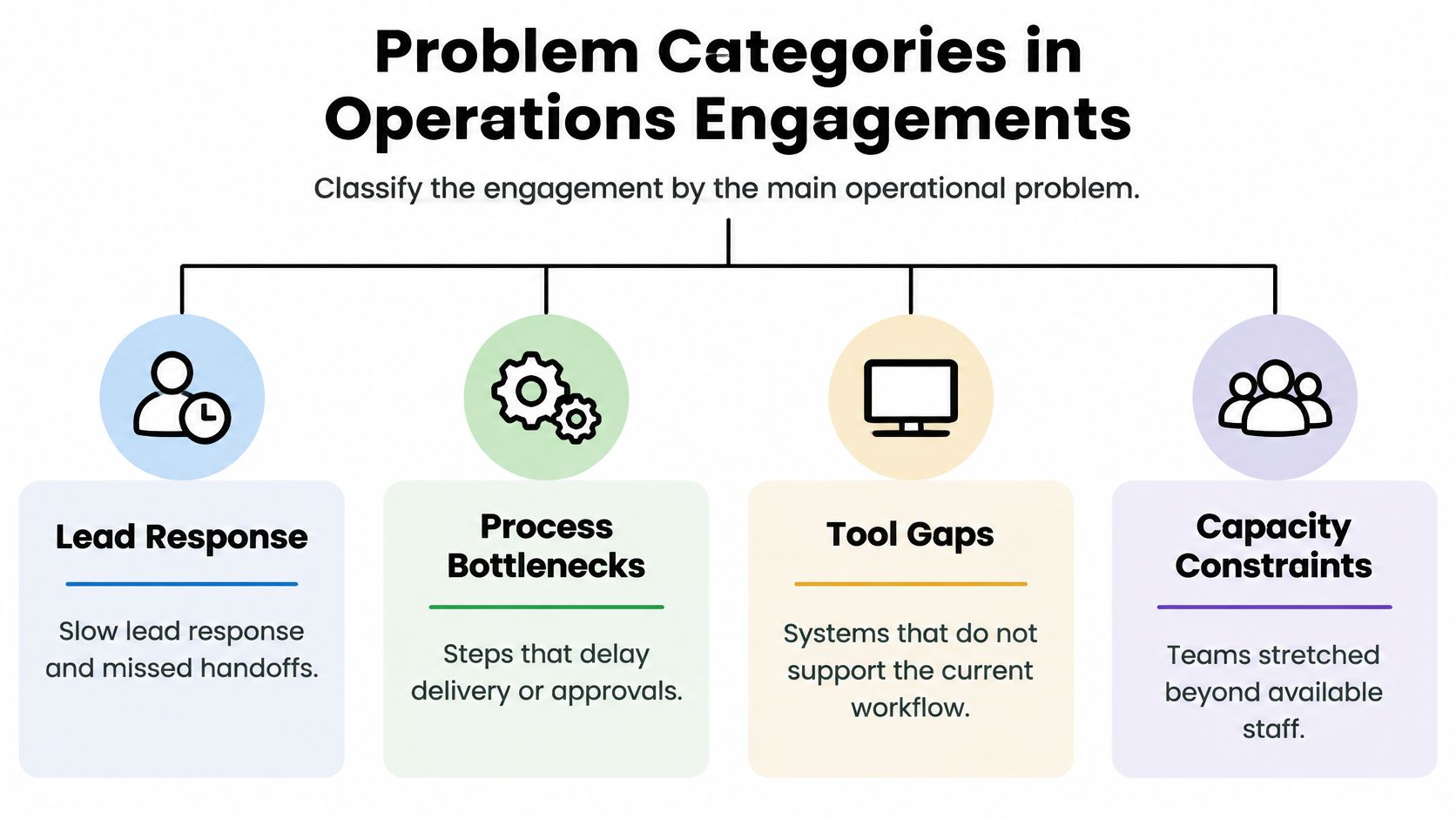
An engagement starts by naming the constraint, not the software. B2B and SaaS teams usually arrive with one of five problems. Each one touches more than the team that feels the pain, which is why a single-department scope is usually the wrong unit.
Five constraints, not five tools
Slow lead response and weak pipeline handoff. Leads sit between marketing, sales, and a CRM that nobody owns after hours. The metric family is lead-response time, conversion rate, and backlog age. Finance belongs in scope if discounts or contract status block the next step.
Manual CRM updates. Reps retype the same fields after calls, so the record lags the conversation. Measure labor minutes per transaction, error rate, and first-pass yield of a complete record. Customer success inherits the bad data on day one of onboarding.
Project and delivery handoffs. Scope, owners, and due dates break between sales and delivery. Measure delivery cycle time, rework, and backlog age. A handoff that lives only inside the project tool still fails if finance has not approved the change order.
Recruitment screening bottlenecks. Talent teams review the same résumés by hand while hiring managers wait. Measure cycle time, throughput, and error rate on screen-outs. This is a capacity problem shared with the hiring manager, not an HR-only queue.
Customer-operations rework. Support or onboarding repeats steps because the upstream record was wrong. Measure error rate, retention, and operating profit only after you can tie rework hours to a real cost. Retention is the outcome. Ticket volume is the symptom.
The measurement menu across these categories is lead-response time, conversion, hours, delivery cycle time, error rate, retention, and operating profit. Those are labels for what to instrument. They are not results from a client you have not measured.
Why one department is the wrong unit
Sales, delivery, finance, customer success, and internal systems have to sit in one operating model. Polishing the sales queue while delivery still lacks an owner just moves the delay. Teams that reduce coordination drag across teams treat the handoff itself as the work, not as a courtesy between functions.
Cross-functional programs beat single-function efforts for a measurable reason. In a transformation analysis covering hundreds of programs, more than 100,000 employees, and over 250,000 initiatives, cross-functional operations transformations outperformed single-function efforts by approximately 30% to 40%, as reported in McKinsey's numbers behind successful transformations. One industrial case combined product development, procurement, manufacturing, supply chain, capital expenditure, and services. Analytics on equipment placement added a 20% productivity increase, and the program produced more than $60 million in bottom-line benefits, about 12 times the value initially envisioned. The same analysis found that 41% of transformation value came from growth initiatives, not cost cuts alone.
Tag your situation to one primary category, then list the adjacent functions that must be in scope before any tool is chosen. If the adjacent owner will not join the working session, you do not have an engagement yet. You have a local workaround.
Baseline Evidence and Root Cause Entries
A case study that opens with the fix is sales material. The baseline card is the evidence: it is written before anyone redesigns the process, and it carries no tool, no vendor, and no projected return.
Fields on the card
Record volume, median and 90th-percentile cycle time, throughput, first-pass yield, backlog age, labor minutes per transaction, and error or rework rate. The median hides the tail; the 90th percentile shows the cases your customers feel. A fuller set of operational efficiency metrics keeps the card from collapsing into a single average.
The method is process mapping plus failure categorization. Map the steps as they run this week, tag each failure (missing data, wrong owner, waiting on approval, system reject), and name one suspected constraint. A workshop opinion list gives you symptoms. The failure tags give you a cause worth testing.
A defect earns a place in the case only when it is tied to a measured financial outcome inside a short validation window.
MIT Sloan's manufacturing example makes that standard concrete. Structured problem solving on a paper-loss issue produced $50,000 in savings within 60 days, as described in Saving Money Through Structured Problem-Solving. The dollar figure traced to the defect itself. The same logic applies to a SaaS or agency workflow: show the money or the capacity against your own baseline. The $50,000 is their result, and you cannot cite it as yours.
Read the card for what it leaves out
Two gaps recur when the baseline is read critically. Hours saved stays an operational metric until someone prices it against payroll or recovered revenue, and a case that reports reclaimed minutes without that conversion has no verified financial value. Second, the card rarely gets re-measured after rollout, so benefits that decay within a quarter go unrecorded. Decay is a finding. It usually means the constraint moved elsewhere in the workflow.
Four entries, symptoms versus causes
Lead-response delay. Baseline: leads per day, median and 90th-percentile minutes to first human reply, conversion, and after-hours backlog age. A verified root cause is a specific gap, such as no owner between form submit and first touch, proven by the timestamp distribution. "Sales is slow" is a symptom.
Manual CRM update. Baseline: updates per rep per day, labor minutes per update, and the share of records missing a required field. A verified cause is a step that cannot be completed inside the system of record, shown by failure codes. "Reps hate admin" is a symptom.
Project handoff failure. Baseline: handoffs per week, cycle time from closed-won to kickoff, first-pass yield of a complete brief, and rework rate in week one. A verified cause is a missing field or approval that delivery cannot start without. "Projects always slip" is a symptom.
Recruitment-screening backlog. Baseline: applications per role, median and 90th-percentile days to screen, throughput per recruiter, and error rate on later-stage rejects that should have been caught early. A verified cause is a review step with no capacity at the observed volume. "We need a better careers page" is usually a symptom.
Draft the card, then stop. If the case starts with the solution, send it back for the numbers.
Process Redesign and Automation Interventions
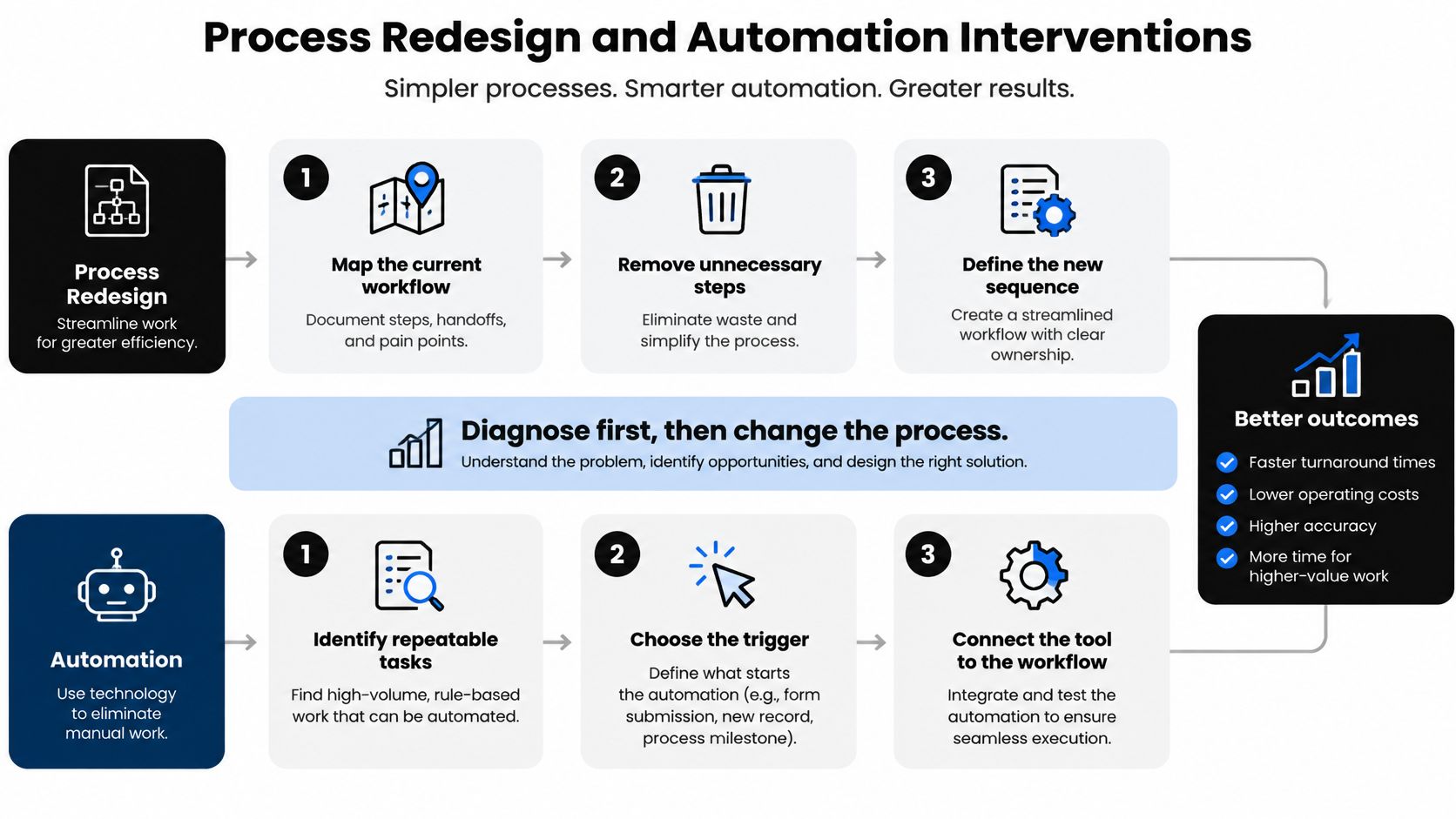
A pilot that got reversed in week ten says more about an engagement than a screenshot of a savings claim. When a case file records interventions, read them as experiments with stop conditions, and expect two classes that belong in separate entries.
Two classes, two templates
Process redesign changes ownership, handoffs, standard work, and exception paths while people still do the work. Use it when the process itself is unstable. Automating a broken handoff multiplies rework, because the system then fails at a higher rate than the person did.
Automation means a system executes a defined step: a CRM field write, a routing rule, a screening sort, or a voice agent on a scripted path. It belongs after the step is stable enough to specify. Candidate types include lead generation, CRM updates, project management, recruitment, and inbound or outbound voice. Treat each as an intervention type that still has to earn its numbers.
One template covers both classes.
- What changed: the step, the owner, and the date.
- What stayed manual: approvals, exceptions, and any customer-facing judgment.
- Pilot boundary: one team, one segment, or one queue, with the rest of the company held constant.
- Comparison period: the baseline window, or a group that did not change.
- Stop rule: the metric and threshold that pause or reverse the change.
A workable sequence for unstable processes is laid out in guidance on how to improve workflow efficiency: stabilize the step first, then automate it. Inverting that order because a vendor demo looked clean is how broken handoffs get faster.
A partial failure belongs in the file
A complete case logs at least one experiment that did not survive. Example pattern, not a client result: a team automated CRM updates from call notes, then paused it after missing fields produced bad records faster than reps had typed them. The pilot boundary was one pod, the stop rule was a rise in incomplete records versus the prior month, and reversal meant turning the write-back off until required fields were enforced at the source.
Survival past the pilot depends on data quality, process ownership, training, governance, integration limits, and adoption. A tool that runs cleanly in a demo can fail all six in production. If adoption goes unmeasured, nobody knows whether the workflow is alive or whether the team quietly reverted.
Savings also decay. Exceptions accumulate, volume shifts, and the manual workaround returns, so a benefit measured in week four needs a recheck at a later date before it counts as durable.
Hours avoided during a pilot are an activity count. Verified financial value is a separate ledger, and a neutral walkthrough on measuring ROI from automated tasks covers the conversion. The intervention entry closes on the stop rule and the recheck date.
How to Choose an Operations Consulting Approach
Once the baseline card exists, the choice is which model will carry the change. Four options show up at growth stage. They are not interchangeable.

Four models
Internal operations lead. A current manager uses existing staff. This fits when boundaries are already clear, an owner is named, and the constraint is discipline rather than design. It fails when that person is also the bottleneck and has no time to map the work.
Tool-only purchase. The team buys software and hopes the workflow appears. This fits a stable, well-specified step with clean data. It fails when CRM or recruitment data is weak, because the tool records the mess at a higher speed.
Traditional advisory that stops at recommendations. You get a diagnosis and a slide deck. This fits when leadership needs an outside read and already has people who will implement. It fails when the team needed standard work, not another list of ideas.
A specialist who documents workflows and implements automation. This fits when you need SOPs, CRM or recruitment automation, lead and outreach workflows, project-management changes, or voice agents for inbound and outbound calls, and you want the build done with you. It does not fit when the baseline is still unknown or leadership will not name a process owner. Those gaps have to close first, or the specialist will automate a guess.
Where a documented offer matches
MakeAutomation's stated offer is AI and automation optimization for B2B and SaaS companies, with frameworks for lead generation, client outreach, project management, AI-enhanced operations, recruitment, CRM automation, and SOP development, plus documentation, consultation, hands-on support, and help implementing AI automation or voice agents. That matches the fourth model when the baseline card and a named owner already exist. It is a mismatch when you still cannot describe volume, cycle time, and the exception path. No pricing or performance claim belongs in that decision. The fit test is the state of your records, not a slogan.
A short working session only helps after someone has walked the current queue. The comparison above is the decision. The video below is a plain look at how operations work gets framed before any vendor is in the room.
Choose the model that matches the gap you have. Unclear boundaries point to mapping. Missing owners point to governance. A stable step with a named owner can justify a tool or a build. A deck cannot substitute for either.
AI Workflow Controls and Risk Gates
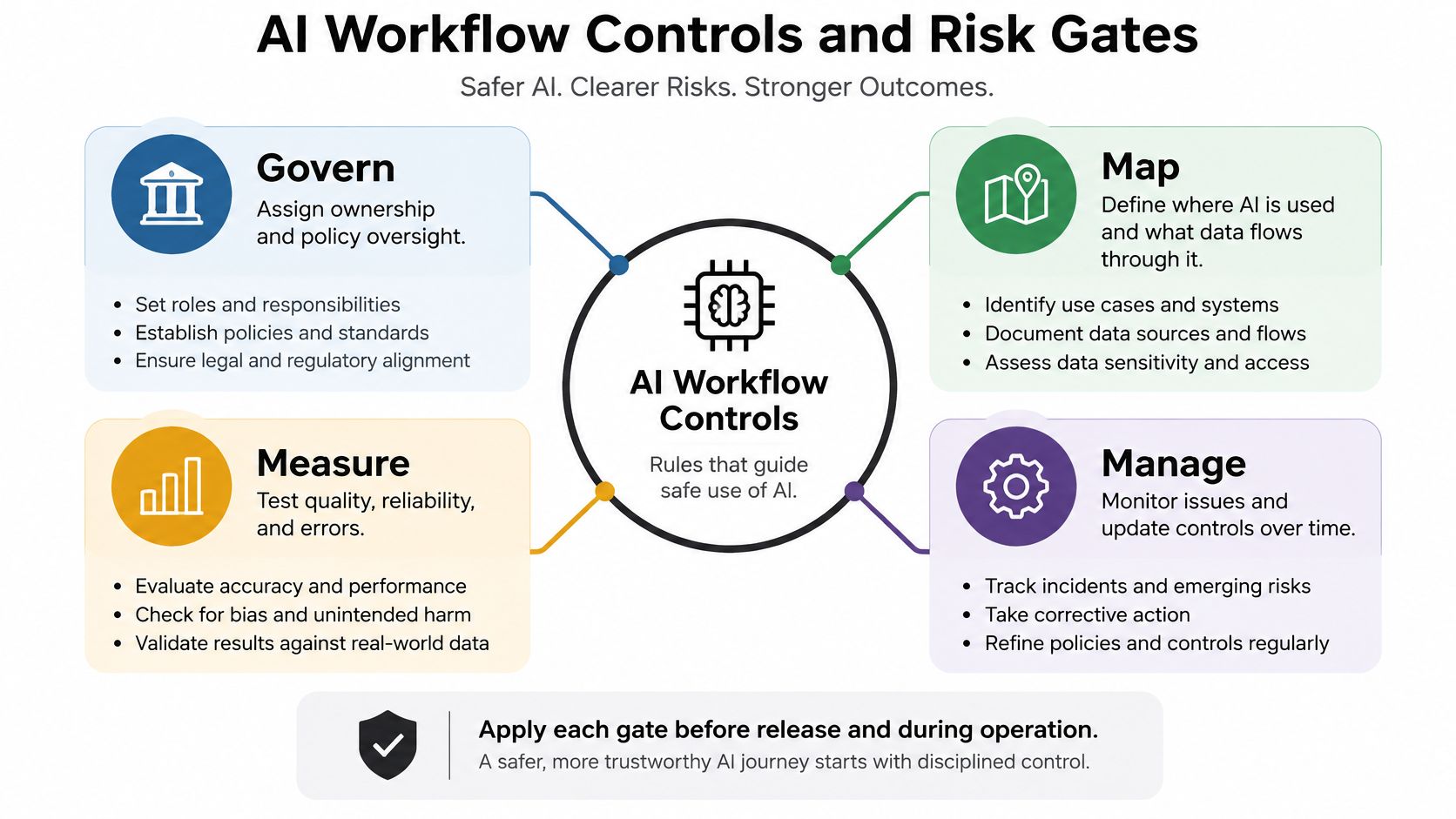
Choosing a provider does not make an AI workflow safe to run. The case needs stage gates. The NIST AI Risk Management Framework supplies four functions that work as those gates: Govern, Map, Measure, and Manage, set out in the NIST AI Risk Management Framework. NIST treats governance as an organization-wide function, which is why the same gates fit CRM automation, recruitment workflows, voice agents, and lead-generation systems.
What each gate requires
Govern. Name the policy owner. Write who may change the workflow, who may approve an exception, and who is on the hook when a customer is affected. A shared Slack channel is not ownership.
Map. Write the business context, the users, the data, the failure modes, and the stakeholders affected. For a voice agent, that includes what the agent may say, which fields it may write, and which calls it must transfer.
Measure. Quantify performance and risk with defined metrics, using the baseline entries as the starting point. The set to report is automation completion rate, exception rate, false-positive or false-negative rate, escalation latency, rework percentage, and customer-impact incidents. Hours saved can sit beside that set. They do not replace it.
Manage. Prioritize mitigations and review residual risk on a set cadence. Each open risk has an owner and a threshold. If the threshold is crossed, the workflow pauses.
The deliverable
The consulting deliverable is a risk register linked to SOPs and workflow logs, with named owners and review thresholds. Calling the automation "safe" is not a control. The register should also list process boundaries, human-approval points, data-access controls, exception handling, monitoring frequency, and rollback.
| Gate | Pass condition | Fail condition |
|---|---|---|
| Govern | Named owner and written policy | Shared responsibility, no approver |
| Map | Context, data, users, and failure modes documented | "The bot handles leads" |
| Measure | The six rates above, vs. baseline | Hours saved only |
| Manage | Thresholds, review dates, rollback tested | Informal check-ins |
Apply each gate before release and again during operation. A gate passed at launch does not stay passed.
Financial interpretation of whatever those gates allow through belongs in the metric index, not in a safety statement. If rollback has never been rehearsed, the workflow is not ready, regardless of how clean the pilot week looked.
Quick Reference for Metrics and ROI
A case study records activity more readily than it records money. Net benefit closes that gap: validated recurring benefit minus implementation cost and ongoing operating cost. Released capacity enters the calculation only when the hours are redeployed or a planned hire is cancelled. Until then it remains a scheduling improvement.
Case Metric Lookup
| Metric | Decision it supports | Misuse to reject |
|---|---|---|
| Baseline vs. post-launch conversion | Whether more of the same leads become revenue | Treating a traffic spike as a process win |
| Response time (median and 90th percentile) | Whether the queue got faster for the slow cases | Quoting the mean after dropping the tail |
| Rework rate | Whether the change reduced repeat work | Counting first-pass volume only |
| Escalation rate and latency | Whether exceptions surface instead of hiding | A falling rate caused by ignored failures |
| Customer-impact incidents | Whether customers absorbed the cost of the change | "No tickets filed" with no feedback path |
| Automation coverage | Share of in-scope volume the system touches | Coverage reported without a quality check |
| Human-review rate | How much still needs a person | A drifting review rate with no error audit |
| Benefit at 90 and 180 days | Whether the gain survives the pilot period | Annualizing week-one results |
| Total cost of ownership | Implementation plus usage, remediation, maintenance | License cost alone |
What the math still has to prove
The base rates argue for restraint. A 2025 survey found that 98% of operations teams were using or experimenting with AI, yet only 2.6% described AI as core to how they operate, and the same evidence set cites a St. Louis Federal Reserve analysis in which reported generative-AI time savings equated to 1.6% of all work hours, implying a potential aggregate labor-productivity increase of up to 1.3% (State of AI in Operations 2025). Adoption that broad alongside productivity that modest means one engagement proves something about one workflow. It does not transfer to the company.
The comparison needs a control period or a phased rollout, then a sensitivity check on three lines: AI usage cost, error remediation, and maintenance. When those consume the recurring benefit, net benefit is zero or negative even if every activity metric improved. Planning estimates also shrink on contact with production, as the transformation evidence cited earlier showed, so the case must report realized benefit after launch and again on a fixed recheck cadence. A pilot that improves half the in-scope queue is a partial result and gets priced accordingly.
A worked automation business case shows the full subtraction instead of a wage-multiple shortcut. Hours never redeployed stay out of profit, and a benefit that decayed after go-live is restated at the lower figure. That restatement is the difference between a verified return and a projection.
Cross References Lessons and Next Steps
The useful page in a case file is usually the one the team would rather skip: the pilot that stalled, the benefit that faded after audit, the hours “saved” that nobody converted into capacity. Read the lookup entries with that bias.
- Lead response: check time-to-first-touch and conversion before routing changes. Redesign ownership first; automate only after the path is stable. Keep a human approval on customer-facing steps. Judge post-launch conversion and response time net of operating cost.
- CRM updates: check minutes per update and first-pass yield. Automate a defined write only when incomplete records stay flat. Count rework and labor redeployed, never keystrokes avoided.
- Delivery handoffs: check cycle time to kickoff and week-one rework. Repair the intake brief before project-tool automation. Judge delivery cycle time and avoided rework cost.
- Recruitment screening: check days to screen and early-stage error rate. Sort only against written criteria, then track false positives and false negatives. Recruiter time counts when it moves to live roles or removes a costable delay.
- Customer rework: check error rate and repeat contacts. Fix the upstream record first. Retention and operating profit count only when the cost tie survives review.
Four lessons hold up across those rows. Integrate functions instead of polishing one team. Write the baseline before the change. Keep failed and partial pilots in the file. Treat hours saved as an unpriced ledger entry until work changes or an avoided hire is documented.
Technology misses for ordinary reasons: unclear ownership, weak adoption, and benefits measured before decay sets in. PwC's 2025 survey of 610 operations and supply-chain leaders found that 92% reported at least one reason technology investments had not fully delivered expected results, while 83% reported two or more reasons (PwC digital supply chain survey). The postmortem asks what broke, who owned the workflow, how adoption was measured, and which benefits remained after 90 or 180 days. Teams in regulated service work can borrow the cadence in a practical improvement guide for insurance teams and apply the same review rhythm to a SaaS queue.
Pick one workflow. Name an owner. Record the baseline fields from the evidence section, including the failure mode and the stop rule. Once that card exists, a working session with MakeAutomation can test documentation, implementation boundaries, and the ROI subtraction before scale.