
Automated Document Classification: How It Works in 2026
Your shared inbox has 1,400 unread messages, and about a third aren't really emails at all. They're attachments: a signed renewal, three invoices from the same supplier, a vendor's W-9, an NDA a prospect wants reviewed before Friday, and a customer complaint that got cc'd to finance by mistake.
Someone on your team opens each one, decides what it is, and drops it in the right place. That person is running a classifier in their head, and they're doing it forty times a day between other work. Automated document classification replaces that mental sorting with a model, a confidence score and a routing rule. It's less glamorous than the generative AI demos, and far more useful.
The hard part isn't picking a model. It's deciding what happens when the model is unsure, who reviews the borderline cases, and how you prove later who saw what. Treat classification as a governed decision system and the technology choices get much easier.
What Automated Document Classification Does for Your Business
Walk into a mailroom that still handles paper and you'll see one person making the same decision hundreds of times a day. Envelope open, glance, invoice tray, contract tray, complaint tray. Automated document classification does that job at scale, on files no clerk ever touches. The input is unstructured or scanned content, whether a native PDF, an email body, a photographed form or a fax. The output is one label from a fixed set (invoice, contract, resume, complaint) plus a confidence score that says how sure the model is.

That label isn't a trophy. It's a routing decision, and every downstream action inherits whatever the label got wrong. For a B2B or SaaS team the cost shows up in ordinary places: an hour or two a day of someone sorting attachments, a renewal sitting in the wrong folder while a deal desk waits, an invoice that reaches accounts payable on day 40 instead of day 5.
The discipline is older than the current AI wave. A review of automatic subject classification published in Knowledge Organization traces rule-based and statistical indexing work to the 1970s, including a documented 1971 pattern-discovery system that classified scientific material through citation content and bibliographic links. Modern deep learning extends that category-for-routing principle rather than founding a new field.
Keep three jobs separate when you look at a single invoice. Classification names the document type. Extraction pulls the invoice number, vendor and total. Generation writes new text, such as a reminder email. Much of the confusion in document automation comes from vendors selling all three under one word while pricing only the third.
Here's the test that tells you whether classification is worth automating: does a person apply the same small set of labels every day, using cues they could explain out loud? If yes, a classifier can usually learn the pattern. If the labels shift with mood and context, no model will rescue the process.
Four Methods, From Hand-Written Rules to Transformers
| Method | How it decides | Labeled data needed | Best fit | Main weakness |
|---|---|---|---|---|
| Rule-based | Keyword lists, regex and template position matching | None | Fixed, highly structured forms | Breaks when wording or layout changes |
| Classical ML | TF-IDF or bag-of-words features with logistic regression, SVM or random forest | Hundreds of labeled examples per class | Stable text with clear vocabulary | Misses meaning in new phrasing; depends on feature design |
| NLP transformer | Contextual text embeddings (for example BERT) fine-tuned on labeled documents | Thousands of examples, fewer for narrow classes | Emails, tickets and contracts with varied wording | Text only; scanned pages need OCR first |
| Layout-aware or multimodal | Text, bounding boxes and page images (for example LayoutLM or Donut) | Large labeled sets, often thousands per class | Invoices, forms and mixed-scan repositories | Heavier to train and monitor for domain shift |
Rule-based systems are a list of conditions a developer writes by hand: if the page contains "TAX INVOICE" in the top third and an amount pattern in the bottom right, label it an invoice. They're transparent, cheap and audit-friendly, which is why they still run inside enterprise platforms. Their failure mode is change. A supplier redesigns its template, the position rule misses, and someone files a support ticket.
Classical machine learning converts text into word-frequency features and trains logistic regression, a support vector machine or a random forest on labeled examples. It needs a few hundred examples per class and works well when vocabulary is stable, like separating billing questions from login problems in a ticket queue. Feature design is where these projects live or die: if your features never capture the words that distinguish two classes, no amount of tuning fixes it.
NLP transformers such as BERT read words in context, which handles the maddening variation in real correspondence. A contract that says "the parties hereby agree" and one that says "this agreement is made between" land in the same class. You fine-tune on a few thousand labeled documents. Scans still need OCR before the model sees anything, so text quality becomes an input you have to manage.
Layout-aware and multimodal models add position and page images. LayoutLM and Donut both work from the page rather than a flat string of words, which is what makes them strong on invoices, forms and mixed repositories where meaning lives in structure.
On one benchmark these two families ran close. On RVL-CDIP, which holds 400,000 grayscale document images in 16 balanced categories with a 320,000/40,000/40,000 split, an OCR-free Donut transformer reached about 0.95 accuracy while the OCR-dependent LayoutLMv3 variant reported 0.9544. A near-tie like that is a failure-mode choice, not a winner. OCR-free models dodge errors from a weak recognition engine on degraded scans but need substantial visual training data and steady monitoring for domain shift. OCR-dependent models suit cases where the same tokens feed extraction, search or an audit trail.
Decision rule: start with rules when the form is fixed, add machine learning when the wording varies, and move to layout-aware models when layout carries the meaning.
Text, Layout and Metadata
A classifier never sees a document the way you do. It sees features: numbers, tokens, positions and file properties that a pipeline converts into a vector, then scores against the classes it learned. Understanding that pipeline explains almost every surprise you'll hit in production.
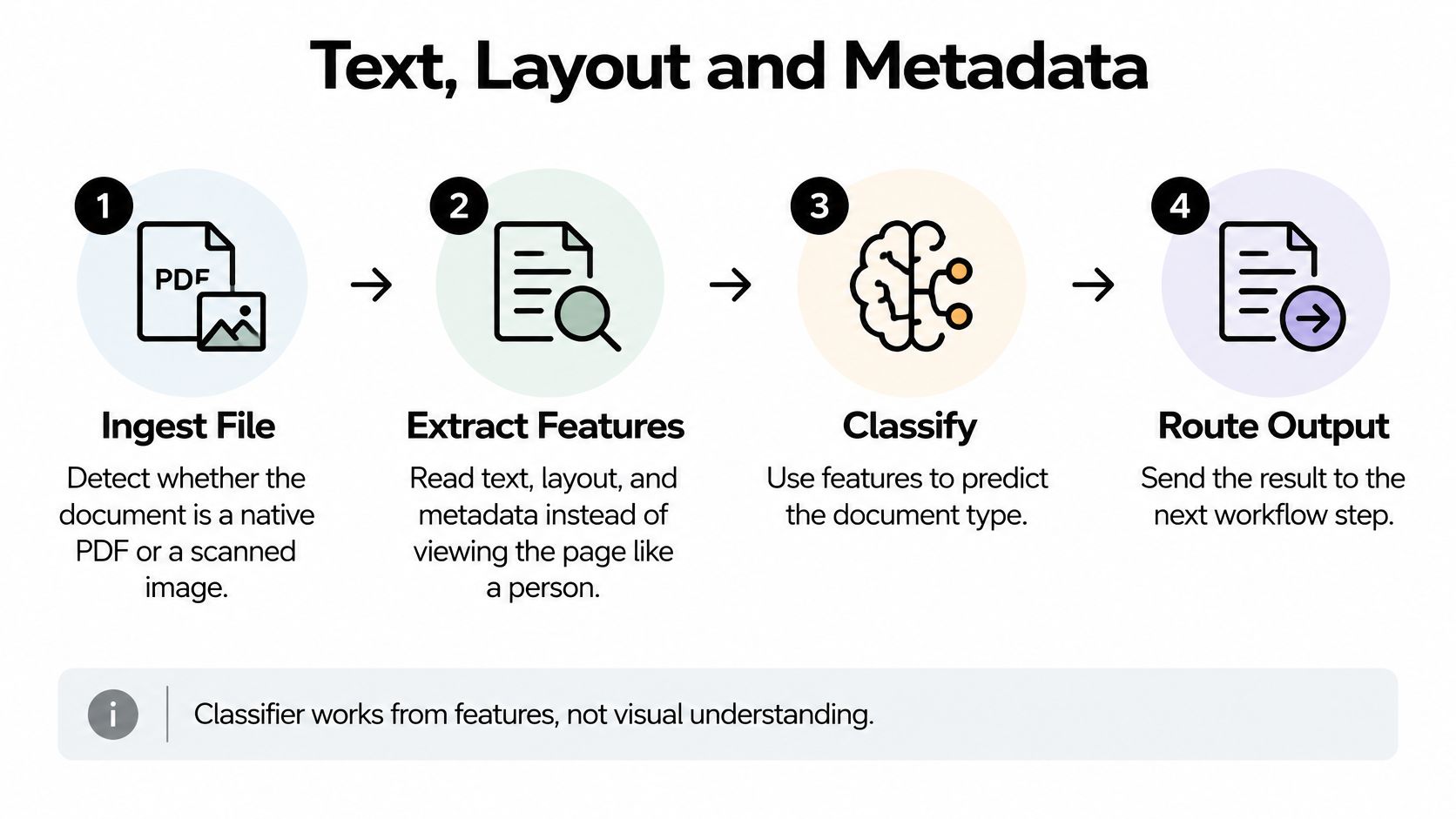
The sequence runs like this:
- Ingest the file and detect whether it's a native PDF with an embedded text layer or a scan with none.
- Run OCR where needed, producing both characters and the coordinates of each word.
- Build text features, such as term frequencies, recurring phrases and named entities like company names or monetary amounts.
- Add layout signals, including header position, table regions, form fields and bounding boxes.
- Add metadata, such as sender domain, upload channel and page count.
- Score the document and return a label with a confidence value.
Take one vendor invoice and watch the signals accumulate. The word "Invoice" sits in the header. The vendor address occupies the top left. A total sits in the bottom right corner with a currency symbol. A table of line items spans the middle third. Even if OCR mangles half the body text, those four cues still point at the same conclusion. That's why structure survives bad scans better than words do.
The trap is shortcuts. If every invoice your team uploads happens to carry "invoice" in the filename, the model learns the filename and looks brilliant in testing. Rename one file and it collapses. The same applies to sender domains: train on three suppliers and the model may just memorize those three addresses. Test with varied filenames, varied senders and a few documents with no useful name at all.
Layout signals earn their keep exactly where OCR struggles, which is common in faxed, photographed and multi-generation photocopied pages. In the LayoutLM study, adding two-dimensional position information lifted document-image classification from 93.07% to 94.42% accuracy on a 400,000-image, 16-category benchmark, because headers, table regions, form fields and email blocks stay informative when the recognized text is incomplete or ambiguous.
That matters when classification feeds a wider intelligent document processing pipeline, where a label determines which extraction model runs next. Before you trust any model, audit your own signals. Which features are reliable? Which are artifacts of how your team names and files things today? And what does the model do when a signal is absent?
Measuring Classification Quality Beyond Accuracy
| Metric | What it tells you | When to prioritize |
|---|---|---|
| Accuracy | Share of all documents labeled correctly | Quick sanity check on balanced data |
| Precision | Share of predicted labels that are correct | When a wrong label triggers a costly action |
| Recall | Share of true documents the model finds | When missing a class is risky, such as compliance forms |
| F1 score | Balance of precision and recall | When classes are imbalanced |
| Macro-F1 | Average F1 across classes, each class weighted equally | Comparing models across rare and common classes |
| Per-class recall | Recall for each document type separately | Finding a minority class that the average hides |
Accuracy is the number everyone quotes because it's the easiest to compute and the easiest to inflate. Say you process 10,000 documents a month and only 3% are compliance forms. A model that labels everything "invoice" scores 97% accuracy and misses every single compliance form. The headline looks excellent. The process is broken.
Each metric answers a different business question, so pick the one that matches the cost of being wrong.
Precision matters when a wrong label triggers an expensive action. If your classifier marks a document as a paid invoice, that can start a payment run to a vendor who was already paid. High precision means the labels you act on are trustworthy.
Recall matters when a miss is the dangerous outcome. Compliance forms, safety reports, legal notices and cancellation requests all have a cost attached to silence. Set a minimum recall for those classes and hold the model to it.
F1 balances the two for imbalanced classes. Macro-F1 averages across classes with each class weighted equally, which is how a weak rare category becomes visible instead of being buried by three high-volume ones. Per-class recall is the clearest view of all: one number per document type, so you can see exactly which category is failing.
Why a benchmark score doesn't transfer to your files
The public benchmark numbers show real progress and tell you nothing about your repository. RVL-CDIP, introduced in 2015, contains 400,000 scanned document images across 16 classes of 25,000 each, with a 320,000-document training split. Reported performance has climbed from 92.31% accuracy for an EfficientNet-based approach in 2020 to 97.12% in later multimodal work, according to research indexed in PubMed Central.
The same work finds that classifiers perform substantially worse when tested on distributions different from that benchmark, with risks coming from unfamiliar layouts, industries, languages, scans and document types. A model above 97% on a standard set can still need confidence thresholds, human review and retraining once it meets a new supplier, a new geography or a new template.
Practical rule: build your holdout set from this quarter's new suppliers, customers and templates, not a random shuffle of last year's files. A shuffle proves the model remembers. A new template proves it generalizes.
A confusion matrix earns its place here too. It shows which classes get swapped for each other, and the pairs are usually predictable: purchase orders misread as invoices, credit notes misread as invoices, references misread as resumes. Those pairs tell you where to add a rule, add training data or add a reviewer.
Before you sign off on a model, run three checks:
- Set minimum recall per high-risk class, and treat that number as the deployment gate rather than overall accuracy.
- Report macro-F1 alongside accuracy so rare classes can't hide behind volume.
- Repeat the whole test after every template change, because a supplier's redesign subtly invalidates the features you relied on.
Routing Uncertain and Borderline Documents to People
The single most useful design decision in a document pipeline is allowing the model to say I don't know. A classifier forced to choose among five labels will always choose one, even when the page is a new supplier's credit note in Portuguese. Confidence-aware routing turns that silent error into a visible queue item.
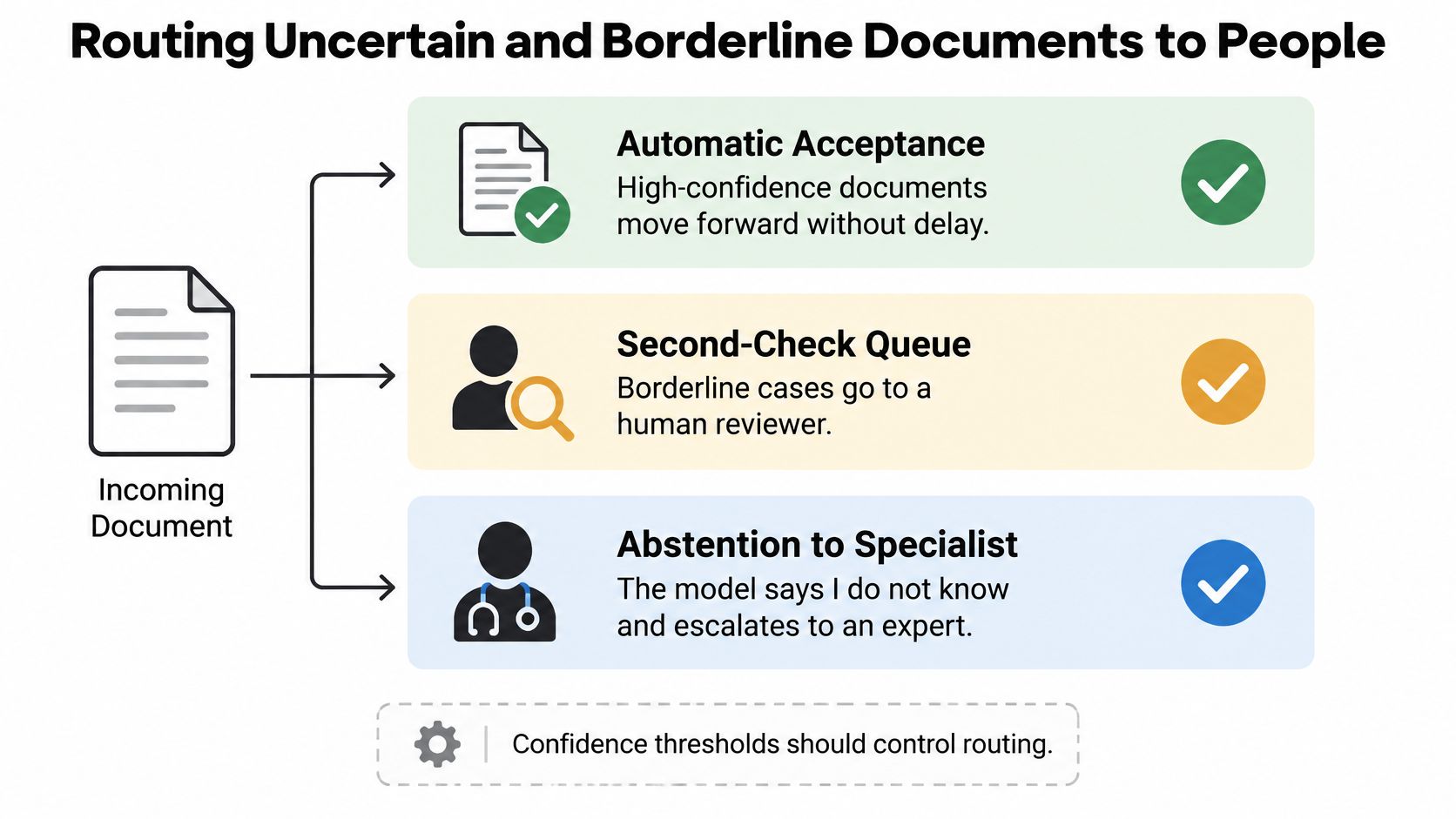
Three outcomes cover almost every case: automatic acceptance for clear documents, a second-check queue for borderline ones, and abstention to a specialist for pages the model has no business judging. The dial between them is the confidence threshold. Slide it up and you buy accuracy with reviewer hours. Slide it down and you buy speed with error risk.
Calibration is the part teams skip. A score of 0.9 should mean the model is right about nine times in ten, and that has to be verified on your own pilot data rather than assumed from the model card. Plenty of classifiers produce confident nonsense on out-of-distribution pages.
| Condition | Action | Example |
|---|---|---|
| High confidence and strong class recall | Route automatically; sample a small share each week | Routine vendor invoices |
| Medium confidence | Send to a queue with a second check | Supplier contracts with mixed clauses |
| Low confidence or unfamiliar layout | Abstain and send to a specialist | New supplier template or new language |
| Any confidence, high-impact class | Require human approval before action | Compliance forms and employee records |
Treat those bands as starting points and tune them against two costs: the cost of a missed document compared with the cost of a manual review. If a misrouted contract stalls a six-figure renewal, a generous review queue is cheap. If a misrouted marketing brochure costs nothing, reviewers are wasted on it.
Class imbalance deserves its own thresholds. A 2025 study of a BERT-based document classifier reported an F1 score of only 0.63 and recall of 0.54 for its Policy_Clarification category, while a separate 2025 document-relevance classifier reached overall F1 0.860 and Cohen's kappa 0.669 and still inherited annotator bias. Averages hide exactly the class you care about most, so measure and threshold each high-risk category on its own.
Here's how a handoff looks when the model abstains.
Two habits keep the queue honest. First, sample a small share of automatically accepted documents every week and have a person check them, because drift arrives through new suppliers and redesigned templates. Second, when a reviewer is involved, give them the model's label, its confidence and the page image side by side. A reviewer who has to start from scratch is paying for automation twice.
The SourceX guide to AI-to-human handoff data is a useful reference for deciding what context travels with an escalated item, so the specialist isn't reconstructing the case from nothing.
Routing ambiguous contracts, compliance records or employee files to specialists is often safer and cheaper than full automation. A slightly less automated workflow that escalates well beats a fully automated one that quietly mislabels.
The decision should weigh business risk, document value, regulatory exposure and reviewer capacity. Aggregate accuracy belongs nowhere in that list. If you're building the reviewer side, the same logic applies to human-in-the-loop automation more broadly: the human needs a decision to make, not a haystack to search.
Audit Trails, Access Control and Data Retention
Governance gets bolted onto document pipelines after launch, which is exactly backwards. The question a serious buyer asks isn't "how accurate is your model?" It's "who accessed, changed, reviewed or overruled a classification, and where was the file processed?"

Adoption is moving faster than the controls around it. In a 2025 survey, 39% of organizations had adopted AI for document use cases such as analysis, autofill, translation or research, yet reported concerns include privacy, confidentiality, authenticity, accountability, metadata tampering and insufficient access controls for AI-created documents, according to Adobe's research on security in document productivity. Among regulated-industry IT, compliance and operations leaders, 49% cited data security as a barrier to document automation, 31% feared losing manual oversight, and 29% were uncertain about regulatory acceptance of AI-generated documents.
Five controls belong in the pipeline itself, not in a policy document:
- Write an immutable audit record for every prediction, override and reviewer action, with timestamp, user and model version.
- Restrict access by role, so the person who can edit labels is not the same person who can approve payments.
- Set retention and deletion rules per class, shorter for employee files than for routine invoices.
- Record the processing jurisdiction and re-test it whenever a vendor or region changes.
- Require human approval before action on high-impact classes such as contracts and employee records.
Logging each stage separately matters because a wrong label propagates. If classification marks a credit note as an invoice and extraction pulls the total, that number flows into payments, CRM rows and the monthly report. Without a record of which model version produced the label and who reviewed it, you can't find the origin of the error, only its symptoms.
Document-level governance sits on top of the data classification work already done for security. F1Group's explanation of data classification is a solid primer if your retention rules currently stop at "keep everything."
All our systems at MakeAutomation include audit logs, access controls and data retention policies, because retrofitting them after a launch costs several times what designing them in costs.
Run one test on a misrouted invoice from last month. Can you show who saw it, which model version labeled it, and who corrected it? If any of those three answers takes more than a minute to find, your governance is documentation rather than architecture.
Implementation Patterns for B2B and SaaS Teams
Once a pilot passes, classification stops being a model and becomes plumbing. Each department needs a document class, a routing outcome and a review trigger agreed before build, not discovered during it.
| Use case | Typical document classes | Routing outcome | Review trigger |
|---|---|---|---|
| Accounts payable | Invoices, purchase orders, credit notes | Route to the matching AP queue with vendor ID | Total or vendor name missing from OCR output |
| Sales and contracts | NDAs, order forms, renewals | Route to legal or deal desk by contract type | Non-standard clause or unknown counterparty |
| Customer support | Tickets, emails, complaint letters | Route by topic and urgency to the right team | Low confidence, or refund or legal wording |
| Recruitment | Resumes, cover letters, references | Route to the matching requisition | Mixed or unreadable attachments |
| HR and compliance | Employee files, policies, forms | Route to restricted storage | Any personal-data class, always reviewed |
Accounts payable is the classic first deployment. The model separates invoices, purchase orders and credit notes, extraction pulls the vendor and total, and the item lands in the AP queue that matches the entity. The review trigger is narrow and testable: if OCR can't find the total or the vendor name, a person checks the page before anything reaches the ledger. That single rule prevents the most common form of automated overpayment.
SaaS support is where classification pays back fastest. Tickets and inbound emails get labeled by topic and urgency, then routed to the right team. Escalation fires on two conditions: low confidence, or language that signals a refund request or a legal threat. Attach the full case context to the escalation so the agent who picks it up isn't starting cold.
The integration pattern is consistent across both. The classifier writes the label and its confidence into the CRM, document system or ticket tool through an API call or a workflow step. It does not sign a payment, approve a contract or send a commitment on its own.
Two failures account for most of the wreckage. Wiring a label straight to payment or signature with no review is the first and worst. Building the happy path before the failure paths exist is the second: no queue, no escalation rule, no owner for the items the model rejects.
Before build: list the case data, enrichment sources, security requirements and the human approval point for every class you intend to automate. Agreement on those four items is what separates a working deployment from a demo that impresses in week one and stalls in week six.
That's the order we work in at MakeAutomation. In a discovery call we map the case data, enrichment sources, failure paths, security requirements and human approval points before recommending an implementation, so the routing table exists before any model gets trained. If you're evaluating tools, a document automation software comparison is a reasonable place to check how each option handles labels, confidence and review.
Pilot One Document Class Before You Scale
Don't start with every document type. Start with one class, prove the whole loop end to end, then add the next.
- List the document classes and the action each one triggers. A class with no downstream action isn't worth automating yet.
- Collect a representative sample from the last three to six months, including new suppliers, poor scans, mixed languages and the oddities nobody talks about.
- Choose a method from the comparison above: rules first when the form is fixed, machine learning or layout-aware models when it isn't. Set per-class recall targets and confidence thresholds before you see the results.
- Run a shadow test, where the model labels documents while people continue routing them by hand. Compare the two for two to four weeks, then switch on automatic routing for the classes that cleared the bar.
The shadow period is where you discover calibration problems, metadata shortcuts and classes that overlap. Two to four weeks is usually enough to see a full cycle of supplier and template variation, and cheap compared with a payment run built on bad labels.
Define the pass test in advance, so nobody argues about it afterward. Three conditions: each high-risk class meets its recall target, uncertain items reach a reviewer within the agreed time, and every decision carries an audit trail. Miss any one and the pilot isn't done.
Consulting helps at this stage because the mapping work is unglamorous. Automation consulting maps the current process, identifies the highest-value automation opportunities and leaves you with a practical sequence for what to build first, which is usually a shorter list than the one you started with. Good advice should also be tool-neutral: we recommend tools based on your situation and aren't tied to any single platform or certification, which means the recommendation should survive a change of vendor.
Classification is a decision system. The model is one component; thresholds, reviewer queues, audit records and retention rules are the rest. Get those right and 92% accuracy in production beats 97% on a benchmark every quarter.
If you're sitting on a shared inbox that nobody owns, MakeAutomation can help you turn document chaos into a governed pipeline, starting with one high-value document class and the routing rules around it. Our smart document processing extracts data from invoices, forms and contracts, and every system we build ships with audit logs, access controls and retention policies rather than adding them later. Visit MakeAutomation to book a discovery call and map your classes, failure paths and approval points before you commit to a model.