
Sentiment Analysis Automation: How to Build a Pipeline
The advice you'll hear first is simple. Buy the model with the strongest accuracy, point it at your tickets, and let the scores update the CRM. That advice fails the moment a wrong label changes a priority, sends outreach, or flags an account as churning.
Public benchmarks compare methods. They don't authorize a business action. A review of sentiment methods traces the automated workflow to Pang, Lee, and Vaithyanathan in 2002, who classified movie reviews as positive or negative, and points to later test sets such as the Stanford Sentiment Treebank's 11,855 labeled sentences and the IMDb set of 50,000 reviews. Those sets made measurement reproducible. They still don't tell you when your pipeline should stay silent.
Sentiment analysis automation pays off only when the label is a trigger, and only after you've decided when the system acts, when it asks a person, and when it writes nothing. Accuracy gets a model into the building. Abstention rules and a rollback switch decide whether it may touch a customer.
Map the Pipeline Before You Automate Anything
A customer success team wants support tickets that turn negative to flag the account. Before any model runs, three decisions are already overdue. What "negative" means. Which channels count. What happens to a message the model can't place.
I would not start with a dashboard score. A score nobody acts on is a report. A label that updates a CRM field, raises a ticket priority, or starts an outreach step is an action, and actions need owners at every stage.

The build has five stages, and each one fails in a way the next stage can't repair.
- Label design. Write the taxonomy the business will act on, including an explicit "unsure" bucket.
- Sampling and annotation. Pull text the way customers write, then label it under frozen rules.
- Model training. Fit a simple baseline and one stronger model on the same split.
- Evaluation. Score a fixed holdout by language and channel, not by a public leaderboard.
- Routing and monitoring. Decide the automatic write, the human review, and the silence rule, then watch the live stream.
A vague taxonomy shows up later as what looks like a model bug. Leave Spanish chat out of the sample and the miss looks like a language defect. Skip the unsure bucket and a short message such as "fine but slow" becomes a CRM update nobody meant to send.
Practical rule: If you can't name the action a label is allowed to take, you don't have a pipeline yet. You have a classifier looking for a job.
Lock these choices before you open a notebook.
- The action. Name the CRM field, queue, or message the label may change.
- The coverage. List channels and languages. Anything off the list stays manual.
- The cost of a wrong call. A false churn alert and a false "all clear" don't cost the same. Write both costs down so the thresholds have something to protect.
Pick a Model Approach That Fits Your Volume and Language
Start with the simplest approach that clears your evaluation bar. Move up only when the errors cluster in a segment you can name, such as code-switched chat or product slang. For a low-stakes tag that a manager reviews once a week, the cheapest build is often the right first build.
| Approach | Works Best For | Main Weakness | Setup Effort |
|---|---|---|---|
| Lexicon-based (rule and word-list scoring) | Short English text and a fast baseline | Misses sarcasm and domain terms | Hours |
| Classical ML (logistic regression, linear SVM) | Stable domain with labeled data | Degrades when language or topics shift | Days |
| Fine-tuned multilingual transformer | Code-switched, nuanced support and sales text | GPU cost and careful labeling | Weeks |
| LLM prompt classification | Prototypes, new taxonomies and low volume | Outputs change between model versions; cost per call | Days |
Lexicon scoring is a word list plus a few negation rules. On short English survey comments it gives you a baseline the same afternoon, with no training set. It falls apart on a technical ticket where "critical" is a severity, not a mood, and it treats "great, another outage" as praise.
Classical models such as logistic regression or a linear SVM need labeled rows from your own channels, then stay steady while the product language stays inside a narrow band. They suit a helpdesk that is mostly one language and one product line. When a new feature launches and the vocabulary shifts, scores slide, and you retrain rather than hoping the old weights still fit.
A fine-tuned multilingual transformer is the step up for sales calls and support chats that mix languages mid-sentence. It handles nuance the linear model misses, and it costs GPU time, a careful label set, and a retraining calendar you keep. Don't jump here because a demo looked fluent.
LLM prompt classification is how I prototype a new taxonomy or cover a low-volume queue. Pin the model version, log every prompt change, and track cost per thousand calls. Unpinned versions move the decision boundary. Teams that also need to tell a complaint from a buying signal should pair the label with intent recognition, because tone and intent are different fields and they should not share one prompt.
PR and brand teams reading public mentions have a different job from a support queue. A sentiment guide for PR teams is a useful companion when the text is public conversation rather than a ticket tied to an account.
We're platform-agnostic on the plumbing around the model. For complex routing logic, higher volume, tighter data control, or a specialized integration, n8n or a small custom service is usually a better fit than forcing the classifier into a generic zap.
Build Labels and Training Data in Five Steps
A model that always returns a label is not finished. The useful build writes the rules for when it stays silent, and the rules for rolling a bad label set back, before anyone scales annotation. A production workflow separates label design, data sampling, annotation, model training, and drift monitoring instead of forcing every message into positive or negative, as laid out in this arXiv note on sentiment workflows.
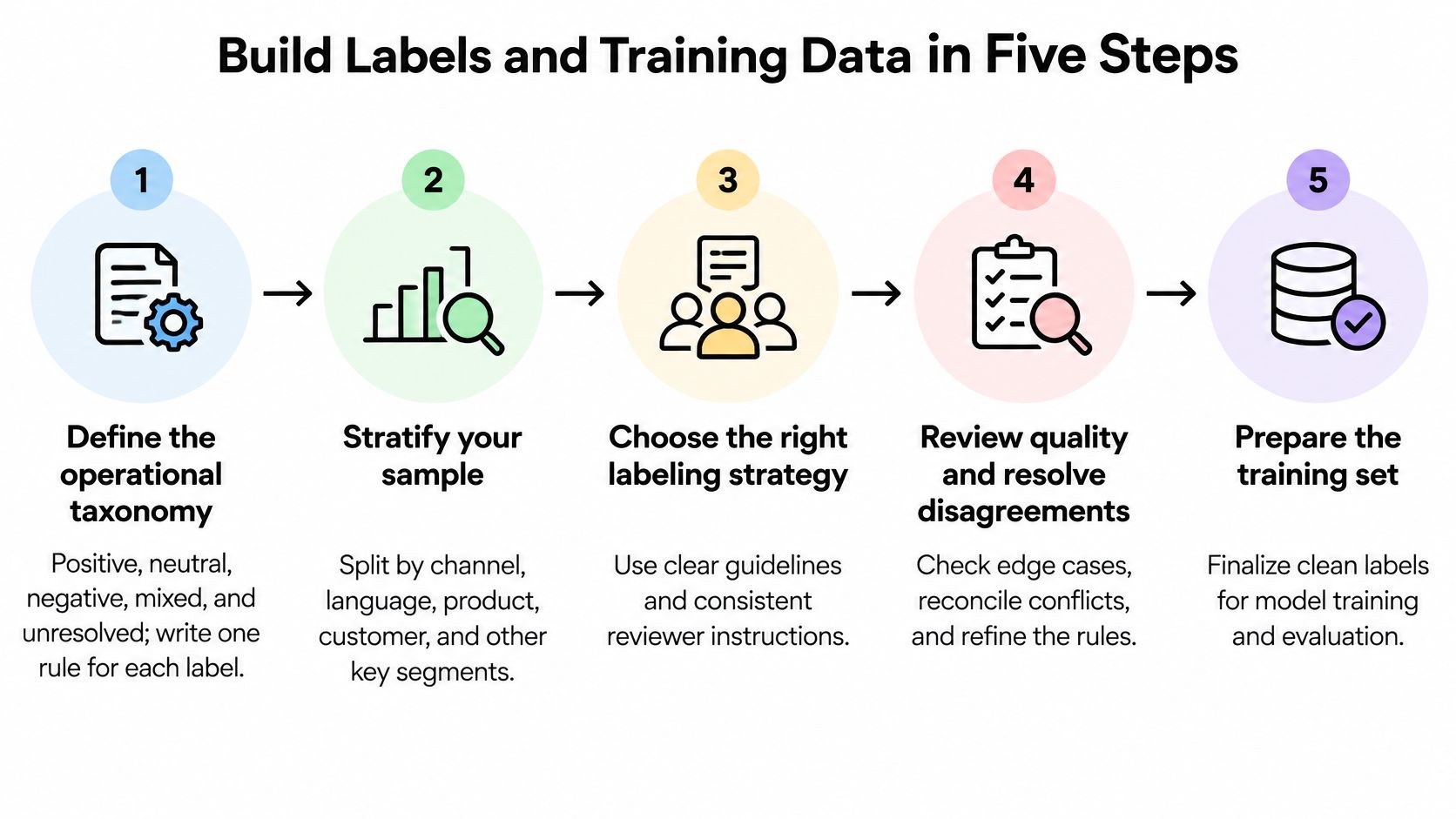
1. Write the taxonomy and one rule per label. Positive, neutral, negative, mixed, and unresolved is a workable set for support and success teams. One sentence per label, with one example and one counterexample. Mixed exists so a praise-plus-complaint does not get averaged into neutral and then ignored. Unresolved is the abstention class: sarcasm, missing context, or a fight the guideline does not settle. I would rather route those to a person than train the model to guess.
2. Stratify the sample before anyone labels. Split by channel, language, product, customer segment, and message length. A random pull from a queue that is mostly English email will train a model that looks fine and fails on short Spanish chat. Put the hard cases in the sample on purpose. If the holdout never sees negation or a product name, you have no rollback signal later.
3. Calibrate with at least two annotators. They label the same set, you adjudicate the fights, and you measure Krippendorff's alpha before you scale. On three-way sentiment, human agreement is often only moderate, so a middling score is a warning about the rules, not proof the model is broken. Two annotators splitting on "fine but slow" is the usual fight. A written rule, such as a complaint about speed outweighing a neutral opener so the label is negative, settles it for every later annotator. If they still cannot agree, the row stays unresolved. Do not force a consensus you cannot repeat.
4. Freeze the guidelines, then label the production sample. Log every wording change with a date. A quiet edit in week three makes the early rows and the late rows different tasks wearing the same name. That log is the rollback criterion for the data itself. If a rule change moves a large share of rows, discard the rows labeled under the old wording, or keep them in a separate split. Do not mix them and call it one dataset.
5. Train two models on one split. A logistic regression baseline and one domain-adapted multilingual transformer, judged with macro-F1 rather than accuracy, because a swollen neutral class hides a weak negative class. Keep a fixed holdout that includes sarcasm, negation, slang, and product terms. For code-switched support text, validate each language on its own. Scores on published code-mixed benchmarks rarely transfer to a company's own inbox, so treat them as a reference from someone else's data, not a target for yours. Ship the new weights only if the holdout holds and the unresolved rate stays inside the band you set in step 1. If either slips, roll back to the previous model and fix the labels first.
A walkthrough of where annotation quality breaks is worth fifteen minutes before you hire the second labeler.
A finished set is a few thousand rows from your own tickets or CRM notes, a dated labeling log, an abstention rule, and an agreement score recorded per language. Without the log and a written rollback line, the next retraining run cannot tell a real shift from a rule you changed on a Thursday.
Measure Accuracy Where Your Customers Actually Write
A release can look fine on overall accuracy and still bury the complaint the queue was built to catch. Urgent negatives are scarce in most support inboxes. A model that stamps nearly everything neutral keeps a flattering score and drops the tickets operators care about. Report the same small set of metrics at every release, split by language and channel, with the previous version in the next column. If a language or a channel has no row, that slice stays silent: no automatic write, no churn flag, no outreach.
| Metric | What It Reveals | When to Report |
|---|---|---|
| Macro-F1 | Balance across all classes | Every release, per language |
| Negative-class recall | Whether urgent complaints still surface | Every release, per channel |
| Balanced accuracy | Performance when classes are unevenly sized | When negatives or positives are rare |
| Calibration error | Whether confidence scores match real accuracy | Before setting routing thresholds |
| Cohen's kappa against human labels | Agreement between model and annotators | After each retraining run |
Why a high accuracy can still miss the complaint
Macro-F1 averages per-class F1, so the rare class weighs as much as the common one. Negative-class recall is the operator question. Of the genuine complaints, how many did we still surface?
Balanced accuracy sits beside those two when positives and negatives are uneven, which is normal in feedback and in lead notes. A 2025 AutoML benchmark assembled 46 preprocessed English sentiment datasets and reported a mean balanced accuracy of 71.01% for its best method, TPOT, a high of 86.50% with AutoGluon, and a low of 38.64% with Auto-Sklearn. A model that is strong on short consumer reviews does not transfer cleanly to sales calls, technical tickets, or multilingual B2B mail. Treat that spread as a ceiling on public English text, not a target you can copy onto your own channels.
Confidence has to mean what the threshold assumes
Routing rules treat 0.9 as "about nine in ten of these are right." That holds only when the scores are calibrated. Check calibration error before you lock a cutoff. After each retrain, Cohen's kappa against fresh human labels shows whether the model still agrees with annotators, not merely whether it agrees with last quarter's predictions.
I would not clear a release that drops negative-class recall on any live channel, even if macro-F1 ticks up. Roll that version back and keep the prior model on the slice. Abstain where the holdout is thin: a language with too few labeled complaints, a channel that never appeared in training, or text so short the class is a coin flip. Outside benchmarks do not close that gap. The holdout cut from your own inbox is the only set that says whether this release may write to a system of record.
Publish one table per release. If a language or a channel is missing a row, that slice is not cleared for automatic action.
Route Results Into CRM, Tickets and Outreach Safely
A label earns a write to a system of record. It doesn't get one on day one because the offline score looked strong. A 2025 comparison on Indonesian social-media text found only 47–49% agreement between GPT-4 variants and IndoBERT, with Cohen's kappa of 0.17–0.18. Two serious models can draw the boundary in different places on the same sentences. A leaderboard score doesn't prove your escalation policy.
| Trigger | Automated Action | Human Step |
|---|---|---|
| High confidence, no sarcasm, code-switching or length flags | Write sentiment to the CRM field | Sample a fixed share each week for audit |
| Mid confidence, clear wording | Tag as provisional; no alerts | Review in queue before any escalation |
| Sarcasm, code-switching, very short text or low confidence | Hold; no churn alert or outreach | Agent assigns the label |
| Negative sentiment on a high-tier account | Create ticket with context for the agent | Agent confirms before any outbound contact |
Shadow mode before any field updates
Run four to six weeks in shadow mode. The model scores live text, logs the action it would have taken, and writes nothing. Compare that log with what agents did. Disagreement clusters tell you whether the cutoff is wrong, the taxonomy is wrong, or a channel was never in the training sample.
Set abstention by cost, not by a round number you liked in a demo. An outreach note sent to a satisfied customer damages trust more than a churn alert that waits a day, so the outbound cutoff sits higher than the cutoff for an internal tag. High-confidence, clean messages may update the CRM field. Borderline wording stays provisional. Sarcasm, code-switching, very short text, and low confidence produce no alert and no send. Corrected labels go back into the next scheduled retrain.
On a high-tier account, negative sentiment creates a ticket with context and stops there. The agent confirms before anyone is contacted. A published Salesforce support setup works the same way. An n8n workflow pulls internal customer and transaction context, drafts a triage note and a reply, and leaves approval with the agent. That pattern belongs in your CRM and automation design. The model prepares, and a person commits.
Rollback, written before the first write
Agree the kill switch while the workflow is still in shadow mode.
- The trip metric. Name the drop, such as negative-class recall or macro-F1 on the weekly audit, that pauses automatic writes.
- The person. Name who is notified and who can turn writes back on.
- The revert. State how a bad batch is cleared from CRM fields, and how fast.
- The language gate. No language writes until it has its own threshold and its own holdout. A blended score hides a weak language.
If you can't say who gets the page and how the batch comes back out, the workflow isn't ready to leave shadow mode.
Monitor Drift and Govern Bias and Privacy
A model that looked fair at launch can start missing one market and over-reading another within a quarter. A scholarly review found that 41% of the NLP-oriented studies in its corpus reported linguistic inequality, interpretive opacity, or algorithmic bias, and 42% of all reviewed studies flagged data extractivism, ambiguous consent, or privacy concerns, as summarized by De Gruyter Brill. One English-centric model is operationally tidy and unfair to every market that does not write like the training set. LLM workflows can also disagree sharply with specialist language models once the text is not English.

What the monthly audit actually samples
Each month, check three drifts: new vocabulary in tickets, a shift in the mix of classes, and language-level F1 falling below the bar you set at launch. Sample false positives and false negatives separately, by language and by customer segment. Retrain only after the shift is real. A noisy week is not a distribution change, and retraining on it bakes the noise in.
When language-level F1 drops, or error rates split by segment, the safe action on that slice is silence. Automatic tags and alerts stop for the affected language or segment until the monthly sample shows the miss rate back inside the launch bar. Dialects, politeness norms, translated text, and code-switching each create systematic misses. Give every language its own holdout. A strong English score does not cover a market where customers soften complaints or switch languages mid-ticket. Audit error rates by segment too. A model that is kind to enterprise English email and harsh on shorter messages from smaller accounts is a routing bias, not a rounding error.
Privacy is a data-flow decision
Confirm a lawful basis before customer text enters labeling. Redact names, emails, and account identifiers before annotators see a row. Set a retention window for raw messages, and give annotators only the fields the guideline needs. Build minimization into the workflow itself, so redaction and retention are enforced by the pipeline rather than left to a policy document. AI governance for sentiment pipelines belongs next to those routing and retention rules, not in a separate PDF nobody opens at audit time.
The operations lead should be able to sign one short list.
- Taxonomy owner. One person approves label-rule changes.
- Audit owner. One person reviews the monthly error sample.
- Retrain approver. One person may promote a new model, and only after the release table is filled in.
If those three names are blank, the model is running without a governor. I would not promote a retrain, or reopen writes on a drifted language, until the audit owner has signed that month's sample.
Pilot One Workflow Before You Scale It
Pick one workflow with real volume and a boring, reversible action. Routing negative tickets into a priority queue, or flagging churn-risk accounts for an account manager, fits. Outbound messages don't. One wrong send costs more than a week of delayed tags.
Run it in shadow mode against the routing rules and the release metrics. We build this in four phases, Discovery & Audit, Solution Architecture, Build & Integration, and Deploy & Optimize, and the build stays iterative. You see it running on realistic tickets before anything writes to the CRM. An Automation Cost Estimator can put a transparent number on that scope before you commit a team.
Don't widen the pilot until four gates are all true.
- Macro-F1 on the holdout, per language, is at or above the target the business owner signed.
- Negative-class recall per channel meets the bar in the release report.
- The shadow-mode log has been reviewed against human decisions for the full window.
- A written rollback rule names the metric drop that pauses writes and the person who is notified.
Only then does the workflow write to the CRM or the ticket system. After the first monthly audit confirms the pilot is stable, add a second channel or a second language. Not both in the same week.
MakeAutomation designs the system between your CRM, your ticket queue, and the people who still have to approve a sensitive action, including the abstention rules and rollback path this pipeline depends on. If you want that first workflow scoped against your own channels rather than a generic demo, visit MakeAutomation and tell us which action the label should be allowed to take.