Use of AI in Automation That Scales B2B Growth
A sales operations manager starts Monday with the same queue waiting in three systems. New leads sit in a CRM, qualification notes arrive by email, and support or onboarding requests wait for someone to decide where they belong. The team has already automated notifications and field updates, yet people still read, interpret, copy, route, and approve nearly every meaningful item.
That ceiling appears because traditional automation is good at known inputs and fixed decisions. It can move a record when a form is submitted, but it struggles when a buyer writes an unclear request, an invoice arrives in a new layout, or a customer explains a problem without using the expected keyword. The use of AI in automation adds interpretation to the workflow, but it doesn't remove the need for process design.

Introduction to AI Powered Automation for B2B Growth
AI changes the middle of a workflow. A trigger can still be a form submission, email, phone call, or CRM event. The difference is that an AI layer can interpret the input, extract relevant details, classify the situation, draft a response, and recommend the next action before deterministic software completes the handoff.
A practical example is an inbound demo request. Rules can assign it by territory or company size. AI can also read the message, identify the buyer's intent, summarize the stated problem, detect missing information, and prepare a suggested reply. A human may still approve the message or accept the routing recommendation, while the workflow records every action in the CRM.
Practical rule: Treat AI as a supervised decision layer inside a controlled process, not as an employee with unrestricted access to every system.
This guide is for B2B and SaaS founders, revenue leaders, operations directors, support managers, and talent teams who need more capacity without creating another fragile collection of tools. It focuses on the decisions that matter in production: which workflow slice to automate, what data the system should receive, where validation belongs, and when a person must intervene.
The distinction matters because adoption is growing faster than operational maturity. Across 11 selected U.S. federal agencies, reported AI use cases nearly doubled from 571 in 2023 to 1,110 in 2024, while generative AI use cases rose from 32 to 282 over the same period, according to McKinsey's State of AI research. The lesson for commercial teams isn't that every process needs an agent. It's that AI is becoming a practical layer on top of existing automation, especially where work involves documents, language, retrieval, and variable decisions.
Teams exploring implementation can also review AI-assisted marketing automation services for support with workflow planning and enablement. For a broader business-growth perspective, this guide to AI for business growth provides useful context before you select a specific workflow.
How AI Augments Automation Beyond Rule Based Workflows
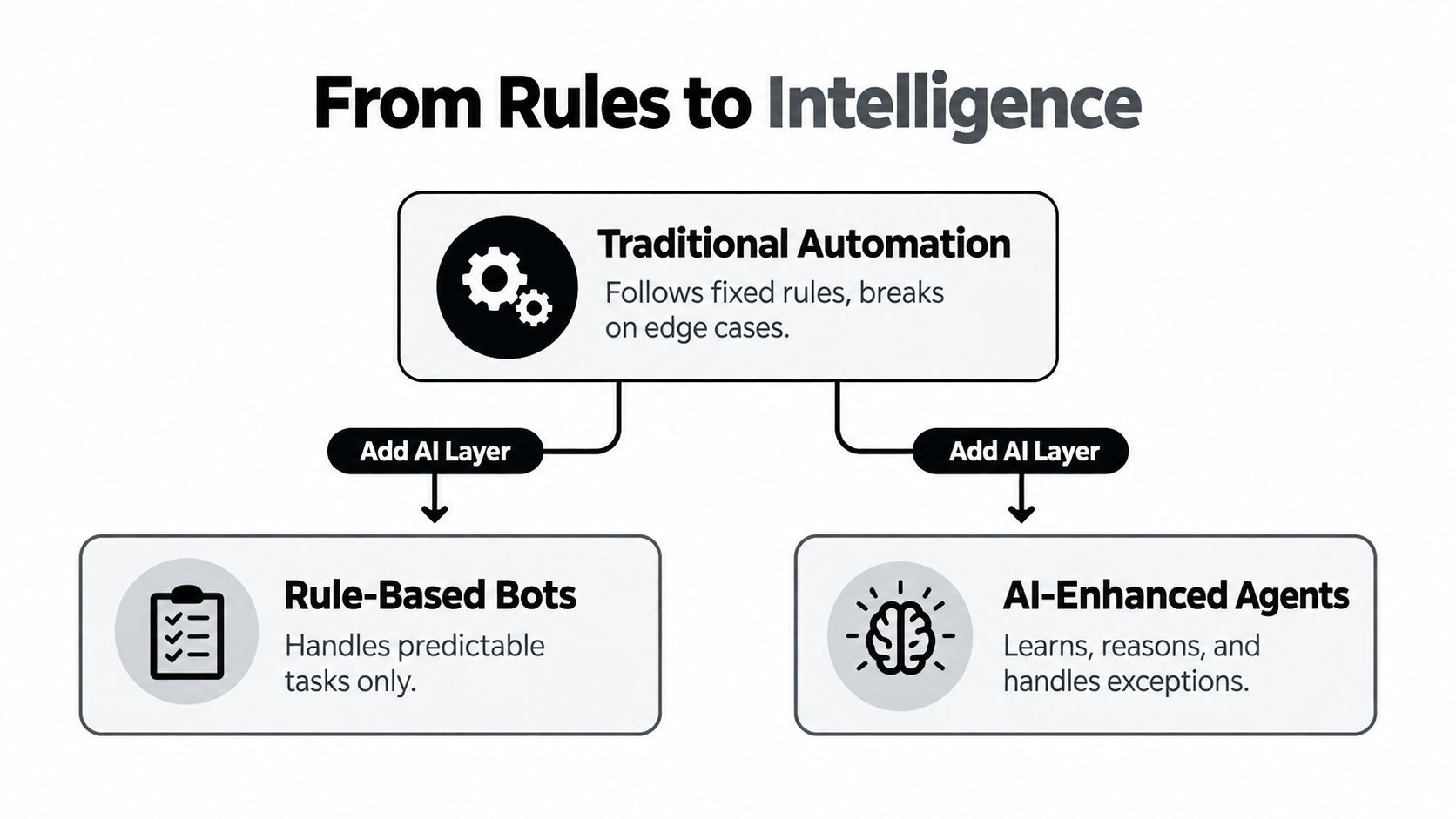
The simplest mental model is autopilot versus co-pilot.
A rules-based automation behaves like autopilot on a clearly marked route. It follows the configured sequence exactly. If a form field contains a particular value, it sends a message, updates a record, or starts another workflow. That consistency is valuable, especially for permissions, status changes, calculations, and other steps where the answer should never vary.
AI behaves more like a co-pilot. It can read the unusual email, compare the request with internal guidance, identify likely intent, and suggest a route. The co-pilot still needs boundaries. It shouldn't decide that a refund is valid without access to the governing policy, or send a sensitive customer response without an approval path.
Start with the input
Traditional automation expects structured fields. AI can work with emails, call transcripts, documents, support tickets, and notes, then convert that material into a defined structure.
For example, a support workflow might receive:
- A customer message: “We've tried the new setup twice and our reports still aren't loading.”
- An AI interpretation: likely reporting issue, frustrated account, setup already attempted.
- A structured output: category, urgency, account identifier, recommended queue, and draft response.
- A deterministic action: create or update the ticket, notify the owner, and hold the draft for review.
The AI doesn't need to control the whole process. It only needs to perform the interpretation that keyword rules can't handle reliably.
Add retrieval and decision support
A language model can generate fluent text, but fluency isn't the same as correctness. Production workflows should give it approved knowledge, such as product documentation, pricing rules, support procedures, or sales qualification criteria. The system can then use that context to draft or classify while the workflow controls what happens next.
This pattern is particularly useful in finance. Document extraction can identify fields in an invoice, while deterministic checks confirm that required fields exist and that the record matches the expected schema. Teams designing governed close AP AR automation can use the same principle, with AI assisting interpretation and controls protecting the accounting process.
A useful comparison is intelligent process automation, where AI extends automation into work that previously required more judgment. The important design choice is not whether AI can produce an answer. It's whether the surrounding workflow can verify that answer before it creates a business consequence.
Core Architectures Behind Scalable AI Automation
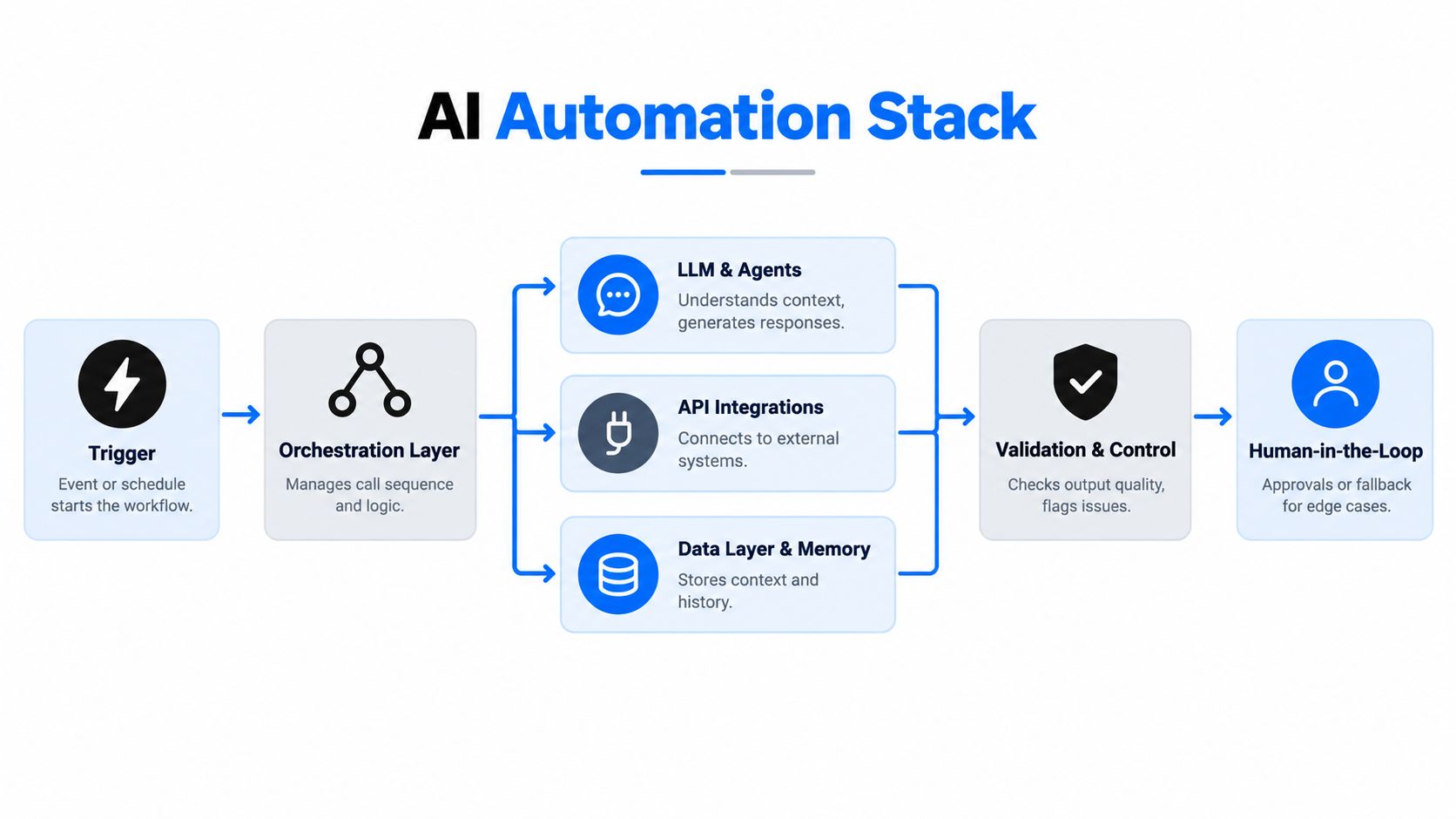
A reliable AI workflow is less like a single chatbot and more like a small operating system. It receives an event, gathers context, asks an AI component to interpret or generate something, validates the result, and then takes a controlled action.
The model is only one part of that chain.
The components that carry the workflow
| Component | Responsibility | Example in a B2B workflow |
|---|---|---|
| Trigger | Starts the process | New lead, email, call ending, ticket, or scheduled review |
| Orchestration layer | Controls sequence, branching, retries, and state | Routes a qualified lead to sales or requests missing information |
| LLM or agent | Interprets language, summarizes, classifies, or drafts | Extracts buyer intent from an inbound message |
| API integrations | Reads and writes to business systems | Connects the CRM, support platform, calendar, and messaging tools |
| Data layer and memory | Supplies approved context and preserves history | Retrieves account notes, policies, and previous interactions |
| Validation and control | Checks output before action | Confirms required fields, permitted values, and confidence thresholds |
| Human-in-the-loop | Handles exceptions and high-impact decisions | Approves an external message or reviews a disputed classification |
The orchestration layer deserves special attention. It should know which step ran, what output it produced, whether the next action is allowed, and what happens after a failure. Without state management, a workflow may create duplicate CRM records, send repeated messages, or lose the reason an item was escalated.
Design for failure, not only the happy path
A production system needs explicit routes for empty fields, ambiguous requests, unavailable APIs, malformed outputs, and conflicting records. If an AI model returns a category outside the allowed list, the workflow should reject it or send it for review rather than pass it downstream.
Schema validation is one of the simplest safeguards. Ask the model for structured fields, then check the field types, allowed values, and required content with deterministic logic. A second control can compare the proposed action with business rules, such as requiring approval before a customer-facing message, refund, contract update, or candidate disposition.
Leaders evaluating AI marketing automation tools should therefore compare more than prompt quality. Look for permissions, logs, retry behavior, review queues, integration coverage, and the ability to inspect each decision. For a deeper look at the coordination layer, see this overview of AI orchestration platforms.
A scalable architecture doesn't ask the model to be perfect. It makes imperfect outputs visible, containable, and correctable.
Where AI Automation Delivers Real Value Across B2B Functions
The strongest opportunities usually sit between a messy input and a structured next step. That boundary lets AI handle interpretation while deterministic automation manages routing, records, permissions, and notifications.
The following matrix separates the AI role from the human responsibility. “High” oversight doesn't mean the workflow lacks value. It means the process carries enough customer, financial, employment, or reputational risk to require a person before the final action.
AI Automation Opportunity Matrix by Function
| Function | High Value Workflow Slice | AI Role | Human Oversight Level |
|---|---|---|---|
| Sales | Inbound lead enrichment and routing | Read the request, identify intent, summarize the account need, and recommend ownership | Medium, review exceptions and high-value opportunities |
| Marketing | Campaign brief to channel-ready drafts | Convert a brief into variants, extract themes, and adapt language to each channel | High for claims, brand voice, and publication |
| Operations | SOP execution and exception triage | Interpret requests, locate the relevant procedure, and classify the next step | Medium, approve unusual or incomplete cases |
| Support | Ticket classification and response drafting | Identify issue type, retrieve approved guidance, and prepare a reply | Medium to high, depending on customer impact |
| Finance | Invoice and expense document processing | Extract fields, classify documents, and flag inconsistencies | High for approvals, payments, and exceptions |
| Recruitment | Candidate intake and interview-note structuring | Normalize applications, summarize evidence against defined criteria, and identify missing information | High, people make the hiring decision |
| Voice agents | Inbound qualification and outbound follow-up | Ask scripted questions, capture answers, qualify intent, and schedule or route calls | High for sensitive conversations and unclear requests |
Sales and marketing
A lead workflow can start with a form, email, or recorded call. AI enriches the initial context, identifies the problem the buyer described, and drafts a useful handoff for the sales representative. The CRM then stores the summary, while the rep decides whether the recommendation fits the account.
Marketing teams can use the same pattern for content operations. AI turns a brief, transcript, or internal note into a first draft and channel variations. Automation moves the work through review, approval, and publication. The human checkpoint protects factual accuracy, positioning, and claims that a model shouldn't invent.
Operations and support
Operations teams benefit when employees ask questions in natural language but the underlying process remains controlled. An AI assistant can locate the relevant SOP, identify the requested action, and create a structured task. It shouldn't rewrite the SOP or bypass an approval because the request sounds urgent.
Support offers a clear supervised use case. AI can classify a ticket, retrieve relevant documentation, summarize account history, and draft a response. A human can approve, edit, or escalate. Over time, the team can review corrections to improve instructions, retrieval sources, and routing rules.
Recruitment and voice
Recruitment automation should focus on administration and consistency, not opaque judgment. AI can standardize application data, summarize interview notes against published criteria, and flag missing information. Recruiters and hiring managers must retain responsibility for evaluation and final decisions.
Voice AI can answer common inbound questions, qualify prospects, route calls, and log context in a CRM. Outbound agents can follow a defined script and schedule a next step, but callers need an immediate handoff when the conversation becomes sensitive, ambiguous, or outside the agent's authority.
Prioritization test: Choose a workflow where AI can produce a structured recommendation, a deterministic rule can verify it, and a named person owns the exception path.
Implementing AI Automation Without Breaking Your Processes
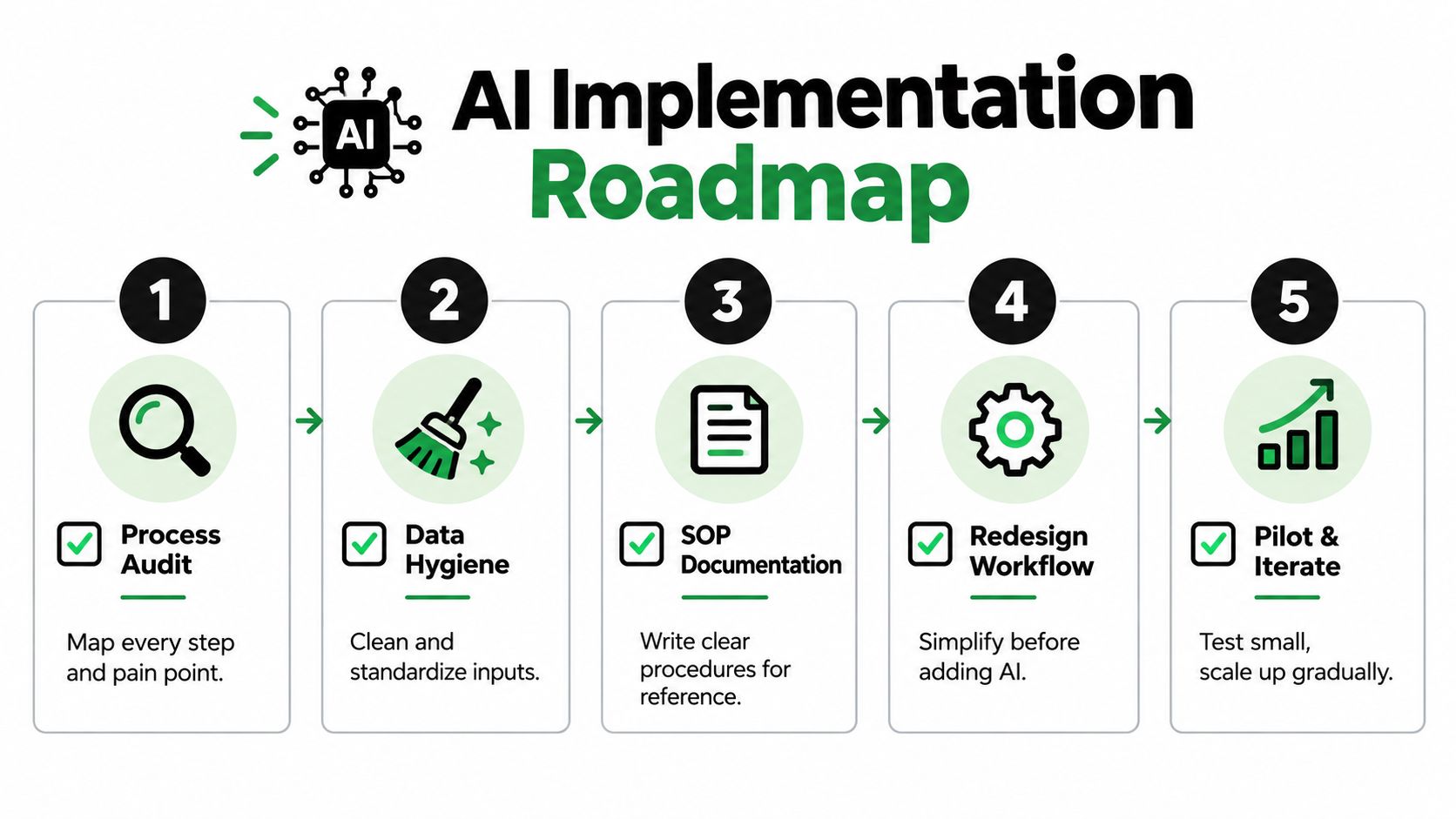
Adding AI to a broken workflow usually creates a faster version of the same confusion. Before selecting a model or building an agent, document what happens between the trigger and the final outcome.
Audit the process you have
Interview the people doing the work, inspect representative records, and map every handoff. Look for repeated reading, copying, classification, summarization, and routing. Also mark decisions that depend on undocumented judgment, because those decisions need explicit guidance before an AI system can support them.
Pay attention to the gap between the official SOP and the actual process. If employees maintain private spreadsheets, apply informal exceptions, or correct CRM data manually, the workflow isn't ready for blind automation. Those workarounds reveal missing rules and weak data structures.
Clean inputs and document decisions
AI output improves when the input has a stable shape. Standardize field names, account identifiers, status values, and ownership rules. For documents, define which fields are required and what should happen when a value is missing or contradictory.
Write the SOP as a decision aid, not a pile of screenshots. Include:
- Entry conditions: What event starts the workflow?
- Allowed actions: Which systems may the workflow read or update?
- Decision rules: What qualifies, escalates, pauses, or ends the process?
- Evidence requirements: Which source must support the recommendation?
- Exception ownership: Who reviews an uncertain or high-impact case?
Pilot a narrow slice
Start with one workflow segment, not an entire department. A good pilot has a clear trigger, a manageable output, known reviewers, and an audit trail. Lead qualification, ticket classification, invoice field extraction, and call summarization are often easier to instrument than autonomous deal negotiation or end-to-end account management.
Build the workflow with controls from the first test. Use structured outputs, allowed-value checks, duplicate detection, deterministic state checks, and a human approval step for external actions. Test normal cases and deliberately awkward inputs, including missing data, contradictory instructions, long messages, and records that look similar but belong to different accounts.
Measure operational value
Time saved matters, but it isn't enough. Track whether the workflow produces usable outputs, reduces rework, improves response consistency, and makes ownership clearer. Also monitor escalation volume, correction patterns, duplicate records, failed integrations, and the time reviewers spend correcting drafts.
Scale only when the process owner can explain why the workflow succeeds, where it fails, and who responds when it fails. Governance is not a document added after launch. It is the operating mechanism that lets the team increase automation without losing accountability.
Common Misconceptions and Why AI Automation Still Fails
The most expensive misconception is that a capable model can compensate for a badly designed process. It can't. AI may classify a message impressively in isolation, but a real workflow also needs the correct account, current policy, valid permissions, reliable API state, and a safe response when two systems disagree.
Benchmarks expose the distance between task-level demonstrations and dependable project completion. The Remote Labor Index evaluates 240 real-world remote-work projects across 23 domains, and its best-performing frontier agent achieved only a 2.5% automation rate. That result doesn't mean AI has no practical value. It shows why narrow workflow segments with clear instrumentation are often safer than attempts to automate an entire knowledge-work project.
Cross-application execution is harder still. AutomationBench reports that even the best frontier models scored below 10% on end-state correctness across realistic workflows involving Sales, Marketing, Operations, Support, Finance, and HR. Layered business rules, endpoint discovery, irrelevant records, and state errors can turn a plausible intermediate step into an incorrect final outcome.
Three assumptions to reject
- “Full autonomy is the default.” In practice, supervised partial automation is usually the more dependable starting point. Let AI interpret and recommend, then let rules and people control consequential actions.
- “Data quality can wait.” PwC reports that poor data quality still hampers digital initiatives for 87% of respondents, while only 30% reported significant improvement in data quality and reliability in the cited survey. Read the PwC operations survey for the broader context.
- “A pilot proves ROI.” A working demo proves that a model can produce an output. It doesn't prove that the workflow improves business performance after review time, correction work, exceptions, security controls, and maintenance are included.
Adoption gaps reinforce the point. PwC found only 27% of respondents had fully embedded an AI strategy across business units, and only 37% were comfortable allowing AI agents to execute full end-to-end processes. Stonebranch reported that only 21% had reached enterprise-scale AI workflow deployment, as summarized in the verified research brief. The constraint is often orchestration, accountability, and process ownership rather than model access.
Conclusion and Next Steps for ROI Driven Automation
The use of AI in automation creates value when a team assigns the right job to each layer. Rules should manage predictable transitions, APIs should move validated data, AI should interpret variable inputs, and people should own judgment-heavy exceptions and high-impact approvals.
The adoption evidence points in the same direction. McKinsey's 2026 survey found that 40% of respondents from large organizations with annual revenues above $1 billion reported scaling AI agents, up from 27% the previous year, a 13-point increase described in the survey reference. That growth signals strategic interest, but it doesn't eliminate the need for controls.
A practical starting checklist looks like this:
- Select one recurring workflow with unstructured input and a structured business outcome.
- Map the process, including informal workarounds and exception paths.
- Clean the data and write the decision rules before configuring prompts.
- Keep AI inside a bounded step, such as classification, extraction, retrieval, or drafting.
- Add schema validation, deterministic checks, logging, permissions, and human approval.
- Measure correction work, exception rates, cycle time, data quality, and downstream outcomes.
- Expand only after the process owner can explain performance and failure handling.
The objective isn't to make every workflow autonomous. It's to remove low-value interpretation and coordination work while preserving the judgment your customers, employees, and business still need.
MakeAutomation helps B2B and SaaS teams audit processes, document SOPs, build AI-enhanced workflows, and implement voice AI agents for inbound and outbound calls. Visit MakeAutomation to identify a narrow pilot, add the right approval controls, and turn a manual workflow into a measurable automation system.