
Contract Management Automation: A B2B & SaaS Guide
Contracts usually break before teams notice. The founder asks for the latest MSA and gets three versions from Slack, email, and a shared drive. Sales is waiting on legal for a redline that should have been routine. Operations is maintaining a spreadsheet of renewal dates that everyone knows is fragile and nobody wants to own.
That's the moment when contract management automation stops sounding like a nice-to-have software category and starts looking like operational infrastructure. In B2B and SaaS companies, contracts sit in the middle of revenue, vendor spend, hiring, compliance, and customer retention. If that system is manual, growth gets messy fast.
From Contract Chaos to Controlled Growth
A familiar pattern shows up in growing teams. Early on, manual contract handling feels manageable. A handful of templates lives in Google Drive. Someone in legal or ops remembers which fallback clauses are acceptable. Renewal reminders sit in one person's calendar. Then the company adds more reps, more customers, more vendors, and more exceptions. The process doesn't scale. The confusion does.
The hidden cost isn't just time spent searching. It's stalled approvals, inconsistent terms, missed obligations, and deals that slow down because nobody is sure which version is current. Contract work also reaches far beyond legal. In practice, sales, finance, procurement, HR, and customer success all touch the process at different stages.
Why the pressure is building now
The market signals are clear. 81% of organizations are actively seeking contract automation opportunities, according to Aavenir's contract management statistics roundup. The same source notes that poor contract management can cost businesses 8.6% of a contract's total value.
That combination matters. Buyers aren't chasing automation because it sounds modern. They're reacting to real leakage.
Practical rule: If contract status depends on inbox searches, tribal knowledge, or spreadsheet reminders, you don't have a contract process. You have a set of temporary workarounds.
I've seen teams try to solve this by buying eSignature first and assuming the problem is fixed. It rarely is. eSignature helps with execution, but it doesn't solve template control, approval routing, metadata capture, or post-signature obligations. That's why many teams that "went digital" still feel operationally manual.
Automation is a business strategy, not a feature
Good contract management automation creates control in three places:
- Before signature: Templates, clause libraries, approval paths, and negotiation rules reduce unnecessary back-and-forth.
- At signature: Routing, signatory controls, and auditability reduce execution friction.
- After signature: Renewal tracking, obligation monitoring, and searchable contract data keep the business from forgetting what it agreed to.
If your team is already automating adjacent document workflows, it helps to look at how other legal-heavy environments structure repeatable documents. This guide to document automation for plaintiff firms is useful because it shows the same underlying lesson. Standardize inputs, control versions, and route work consistently before volume exposes the cracks.
Contract management automation works best when leaders stop treating contracts as static files. They are operating assets. Once you manage them that way, controlled growth gets a lot easier.
The True Business Value of Automated Contracts
A sales rep needs an MSA out today. Ops is waiting on contract terms before onboarding can start. HR has three offer letters sitting in email because the approver is traveling. Nothing is technically broken, but work keeps queuing behind documents that should have been routine.
That is the true business case for contract management automation. It removes repeatable contract work from inboxes, Slack threads, and ad hoc follow-up, then puts it into a controlled system that moves at a predictable pace.
Research from World Commerce & Contracting points to the scale of the problem. Poor contracting processes can cost organizations significant value through delay, missed obligations, and weak commercial control, as outlined in WorldCC's analysis of contract value leakage. For busy B2B and SaaS teams, that loss rarely shows up as one dramatic failure. It shows up as slower revenue, more manual review, and too many contracts that nobody can answer questions about without hunting through files.
ROI shows up differently by role
The strongest automation projects are built around who wins first, not which features sound impressive in a demo.
Sales teams usually see the first payoff. Preapproved templates, guided fields, fallback clauses, and automatic routing cut the wait time for low-risk agreements. That means fewer deals stuck in legal review because a rep reused an outdated draft from six months ago.
Operations teams care about a different outcome. They need signed terms, notice dates, pricing rules, and service commitments captured in a way the business can use. If that data stays trapped in PDFs, renewals slip, billing exceptions increase, and customer commitments get missed. Teams that pair CLM with intelligent document processing for contract data extraction usually get more value because metadata becomes searchable and usable after signature, not just stored.
HR gets a cleaner process too. Standard offer letters, contractor agreements, and approval rules reduce policy drift and shorten turnaround for hiring managers. The gain is consistency as much as speed.
Executives and department heads get visibility. They can see cycle time, approval bottlenecks, deviation from standard terms, and upcoming renewals without asking three teams to assemble a spreadsheet.
Speed matters because contract delays spread
A contract delay is rarely isolated to legal.
If procurement terms are unresolved, vendor setup waits. If customer paper is not signed, onboarding stalls. If finance does not have final commercial terms, invoicing can slip. A slow contract process creates idle time across teams that cost more than the document review itself.
I usually advise clients to quantify this in hours, not abstractions. Start with one high-volume agreement type, then measure how long it sits in drafting, review, approval, signature, and post-signature handoff. That baseline shows where labor cost and revenue delay originate. It also prevents a common mistake, buying automation for drafting when the bigger problem is approval routing or obligation tracking.
The ROI case that gets funded
Generic efficiency language does not move budget. Role-based outcomes do.
| Business issue | Manual symptom | Automated outcome |
|---|---|---|
| Sales delays | Reps wait on legal for routine paper | Guided templates and rule-based approvals cut cycle time |
| Renewal risk | Ops tracks dates in spreadsheets and calendars | Alerts, metadata, and workflow ownership keep deadlines visible |
| Inconsistent terms | Teams reuse old files and edit them manually | Controlled templates and clause rules improve term discipline |
| Hiring friction | HR chases approvals across email | Standard document packages move through a defined approval path |
| Poor visibility | Leaders cannot answer basic contract status questions quickly | Searchable contract data supports faster reporting and decisions |
The trade-off is straightforward. Automation takes planning up front. Templates need cleanup. Approval rules need agreement. Systems need integration with CRM, HRIS, or procurement tools. But once those pieces are in place, contract work stops depending on who remembers the process and starts running on defined rules.
That is where the return becomes durable. Busy teams get faster execution, lower administrative drag, and fewer missed commitments, without adding headcount every time contract volume rises.
Core Components of Your Automation Engine
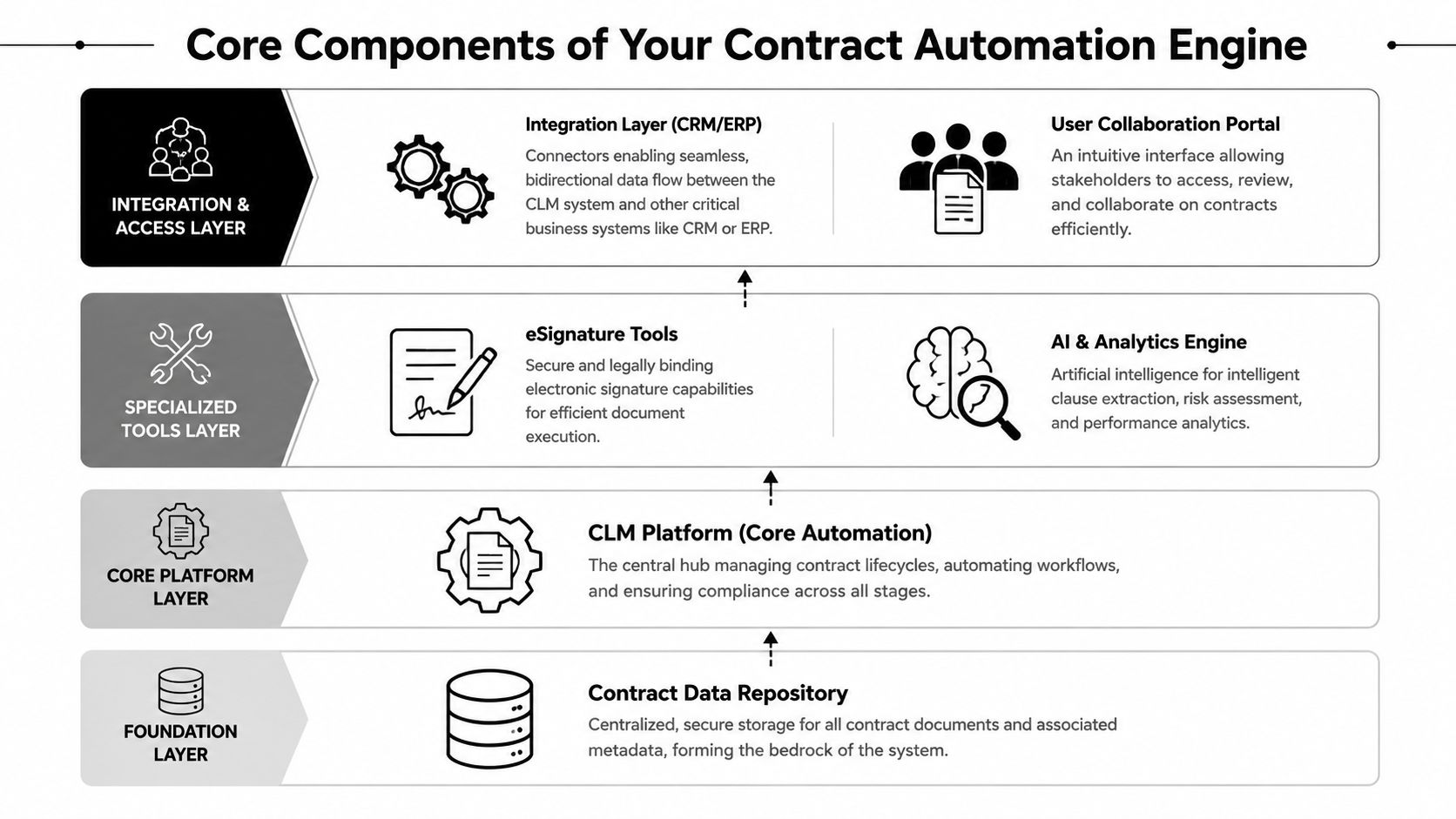
Organizations often overbuy features and underdesign workflow. A better way to think about contract management automation is as an engine with connected parts. The repository is the foundation. The CLM platform is the operating core. eSignature handles execution. AI handles extraction and analysis. Integrations carry data in and out of the system.
The base layer that teams skip
If contracts still live across inboxes, shared folders, and local drives, automation won't hold. You need a contract data repository first. Not just a folder, but a governed place where the executed file, metadata, status, and related documents stay connected.
From there, the CLM platform becomes the process manager. It controls intake, drafting, review, approval, execution, and post-signature tracking. This is the chassis of the whole system. Without it, you'll end up with disconnected tools that each solve one narrow step.
What each layer actually does
Think about the stack this way:
- CLM platform: Orchestrates workflows, templates, approvals, and lifecycle state changes.
- eSignature tools: Finalize execution securely and return signed records into the system.
- AI and analytics engine: Extract key terms, identify clause patterns, and help make contract data searchable.
- CRM and ERP integrations: Push deal, customer, supplier, or billing data into contract workflows and sync contract outcomes back to business systems.
- User collaboration portal: Gives sales, legal, procurement, HR, and finance a usable front door instead of forcing every request through email.
If your contract records arrive as PDFs, scans, or legacy documents, intelligent extraction matters early. In such cases, intelligent document processing becomes relevant. It helps convert unstructured contract files into usable fields that can drive approvals, alerts, and reporting.
Pre-signature and post-execution need different design
A lot of failed implementations happen because teams treat the whole lifecycle as one workflow. It isn't. A sound architecture separates pre-signature and post-execution workflows, as explained in Legalon's overview of contract automation.
Pre-signature automation typically includes:
- Templates and clause controls: Keep drafting inside approved boundaries.
- Review playbooks: Guide legal and business reviewers on acceptable fallback positions.
- Approval routing: Send non-standard terms to the right approvers based on value, risk, or contract type.
Post-execution automation usually includes:
- Obligations management: Track what each side needs to do after signature.
- Renewal and expiration reporting: Surface upcoming deadlines early enough to act.
- Audit trails and retrieval: Make it easy to prove who approved what and when.
Buy the system for the workflow you need next, not the feature demo that looks best.
That distinction matters because some teams only automate drafting and signing, then wonder why they still miss renewals and struggle with reporting. The contract engine isn't complete until post-signature work is operationalized too.
Your Phased Implementation Roadmap
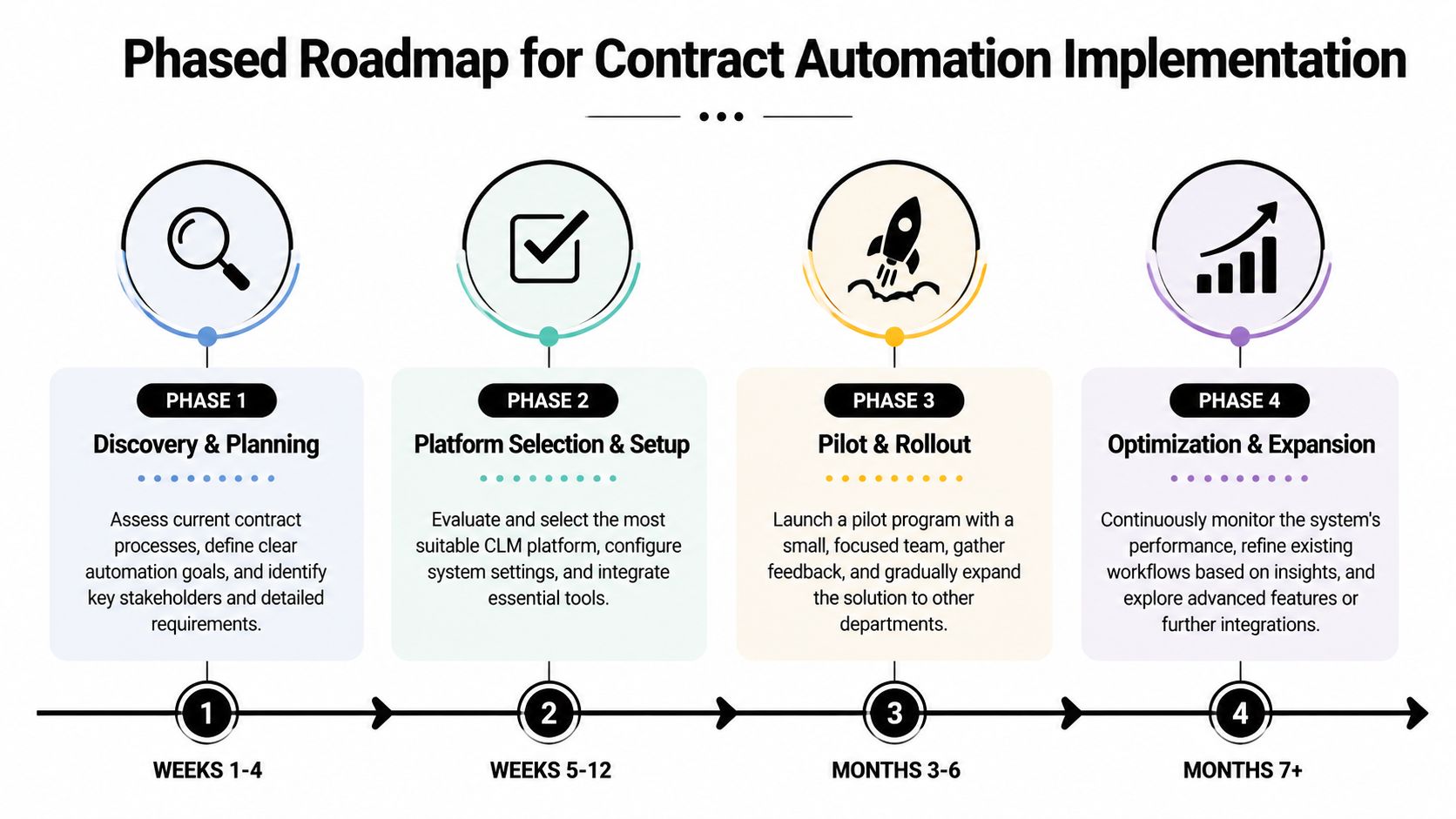
Organizations often don't fail because the software is wrong. They fail because they try to automate everything at once. The smarter path is phased implementation. Start with control. Then standardize. Then integrate.
A staged rollout also protects adoption. People can absorb one meaningful improvement at a time. They can't absorb a total process rewrite in one quarter.
Phase 1 discovery and planning
The first phase is diagnostic work. You map where contracts enter the business, who touches them, where they stall, and which agreements create the most friction or risk. For most B2B and SaaS teams, the short list includes sales agreements, vendor agreements, NDAs, and employment documents.
Key tasks in this phase include:
- Determine actual intake points: Not just legal requests, but sales, procurement, HR, and finance triggers.
- Define contract types: Group high-volume and high-impact documents separately.
- Document approvals: Identify where rules are clear and where they're based on habit.
- Clean source files: Remove outdated templates and duplicate contract records.
A lot of teams benefit from reviewing broader content around repository and governance setup before they choose software. This guide to document management software options is useful because contract automation depends on sound storage and retrieval discipline.
After you've mapped the process, this walkthrough is a useful visual reference for rollout pacing:
Phase 2 platform selection and setup
Now choose the platform based on the workflows you documented, not based on broad claims about AI. Focus on template control, approval logic, integration options, permissions, reporting, and post-signature tracking.
What works in setup:
- Start with a small number of templates: Usually NDA, MSA, order form, vendor agreement, and offer letter.
- Configure approval rules clearly: Route by contract type, risk triggers, or commercial thresholds.
- Set metadata standards: Decide how fields like term, renewal type, owner, governing law, and counterparty will be captured.
What doesn't work is migrating every historical contract on day one. Bring over the records you need for visibility and action first. Archive the rest in a controlled backlog.
Phase 3 pilot and rollout
Choose one team with enough volume to test the system properly and enough discipline to give useful feedback. Sales is often a strong pilot group for pre-signature workflows. Procurement or ops can be a strong pilot for post-signature monitoring.
Use the pilot to answer practical questions:
- Are users requesting contracts from the system, or bypassing it?
- Are legal reviewers trusting the playbooks?
- Are the fields captured at intake sufficient for downstream reporting?
- Are approvers acting in-system, or reverting to email?
Pilot one workflow that matters. Don't spread the project thin just to say multiple departments were included.
Phase 4 optimization and expansion
Only after the pilot stabilizes should you expand into additional departments, deeper integrations, and advanced analytics. At this point, contract management automation starts becoming part of the operating model instead of a standalone legal tool.
At this stage, teams usually refine:
| Expansion area | What improves |
|---|---|
| CRM integration | Sales can launch and track agreements inside the revenue workflow |
| ERP or procurement sync | Vendor and commercial data stays aligned across systems |
| Reporting | Leaders can monitor active obligations and bottlenecks |
| Exception handling | High-risk or unusual terms get clearer escalation paths |
The phased approach is slower at the start, but much faster to make durable. That's the trade-off worth taking.
Sample Automation Workflows for Key Roles
The fastest way to judge contract management automation is to ask one question. What changes for the people who are stuck in the process today?
Below are four role-based workflows that matter in B2B and SaaS environments. Each one solves a different bottleneck. Together, they show why a feature list isn't enough. ROI comes from role-specific execution.
Sales lead workflow
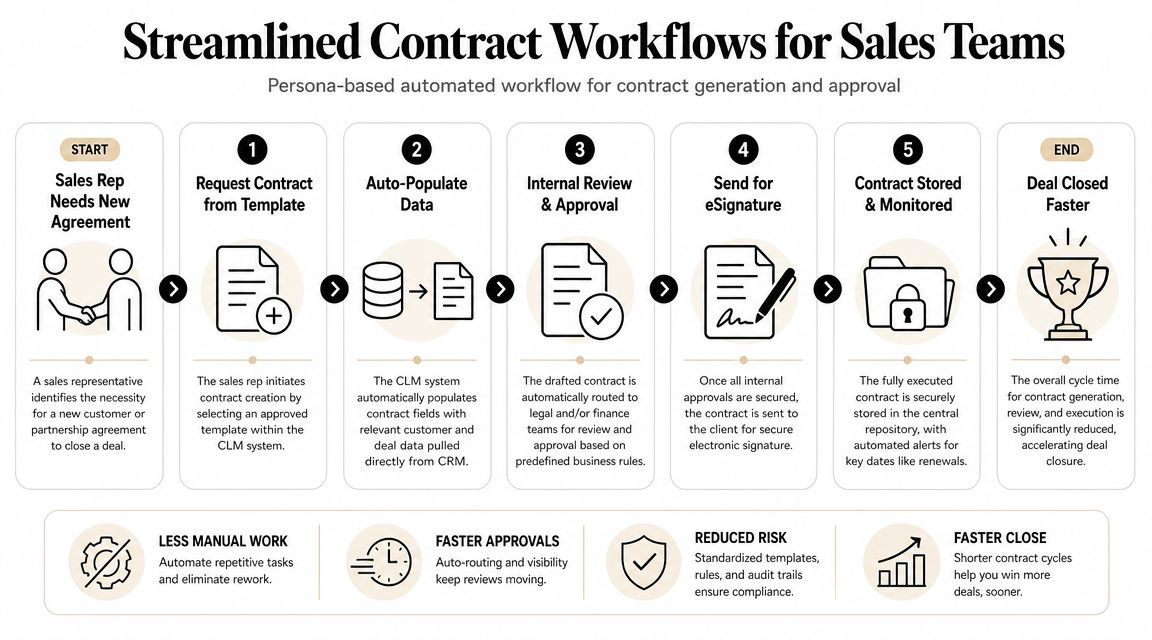
Before automation, the sales lead asks legal for an NDA or MSA, waits for a reply, updates customer details manually, and then chases for approval status. The contract becomes a side quest inside the deal cycle.
After automation, the rep starts from an approved template inside the CRM or CLM request portal. Customer and deal fields populate automatically. If the requested terms stay within policy, the workflow routes for routine approval and goes to eSignature. If the customer requests non-standard language, the system flags it and sends it to legal with context already attached.
That shift is important because it removes low-value administrative work from the rep and low-risk repetitive review from legal.
Operations director workflow
Ops usually inherits the mess after signature. Customer notice periods, auto-renewals, pricing review windows, and service obligations often live in spreadsheets because nobody built post-signature discipline into the contracting process.
With automation, executed contracts enter a central repository with tagged fields for term dates, renewal logic, account owner, and key obligations. Alerts go to the right person before action is required. The ops director stops building emergency reports and starts managing a visible pipeline of upcoming contract events.
A similar design principle shows up in finance automation. If you're thinking about how structured intake, extraction, and routing improve downstream execution, this guide on how to automate invoice processing is useful because the same operational logic applies.
HR and recruiting workflow
Recruiting teams often move fast and break consistency. One manager sends an outdated offer letter. Another edits terms manually. A third forgets to route the agreement for final approval before it goes out.
A better setup uses role-based templates for offer letters, contractor agreements, and employment documents. The recruiter enters a small set of approved variables, such as role, compensation structure, start date, and manager. The system generates the document, routes it for internal approval, and stores the final signed version automatically.
That matters because HR automation isn't only about speed. It's also about keeping employment terms consistent and reducing preventable process errors.
Founder or executive workflow
Founders don't need another dashboard with vanity metrics. They need fast answers to real contract questions. Which customer agreements have unusual liability language? Which vendor contracts renew soon? Which accounts are tied to non-standard pricing commitments?
The right contract automation setup gives leaders searchability and structured visibility without forcing them to read every agreement end to end. AI can help surface term summaries and clause patterns, but only if the underlying repository and metadata are clean.
The executive use case isn't contract drafting. It's decision access.
When role-based workflows are designed properly, every team wins differently. Sales closes with less friction. Ops avoids preventable misses. HR standardizes high-volume documents. Leadership gets visibility without creating more reporting work for everyone else.
Measuring Success and Proving ROI
A month after rollout, the true test shows up in a simple question from leadership: what changed? If the answer is "users logged in" or "documents were sent," the automation program is already on weak footing. ROI comes from less waiting, fewer exceptions, cleaner handoffs, and better control for the teams that touch contracts every day.
The cleanest way to measure that value is by role. Sales cares about speed to signature. Ops cares about renewal control and missed obligations. HR cares about consistency at volume. Executives care about fast access to contract exposure without pulling three people into a Slack thread. That framing keeps reporting tied to business outcomes instead of software activity.
Role-based KPIs that matter
| Role | Primary Goal | Key Performance Indicator (KPI) | How to Measure |
|---|---|---|---|
| Sales Lead | Reduce delay in customer contracting | Average time from contract request to sent-for-signature | Compare timestamps between intake and outbound signature request |
| Operations Director | Improve post-signature control | Renewal and notice events handled on time | Track upcoming deadlines versus completed actions in the system |
| HR or Recruiter | Standardize employment documents | Percentage of agreements generated from approved templates | Review template usage against total HR contract volume |
| Legal or Finance Reviewer | Reduce manual review load | Volume of contracts handled without ad hoc email review | Compare in-system approvals to off-platform exception handling |
| Founder or Executive | Improve visibility into obligations and risk | Time required to retrieve key contract data | Test how quickly the team can locate active terms, owners, and deadlines |
One warning. Do not bundle every gain into a single ROI number too early. Early in a phased rollout, some value is operational rather than financial. A sales team may close the same volume but spend less time chasing approvals. HR may not cut headcount, but it can reduce document errors and onboarding delays. Those improvements still matter, and they usually show up before hard cost savings do.
What to review monthly
I recommend a short monthly operating review with process owners, not a long quarterly presentation built for optics. Focus on four things:
- Adoption: Which teams use the workflow consistently, and which ones still work through email or old templates?
- Cycle friction: Where do requests stall, and which approval step creates the most avoidable delay?
- Data quality: Are key fields complete and reliable enough to support search, reporting, and downstream workflows?
- Exception rate: Which contract types still fall out of the standard path and require manual handling?
If your automation includes CRM handoffs, this guide to designing CRM work flows is worth reviewing because many contract delays start upstream. Bad intake design, missing commercial fields, and unclear ownership create rework long before the agreement reaches legal or procurement.
Strong ROI reporting stays simple. Show the before-and-after change in turnaround time, on-time renewal handling, template compliance, and off-platform review volume. If each team can see how its workload improved, budget approval for the next phase gets much easier.
Common Pitfalls and How to Avoid Them
A SaaS company buys a CLM platform to speed up deals. Three months later, sales is still sending old Word templates, legal is reviewing work that should have been self-serve, HR keeps offer letters in shared drives, and ops cannot trust the renewal data. The software is live, but the operating model never changed.
That is the pattern behind many failed rollouts. Contract automation works when teams agree on intake rules, ownership, exception handling, and data standards before the workflow goes live. It fails when software is expected to fix unclear process.
Pitfall one, automating broken process
Automation magnifies design quality. If the intake form is vague, approvals are unclear, or fallback paths are missing, the system routes bad requests faster and creates more rework.
Start with decision logic by contract type and by team. Sales usually needs a fast path for standard MSAs, order forms, and low-risk redlines. HR needs controlled templates for offer letters, contractor agreements, and policy acknowledgments. Ops and procurement need clear triggers for vendor review, renewal tasks, and obligation tracking. Those paths should reflect real approval thresholds, not a generic workflow diagram copied from the vendor demo.
A practical test helps here. If a coordinator cannot answer who approves a pricing exception, who owns fallback terms, or when legal must step in, the process is not ready to automate.
Pitfall two, bad migration discipline
Poor migration work breaks trust early. Users search for a contract, find three versions, and none of them show the effective date or renewal terms. After that, they go back to email, desktop folders, and side spreadsheets.
The fix is scope control.
Migrate active contracts first. Define a required metadata set for that group, such as entity name, counterparty, signature status, effective date, renewal date, owner, and contract type. Put archive cleanup into a separate workstream with a lower priority. Busy B2B teams get better ROI from reliable live workflows than from spending months perfecting ten years of legacy files.
Good automation depends on discipline. File hygiene, field standards, and approval rules have more impact on adoption than a polished demo.
Pitfall three, over-automation without governance
Teams get into trouble when they treat AI as a substitute for policy. Clause extraction, document classification, and draft generation can reduce manual effort, but those tools still need boundaries. Someone must define which contracts can move straight through, which changes trigger review, and which exceptions need named approval.
That governance work shows up in three places:
- Exception handling: Assign authority for non-standard legal, commercial, and security terms.
- Policy maintenance: Review templates, clause libraries, and approval rules on a set schedule.
- System actions: Limit automated actions to low-risk steps like routing, reminders, metadata updates, and task creation.
The best setups are selective, not maximal. Sales gets speed on standard paper. Ops gets reliable tracking and fewer manual handoffs. HR gets consistency and an audit trail. Legal stays focused on risk and exceptions instead of inbox triage.
If your team is ready to replace contract bottlenecks with structured, scalable workflows, MakeAutomation can help design and implement the systems behind it. From intake and approvals to AI-enhanced document workflows and cross-platform integrations, the focus is practical automation that busy B2B and SaaS teams will use.