React Native AsyncStorage Guide for Data Persistence
You ship a React Native app, reopen it after a restart, and your carefully managed UI state is gone. The user has to pick a theme again, dismiss onboarding again, maybe even reselect account filters they already set. That's usually the moment AsyncStorage enters the conversation.
In B2B and SaaS mobile apps, that conversation gets more serious fast. You might need to persist onboarding completion, tenant selection, feature flags, or a lightweight offline cache for account data. You also might be under pressure to store session data locally, which is exactly where many teams misuse AsyncStorage and create security problems they don't notice until later.
Introduction to React Native AsyncStorage
React Native AsyncStorage is the standard persistent key value store used for simple local storage that survives app restarts. It's best for things like preferences, small caches, and app state that doesn't justify a full database.
React Native changed the way developers use it when AsyncStorage was removed from React Native core in 2020 and moved to the community package @react-native-async-storage/async-storage, as documented in the React Native AsyncStorage reference. That move was good for maintenance, but it also created a long tail of outdated tutorials, broken imports, and apps still carrying deprecated code.
What keeps AsyncStorage relevant is its simplicity. You can save a theme flag, a dismissed-banner state, or a recently selected workspace from any component without introducing heavy infrastructure. In production, that's often enough.
Practical rule: Use AsyncStorage when the data is small, non-sensitive, and accessed by exact key. The moment you need stronger security, heavy write frequency, or large collections, treat it as the wrong tool.
For mobile B2B apps, that distinction matters. A remembered sidebar state is harmless. A CRM access token stored unencrypted isn't.
Installing and Configuring AsyncStorage
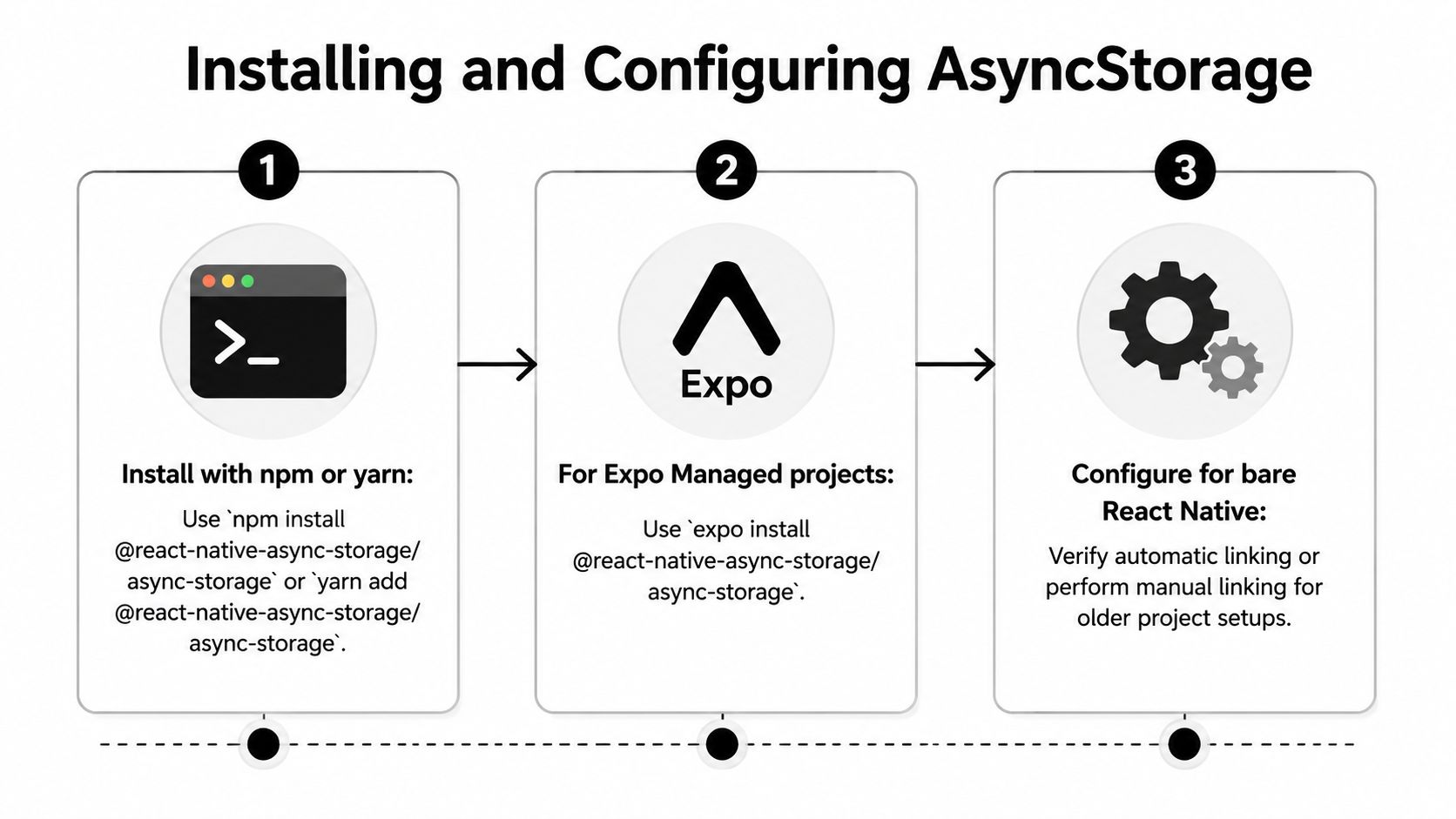
The setup is straightforward if you use the right package and the right import. Most installation pain comes from following old blog posts that still import AsyncStorage from react-native.
Bare React Native setup
For a standard React Native project, install the community package:
With npm
npm install @react-native-async-storage/async-storageWith yarn
yarn add @react-native-async-storage/async-storage
Then import it like this:
import AsyncStorage from '@react-native-async-storage/async-storage';
On iOS, run CocoaPods install in the ios directory if your project requires it after adding the native dependency. In modern React Native projects, linking is usually automatic. Older setups may still need manual cleanup if they were upgraded across multiple framework versions.
Expo Managed setup
Expo is where teams lose time because the install command matters. The common NativeModule: AsyncStorage is null error shows up frequently in Expo Managed apps when developers mix native package assumptions with the wrong installation path. The Stack Overflow discussion of the Expo AsyncStorage null module error points to the practical fix: use the specific Expo install command and the correct import path.
For Expo Managed, use:
- Expo install command
expo install @react-native-async-storage/async-storage
Then keep the same import:
import AsyncStorage from '@react-native-async-storage/async-storage';
That sounds minor, but it's the difference between a clean build and a native module failure.
If you see deprecation warnings or a null native module, check the import first. In many apps, the bug isn't storage logic. It's that the project still imports from the old core module.
Quick verification checklist
Before writing storage code, verify three things:
The package name is current
@react-native-async-storage/async-storageThe import path matches the package
Notreact-nativeExpo projects use
expo install
Not plain npm or yarn by habit
That setup discipline avoids a surprising amount of wasted debugging time.
Using AsyncStorage in Your App
Once it's installed correctly, AsyncStorage is easy to work with. The API is small, and that's part of why it remains useful.

Save simple values
For flags like hasSeenOnboarding or preferredTheme, keep the write path boring and explicit.
import AsyncStorage from '@react-native-async-storage/async-storage';

export async function saveTheme(theme: 'light' | 'dark') {
  try {
    await AsyncStorage.setItem('ui.theme', theme);
  } catch (error) {
    console.error('Failed to save theme', error);
  }
}

export async function getTheme() {
  try {
    return await AsyncStorage.getItem('ui.theme');
  } catch (error) {
    console.error('Failed to load theme', error);
    return null;
  }
}
Namespacing keys like ui.theme or auth.onboardingComplete helps once the app grows. It also makes cleanup easier when you need to remove an entire class of values.
Store objects safely
AsyncStorage stores strings. That means arrays and objects need serialization.
type UserPrefs = {
  compactMode: boolean;
  defaultWorkspaceId: string | null;
};

export async function saveUserPrefs(prefs: UserPrefs) {
  try {
    await AsyncStorage.setItem('user.prefs', JSON.stringify(prefs));
  } catch (error) {
    console.error('Failed to save preferences', error);
  }
}

export async function getUserPrefs(): Promise<UserPrefs | null> {
  try {
    const raw = await AsyncStorage.getItem('user.prefs');
    return raw ? JSON.parse(raw) : null;
  } catch (error) {
    console.error('Failed to read preferences', error);
    return null;
  }
}
If your state logic is getting messy, pair storage with predictable component state patterns. This is one place where solid React useState habits for local state management make persistence easier instead of turning every screen into a custom cache layer.
Remove and reset data
Logout flows often need selective cleanup, not a total wipe.
export async function clearSessionFlags() {
  try {
    await AsyncStorage.removeItem('auth.onboardingComplete');
    await AsyncStorage.removeItem('ui.lastWorkspace');
  } catch (error) {
    console.error('Failed to clear session flags', error);
  }
}
Use clear() carefully. In multi-feature apps, it can remove unrelated keys and create bugs that look like random state loss.
A good walkthrough helps if you want to watch these patterns in action:
Don't treat AsyncStorage like a hidden database. Treat it like durable app preferences and lightweight cached state.
Managing Storage Limits and Security
AsyncStorage works well only when you respect its boundaries. The most important one is size. According to the Monterail guide to React Native AsyncStorage storage behavior, AsyncStorage has a 6 MB total storage limit and a 2 MB per-record limit.
AsyncStorage storage limits
| Dimension | Limit | Platform |
|---|---|---|
| Total storage | 6 MB | iOS and Android |
| Per record | 2 MB | iOS and Android |
That per-record limit is what catches teams first. A single oversized JSON blob can fail, and the failure often shows up only after the app accumulates more real user data.
What works for large payloads
If you need to persist a large list, split it rather than writing one giant object.
Chunk arrays by key
Savecontacts.1,contacts.2,contacts.3instead of one monolithic payload.Load lazily
Fetch only what the screen needs first, then hydrate additional chunks as the user scrolls.Trim caches aggressively
AsyncStorage is better for the last useful slice of data than for a full offline mirror.
For B2B apps, this matters with things like saved lead lists, CRM summaries, or activity histories. A dashboard snapshot might fit. A full customer dataset usually shouldn't.
The security line teams cross too often
AsyncStorage is unencrypted by default. That means it's fine for theme settings and onboarding flags, but not a good default for sensitive session data, client records, or anything that could trigger compliance trouble.
A practical pattern is to separate storage by sensitivity:
Keep in AsyncStorage
UI preferences, non-sensitive feature flags, last-opened screen, dismissed noticesUse an encryption wrapper for secrets
Put access tokens, refresh tokens, and client-sensitive session artifacts into a dedicated encrypted storage library
If your team also manages secrets outside the app stack, the discipline should match what you'd apply with something like AWS Secrets Manager for centralized secret handling. Mobile local storage deserves the same threat model thinking.
Here's a simple abstraction pattern:
import AsyncStorage from '@react-native-async-storage/async-storage';
// import EncryptedStorage from 'react-native-encrypted-storage';

export async function saveNonSensitiveSetting(key: string, value: string) {
  await AsyncStorage.setItem(key, value);
}

export async function saveSensitiveToken(token: string) {
  // await EncryptedStorage.setItem('auth.token', token);
}
That split is more realistic than all-or-nothing advice. Many apps need both lightweight speed and stronger handling for a narrow set of secrets.
Performance Tips and Debugging
AsyncStorage performance problems usually don't come from one catastrophic mistake. They come from lots of small, chatty reads and writes spread across the app.
The strongest optimization pattern I've seen is the one documented in Sendbird's write-up on extreme AsyncStorage optimization techniques. Grouped writes, batching, caching, and callback-based patterns can produce a 10 to 12 times performance boost compared with naive Promise-heavy usage.

The four patterns that matter
Group related data
Don't scatter tightly related values across many keys if they're always read together. A small grouped object often reduces disk churn.Batch writes
If you're saving several values during one user action, batch them instead of firing many isolated write operations.Cache hot data in memory
Keep frequently read values in a lightweight in-memory layer so the app doesn't hit disk every time the same screen renders.Be deliberate with async patterns
Promise chains everywhere can add overhead. On older devices and busy screens, storage architecture matters more than people expect.
A practical batching example
import AsyncStorage from '@react-native-async-storage/async-storage';

export async function saveDashboardBootState() {
  try {
    await AsyncStorage.multiSet([
      ['ui.lastTab', 'pipeline'],
      ['user.dismissedNudge', 'true'],
      ['filters.owner', 'team'],
    ]);
  } catch (error) {
    console.error('Failed to batch save dashboard state', error);
  }
}
This won't magically fix every slow screen, but it reduces self-inflicted I/O overhead.
Debugging the failures people misread
Two issues show up often in production.
First, interrupted writes. If the app closes during a write sequence, metadata and payload can drift apart. The Sendbird article describes storing a transaction queue at the start and clearing it after completion so the app can recover on the next I/O cycle.
Second, render loops that look like storage latency. I've seen screens blame AsyncStorage when the underlying cause was repeated recomputation after every fetch. Good memoization reduces the pressure around storage-backed UI hydration, especially with list-heavy dashboards. Here, React component memoization patterns often help more than adding another storage abstraction.
Cache what's hot, batch what's related, and log every failed write. AsyncStorage bugs are easier to fix when the storage layer is explicit instead of scattered across hooks and effects.
Alternatives and Migration Strategies
AsyncStorage is still the default for lightweight persistence, but it's not the right endpoint for every app. Once data becomes sensitive, write-heavy, or structurally complex, alternatives are easier to defend.
The clearest upgrade path for many teams is MMKV. The GitHub guide comparing AsyncStorage usage and alternatives notes that MMKV offers superior performance, larger capacity, and built-in encryption compared with AsyncStorage. That makes it a stronger fit for high-frequency access and sensitive local data.
When each option makes sense
| Tool | Best fit | Trade-off |
|---|---|---|
| AsyncStorage | Preferences, flags, onboarding state, small caches | Unencrypted, limited capacity |
| MMKV | Fast reads, larger local state, encrypted needs | Different API and migration work |
| Encrypted storage wrapper | Tokens and sensitive session artifacts | Narrower scope than general app state |
| SQLite-style database | Structured records and query-heavy local data | More setup and data modeling |
Migration without chaos
A clean migration usually follows this sequence:
Replace imports first
Remove old core imports and standardize the storage access layer.Map keys intentionally
Don't just copy values blindly. Decide which keys stay in AsyncStorage and which should move to a secure or faster store.Preserve serialized formats during transition
If old values are JSON strings, keep parsing stable while you migrate.Validate reads before deleting the old source
Migrations fail when teams clear old storage before confirming the new store returns the expected data.
The hybrid model that works well
In many production apps, the best answer isn't full replacement.
Keep AsyncStorage for:
- non-sensitive UI state
- onboarding flags
- feature toggles
- last-used filters
Move elsewhere:
- auth tokens
- sensitive customer session data
- frequently accessed heavy state
- anything approaching database behavior
That hybrid approach avoids overengineering while fixing the weakest part of the stack first.
Conclusion and Best Practices
AsyncStorage is still worth using when you keep it in its lane. It's simple, predictable, and good at persisting lightweight app state without much ceremony.
The mistakes are also predictable. Teams import the deprecated module, overload it with large payloads, or store sensitive data because it's convenient. Those shortcuts usually work for a while, then fail at the worst time.
The reliable approach is simple:
- install the community package correctly
- use exact, namespaced keys
- serialize carefully
- avoid oversized records
- keep secrets out of plain AsyncStorage
- batch and cache when storage starts affecting UX
- migrate selectively when performance or security requirements change
Used this way, React Native AsyncStorage stays useful. Used as a catch-all local database, it becomes technical debt quickly.
If your B2B or SaaS team needs help designing safer mobile persistence, cleaning up outdated React Native storage patterns, or connecting app state with broader automation workflows, MakeAutomation can help map and implement the right setup without turning your stack into a maintenance burden.