
What Is Content Automation and How It Drives B2B Growth
Content automation is the use of software, AI, and workflow rules to plan, generate, approve, publish, distribute, and optimize content at scale. It can cut production time by 40%–60% on average and save marketing teams 5 to 15 hours per employee each week, depending on volume and complexity (content creation automation statistics). The point is not to remove humans, it's to remove bottlenecks.
You probably feel that bottleneck right now. A launch is close, the blog queue keeps growing, nurture emails still need review, and everyone is waiting on someone else to finish the next handoff. That's where content automation matters, because it turns a messy sequence of manual tasks into a controlled system that still leaves room for judgment where it counts.
For a useful comparison, Salesmotion's guide to sales automation shows the same basic pattern in a different function, repetitive work gets handled by software, while people keep control of the conversation and the exceptions. Content automation works the same way in marketing and operations. If you want a broader operations lens on the moving parts, the logic is close to workflow automation, just applied to the content lifecycle.
By 2026, this is no longer an experiment sitting on the edge of the stack. Most B2B teams have moved from testing AI tools to wiring them into daily work, which is why the question isn't whether to automate content, it's where to place the human checkpoints so speed doesn't break trust.
A Plain-English Definition of Content Automation
A SaaS marketing lead staring at 80 blog drafts, three nurture sequences, and a launch next week doesn't need another slogan about AI writing faster. She needs a system that gets content from idea to published asset without ten people manually passing files around. That's content automation in plain English, software, AI, and workflow rules doing the repetitive parts of the content job so the team can move faster without losing control.
The simple definition
Content automation is an end-to-end workflow layer. It connects planning, drafting, approval, publishing, distribution, and optimization so each stage hands off cleanly to the next. HubSpot describes it as tying structured data, templates, and rules together so content can be generated and managed at scale, especially for programmatic SEO and other data-driven use cases (HubSpot content automation guide).
That definition matters because many people stop too early. They hear “automation” and think “AI writes the post.” In practice, the bigger win is removing the manual waiting between steps, the chasing for approvals, the copy-paste work, the version confusion, and the publishing delays.
Practical rule: automate the handoffs before you automate the judgment calls.
What stays human
The human job doesn't disappear. Someone still has to define the topic, set the angle, protect the brand voice, and decide whether a draft is accurate enough to ship. Adobe frames content automation as tools and processes that handle lifecycle tasks with minimal human input, but that “minimal” part still leaves room for strategy, review, and quality control (Adobe on content automation).
That's why the lifecycle lens is useful. It forces you to separate the repetitive middle from the high-trust edges. The first is ideal for automation. The second should stay under named human ownership.
One more reason this matters now, especially in 2026, is that content automation has moved from a tactical shortcut to an operating layer for B2B teams. The teams winning with it aren't treating it like a one-time tool purchase. They're treating it like a system.
The Five Core Components of a Content Automation Stack
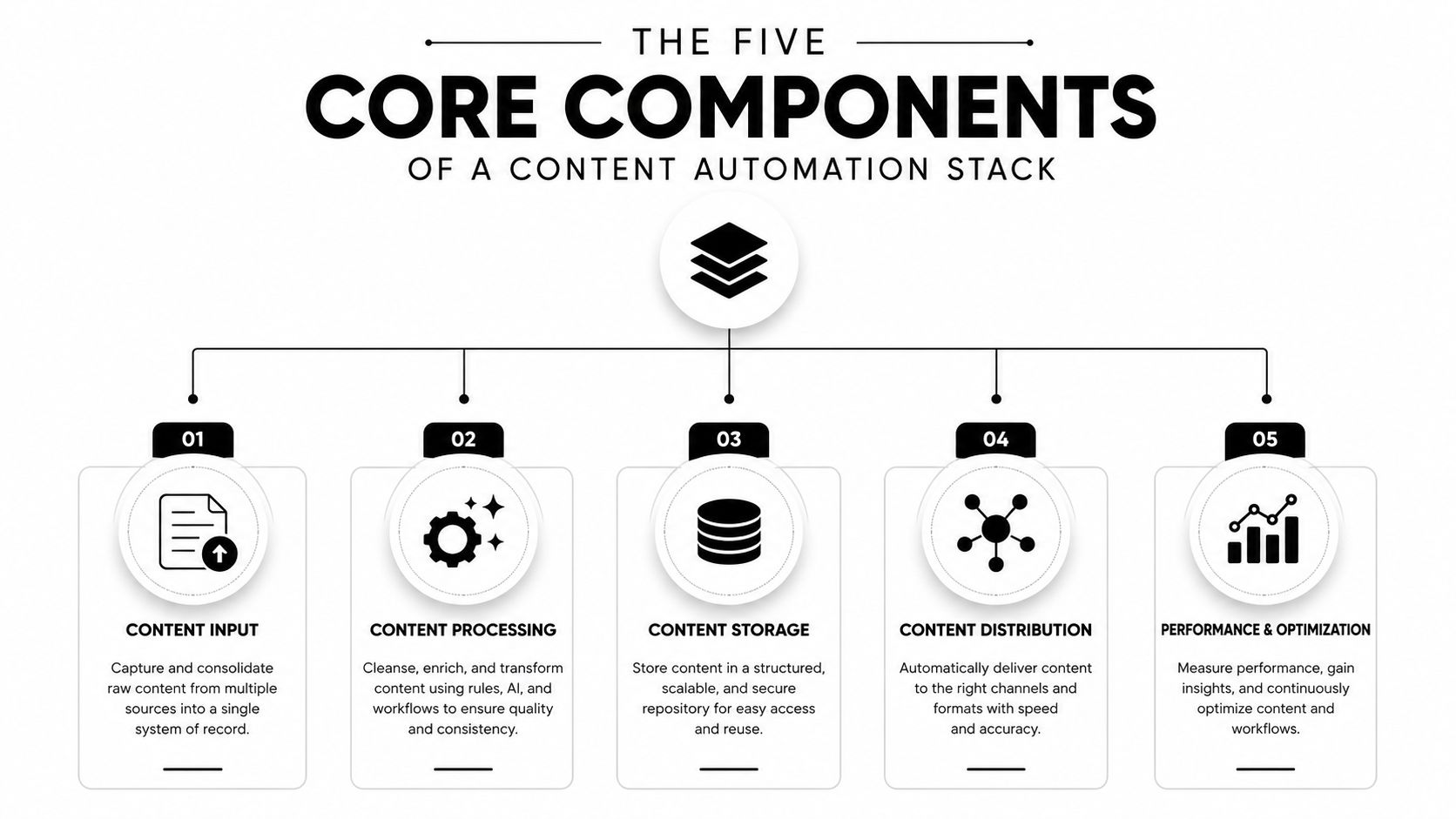
A content automation stack works like a factory line with five stations. One station gathers the inputs, another turns them into draft material, a third checks the work, a fourth sends it out, and the last one studies what happened so the process can improve. If any station breaks, the whole system slows down.
1. Planning and ideation
The planning layer decides what content should exist, who it serves, and which data points should shape it. In a B2B setup, those inputs often come from a CMS, CRM, spreadsheets, and analytics feeds. The result is a set of content briefs, topic clusters, and reusable templates that save teams from starting at zero every time.
A simple example helps. A founder wants a webinar recap, a landing page, and a follow-up email to all speak to the same buyer problem. Planning turns that scattered request into one structured brief, so each asset has the same message and different execution.
2. Generation and drafting
This layer turns the brief into draft material. It does not have to mean one giant prompt that spits out a finished article. AI writers, template engines, and structured fields can produce first drafts, summaries, subject lines, and page variants, and when they pull from data sources, the system can create many versions without a human retyping the same information.
That matters in B2B marketing because the same core offer often needs different wording for different audiences. A draft for operations leaders may stress process control, while a draft for revenue leaders may stress pipeline impact. The automation handles the repeatable assembly, while the message still comes from the plan.
3. Approval and governance
The machine pauses here, and the editor takes over. A workflow tool routes drafts for review, checks that the right person has signed off, and blocks publication until the content meets the brand and accuracy standard. Vectoron's guidance makes the point clearly, speed only holds up when automation is paired with human approval, prompt libraries, and workflow orchestration (content marketing automation guidance).
Governance is the part that keeps a fast stack from turning sloppy. Prompt curation keeps the draft from drifting off brief. Editorial review catches errors in claims or phrasing. Brand voice sign-off protects consistency. Final QA catches broken links, bad formatting, or a mismatched version before it goes live.
4. Distribution and publishing
Once the content is approved, it moves into the channels that matter, usually the website, email, and social. CMS publishing, email tools, and scheduling rules do the heavy lifting here. The goal is straightforward, get the right asset into the right channel without a manual upload for every destination.
That is also where marketing automation integration becomes useful. When the content stack connects cleanly to the rest of the marketing system, a published asset can trigger the next action without someone copying links between tools. In a B2B workflow, that might mean a new case study automatically feeding an email nurture path, a sales alert, and a social queue.
5. Measurement and optimization
The last station closes the loop. Analytics tools track performance, show where people drop off, and reveal which topics or formats deserve another round. At that point, the stack stops acting like a content machine and starts acting like a learning system.
This is also where teams decide what to keep human and what to automate next. If a certain headline format consistently performs well, the system can reuse that pattern. If a page needs a different angle for a different segment, the optimization layer can feed that insight back into planning instead of leaving it buried in a report.
How the End-to-End Workflow Actually Runs
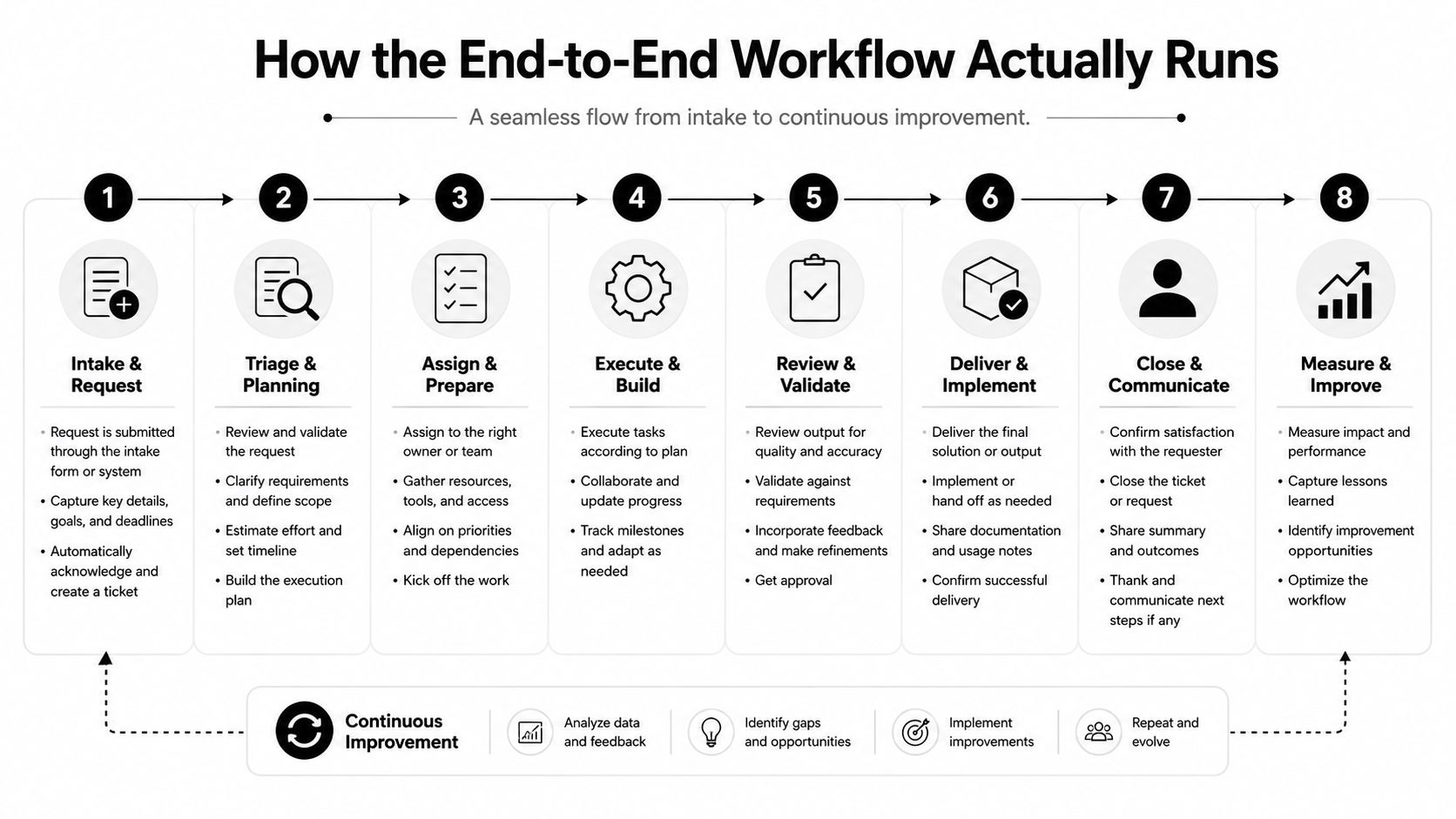
A workable content system begins with one brief and one clear owner. A strategist enters the topic, audience, and goal into the planning tool, then the workflow passes that input into a template tied to a prompt library. From there, the draft is generated, reviewed, approved, published, and measured as one loop, not as a pile of separate tasks.
The moving parts in order
The workflow starts with the brief. A strategist defines the angle, the audience, and the outcome the asset needs to support. The AI draft is then produced against brand rules, like a machine running from a fixed set of instructions instead of inventing its own.
A named editor checks the language, claims, and structure. Then the asset gets brand-voice sign-off and final QA before it is scheduled or published. After that, distribution rules send it to the CMS, the email system, and social channels, while analytics feed the next planning cycle. For teams mapping that sequence visually, workflow visualization helps show where each handoff sits in the loop.
That sequence only works if the human checkpoints are explicit. Prompt curation keeps the AI from drifting. Editorial review catches accuracy issues. Brand-voice sign-off protects consistency. Final QA prevents a bad link, a broken format, or a mismatched version from going live.
A content workflow gets faster when fewer people touch it, but it gets safer when the right person touches each decision point.
For a glossary that helps teams keep terminology straight while building these flows, the Glossary of workflow terms is a helpful reference.
What the loop should never lose
The strongest systems keep a named editor in charge and maintain a prompt library that reflects brand standards accurately. That difference separates automation that helps from automation that sprays out generic output. The machine handles the repetitive middle. The human owns the edges, the exceptions, and the final call.
Three B2B Use Cases Worth Copying
The best way to understand content automation is to watch it solve real B2B work. The pattern stays the same, but the inputs and triggers change depending on the job.
Programmatic SEO for product and comparison pages
A SaaS company can connect product data, CRM fields, and keyword templates to generate pages at scale. The system can build comparison pages, integration pages, and feature pages from structured inputs instead of one-off writing. The human checkpoint sits at template design and editorial review, because those pages still need a clear claim, a useful angle, and compliance with brand standards.
Lead nurture sequences tied to buyer stage
A CRM trigger can launch the right email sequence when a lead moves from awareness to consideration or from demo request to onboarding. The data source is the CRM, the trigger is a stage change or behavior event, and the automation generates the message framework for that segment. A marketer should still review timing, tone, and offer fit before those sequences go live, especially when the content is close to a sales conversation.
Repurposing one asset into many
A webinar can become a blog post, short social clips, an email recap, and a sales one-pager without a full rewrite. The data source is the original asset, the trigger is completion and approval, and the workflow slices the content into channel-specific formats. The human checkpoint is the quality pass, because repurposed content can sound stitched together if no one checks the message flow.
The pattern is repeatable, but the trigger matters. Good automation starts when the system knows what event should create the next asset.
These examples all share the same logic. Structured inputs go in, reusable rules shape the output, and a person approves the result before it reaches the market.
The ROI Story Most Articles Skip
A lot of teams say content automation saves time, but that only becomes meaningful when you can show where the time went and what it changed. The cleanest way to think about ROI is in three layers, time recovered, throughput, and pipeline impact. If you skip the last layer, you end up proving activity instead of business value.

Measure the operational gain first
Time recovered shows up in cycle time, approval turnaround, and hours reclaimed for each person involved. The verified data says automation can save 5 to 15 hours per employee each week in some teams, which is a meaningful operational gain when you multiply it across writers, editors, and marketers (content creation automation statistics). That is the easiest layer to prove because it lives inside the workflow itself.
Then connect the workflow to business outcomes
Throughput is the next layer. If your team ships more assets per month or keeps a steadier publish cadence, that's a useful signal, but it still isn't revenue. Pipeline impact is where the business cares most, because the core question is whether more content influenced more MQLs, more assisted pipeline, or more revenue influenced by content.
The measurement gap is real. Sitecore and Shopify both emphasize goals, performance analysis, and spotting time-consuming tasks, yet many teams still stop short of a rigorous attribution model, which makes it hard to prove that automation improved revenue rather than just output volume (Shopify content automation overview).
A simple way to attribute lift
Tag automated assets. Baseline the funnel before the new workflow starts. Compare performance against a control cohort or a similar set of manual assets. Then review the results by cycle time, publish rate, and downstream pipeline contribution. If you want one practical hygiene check for email-heavy workflows, a tool like the MailGenius spam checker can help teams inspect deliverability issues before they confuse the measurement.
The point is not to chase perfect attribution. It's to build enough discipline that your team can say, with evidence, what the automation changed and where it paid off.
Pitfalls That Quietly Kill Content Automation Programs
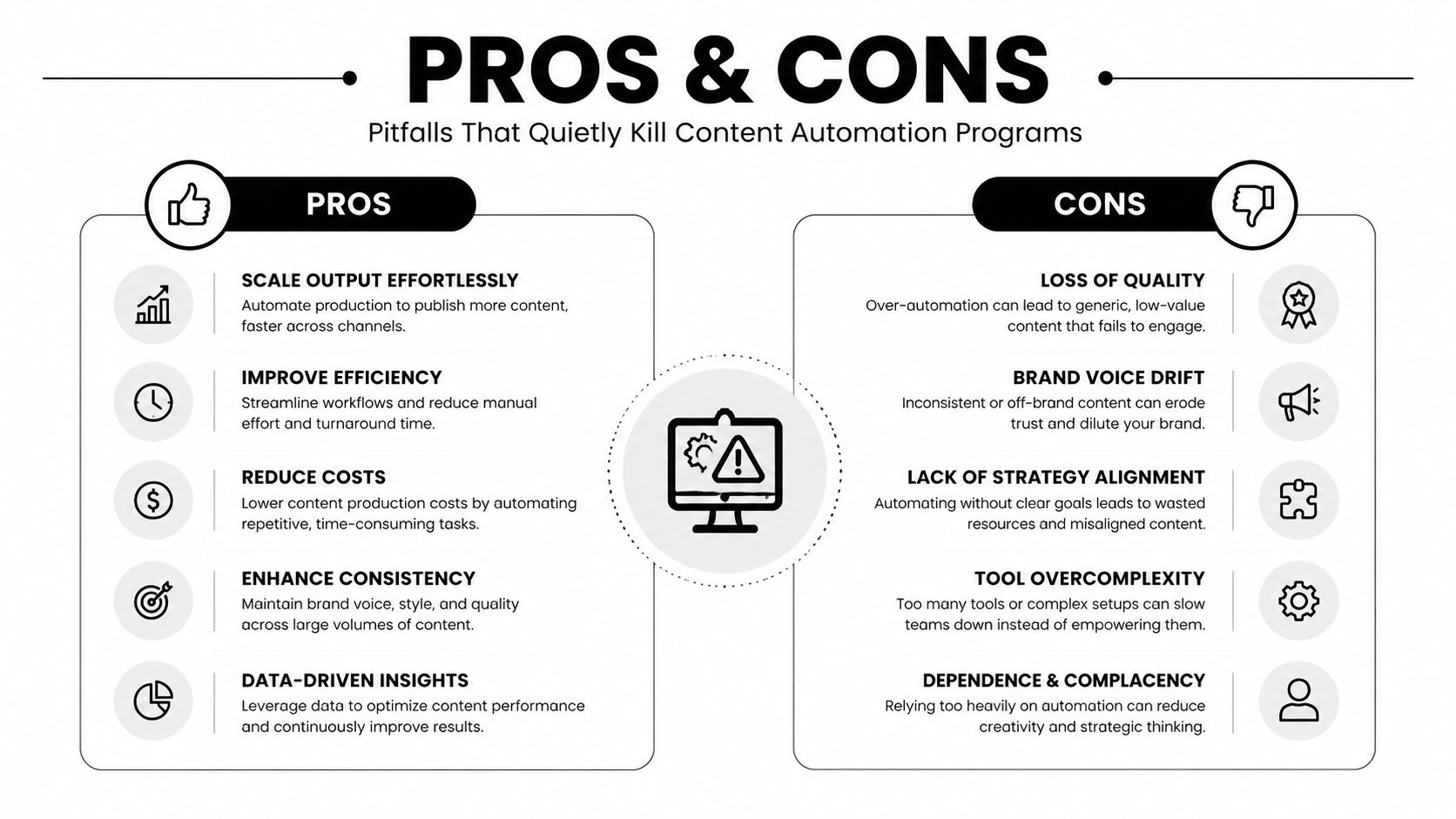
The teams that struggle with content automation usually don't fail because the software is weak. They fail because the operating rules are vague. That's why the most automated teams aren't always the winners. The most governed teams usually are.
The common failure modes
Over-automation is the first problem, and it shows up when teams publish AI output with no real review. Brand-voice drift comes next, usually because no one built a prompt library or style guardrails. Approval chaos follows when nobody knows who signs off or when a draft is allowed to move forward.
Measurement theater is another trap. Teams celebrate output volume, but they never connect it to the pipeline. Tool sprawl makes it worse, because five disconnected AI tools create more handoffs instead of fewer.
Why the hybrid model works better
Pure-manual teams are slow. Pure-AI teams are risky. The hybrid model works because it divides labor cleanly. The human sets direction, AI handles the repetitive middle, and the human approves the edge cases and anything that could affect trust.
That structure matters more in B2B than in lightweight consumer content, because buyers notice inconsistency fast. One inaccurate claim in a comparison page or one off-tone nurture email can erode confidence before sales ever gets the lead.
If no one owns the final decision, automation becomes noise.
The fix is usually simple, but not easy. Assign a named editor. Set thresholds for what can publish automatically. Keep one prompt library instead of a dozen ad hoc prompts. Then review the workflow weekly, not only when something breaks.
A 90-Day Rollout Plan for Growth-Stage Teams
Start small and choose work that is repetitive, low-risk, and easy to measure. That gives the team a real system to improve instead of a vague AI initiative.
| Phase | Timeframe | Focus | Owner | First Win |
|---|---|---|---|
| Days 1 to 30 | Audit repetitive tasks and choose three low-risk automations, such as meta descriptions, alt text, and summary blurbs | Marketing lead | Faster output on routine content tasks |
| Days 31 to 60 | Wire one full lifecycle loop from brief to publish to analytics, then build a prompt library and approval thresholds | Named editor | One governed workflow that runs end to end |
| Days 61 to 90 | Add a second loop, instrument attribution, and review cycle time and approval throughput weekly | Operations or growth lead | Repeatable measurement and a second use case |
By day 90, good looks like this, a named editor owns approvals, the team can point to at least one automated loop, the prompt library is maintained, and weekly reporting covers both speed and quality. If those pieces are in place, you're not dabbling anymore, you're operating a system.
Where to Go From Here
Content automation isn't a productivity hack. It's operating infrastructure for teams that publish a lot, move fast, and still need to stay accurate. The right model is simple, human direction, machine repetition, human approval where the risk is real.
If you're stuck on the first step, start with the lowest-risk repetitive task, measure it, and expand only after a named editor approves the output. MakeAutomation helps B2B and SaaS teams design and implement these kinds of automation frameworks end to end, so the system fits the business instead of adding another tool to manage.
If you want to turn content automation into a real operating layer instead of a pile of disconnected experiments, visit MakeAutomation. We build the workflows, governance, and documentation that help B2B and SaaS teams reclaim time without losing control of quality.