
10 Performance Optimization Techniques for SaaS
Performance optimization often begins by purchasing another platform. That's usually backwards. Software can execute a weak process faster, spread bad data across more systems, and hide the bottleneck behind attractive dashboards. Performance optimization techniques work best when they begin with process discovery, then connect automation and AI to workload volume, data quality, operational risk, human oversight, and a measurable business outcome.
The practical question isn't “Which tool should we add?” It's “Where does work slow down, repeat unnecessarily, or fail quality checks?” A lead may sit unassigned, a contract may wait through an invisible approval loop, or a support request may move between teams without a clear owner. Each problem calls for a different intervention.
The techniques below follow that operating logic. Start by understanding the work, then automate repetitive execution, improve revenue operations, process documents, support hiring, strengthen forecasting, make knowledge usable, and coordinate communication. The objective is an operating system that scales without removing judgment from decisions that still need a person.
1. Workflow Automation and RPA
Workflow automation and robotic process automation, or RPA, are strong starting points when people repeatedly move information between applications. A bot can capture lead details, update Salesforce, reconcile an invoice, route a support ticket, or schedule an interview according to defined rules. The value comes from removing coordination work, not from adding a bot for its own sake.
Begin with a process that has clear inputs, predictable decisions, and a visible owner. Lead entry, data validation, invoice matching, and customer onboarding often qualify. Map the current workflow before configuring anything. That map should show every handoff, exception, approval, and system dependency. If the documented process differs from what employees do, automating the documentation will reproduce the wrong behavior.

Independent business-process sources report that workflow automation users save 10 to 15 hours per employee per week, while surveyed organizations commonly report 25% to 40% productivity gains. The same source reports average process-cycle-time reductions of 50% to 70%, with 60% of organizations seeing positive returns within 12 months. These figures come from workflow automation statistics, and they should be treated as reference points, not guarantees for every implementation.
Design for exceptions, not just the happy path
A reliable RPA deployment needs error handling, retry rules, audit trails, and escalation to a human. Monitor processing time, accuracy, failed runs, exception volume, and the amount of manual rework. Start with one department or workflow, prove that the process is stable, then expand.
Best practices for RPA implementation can help teams structure that rollout. Outreach-dependent workflows can also benefit from proven outreach tactics for 2026, provided automation remains subject to consent, deliverability, and human review.
Practical rule: Automate a stable process first. If the rules change every week, improve the process before handing it to a bot.
Once the workflow runs, compare its baseline and current results. Automation that completes tasks quickly but creates incorrect CRM records or misroutes customers isn't optimization. It's deferred cleanup.
2. AI-Powered Lead Scoring and Qualification
Lead scoring becomes useful when sales teams can't inspect every signal with equal attention. An AI model can combine behavioral activity, firmographic attributes, and progression through the buying journey to prioritize accounts. HubSpot predictive lead scoring, Marketo scoring workflows, custom models, and conversational tools such as Drift can support different operating models, from self-serve SaaS to high-touch enterprise sales.
The model should serve a defined commercial decision. Decide whether its output determines who receives a sales task, who enters a nurture path, or which accounts receive research. Avoid treating a score as a verdict. A high score can reflect curiosity rather than purchase intent, while a low score can reflect incomplete data rather than a poor fit.
Connect scoring to outcomes
Integrate the scoring system with the CRM and track meaningful milestones, such as a demo request, trial activation, qualified opportunity, or closed deal. Those milestones create a feedback loop that lets marketing and sales compare predictions with outcomes. If the model rewards page visits but ignores buying role, company fit, or product usage, the team will optimize activity rather than revenue relevance.
Useful implementation controls include:
- Define conversion milestones: Make the model's success criteria visible to marketing, sales, and revenue operations.
- Combine signal types: Behavioral data should sit alongside firmographic and account-context data.
- Review false positives: Ask sales representatives why highly ranked leads were rejected or ignored.
- Protect data quality: Missing titles, duplicate accounts, and inconsistent lifecycle stages weaken model usefulness.
Teams often need lead scoring best practices before they need a more advanced model. A transparent rules-based score can be easier to audit and improve than an opaque system trained on inconsistent historical decisions.
A score should prioritize attention, not replace qualification.
Keep human review in the loop for strategic accounts, unusual buying committees, regulated use cases, and any decision that could unfairly exclude a prospect. The best implementation makes sales focus faster while preserving the judgment needed to interpret context.
3. Voice AI Agents and Conversational Automation
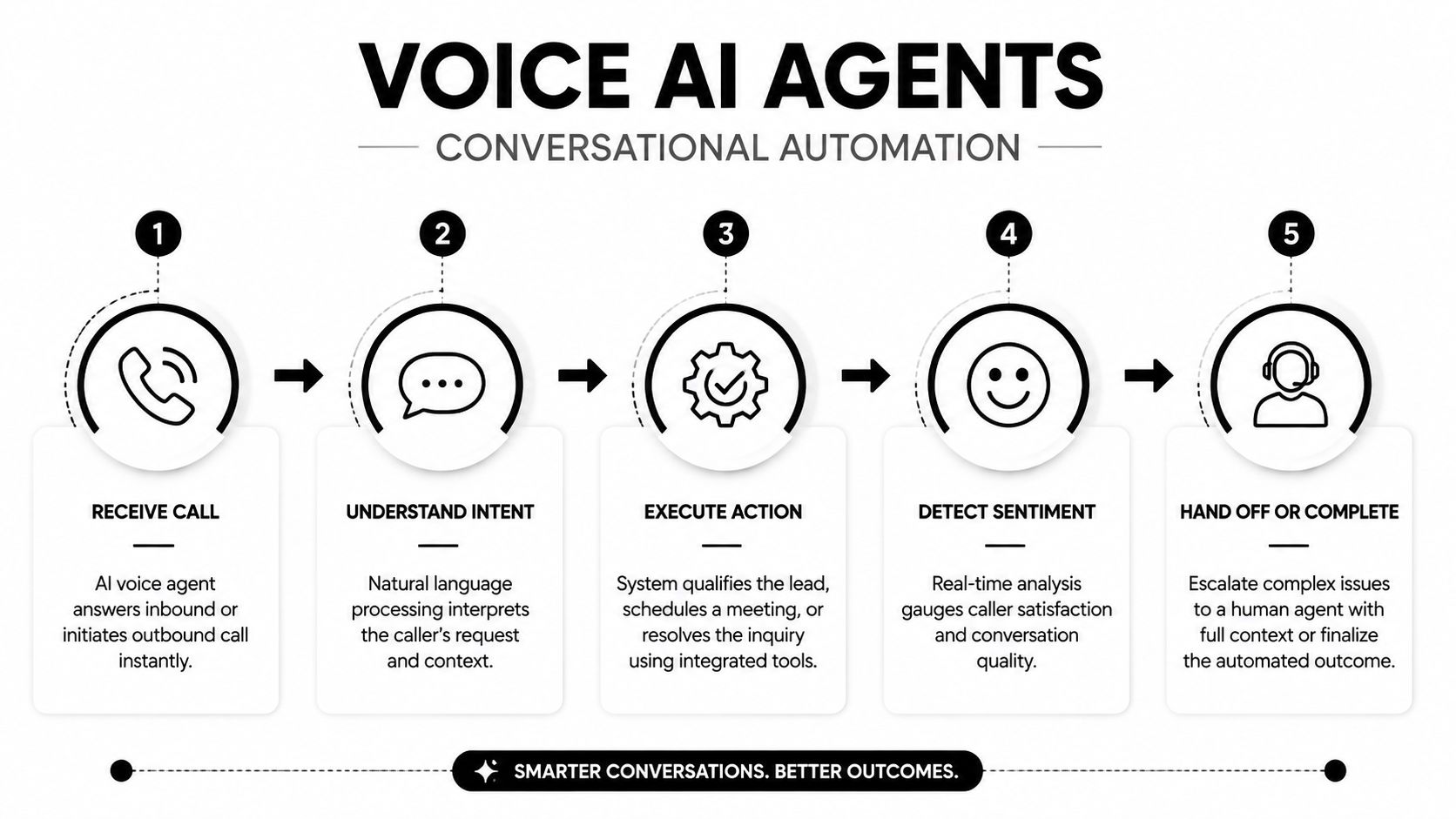
Voice AI agents are most effective when conversations follow a recognizable structure. An inbound agent can identify the caller, classify a support request, answer routine questions, schedule a meeting, or collect account information. An outbound agent can qualify a lead, confirm interest, gather feedback, or support payment and account-management conversations.
The strongest first use cases have narrow boundaries. Appointment scheduling, call routing, qualification, and status updates usually have clear completion criteria. A general-purpose agent that tries to handle every customer conversation creates a larger testing burden and makes failures harder to diagnose.
Build the handoff before the launch
Human escalation isn't a fallback detail. It's part of the conversation design. Define when the agent must transfer a call, what context it passes to the employee, and how the customer knows a person is taking over. Sensitive account changes, complaints, unusual contract questions, and ambiguous requests should move to trained staff rather than forcing the model to improvise.
Review call recordings or transcripts regularly, subject to applicable privacy and consent requirements. Look for incomplete answers, awkward interruptions, repeated questions, and incorrect routing. Configure tone and vocabulary to match the brand, but don't confuse friendliness with competence. A concise, accurate agent is more useful than an entertaining one that fails to complete the task.
Practical metrics include call completion, transfer frequency, abandonment, resolution quality, and customer feedback. A high completion rate can conceal poor outcomes if callers accept an answer only because reaching a person is difficult.
For sales teams, conversational AI for sales offers a framework for connecting voice interactions to qualification and follow-up workflows. The agent should write structured outcomes into the CRM, while a human reviews edge cases and important opportunities.
Voice automation reduces waiting and coordination when it has a clear job. It doesn't eliminate the need for conversation design, monitoring, consent controls, or accountable ownership.
4. Process Mining and Workflow Analysis
Process mining shows how work moves through an organization by analyzing system event logs. A procedure manual may describe onboarding as a straight path, while the records reveal repeated approvals, missing fields, and handoffs among customer success, finance, and implementation. The same review can expose sales deals that stall during one approval or security check, even when overall pipeline activity appears healthy.
Choose a repeatable process with clear operational or financial impact, such as order-to-cash, hire-to-deploy, customer onboarding, contract processing, or project delivery. IT must provide event logs with consistent case identifiers, timestamps, activities, and status changes. Poor identifiers or incomplete timestamps can make a system artifact look like a real workflow problem.
The map is evidence, not an explanation. Process owners need to interpret each loop, wait state, and ownership change. They can separate a required compliance review from redundant approval, and a genuine customer decision from a data-entry mistake. Their input should shape any redesign before automation is configured.
Turn process evidence into operating decisions
Review findings through four questions:
- Where does work wait? Separate active processing time from queue time and approval delays.
- Where does work repeat? Find rework, duplicate entry, and avoidable loops.
- Where does quality fail? Trace missing data and errors back to the activity that introduced them.
- Where does volume concentrate? Prioritize frequent paths that consume substantial capacity.
Rank opportunities by volume, business value, risk, and implementation effort. A high-volume process with little customer or revenue impact may rank below a slower workflow tied to retention, compliance, or cash collection. Track cycle time, rework, queue duration, error rates, and automation coverage after changes. Human review remains appropriate for exceptions and policy-sensitive decisions.
Process mining provides the baseline needed before RPA or AI deployment. It can reveal whether the right response is to redesign the workflow, standardize its inputs, or automate a stable segment while keeping unusual cases under accountable human supervision.
5. CRM and Sales Pipeline Automation
CRM automation should make the next sales action obvious without turning the pipeline into a collection of artificial status changes. Workflows can assign leads by territory and capacity, sync email and calendar activity, create follow-up tasks, send reminders after a discovery call, and enforce required fields before an opportunity moves forward.
Start with the sales methodology, not the CRM menu. Define what each stage means, what evidence allows progression, and who owns the next action. Then configure simple rules around explicit buyer behavior. A demo request, completed security questionnaire, or accepted meeting can trigger a relevant workflow. A timer alone is a weak substitute for buyer intent.

Preserve pipeline integrity
Auto-advancing opportunities can make reports look cleaner while damaging forecast quality. Use validation rules to prevent incomplete records, duplicate contacts, and unsupported stage changes. Give representatives a clear way to correct automation when the workflow encounters a legitimate exception.
Monitor response time, task completion, meeting outcomes, data completeness, and the quality of pipeline reviews. Open and click activity can help assess communication workflows, but those signals shouldn't be treated as proof of buying intent. A reply, meeting, opportunity progression, or explicit customer action carries more operational meaning.
Pipeline principle: Automate administration and reminders. Keep relationship judgment with the seller.
Revenue operations teams should review workflow permissions, ownership rules, and integration failures as part of routine CRM governance. Excessive complexity makes the system difficult to maintain and encourages employees to work around it. A small set of dependable automations usually outperforms a dense network of triggers nobody understands.
6. Intelligent Document Processing
Intelligent document processing, or IDP, improves performance by removing repeated reading and data entry from document-heavy workflows. OCR, machine learning, and language processing can extract, classify, and validate information from invoices, contracts, forms, and emails. That supports accounts payable, purchase-order matching, contract obligation tracking, customer verification, employment applications, and similar processes.
Begin with standardized, high-volume documents. Predictable invoices are easier to process reliably than negotiated contracts containing unusual clauses. Before selecting a model or configuring extraction rules, collect samples covering different layouts, vendors, scan quality, and missing fields. A clean demonstration document does not represent production conditions.
Set clear control points
Extraction should produce confidence signals, retain the source file, and send uncertain fields to a named employee. Validation may compare invoice totals with purchase orders, check required fields, or flag differences between a contract term and an approved record. Reviewers need a simple correction path. Store those corrections for model or rule improvement without altering historical records.
Measure the current workflow first, then compare processing time, manual touchpoints, error frequency, exception volume, and downstream correction work after deployment. Faster extraction has little value if finance teams spend longer repairing inaccurate records.
Design the workflow around four controls:
- Document classification: Identify the document type before applying field-specific extraction.
- Validation rules: Compare extracted values with trusted systems and business constraints.
- Exception queues: Route unclear or high-risk documents to named reviewers.
- Audit history: Keep the original file, extracted values, corrections, and approval trail together.
Start automation where errors are easy to detect and corrections are inexpensive. Expand only after the review queue, exception rate, and downstream rework remain manageable.
Contract interpretation, identity verification, and financial approvals can carry material risk. Keep people accountable for legal interpretation, policy judgment, and final approval. IDP should reduce reading and typing while preserving control over sensitive decisions. The operating goal is a measurable reduction in handling time and rework, not full automation of every document workflow.
7. Recruitment and Talent Acquisition Automation
Recruitment automation can remove scheduling friction and repetitive coordination while leaving selection decisions with people. Systems such as LinkedIn Recruiter, HireEZ, Gem, Calendly integrations, screening tools, and conversational assistants can help source candidates, organize pipelines, answer routine questions, schedule interviews, manage references, and coordinate offers.
The best first step is usually source qualification or scheduling. Those activities consume time, follow recognizable rules, and don't require an automated system to decide whether a person belongs in the team. Use skill-based matching where possible, because keyword matching can miss transferable experience and can overvalue repeated phrases.
Protect candidate experience and fairness
A chatbot that answers common questions can improve responsiveness, but candidates should know when they're interacting with automation and how to reach a human. Keep human involvement in interviews, assessment interpretation, offer discussions, and exceptions. Review screening criteria for irrelevant requirements, inconsistent treatment, and proxy signals that could produce unfair outcomes.
Recruiting teams should monitor candidate feedback, drop-off points, response quality, and the time recruiters spend correcting automated decisions. Automation that saves recruiters time but makes applicants repeat information or wait without explanation damages the experience it was meant to improve.
Document the system's role clearly. Candidates, recruiters, and hiring managers should understand which tasks are automated, which data is used, and who owns the final decision. A practical 2026 recruiting automation guide can help teams compare workflow options, but the company still needs its own privacy, retention, and review policies.
Recruitment performance depends on trust as much as throughput. Automate coordination aggressively where the rules are clear, and keep accountable humans close to decisions about suitability, progression, and employment.
8. Predictive Analytics and Forecasting Automation
Forecasting automation is useful only when it changes an operating decision. SaaS and B2B teams can estimate recurring revenue, pipeline movement, or churn risk. Agencies can plan project demand and resource needs, while customer success teams can prioritize accounts showing signs of disengagement. The technique connects data from revenue operations, delivery, and customer activity into one planning process.
Begin with the decision, then select the simplest model that can support it. Moving averages, consistent definitions, and disciplined data collection often outperform a complex model trained on unreliable history. Define bookings, revenue, churn, pipeline stages, utilization, and capacity before modeling. Otherwise, different teams may report the same metric differently and create false precision.
A practical forecast should expose its assumptions, confidence, and data window. Sales leaders can explain a deal delayed by procurement. Customer success can add renewal context that usage data has missed. Finance can challenge an optimistic plan based on uncommitted pipeline. The model provides a common starting point, while accountable operators make the decision.
Set the refresh cycle according to the operating rhythm. An active sales pipeline may need weekly updates, while longer-range resource planning can use a slower cadence. Measure forecast error by segment, owner, product, and time horizon. One aggregate accuracy measure can conceal recurring overprediction in enterprise deals or other specific parts of the business.
Use four controls during implementation:
- Data-quality gates: Flag forecasts built from incomplete or stale inputs.
- Scenario views: Compare conservative, expected, and upside assumptions without presenting any as certain.
- Human commentary: Require owners to explain material changes and unusual movements.
- Outcome review: Compare predictions with actual results, then revise the model or the process.
Forecasting improves allocation of people, capacity, and budget when leaders understand its limits. It becomes a control risk when software output receives authority because it appears objective. Human review should remain part of the operating system, especially when a forecast affects commitments or customer decisions.
9. Standard Operating Procedures and Knowledge Systems
The fastest SOP improvement often comes from removing documentation that nobody uses. Map a few high-volume processes first, identify where employees hesitate or improvise, then document the decisions that affect quality, speed, and handoffs. Sales playbooks, onboarding procedures, support paths, delivery guides, and recruitment workflows may combine written instructions, videos, templates, decision rules, and links to working systems.
Process owners should write or review each procedure. They know the exceptions that generic documentation misses. Use video or interactive guidance for complex tasks, but pair it with searchable text, concise decision points, and current templates so employees can find and apply the right instruction quickly.
Make knowledge available at the point of work
An SOP in an abandoned folder changes nothing. Connect guidance to the CRM, project-management platform, help desk, or hiring system where the task occurs. An AI assistant can answer process questions, summarize approved documentation, and guide an employee through a known procedure. Require it to identify the approved source internally and escalate cases the documentation does not cover. Human review remains necessary when an exception affects customers, compliance, or revenue.
Assign an owner and review schedule. Pricing, product behavior, compliance requirements, and team responsibilities can change, leaving employees with conflicting versions or forcing them to invent workarounds.
A usable knowledge system should provide:
- A named owner: One person is accountable for accuracy and review.
- A visible revision history: Employees can see what changed and when.
- Role-based access: Sensitive information remains limited to authorized users.
- Feedback capture: Employees can flag unclear, missing, or contradictory guidance.
Document the decisions that make important work repeatable, not every individual action. Strong SOPs reduce dependence on memory while leaving room for judgment. That balance improves consistency without turning employees into passive operators.
10. Email and Communication Workflow Automation
Email automation works best as a coordination layer across the customer lifecycle, not as a sequence of scheduled broadcasts. A SaaS team can trigger trial onboarding, webinar follow-up, inactive-account re-engagement, or sales-response routing. Customer success can respond to product milestones, while marketing adjusts education to engagement, role, and account context.
Start with segmentation before personalization. Classify contacts by lifecycle stage, behavior, engagement, role, and account fit, then assign an appropriate action to each group. Merge tags and dynamic content can adapt a message, but inaccurate records produce irrelevant outreach, even when the template looks customized.
Let behavior control the next action
Replies, meeting bookings, trial activation, and support requests should update the workflow immediately. Suppress outreach after conversion, during a sensitive support case, or following an opt-out. Coordinate marketing, sales, and customer-success systems so separate teams do not send conflicting instructions.
The plan recommends a maximum of 1 to 3 emails per week. Use that range as an initial control, then adjust it for consent, channel expectations, customer preferences, and communication urgency. Track unsubscribes, replies, clicks, conversions, complaints, and deliverability signals. Open activity can indicate attention, but it does not establish business value on its own.
A workflow can be configured around five decisions:
- Trigger: A prospect attends a webinar or a user starts a trial.
- Segment: Add lifecycle, role, account, and engagement context.
- Message: Send relevant education or a clear next-step prompt.
- Branch: Change the sequence after a reply, click, conversion, or period of disengagement.
- Review: Remove unsuitable contacts and route meaningful responses to an employee.
Connect these rules to the systems that own customer status, consent, and account activity. That prevents a local email tool from acting on stale information and makes performance measurable across the full operating process. Review reply quality, conversion progress, and complaint patterns alongside delivery results.
Automation should make communication timely and coherent, not constant. Human review remains necessary for strategic accounts, sensitive customer situations, and messages where context or judgment determines the appropriate response.
Performance Optimization: 10 Automation Techniques
| Solution | Implementation complexity | Resource requirements | Expected outcomes | Ideal use cases | Key advantages |
|---|---|---|---|---|---|
| Workflow Automation & RPA (Robotic Process Automation) | Medium, process mapping and occasional custom development | RPA platform, integrators, monitoring/ops staff | Reduced manual errors, 24/7 processing, ROI typically 6–12 months | High-volume rule-based tasks (data entry, invoicing, CRM updates) | Scales quickly, integrates legacy systems, frees human time |
| AI-Powered Lead Scoring & Qualification | Medium–High, data pipelines and model training required | Historical conversion data, data engineers/analysts, CRM integration | Prioritized leads, shorter sales cycles, improved conversion rates | Large inbound lead volumes; SaaS B2B sales prioritization | Data-driven prioritization, real-time scoring, continuous refinement |
| Voice AI Agents & Conversational Automation | High, NLP/voice, telephony and compliance complexity | Voice data, telephony APIs, model training, QA and escalation flows | Handles many calls automatically, faster responses, lower cost-per-interaction | Call centers, appointment scheduling, outbound qualification | 24/7 availability, rapid scaling of voice outreach, reduced labor cost |
| Process Mining & Workflow Analysis | Medium, log extraction and specialist interpretation | Access to event logs, analytics tools, process experts | Visibility into actual workflows, identifies automation opportunities (10–30% gains) | Complex multi-system processes (onboarding, approvals, pipeline stalls) | Reveals bottlenecks, conformance checks, data-driven prioritization |
| CRM & Sales Pipeline Automation | Medium, workflow configuration and change management | CRM platform, data hygiene, admins/ops support | Saves reps hours, improves close rates and forecast accuracy (15–25%) | Lead routing, follow-up automation, task assignment for sales teams | Reduces admin work, consistent follow-up, improved pipeline visibility |
| Intelligent Document Processing (IDP) | Medium–High, OCR/NLP setup and training for document types | Sample documents, ML models, integration with ERP/CRM, human review | Dramatic speedups (60–80% time reduction), big error reduction | Invoicing, contract extraction, accounts payable, onboarding docs | High throughput, fewer manual entries, handles varied formats |
| Recruitment & Talent Acquisition Automation | Medium, ATS integration and matching model configuration | ATS/CRM integration, candidate data, recruiter oversight | Shorter time-to-hire (40–60%), screen more candidates, better candidate experience | High-volume hiring, sourcing, interview scheduling and screening | Scales sourcing, speeds screening, improves candidate engagement |
| Predictive Analytics & Forecasting Automation | High, modeling, feature engineering, and retraining | 12–24+ months historical data, data scientists, dashboards | Improved forecast accuracy (10–40%), earlier intervention on trends | Revenue forecasting, churn prediction, resource and demand planning | Scenario modeling, anomaly detection, reduces forecast bias |
| SOP Automation & Knowledge Systems | Medium, documentation capture and knowledge tooling | SMEs time, knowledge platform, content maintenance | Faster onboarding (50–70%), consistent process execution | Onboarding, standardized procedures, field/remote operations | Preserves institutional knowledge, enables scalable training |
| Email & Communication Workflow Automation | Low–Medium, campaign and trigger setup with segmentation | Marketing automation platform, clean contact data, content assets | Higher engagement (20–50%), reduced manual outreach | Nurture sequences, onboarding emails, re-engagement campaigns | Personalization at scale, multichannel orchestration, analytics |
Build a Measurable Optimization Roadmap
Ten techniques can create ten disconnected projects if leadership treats each one as a separate software purchase. A better approach is to build a roadmap around the operating system of the business. Start with the work that constrains growth, then choose the smallest intervention that can improve it without creating unacceptable risk.
Select one high-volume, repeatable bottleneck. It might be lead assignment, invoice processing, onboarding coordination, interview scheduling, support triage, or a recurring forecasting handoff. Don't choose the most fashionable workflow. Choose the one with a clear owner, enough repetition to justify improvement, and a business consequence when it slows down or fails.
Document the baseline before changing anything. Capture processing time, error rate, throughput, quality, queue time, manual touchpoints, and operating cost where the data is available. Technical teams should also define explicit targets for throughput, latency percentiles such as p50, p95, and p99, error rates, and resource consumption under controlled load. Technical guidance on software performance optimization emphasizes setting service-level targets first, such as a p95 response time under 200 ms or support for 10,000 concurrent users, rather than pursuing generic speed improvements.
Match the technique to the bottleneck
Use process mining when nobody agrees on how work flows. Use workflow automation or RPA when rules are stable and repetitive. Use AI lead scoring when prioritization is the constraint and outcome data is available. Use voice agents for structured, high-volume conversations with clear escalation. Use IDP when employees repeatedly extract information from documents. Use SOP systems when inconsistency and missing knowledge slow execution.
Forecasting requires trustworthy historical data and a decision that can respond to the prediction. Communication automation requires clean segmentation and coordinated ownership. Recruitment automation requires stronger human safeguards because candidate experience, privacy, and fairness are directly involved.
Pilot the smallest viable automation. Define what the system will do, what it won't do, what happens when it fails, and who receives an exception. Test with representative data and real variations, not only ideal examples. Give employees a visible way to correct records, override an unsuitable action, and report a failure.
Review the operating model before scaling
A successful pilot still needs governance. Review access permissions, compliance obligations, data retention, vendor dependencies, maintenance ownership, model drift, employee adoption, and customer impact. Ask whether the team can support the workflow six months from now, including changes to APIs, business rules, products, and staff responsibilities.
BPM has a long history in operations research and management science, and the modern business case remains substantial. The evidence set cited by BPM performance statistics reports potential productivity gains of 30% to 50% for BPM projects and cites 80% of enterprise organizations executing BPM projects as achieving an internal rate of return above 15%. The same source projects the BPM market will grow from USD 11.84 billion in 2021 to USD 26.18 billion by 2028, a 12.0% compound annual growth rate. These figures indicate sustained investment, but your own baseline should determine whether a particular project deserves funding.
The workflow automation and optimization software market provides another adoption signal. One market report estimates $1.54 billion in 2025 and projects $2.46 billion by 2030, implying a 9.5% CAGR, with North America identified as the largest region in 2025. That projection appears in the workflow automation and optimization software market report. Market growth doesn't prove that a tool fits your company, so treat it as context rather than a business case.
MakeAutomation is relevant when a B2B or SaaS team needs help documenting processes, improving workflows, deploying AI, or implementing inbound and outbound Voice AI agents. Teams can also connect operational improvements with revenue execution, including the decision to Hire SDRs when automation has clarified which human capacity the business still needs.
The final test is operational, not promotional. Did the team reduce avoidable work? Did quality hold? Can employees understand and trust the system? Are exceptions visible? Can leaders connect the change to throughput, customer experience, revenue, capacity, or cost? Performance optimization techniques earn their place when the answers are measurable and repeatable.
MakeAutomation helps B2B and SaaS teams document processes, improve workflows, and implement AI automation or Voice AI agents with human oversight built into the operating model. Visit MakeAutomation to identify a bottleneck, design a measurable automation plan, and turn fragmented work into a scalable process.