8 AI Workflow Examples That Cut Manual Work in 2026
Generative AI business adoption grew 78.4% on an annualized basis between 2023 and 2024 on the Census Business Trends and Outlook Survey, a pace that enterprise software categories usually take a decade to reach (Federal Reserve Bank of St. Louis). What that figure hides is how few of those deployments removed work from anyone's day.
The gap between teams getting results and teams getting applause in a demo comes down to three things that have nothing to do with model choice: a defined trigger, a named owner, and error handling built in from day one. A workflow with a Slack notification and an untested prompt isn't a workflow. It's a demo with a cron job.
The eight patterns below cover sales, marketing, voice, recruitment, operations, and support. Each one gets the same treatment: the trigger that starts it, the mechanics that make it reliable, a real deployment shape, and the failure points that show up in production rather than in a sandbox.
These patterns work for teams with a genuine operating bottleneck and someone who can define the process in detail. If nobody owns the workflow today, automation will only make the confusion faster.
1. Inbound Lead Capture, Enrichment, and AI Scoring
The trigger is a form submission, a chat transcript, or a booked meeting landing in the CRM. The workflow enriches the record with company size, industry, tech stack, role, and funding data, scores fit, routes qualified leads to a rep, and drops the rest into nurture.
The order of operations decides whether the score means anything. Enrichment runs first so every field the scorer reads exists, then scoring runs and logs the reasons behind its number.
The end-to-end path, from form fill to rep alert, looks like this.
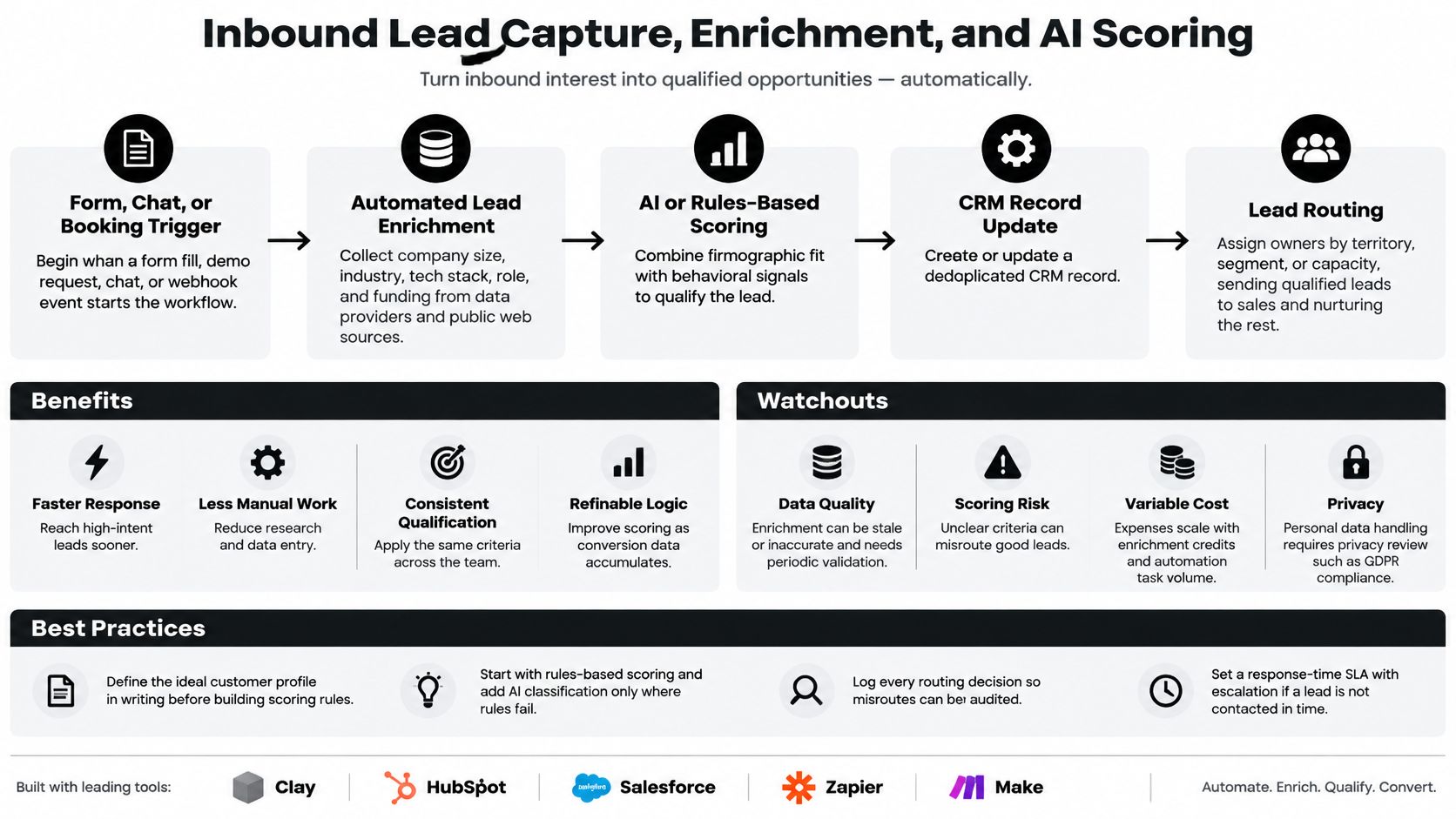
What it looks like in production. A SaaS team fires Clay-style enrichment on every demo request, then writes a score and an account owner into HubSpot or Salesforce within minutes. A leaner B2B team does the same in Make or Zapier, posting anything above a fit threshold to the assigned rep's Slack channel.
Scope mistakes cost more than tool mistakes. CBRE's facilities-management program targeted 50% process automation with AI agents and reported results above that target, and the lesson was orchestrating the full process rather than one step (Google Cloud customer story).
Practical rule: start with rules-based scoring and hand classification to a model only where the rules genuinely fail, such as free-text industry descriptions. You can't audit a model that never had a baseline to compare against.
Where this build breaks
Routing fails on duplicates, on records with a missing domain, and on leads with no owner. Put a duplicate rule, a fallback enrichment path, and an unmatched queue in place before launch. Log every routing decision so a misroute takes one query to trace instead of an hour of guessing, and attach a response-time SLA with an escalation step to anything scored above your threshold.
2. AI-Personalized Outbound Sequence with Human Review
Personalization at scale is the promise. In practice, a rep clicks approve on 200 drafts without reading any of them, which turns a quality gate into a rubber stamp.
The trigger is an account entering a target list. The agent pulls context from recent funding news, job postings, product launches, and website changes, drafts the first touch plus two follow-ups, and parks each one in an approval queue. On approval it sends, and reply detection pauses the sequence and alerts the account owner immediately.
Approval queues are easier to police when they live inside sanctioned tooling. In 2024, 66% of business leaders surveyed by Insight Enterprises and The Harris Poll said their organizations had deployed private, secure generative-AI tools to their workforces (Insight survey).
The human checkpoint looks like this in practice.

Build rules that survive contact with reps.
- Ground every claim: if the draft mentions a funding round or a new hire, the system stores the source URL alongside the sentence so the rep can verify in one click.
- Keep the approval step until draft quality holds steady across a full quarter, then consider auto-send for the safest segment only.
- Protect deliverability: warm sending domains, cap daily volume per mailbox, and pause any domain that appears on a major blocklist.
- Test the offer, not just the opener: subject line variants move replies more than clever first sentences.
The failure mode nobody plans for
The workflow breaks when a model invents a detail the account can't support, because one hallucinated claim costs more trust than twenty good emails earn. It also breaks when approval fatigue sets in and nobody reads drafts anymore. Track edit distance between drafted and sent copy. When it collapses toward zero, the queue has stopped working and it's time to re-scope or retire it.
3. Inbound and Outbound Voice AI Agent
The strongest evidence for conversational agents inside a sales process comes from a randomized field experiment at a cross-border online retail platform, where a pre-sales service chatbot lifted sales 16.3% against a control group at p<0.01 (arXiv study). The agent didn't just answer questions faster. It moved revenue because it sat directly in the customer journey with product documentation, qualification rules, and an escalation path.
Voice applies the same pattern to the phone, with the same requirement that the agent can reach real systems.
The trigger is an inbound call, a missed call, or a scheduled outbound dial. Speech recognition feeds a language model that holds the conversation, calls tools for calendar availability and CRM lookups, and returns text to speech. Every call ends with structured data captured: name, intent, job details, and a disposition code.
Deployment shapes that hold up. A home services company routes missed calls to a voice agent that collects job details and books an estimate directly into the scheduling tool. A B2B team runs outbound agents to confirm webinar registrants and warm-transfer interested contacts to reps. The mechanics for outbound patterns are covered in this guide to AI voice agents for outbound calls, and firms handling overflow models well show up in this write-up on how AI answers overflow client calls.
A voice agent that resolves 60% of calls and frustrates the other 40% is worse than one that resolves 35% and hands the rest to a human in eight seconds. Measure containment and handoff quality together, never containment alone.
Where voice breaks first
Latency above roughly a second makes callers talk over the agent, and interruption handling exposes it immediately. Background noise, accents, and poor microphones wreck transcription accuracy on real calls far more than on demo calls. Disclose that the caller is speaking to an AI, confirm recording consent, and define hard escalation triggers such as a request for a human or any complaint.
4. Meeting-to-CRM Automated Sync
CRM data goes stale for one reason. Reps won't type notes after a call, and forecasting built on stale fields misleads everyone downstream.
The trigger is a meeting ending, or a transcript arriving from a recorder. An LLM extracts action items, next steps, objections raised, buying signals, and contact changes, then writes notes and follow-up tasks to the deal record. Stage movement is the one field that should stay a suggestion until a rep confirms it.
The pattern shows up on both sides of a deal, sales calls and client commitments.

What it looks like in production. A sales team connects Gong or Fireflies to HubSpot so summaries and next steps post to the deal record automatically. A services firm pushes Otter.ai transcripts through an LLM that creates an Asana task for every commitment made on a client call, with an owner and a due date attached.
Where the sync goes wrong
Start with low-risk fields, notes and tasks, and leave deal stage alone until the extraction has proven itself over a few hundred calls. Auto-written stage changes corrupt forecasts faster than missing notes ever did. Summaries that smooth over objections are worse than no summary, because they remove the signal a sales manager needs. And set a transcript retention policy that matches your legal obligations before the first recording, not after the first data request.
5. AI-Assisted Recruitment Screening Pipeline
Screening is the workflow with the highest ratio of manual effort to judgment, which is exactly why it attracts automation and exactly why it carries the most risk.
The trigger is an application arriving. The system parses the CV, checks must-have criteria, and scores the candidate against a structured rubric written before the role opened. Qualified candidates get automatic scheduling links and status updates. Recruiters make every final call.
Mapping a candidate screening process before automating it usually reveals that the main bottleneck is scheduling, not reading resumes, which changes what you build first.
What it looks like in production. An ATS with automated scheduling lets screened candidates book interviews without email ping-pong, cutting days out of the cycle. A staffing firm uses an LLM to summarize resumes against a rubric, with recruiters reviewing every shortlist before a client sees it. That second pattern is the safer one, because the model compresses information while a human still decides. Underdog's take on why AI hasn't made recruiting easier is a useful counterweight to the vendor pitch.
Score against job-related criteria only, document the rubric before the first application lands, and keep a human decision plus a review path on every rejection. That rubric becomes evidence the moment a candidate challenges the outcome.
Where screening breaks
Rubric drift is the quiet killer. Someone tweaks a weight mid-cycle and pass rates shift without anyone noticing. Run adverse-impact analysis on pass rates by group each quarter, and tell candidates when automated tools are used in their evaluation, because discovering it later damages the brand more than a slower process would.
6. Support Ticket Triage and Routing
Volume is the trigger, and misrouting is the cost. Every ticket that lands in the wrong queue burns two people's time instead of one.
The workflow classifies incoming email, chat, and form submissions by intent, urgency, product area, and customer tier, then routes each ticket to the right queue. Common questions get a suggested answer pulled from the knowledge base, and anything urgent escalates immediately rather than waiting its turn. The controlled evidence is strong: a study in the Quarterly Journal of Economics analyzed 5,172 customer-support agents after a generative-AI assistant was introduced in stages and found access raised issues resolved per hour by 15% on average, with wide variation between workers (Microsoft Research).
The routing layer is where the quality gains live.

What it looks like in production. A SaaS company runs AI triage in its helpdesk so billing questions go to finance and bug reports reach engineering support with reproduction details attached. Klarna publicly reported in early 2024 that its AI assistant handled a large share of customer service chats in its first month while citing reduced resolution times, which is the shape most support leaders now aim at.
Where triage quietly degrades
The knowledge base rots first. Assign one owner and a review cadence, or the suggested answers drift into confidently wrong. Review misrouted tickets weekly and update the rules that caused them. Track CSAT next to deflection rate, because a fast wrong answer looks like a win on a deflection dashboard and a loss in the renewal conversation. Keep a visible path to a human on every channel.
7. Automated SOP Generation from Recorded Processes
Most automation projects stall on a step nobody budgets for: the process has never been written down, and the only person who understands it is in meetings all week. The documentation gap is measurable. Microsoft's survey of 500 decision-makers across 13 countries and 16 industries found only 22% strongly agreed their organizations had documented key processes and data dependencies, while 80% said data wasn't accessible across teams (Microsoft WorkLab).
The trigger is a process owner recording a walkthrough. The system transcribes it and drafts a structured SOP with numbered steps, inputs, outputs, owners, and the exceptions people handle from memory. The owner validates each step against the live system, then publishes.
What it looks like in production. An operations team records a client onboarding walkthrough and an LLM converts the transcript into a checklist SOP in Notion or Confluence. A marketing agency generates campaign setup SOPs from recorded screen sessions and assigns a quarterly review date to each one. The mechanics of turning recordings into maintainable documentation are covered in this guide to how to automate documentation.
Record on a clean test account. A walkthrough recorded on live data captures customer names, pricing, and internal notes straight into a draft that gets shared across the company.
Where SOP generation fails
Drafts describe what happened on screen rather than the judgment behind it. The person recording says "then I check if it looks right" and the transcript preserves nothing useful, so the owner has to annotate the reasoning by hand. Standardize the template so every draft has the same sections, and give every published SOP an owner and a review date. An unowned SOP is a liability with a version number.
8. Meeting-to-Task and Project Status Automation
The weekly status meeting exists because nobody updates the tracker. Automate the update instead of scheduling another meeting about it.
The trigger is a meeting ending or a thread reaching enough replies to imply a decision. Notes get converted into tasks with a named owner and a due date, written straight into the project tool. Status updates compile from task data and recent activity, then go out as a daily or weekly digest to the stakeholders who need them.
What it looks like in production. An agency turns Fireflies or Otter notes into ClickUp tasks and sends a Monday digest to each client channel. A product team uses Asana rules plus an LLM summary to produce a weekly executive update from sprint data, which takes the reporting burden off the delivery lead.
Where status automation breaks
Task sprawl is the first symptom. Every sentence in a meeting becomes a ticket, and the board fills with work nobody intends to do. Require a named owner and due date for creation and drop anything without both. Client-facing digests need human review during setup, since one wrong "on track" costs more trust than a late report. Pick one source of truth for status, because two dashboards that disagree will send everyone back to the meeting.
8 AI Workflow Examples at a Glance
| Primary Function | Best For | Key Risk | Implementation Effort |
|---|---|---|---|
| Capture, enrich, score, and route inbound leads | B2B and SaaS growth teams | Inaccurate data or scoring can misroute leads | Medium; requires data and CRM integrations |
| Draft personalized outbound sequences for human approval | Sales teams scaling targeted outreach | Generic or inaccurate copy can harm credibility and deliverability | Medium; requires research, sequencing, and review workflows |
| Handle inbound or outbound calls, qualify leads, and book meetings | Businesses with high call volume or appointment booking | Awkward interactions, consent issues, or speech-recognition errors | High; requires telephony, calendar, and CRM integrations |
| Extract meeting insights and update CRM records and tasks | Sales and client teams seeking accurate CRM records | Extraction errors can corrupt CRM data | Medium; requires transcript and CRM integrations plus review rules |
| Parse, score, and schedule job applicants with recruiter oversight | Recruiting teams handling high application volumes | Bias, compliance exposure, or parsing errors | High; requires validated criteria, audits, and ATS integration |
| Classify, answer, and route support tickets | Support teams managing repetitive or high-volume requests | Misclassification can delay urgent issues | Medium; requires reliable knowledge content and ongoing tuning |
| Turn recorded workflows into reviewed, published SOPs | Operations teams documenting repeatable processes | Mistakes or sensitive information may be captured in documentation | Low to medium; requires capture, review, and publishing workflows |
| Convert meeting notes into assigned tasks and project status digests | Agencies and teams managing multiple projects | Poor task hygiene can make updates inaccurate | Medium; requires project tool integrations and digest review |
How to Pick Your First AI Workflow (and Build It Right)
The economics explain why selection matters more than tooling. Deloitte's 2025 survey of 1,854 executives found only 15% of organizations using generative AI reported significant, measurable ROI, while 38% expected to achieve it within one year, and the report frames ROI as a multi-year effort spanning implementation, adoption, and process integration (Deloitte). The teams in that 15% didn't pick the most exciting use case. They picked one with a measurable before and after.
Three patterns repeat across all eight workflows. Start where response time or manual research is the visible bottleneck, because that's where a working baseline already exists. Keep humans in the approval gate for anything customer-facing until quality holds over hundreds of real cases. Build error handling and monitoring on day one rather than retrofitting them after the first silent failure, because a workflow that fails without warning is worse than a manual process that fails loudly.
A selection checklist that holds up.
- Pick one workflow with a real operating bottleneck and an owner who can describe the current process step by step.
- Map it before you build it, including the exceptions, the duplicate cases, and the handoffs between systems where most failures hide.
- Test with real data and edge cases, not the clean examples that made the demo look easy.
- Document and train so the team can maintain the workflow without you, and set a review date on the documentation.
- Measure the baseline first, then compare cycle time, manual minutes per case, exception rate, and quality on the same metric you used before launch.
This is the work MakeAutomation does, and the free Workflow Diagram Builder and Automation ROI Calculator on the site are the same starting points we use in discovery. We audit and rebuild workflows across n8n, Make, Zapier, and Power Automate with error handling and monitoring built in, and simple workflows typically go live in one to three business days. If your team writes proposals or bid responses, the same documentation discipline feeds that work, which is why teams evaluating bid writing software for UK bid teams usually start by cleaning up the process behind the template.
If your workflow examples keep stalling at the demo stage, MakeAutomation can map the process, identify the failure points, and build the workflow with monitoring and approval gates from the first version. Start with the free Workflow Diagram Builder and Automation ROI Calculator, then bring the bottleneck you want gone. Visit MakeAutomation to see the audit and build process.