AI Workflow vs AI Agent: When to Use Each
The most repeated advice on automation spend is to pick the smarter tool and let it run the process. That advice sends budget to the wrong place. A system that can plan is not a substitute for a path you can audit, and a pile of agents is not automatically faster than one workflow with a named owner.
The useful comparison in AI workflow vs AI agent is a question of where autonomy should stop, step by step. Some steps should follow the same rule every time. Some can read messy input and stop before they act. A few can research on their own. Almost none should move money, change a contract, or message a customer without a gate. Extra agents also create coordination work that never appears on a model invoice.
What follows is a budget test for operators. It sets the two patterns side by side, walks each operating loop, and shows which steps can be trusted to act alone.
AI Workflow vs AI Agent at a Glance
An AI workflow runs a predefined sequence. A trigger starts it, and fixed if-then rules route data and fire the actions you specified. An AI agent is given a goal. It plans several steps, chooses tools, and adjusts when conditions change.
The two are not rival product categories. An agent is usually a layer inside a workflow, so most systems that hold up in production combine both. The table is the working distinction. Match it to the step in front of you, not to a vendor label.
| Criterion | AI Workflow | AI Agent |
|---|---|---|
| Trigger and control | Fixed trigger and predefined path | Given a goal; the agent chooses the steps |
| Decision logic | Explicit if-then rules | Model reasons over context and available tools |
| Predictability | High; the same input follows the same route | Variable; outputs can differ between runs |
| Auditability | Easy to log and review each step | Needs traces of reasoning and tool calls |
| Handling exceptions | Routes to a human or error path | Can adapt, but may act wrongly without limits |
| Governance need | Standard access and approval controls | Permissions, evaluation and monitoring |
| Best first use | Repeatable, documented processes | Research, triage and multi-step judgment |
What the adoption numbers actually say
Teams use the labels loosely because the vocabulary is still settling. A workflow in one company is an "agent" in another, even when both are the same rule chain with a model call in the middle. Use the rows above against your own process map, then ignore the product name.
McKinsey's 2025 global survey found that 88% of respondents reported regular AI use in at least one business function, up from 78% the year before. Agent deployment was far less mature. 23% said their organizations were scaling an agentic AI system somewhere in the enterprise, and another 39% were experimenting. In any individual business function, no more than 10% reported scaling agents.
That is a maturity curve, not a verdict that agents failed. Assisted workflows are already normal. Autonomous agents are still concentrated in pilots and in a few functions. Documented, measurable workflows are the baseline. Agent autonomy belongs only where variable inputs, judgment, and multi-step execution pay for the extra governance. Concrete patterns for that baseline are in these AI workflow examples.
Practical rule: The question is not which tool is smarter. It is how much variability and judgment a given step can tolerate before a person has to stay in control.
How Each One Operates Step by Step
A workflow is a closed path. You can draw it before the first record arrives. An agent is a loop. The path is chosen after the system sees what the tools returned.
The workflow path
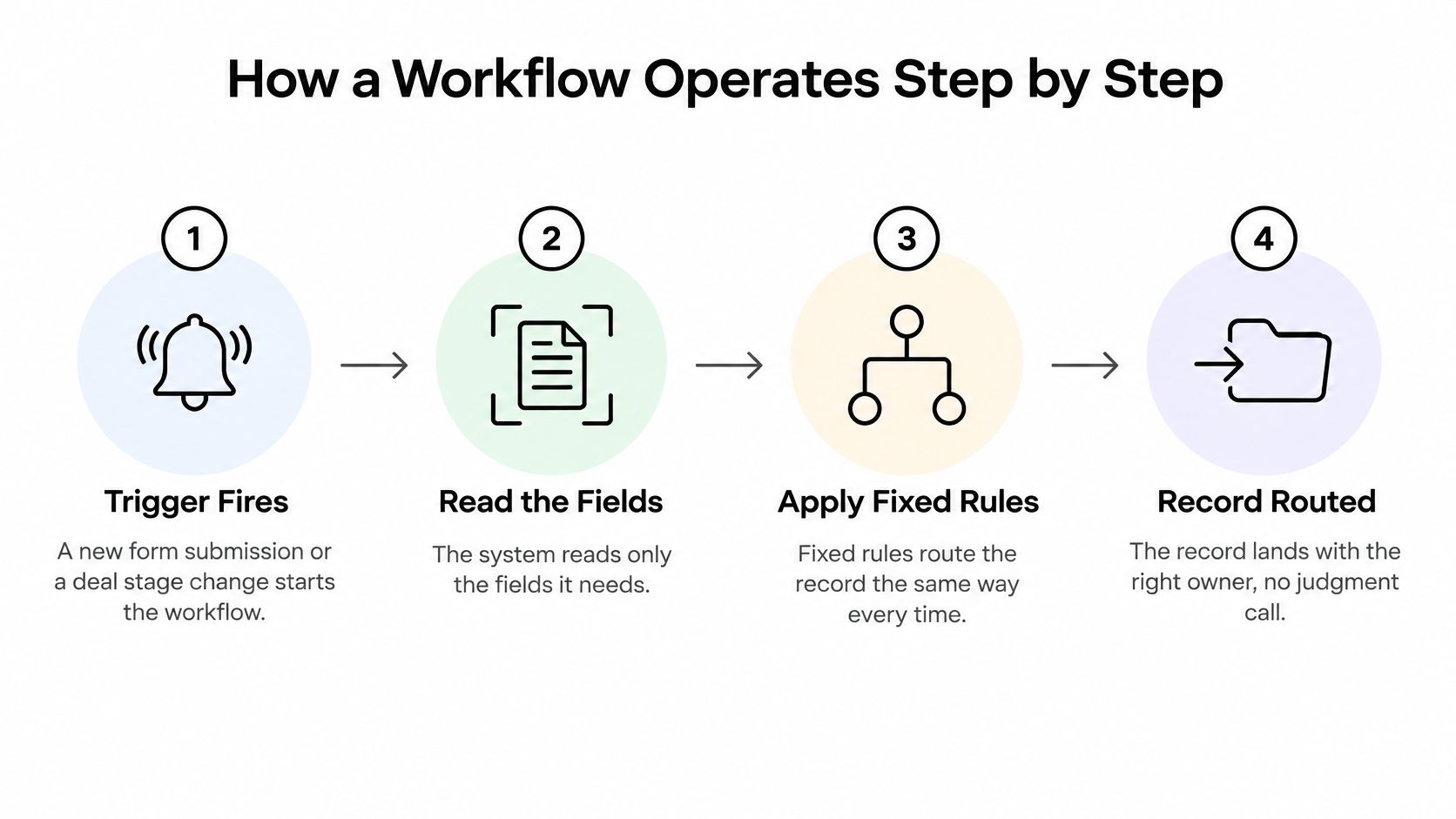
- A trigger fires. A new form submission, a deal-stage change in HubSpot or Salesforce, or a status update starts the run.
- The system reads the fields it needs. It pulls name, stage, owner, and amount. It does not interpret a free-text note unless you wrote a rule for a specific field.
- Fixed rules route the record. Territory, product line, or deal size sends it down one branch. The same input takes the same branch on every run.
- Actions execute. A CRM update, a Slack notification, or a document created from a template.
- The outcome is logged, and the run stops. There is no second plan.
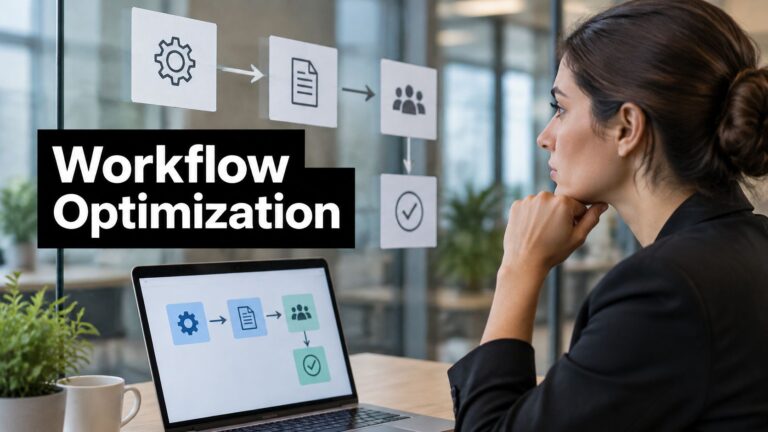
The four-step view below is that reliable core, from the trigger through a routed record that did not require a judgment call.
Workflows break when an input format changes, because a renamed field or a new status value has no branch and the run errors at a known step.
The agent loop
- It receives a goal and the context. "Qualify this inbound lead and draft the next step" is a goal. "Set status to MQL when score is above 70" is a rule.
- It plans the sub-steps. Search the company, read the form, check the CRM, then draft.
- It chooses and calls a tool. A web search, a database lookup, or an email draft. The choice is made at runtime.
- It reads the result and asks whether the goal is met. A thin search result or a missing CRM match sends it back into the plan.
- It revises the plan, or it stops and hands off. Stopping cleanly is part of the design, not a failure.
Agents drift when the goal is ambiguous or a tool returns unexpected data, because the loop will keep acting on a bad reading instead of erroring at a named step.
Why the loop is harder to audit
A workflow log can list trigger, branch, and action. An agent log has to record the reasoning, every tool call, and the intermediate state, because the path did not exist until the run. If you only store the final CRM write, you cannot tell a sound assignment from a lucky one.
If you can draw the full path before the process runs, a workflow is enough. If the path depends on what the system finds, an agent may be justified.
Reliability, Auditability and Control Compared
Day-to-day operations diverge in three places: how you notice a failure, how you change behavior, and how a reviewer checks the work.
Errors that shout and errors that look finished
A workflow fails loudly and at a known point. The alert names the step, the record, and the missing field. An operator opens the run, fixes the input or the rule, and replays it.
An agent can fail without notice. It produces a plausible owner, a plausible email, or a plausible status that passes a surface check. Nothing errors. The record looks complete. The mistake shows up later, when a rep calls the wrong account or a customer gets the wrong promise.
Say a B2B team routes inbound leads. A workflow sends every record with "enterprise" in the company-size field to the same owner under a rule anyone can read. An agent reads the free-text notes and assigns an owner from wording like "evaluating a rollout across three regions." That saves time on messy forms. A wrong assignment is harder to spot, because the write looks like every other successful write.
Change control is a different job
A workflow changes when someone edits a rule. The diff is reviewable. You can say what changed on Tuesday and who approved it.
An agent's behavior can shift when the model updates, the prompt changes, or a new tool is added to the set it may call. The configuration still "looks" the same. Teams need regression tests on a set of representative cases before a release, the same way they would test a pricing change. A green build on one happy-path lead is not a release test.
What a reviewer actually has to read
A reviewer can verify a workflow by reading its configuration. Branches, filters, and field maps are the behavior.
A reviewer cannot verify an agent that way. They have to sample traces and judge whether the reasoning was sound on those runs. Sampling is ongoing work, not a one-time sign-off.
Three controls belong on any agent step before it touches a live process:
- A logged trace for each run. Store the goal, the tool calls, and the intermediate state, not only the final write.
- A sample review schedule. Pick a fixed share of runs each week and have the process owner mark them correct or not.
- A defined rollback path. Know how to revert the CRM field, the email, or the status when a sampled run is wrong.
A confident paragraph is not evidence. If the trace cannot show why the step acted, the step is not ready to act alone.
Where Autonomy Should Stop in Your Process
The right question is not whether to choose workflows or agents. It is where autonomy should stop at each step. A reliable process often combines fixed rules for predictable actions with AI for interpretation, research, and recommendations. The boundary should move only when the consequences and review burden of a step make that sensible.
Adoption intent is running ahead of governance. Deloitte's State of AI reports that nearly three-quarters of companies plan to deploy agentic AI within two years, while only 21% report mature governance for autonomous agents. That gap matters operationally: a process can be technically capable of acting without being ready to do so safely.
A warehouse lead checking a laptop against a clipboard captures the distinction. The system can surface the next action, while a person retains authority over a decision that is difficult to reverse.

A step-level map
| Step Type | Autonomy Level | Example Action |
|---|---|---|
| Data update and routing | Deterministic | Write lead status to the CRM after a defined event |
| Draft or summarize | Agent-assisted, human reviews | Draft a follow-up email for a rep to approve |
| Research and enrichment | Agent may act alone | Collect public company details for a lead record |
| Customer-facing send | Approval required | Send an outbound message or proposal to a prospect |
| Financial or contract action | Fully deterministic | Issue an invoice or change a contract term |
| Compliance-sensitive communication | Approved template with sign-off | Send a regulated notice to a client |
Use the table as a starting map, not a universal permission scheme. A research agent may gather public company details, for example, while a rule checks the fields before anything is written to a live record. Drafting can be delegated, but sending a proposal deserves a separate decision point because it creates an external commitment.
AI can assist with triage, drafting, extraction, and customer conversations. Keep deterministic controls and human handoff around consequential decisions. Voice agents can qualify and route conversations, with escalation to a person when needed. Approval gates on critical actions preserve oversight; that is the operating principle behind human-in-the-loop automation. The model proposes, while a rule or a person decides whether to proceed.
Four factors before you remove a gate
Assess each candidate step against four factors. If a step fails any one, keep it deterministic or require approval, even if an agent handles a demonstration well.
- Financial exposure. If an error could create a credit, discount, or contractual commitment, keep the action behind a rule or approval.
- Reversibility. If the change cannot be undone easily, do not let the agent commit it without review.
- Customer impact. Outbound email and voice follow-up reach prospects or clients directly. Keep approval in place until the outputs have a measured record of correctness.
- Data sensitivity. Personal data, health details, and regulated content should remain on approved templates with sign-off.
Start a new agent step in approval mode. Remove the gate only after a measured run of correct outputs, not after one impressive demo. As evidence accumulates, autonomy can expand for the specific step that performed reliably, without granting the agent authority over neighboring actions.
Lead generation, recruitment, client outreach, and voice interactions can turn a small automated action into a revenue or reputation problem. A mis-sent proposal is not merely an unusual failure; it shows why drafting and sending should be treated as separate steps, with distinct autonomy limits.
When Adding More Agents Costs More Than It Saves
Each extra agent adds tool switching, output checking, and conflict resolution. Those hours do not appear on an API invoice, so a stack can look cheap while the team gets slower.
Asana's survey on agents in the flow of work puts numbers on that trap. 68% of business leaders use three or more agents in a typical week, compared with 36% of workers. Among workers using at least two agents, 46% say switching tools, checking outputs, and resolving conflicts consumes more than 10% of their work time. 38% estimate that more than a quarter of agent-completed work is duplicated or substantially overlapping.
| Measure | Share |
|---|---|
| Business leaders using three or more agents in a typical week | 68% |
| Workers using three or more agents in a typical week | 36% |
| Workers using at least two agents who spend over 10% of work time on switching tools, checking outputs and resolving conflicts | 46% |
| Respondents estimating over a quarter of agent-completed work is duplicated or substantially overlapping | 38% |
Leaders feel surrounded by agents. The people doing the work feel the overlap. Two agents enriching the same lead, or a research agent and a drafting agent both "updating" next-step notes, produce more tasks completed and a longer cycle.
Design rules that stop the waste
- One owner and one outcome per process. If two agents can both mark a lead qualified, neither owns the outcome.
- A system of record for each field. The CRM owns status and owner. An agent may propose a value. It does not get a second place to write a conflicting one.
- No duplicate actions. Idempotent keys or a single trigger stop a retry from sending the same email twice.
- Observability on every run. If you cannot trace which agent wrote a field, you cannot retire the duplicate.
A total-cost check, not a model bill
Price the change as monitoring time, review time, exception handling, and tool switching, then add model cost. A growth-stage SaaS team should ask whether end-to-end cycle time fell and whether people spend less time coordinating. Completing more individual tasks is not the benchmark. A cost-benefit analysis framework that ignores review and conflict time will green-light stacks that lose money.
Orchestration and process redesign usually beat another autonomous agent. If the exception is rare and already handled by a rule, a second agent is overhead.
Which Fits Your Business Situation
Most companies adopting AI agents remain in early stages; broad use across multiple teams is still the exception. That makes the practical question where autonomy should stop in each process, not which pattern to deploy across the company.
| Business Situation | Better Fit | Why |
|---|---|---|
| Repeatable intake, routing and notifications | AI workflow | Same rules every time and easy to audit |
| Inbound calls that need qualification | Workflow with an AI step | Fixed booking rules plus AI conversation and handoff |
| Unstructured research across many sources | AI agent | Requires planning and choice of tools |
| Support tickets with varied wording | Hybrid | Agent triages; workflow enforces SLA rules |
| No documented process yet | AI workflow first | The process must be mapped before any automation |
| Mature process with measurable exceptions | Agent on exceptions only | Autonomy used only where variability adds value |
How to read a row without stretching it
Repeatable intake belongs in a workflow because the route should follow defined rules, not a model's interpretation of a form. Inbound qualification needs more flexibility in the conversation, while booking rules, CRM updates and handoffs can remain fixed. The voice agent handles varied wording and escalates callers who fall outside the script.
Unstructured research is a clearer case for an agent: sources are not known in advance, so fixed branches may not cover the work. Support tickets with varied wording can use a hybrid approach. An agent proposes a category, while the workflow controls the SLA clock. AI may assist with triage, but it should not change timestamps or SLA verdicts.
Without a documented process, mapping the work comes first. After the path and its exceptions are understood, an agent can handle exceptions where variability adds value. This progression is not a mandate to increase autonomy: a process may remain a workflow if its rules cover the work reliably. Choose the narrowest level of autonomy that addresses the specific source of variability, and retain fixed controls wherever the outcome must follow a rule.
Choose Your First Automation This Quarter
Pick one process that can survive a boring test. If it fails the test, it is not your first build, however attractive the demo looks.
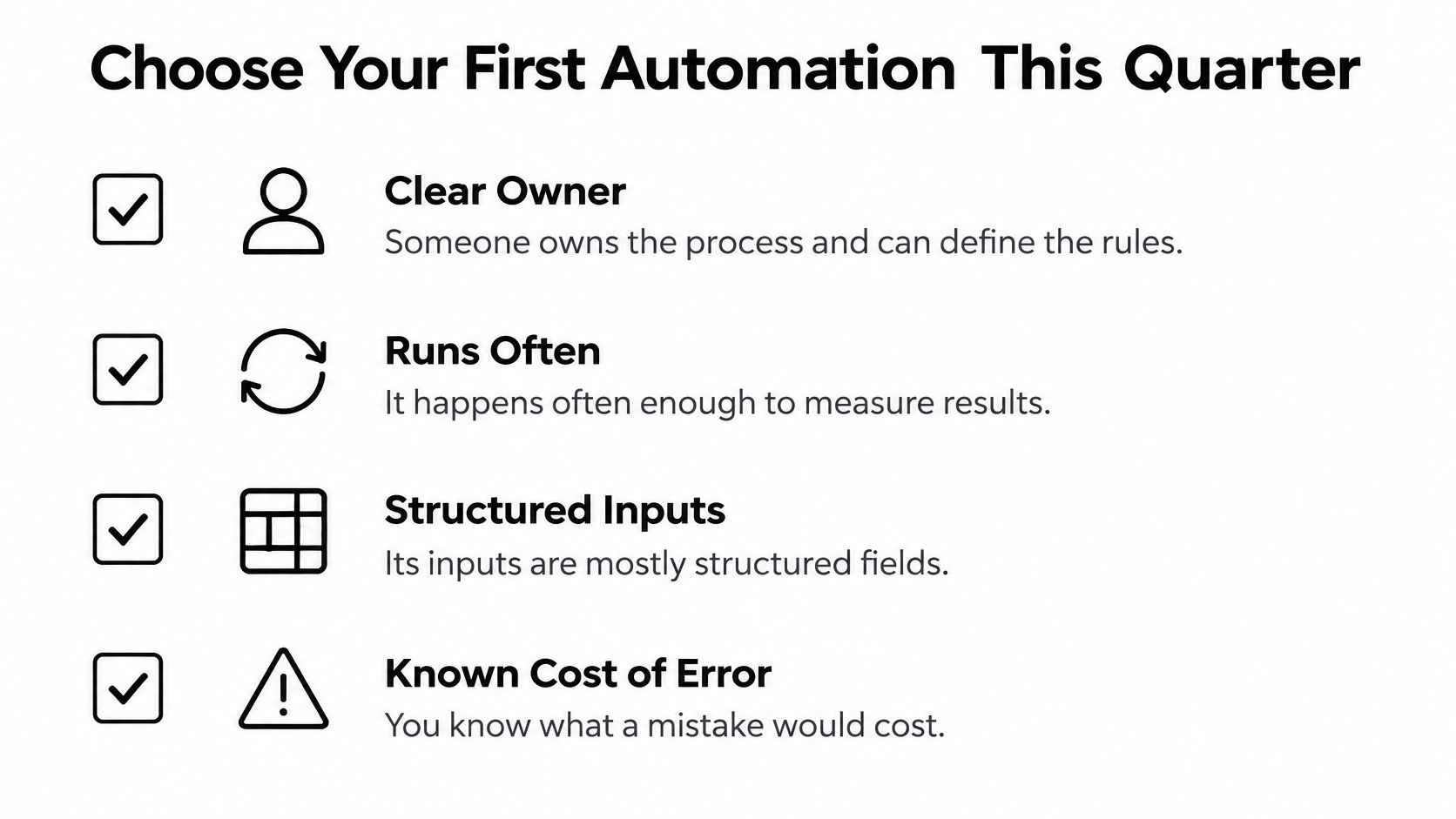
- Clear owner. Someone can define the rules and answer what "done" means. A process with no owner cannot be automated cleanly, because every exception becomes a debate.
- Runs often enough to measure. A monthly exception will not produce a sample you can trust this quarter. Weekly or daily volume will.
- Inputs are mostly structured. Fields you can name, not a pile of attachments nobody has classified.
- Known cost of error. You can say what a wrong status, a duplicate email, or a bad handoff costs in time or revenue.
- A baseline cycle time. Record how long the process takes now, before any tool changes, or you will not know whether the build helped.
Build the path, then add judgment
If the process passes, build it as a workflow first. Put approval gates on any customer-facing or consequential action. Add an agent step only after that workflow runs cleanly and one exception type is causing a delay you can measure. The agent then handles that exception type. It does not inherit the whole process.
A free discovery call audits current workflows, identifies the highest-ROI automation opportunities, and returns a custom implementation plan with a timeline and pricing. The discovery and audit phase maps workflows and bottlenecks and pinpoints where automation will return the most, and it typically takes one to two weeks. Escalation to a person, and approval gates on critical actions, belong in the design of both workflow automation and voice agents from the start.
The decision for this quarter is small and specific. Pick one process, record its baseline, and mark which of its steps stay deterministic.
MakeAutomation designs the system between your tools, your data, and your team, with workflows for the steps that must stay fixed and agents only where judgment earns its keep. If you are deciding where automation budget should stop, we can map that boundary against the process you already run. Visit MakeAutomation to book a discovery call and leave with a plan, a timeline, and pricing for the first build.