
Flexibility in Use: Building Software for Every User
You can spot the problem fast in any SaaS rollout. The product team calls it “flexible” because users can tweak a few settings, but the moment a customer needs a different workflow, a different role view, or a different pace, the experience breaks and support tickets pile up. That gap between what the interface promises and what the system can absorb is where flexibility in use either becomes a real product advantage or a polite label on top of rigid software.
In practice, flexibility in use is not a design garnish. It is the degree to which software lets different people complete the same outcome through different methods, at different speeds, and across changing contexts. That's the difference between a tool that works in a demo and one that survives contact with real customers, messy operations, and growing teams.
What Flexibility in Use Means for Software
A founder once told me their CRM was “customizable enough” because every field could be renamed. Two months later, sales reps were still skipping the workflow, managers were exporting data into spreadsheets, and onboarding stalled because the same sequence had to fit every account. Renaming fields did nothing for the core problem, the system had no room for different methods of use.
Flexibility in use has two strong anchors. In Universal Design Principle 2, it means supporting a wide range of preferences and abilities through choice in methods, pacing control, and access patterns. In ISO/IEC 25010, it means a product can be adapted to changes in requirements, contexts of use, or system environment, including adaptability across different hardware, software, or operational settings. For a practitioner, that is a sharper test than “Can users personalize the dashboard?” It is “Can the system still work when the workflow, user role, or environment changes?” Universal Design Principle 2 and ISO/IEC 25010 flexibility You can also use this universal design guide to see how those principles map to product decisions.
A useful analogy is transport. A fixed-route bus is efficient when everyone needs the same route at the same time. A ride-share network is more flexible because it adjusts to different starting points, destinations, and timing needs. Software works the same way. The more it assumes one route, one pace, and one user type, the more often real customers get forced out of the flow.
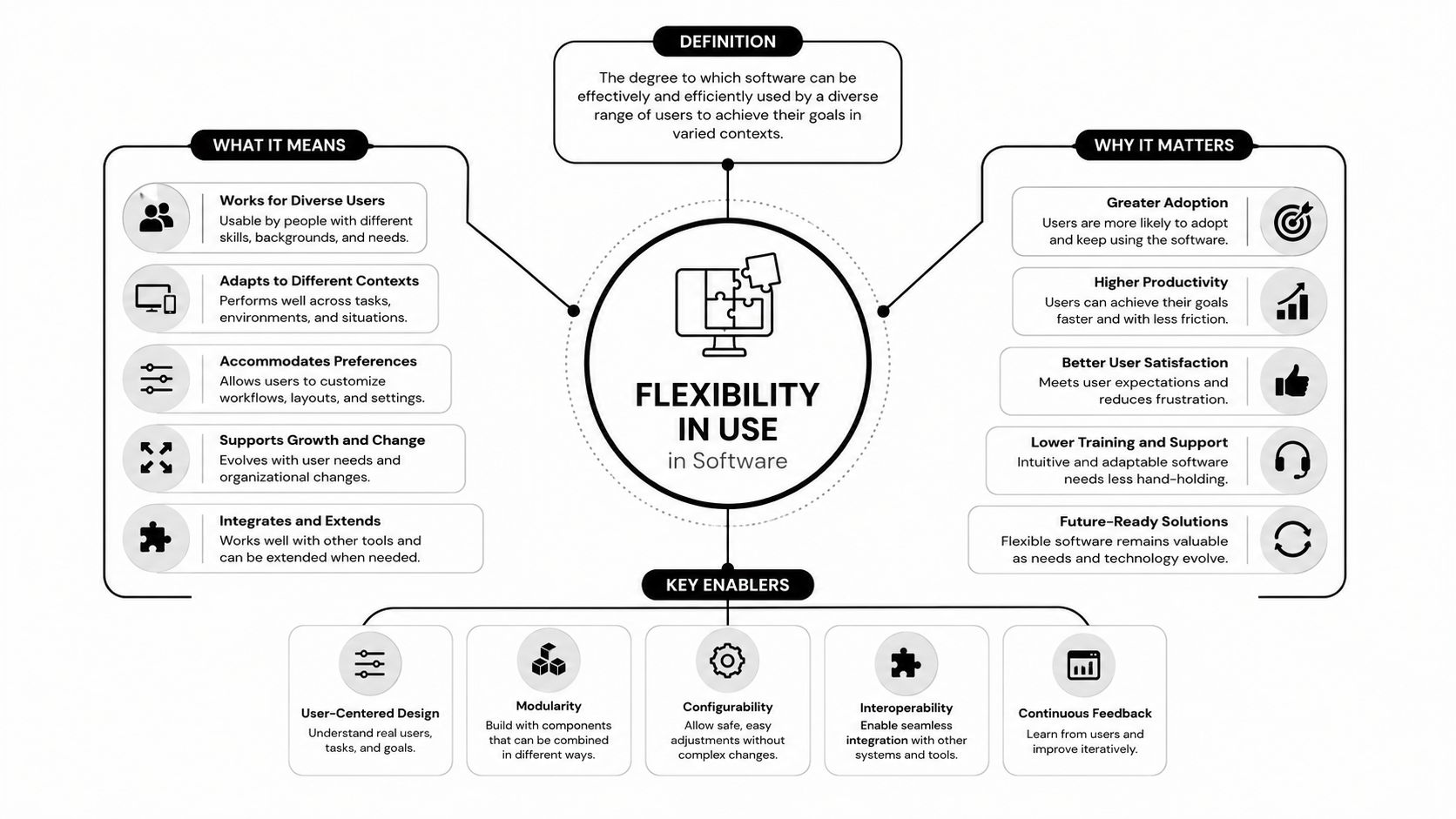
Practical rule: if a user can only succeed by working around your workflow, the system is rigid, no matter how many settings it exposes.
The clearest sign of real flexibility is not surface-level customization. It is whether the product can absorb change without a redesign, whether that change shows up in user pace, user ability, or deployment context. That is the difference between a feature list that looks adaptable and a system that keeps serving different teams without forcing engineering to rebuild the same path twice.
The Business Case for Building Adaptable Products
Rigid products don't usually fail loudly. They fail in the support queue, in slow onboarding, and in the quiet moment when an account stops expanding because the software can't handle the next team, the next workflow, or the next integration.
That's why I treat flexibility in use as a business property, not a UX preference. The payoff shows up in three places. First, scalability, because one codebase can serve more customer types without forcing constant one-off builds. Second, adoption speed, because people reach value faster when the product can meet their current way of working. Third, churn reduction, because accounts are less likely to leave when the system still fits after their process changes. In B2B SaaS, those are not abstract wins, they are the difference between a product that grows through repeatable operations and one that grows through labor.
The hidden cost of inflexibility is usually underestimated. Every custom workaround consumes engineering time, every confusing flow adds support load, and every blocked customer journey weakens expansion potential. A product that looks simpler on paper can become more expensive to run because users keep asking for exceptions the software should have anticipated.
Why flexibility pays for itself
The strongest ROI comes from reducing friction where customers feel it most. If onboarding assumes one order of operations, the wrong user segment hits a wall. If automation only supports one role, managers end up rebuilding the process outside the tool. If configuration is buried in code, the product team becomes the bottleneck for every variation.
Operational truth: the cost of inflexibility is rarely visible in one ticket. It shows up as cumulative rework, slower deployment, and a longer path to value.
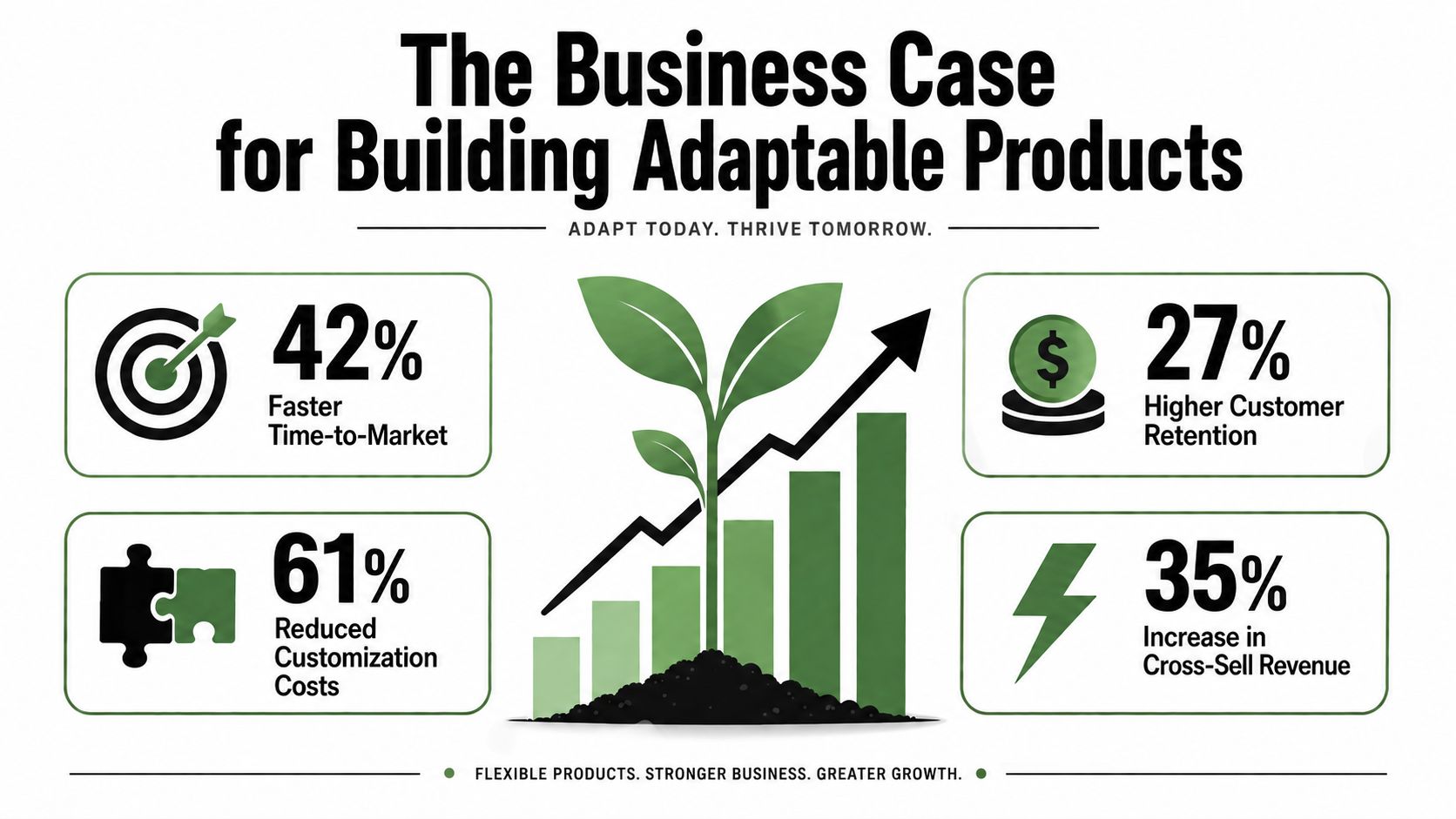
What works is making adaptability a deliberate product capability, not an afterthought. What does not work is assuming “custom fields” or “optional steps” are enough to protect retention when customer maturity changes.
Architecture Patterns That Enable Real Flexibility
A flexible product does not happen because the team wants it badly enough. It happens because the architecture gives the product room to change without turning the codebase into a pile of exceptions.
The first pattern is a configurability layer. This exposes settings without exposing code. It works well when the variation is predictable, such as routing rules, notification preferences, or approval thresholds. It breaks down when configuration becomes a shadow programming language. If users need to understand internal logic to use the setting, the layer is too deep.
The second pattern is modular flow design. Build workflows as composable blocks instead of a single rigid sequence. That's useful in onboarding, intake, and automation tools because different customers can swap steps without rewriting the whole flow. It does create governance work, though. Modular systems need clear ownership, or every team starts assembling its own version of the product.
The third pattern is conditional routing. Logic adapts to context, such as role, account type, or record state. A CRM automation becomes useful here because the system can branch instead of forcing every user down one path. The trade-off is maintainability. The more branching you add, the more important it becomes to document why each branch exists.
The fourth pattern is role-based UIs. Different users see different surfaces from the same codebase. Sales reps need speed and clarity. Managers need visibility and control. A single interface that tries to satisfy both usually ends up satisfying neither.
What to use and what to avoid
- Configurability layers: use them for stable business rules, avoid them when users need to invent new logic on the fly.
- Modular flows: use them when the sequence can vary by customer segment, avoid them if every block depends on every other block.
- Conditional routing: use it when context drives decisions, avoid it when the rules are temporary and likely to churn.
- Role-based UIs: use them when tasks differ sharply by responsibility, avoid it when the team is only hiding clutter instead of improving use.
For teams formalizing their UI patterns, this design system guide is a useful internal reference point. And for a broader systems lens, the architecture idea aligns with ISO/IEC 25010's definition of flexibility as adaptation across changing environments.
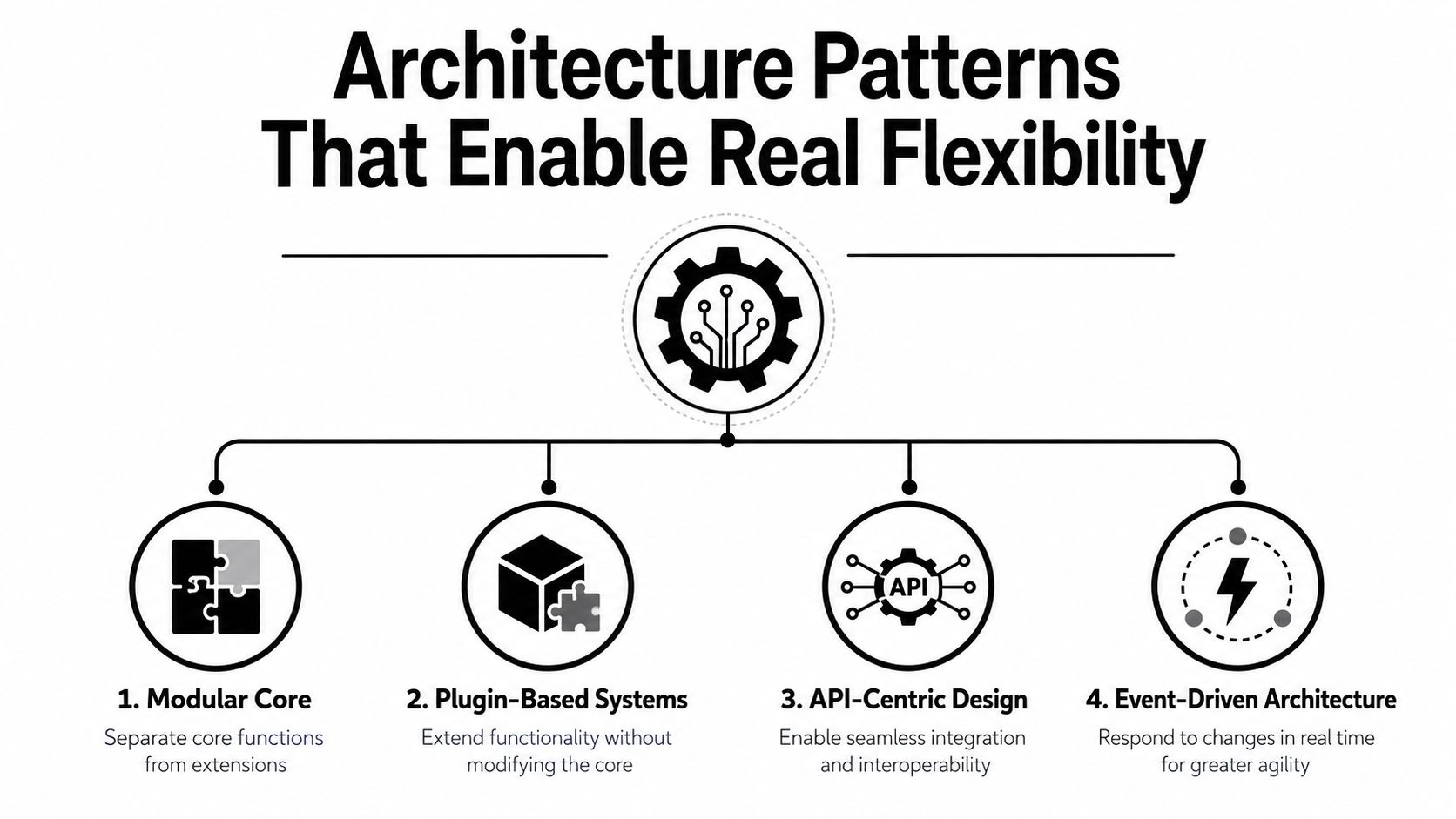
A clean architecture is not one that allows every possible variation. It's one that makes the right variations cheap and the wrong ones obvious.
Your Stepwise Implementation Checklist
Flexibility should be introduced the way good infrastructure changes are introduced, one high-value layer at a time. Big-bang rewrites usually create more rigidity because the team becomes afraid to touch the new system.
Start with the friction map
Audit where users are already forcing workarounds. Look at support tickets, onboarding drop-off, manual overrides, and places where the team says “we just handle that one in Slack.” Those are usually the first signs that the product is too rigid for its own customer base.
Rank by user pain and engineering cost
Not every friction point deserves immediate work. A workflow that annoys every new customer is a better target than a niche edge case that only affects one account. The best candidates sit where user impact is high and implementation risk is moderate.
Define the configuration boundary
Decide what belongs in settings, what belongs in logic, and what should stay fixed. If you let users configure every branch, support gets harder. If you let them configure nothing, product adoption gets harder. The boundary has to reflect how much variation the business can safely support.
Build reusable components
Break workflows into blocks that can be tested separately. That keeps flexibility from becoming spaghetti code. It also makes it easier to version changes without breaking existing customer paths.
Validate with real scenarios
Run the new flow against actual user situations, not just the happy path. Include role changes, late-stage edits, skipped steps, and different pacing. For accessibility-minded teams, this accessibility consulting resource is useful because flexibility in use and accessibility often fail in the same places.
Don't optimize for elegance first. Optimize for the variation your customers already live with.
The teams that get this right usually ship flexibility in narrow slices, measure the result, then expand the pattern only where it proves itself.
Real World Applications and SOP Snippets
A digital agency I worked with had a client onboarding flow that tried to treat every account the same. That worked for small clients, then it started breaking down for enterprise accounts, industry-specific engagements, and service-tier differences. The fix was not a new platform. It was conditional routing and modular steps inside the existing workflow.
The SOP looked like this in simplified form:
- If client type equals enterprise, route to legal review before kickoff.
- If client type equals regulated industry, add compliance questionnaire.
- If service tier includes implementation support, assign onboarding specialist.
- If none of the above apply, run the standard sequence.
That small change stopped the team from manually managing exceptions in email threads. It also made the workflow easier to explain because the rules were visible instead of hidden in tribal knowledge.
A second example came from a SaaS company that had one CRM interface for everyone. Sales reps found it cluttered, while managers needed the full picture. The team kept one data model and split the presentation layer by role. Reps saw a short action list and key account fields. Managers saw the broader analytics and exception tracking.
The SOP snippet was simple:
- If user role is sales rep, show daily pipeline view and required actions only.
- If user role is manager, show pipeline view plus aggregate status and segment reporting.
- If a record is flagged for review, show escalation controls to authorized roles only.
That change did two things. It removed noise for the front line and preserved visibility for leadership. The underlying lesson is consistent, flexibility in use is strongest when the system adapts without making everyone relearn the product.
What did not work in either case was trying to solve variation with more manual instruction. Once the logic lived in the workflow, the team could maintain it. Before that, every exception became a human memory problem.
Metrics That Prove Flexibility Is Working
If a team says a product is more flexible but can't show it in usage data, they're probably describing an opinion. I care about visible behavior, because flexibility in use should change how people move through the product.
| Metric Category | Specific Metric | Benchmark Range | Measurement Method |
|---|---|---|---|
| Configuration Adoption | Percent of active accounts that change at least one setting | Varies by segment | Product analytics on settings events |
| Time to First Value | Median time from signup to first completed workflow | Varies by user type | Funnel tracking by cohort |
| Support Load | Share of tickets tied to workflow rigidity | Varies by release cycle | Ticket tagging and reason codes |
| Feature Utilization | Distribution of paths used to complete the same task | Varies by product surface | Event tracking across branches |
| Retention Correlation | Renewal behavior among heavily configured accounts | Varies by segment | Cohort analysis matched to usage depth |
The table matters because each metric answers a different question. Configuration adoption tells you whether people are using the flexibility you built. Time to first value tells you whether the extra options slowed onboarding. Support patterns show whether friction is moving in the right direction. Path distribution reveals whether users are finding useful alternatives instead of forcing one route.
What to watch out for
A high setting-change rate is not automatically good. Sometimes it means users are confused. A long feature list is not proof of flexibility either, because dead options can create clutter without improving outcomes. The key signal is whether different user types can complete the same job with less friction and fewer manual interventions.
Track the metrics at the account level and the role level if you can. That's where flexibility shows up most clearly. A product that serves managers well but frustrates operators is not flexible, it's just uneven.
When to Invest in Flexibility and When to Stay Rigid
Not every product needs deep adaptability. Some workflows benefit from strict structure because the process itself is the value. In those cases, rigidity reduces error and keeps the system simple enough to support.
Use four questions. Do your users vary widely in how they work. Do their workflows change often. Does flexibility help you differentiate. Can your team maintain the added complexity. If the answer is yes to most of those, flexibility is worth the investment. If the answer is no, stay narrow and protect the core flow.
That's also where platform choice matters. Some teams should build flexibility into their own product. Others should use tools that already provide adaptable workflow layers, especially when the goal is automation rather than a fully custom application. MakeAutomation is one option in that space for teams that need configurable lead generation, client outreach, project management, CRM automation, and SOP development without rebuilding every workflow from scratch.
Simplicity is valuable when the process is stable. Flexibility is valuable when the process keeps changing.
The right decision is usually not “flexible everywhere” or “rigid everywhere.” It's a deliberate mix, shaped by customer variety, operational maturity, and the cost of exceptions.
If you're trying to turn rigid workflows into systems people stick with, MakeAutomation can help design and implement the automation layers, CRM logic, and SOP structure that make flexibility in use practical instead of theoretical. Start by looking at the workflows where users are already improvising, then build the configuration and routing that lets the product absorb that variation cleanly.